Jeremy / Kirk

Thanks for the replies.
They don'tt really address my question, though. As things stand, I have a
component which sets up and manages listboxes which I’ve designed: I tell it
the sources and the columns and it handles the rest. I plonk an empty listbox
(of the correct type: array or selection) on the form, call the component in
its object method, passing it only the name of the configuration, and need do
nothing else. If I want a second listbox on the same form, I just put it there
and pass the component a different name. It works for array and selection boxes.

It seems to me that that won’t work with entity boxes unless I put them in
subforms or set up the variables (your Form.xx variables) myself. Even then,
the component can’t “know” which variables to use unless I tell it directly,
because it can’t read the box to determine what they are.

That seems to me a retrograde step, a step back from “everything about a
listbox is readable and configurable in code” which we had reached before.

Am I wrong?

Jeremy


> On 29 Oct 2018, at 13:05, Jeremy French <[email protected]> wrote:
>
>> It’s great to be able to make generic listboxes and set them up entirely in
>> code. It’s easy for array-based and selection-based listboxes, but can it be
>> done for entity/collection boxes?
>
> Yes. It's even more easy using collections.
>
>> In other words, are there LISTBOX SET xx calls to identify the names of the
>> variables unique to entity/collection boxes: the collection/entity source;
>> the current item; the current item position; and the selected items?
>
> No new listbox commands are needed, since we have the "Form" command.
>
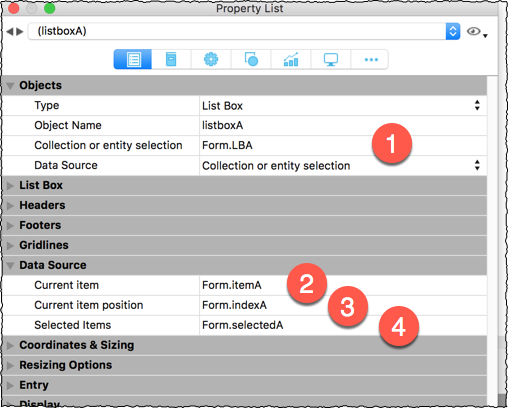
> I'm using the naming convention:
>
> Form.LBA
> Form.itemA
> Form.indexA
> Form.selectedA
>
> where "A" uniquely identies the listbox collection. If more than one listbox
> is present on the form, the "A" becomes "B", "C" and so on.
>
> So the listbox properties would show these references:
>
> https://i.postimg.cc/SxB6FPPL/collection-listbox.png
> <https://i.postimg.cc/SxB6FPPL/collection-listbox.png>
>
> Use the "LISTBOX INSERT COLUMN FORMULA” command to create columns. Remember
> to prefix attribute names with “This."
>
>
>
>
>> On Oct 29, 2018, at 6:21 AM, Jeremy Roussak via 4D_Tech
>> <[email protected] <mailto:[email protected]>> wrote:
>>
>> It’s great to be able to make generic listboxes and set them up entirely in
>> code. It’s easy for array-based and selection-based listboxes, but can it be
>> done for entity/collection boxes?
>>
>> In other words, are there LISTBOX SET xx calls to identify the names of the
>> variables unique to entity/collection boxes: the collection/entity source;
>> the current item; the current item position; and the selected items?
>>
>> I can’t find them, but it’s perfectly possible that, as so often, I’ve
>> missed something.
>>
>> Jeremy
>> **********************************************************************
>> 4D Internet Users Group (4D iNUG)
>> Archive:  http://lists.4d.com/archives.html
>> <http://lists.4d.com/archives.html>
>> Options: https://lists.4d.com/mailman/options/4d_tech
>> <https://lists.4d.com/mailman/options/4d_tech>
>> Unsub:  mailto:[email protected]
>> <mailto:[email protected]>
>> **********************************************************************
>

**********************************************************************
4D Internet Users Group (4D iNUG)
Archive:  http://lists.4d.com/archives.html
Options: https://lists.4d.com/mailman/options/4d_tech
Unsub:  mailto:[email protected]
**********************************************************************