Hi all, hi Rui :)

the details are for those who wanted a less vague report from me, I
guess you Rui can skip most of the text.
I'll start with the résumé. After editing the rtirq configuration and
using PCM playback as timer source for the sequencer, jitter might be no
longer a problem, but the compensation of the latency is bad. I can't
say this for sure, because I didn't finished the test, by checking the
wave files using Audacity and because there were no DSSIs as reference.

The test can be downloaded by

    https://disc.alice-dsl.net/
    Username: ralf.mardorf(at)alice-dsl.net
    Passwort: 64studio
    You need to replace the (at). The file's name is 'jitter_test.tar.bz2'.

1. The used software

The distro is 64 Studio 3.0-beta3 amd64, upgraded by the Hardy
repositories, the 3.0-beta3 repository and Quentin's private repository.
Nothing is upgraded or downgraded by any other repository, even if I've
got some stuff from other sources, the 64 Studio standard packages are a
strictly clean install, I even didn't enable a root account or did any
other critical Ubuntu Hardy unusual changes. I've KDE installed, but I
run the test using GNOME. There's one exception, Qtractor isn't the 64
Studio, but the CVS version 0.4.2.1350 with VST disabled and
unfortunately, because of the missing libjack0.100.0-dev package, DSSI
disabled. The kernel, ALSA, JACK, Qsynth etc. comply with everybody's
clean 64 Studio 3.0-beta3 install with actual upgrades. DSSIs versions
might not fit to optimize stability for Qtractor, but for testing MIDI
jitter without using DSSIs, this shouldn't matter. The BIOS is the
latest version 2302.

By the way, a bug announcement to the 64 Studio people, OT to this
thread, randomly I launched Qsampler and it seems to be broken, I won't
spend time to check this now.

2. The used hardware

The mobo is an ASUS M2A-VM HDMI, HDMI and other on-board audio stuff is
disabled. The on-board graphics uses RAM from the 2 * 1GB Aeneon by
Qimonda DDR2 - 800 RAMs, hwinfo --memory says that memory size is 1 GB +
896 MB. If the driver is the free ATI or VESA driver is unknown, I
didn't spend much time in figuring out how Ubuntu handles X
configuration. The sound card is a TERRATEC EWX 24/96 Envy24 based PCI
one, ftp://ftp.terratec.de/Audio/EWX/2496/TechnicalData/EWX2496_GB.pdf,
ftp://ftp.terratec.de/Audio/EWX/2496/Manual/EWX2496_Manual_GB.pdf (for
this ftp links, there seems to be the need to copy and paste them), with
MIDI unused, because I don't have a MIDI adapter cable until now,
instead of that I'm using a swissonic USB device,
http://www.thomann.de/gb/swissonic_midiusb_1x1.htm, connected to USB
port 3. The device has one MIDI input and one MIDI output. The rtirq
configuration is set to RTIRQ_NAME_LIST="rtc snd usb3 i8042". The CPU is
an 15.107.2 "AMD Athlon(tm) X2 Dual Core Processor BE-2350" 2.1GHz.

For latest tests I used an Alesis D4,
http://www.vintagesynth.com/misc/d4.php, this never caused any MIDI
timing or jitter trouble, anyway, things can change, so for this test I
used a Yamaha TG33, http://www.vintagesynth.com/yamaha/tg33.php. I did a
direct MIDI connection, no MIDI-thru-box or anything else was involved.
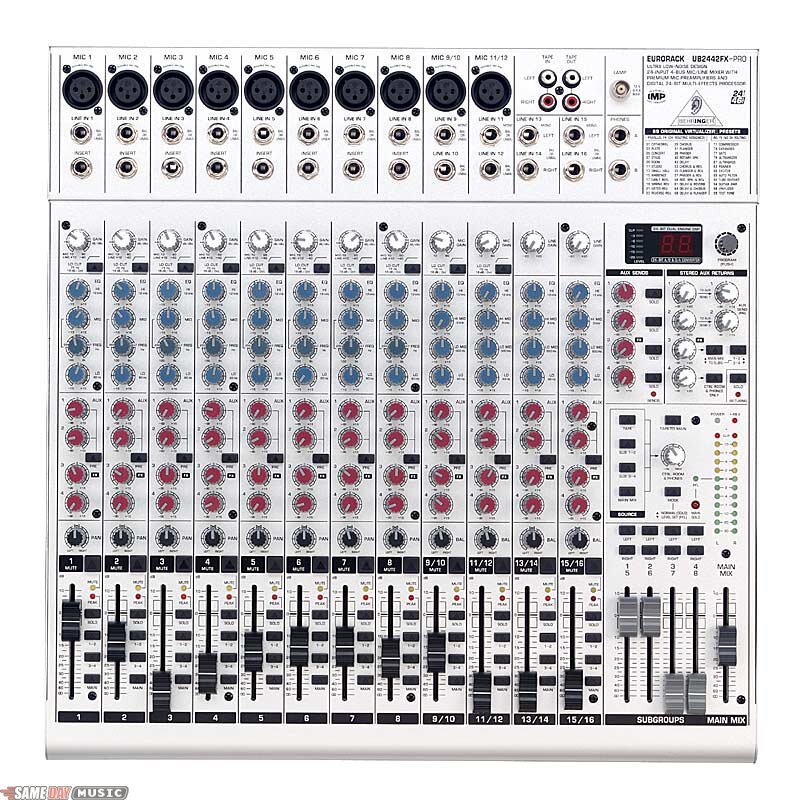
The mixer is a Behringer UB2442FX-Pro,
http://www.behringer.com/EN/Products/UB2442FX.aspx,
http://cachepe.samedaymusic.com/media/quality,85/brand,sameday/UB-2442-FXtop-fc67932dda9ef5417f19d3e64f77846a.jpg,

it's analogue and for the recording input signal flow it was only for
the external equipment connected, for internal applications the
recording signal flow directly was connected within JACK. The sound
modules and mixer just have home recording sound quality, but excepted
to the mixer it's used by many people for professional mainstream chart
productions, timing problems aren't an issue by this equipment and years
ago at Brauner, we made the final check for the VM-1 microphones with a
much cheaper Behringer, with more less sound quality. I guess it's
arrogant to say that chart productions are bad for the sound quality,
they might be bad because of the style, but not because of the technical
quality and it's also arrogant to say at one day that equipment needs to
have a high quality standard and at the other day that equipment can be
worse, only talent is needed. I refer to this, because I again will make
clear, that trouble like MIDI jitter isn't from the equipment and when I
use the word 'professional' it should be resolved by the context, that
I'm talking about minimum claims for good results. The argument that
commercial stuff is bad, but someone makes money by using Linux, so
Linux must be professional, is paradox, but a lot of people exactly say
that. I hope we don't need to discuss that further on and that this
detailed report is detailed enough to satisfy everybody.

3. About the TAR file (continued by 6.)

Before I launched anything I copied the Qtractor configuration file into
the test's folder.

spinymouse-s...@64studio:~$ cd /mnt/music/studio3.0b
spinymouse-s...@64studio:/mnt/music/studio3.0b$ mkdir
jitter-test-0.4.2.1350-1
spinymouse-s...@64studio:/mnt/music/studio3.0b$ cp
/home/spinymouse-sudo/.config/rncbc.org/Qtractor.conf
/mnt/music/studio3.0b/jitter-test-0.4.2.1350-1

On half spec I downloaded a free soundfont, I read reviews to avoid
absolutely improper stuff.

spinymouse-s...@64studio:/mnt/music/studio3.0b$ cd jitter*
spinymouse-s...@64studio:/mnt/music/studio3.0b/jitter-test-0.4.2.1350-1$
wget
http://www.ibiblio.org/thammer/HammerSound/localfiles/soundfonts/JV1080_Standard_Set.rar
spinymouse-s...@64studio:/mnt/music/studio3.0b/jitter-test-0.4.2.1350-1$
unrar e JV1080_Standard_Set.rar
spinymouse-s...@64studio:/mnt/music/studio3.0b/jitter-test-0.4.2.1350-1$
rm JV1080_Standard_Set.rar

I copied the Qsynth configuration file into the test's folder.

spinymouse-s...@64studio:/mnt/music/studio3.0b/jitter-test-0.4.2.1350-1$
cp /home/spinymouse-sudo/.qt/qsynthrc
/mnt/music/studio3.0b/jitter-test-0.4.2.1350-1

4. Once and for all I disabled timidity

spinymouse-s...@64studio:/mnt/music/studio3.0b/jitter-test-0.4.2.1350-1$
sudo killall timidity
spinymouse-s...@64studio:/mnt/music/studio3.0b/jitter-test-0.4.2.1350-1$
sudo mv /etc/init.d/timidity /etc/FROM_init.d_A_COPY_OF_timidity

By the way, a second bug announcement to the 64 Studio people, OT to
this thread, I'm not sure if I don't know how to handle timidity or if
it's broken, but it seems to be not fine.

5. The test

Before I started the test, I shut down the computer, had a break and
started up 64 Studio again. The MIDI input of the USB device wasn't
connected to any device.

5.1 The terminal emulation for the GNOME desktop

Tab 1

spinymouse-s...@64studio:~$ sudo -i
r...@64studio:~# ntpdate ntp.favey.ch
22 Jun 13:56:00 ntpdate[5756]: adjust time server 195.34.89.227 offset
0.100893 sec
r...@64studio:~# synaptic (I checked for upgrades, some development
stuff was upgraded)
r...@64studio:~# logout
spinymouse-s...@64studio:~$ jackd -Rdalsa -dhw:0 -r96000 -p512 -n2
jackdmp 1.9.2
Copyright 2001-2005 Paul Davis and others.
Copyright 2004-2008 Grame.
jackdmp comes with ABSOLUTELY NO WARRANTY
This is free software, and you are welcome to redistribute it
under certain conditions; see the file COPYING for details
JACK server starting in realtime mode with priority 10
creating alsa driver ... hw:0|hw:0|512|2|96000|0|0|nomon|swmeter|-|32bit
Using ALSA driver ICE1712 running on TerraTec EWX24/96 at 0xcf00, irq 21
configuring for 96000Hz, period = 512 frames (5.3 ms), buffer = 2 periods
ALSA: final selected sample format for capture: 32bit integer little-endian
ALSA: use 2 periods for capture
ALSA: final selected sample format for playback: 32bit integer little-endian
ALSA: use 2 periods for playback

Tab 2

spinymouse-s...@64studio:~$ qsynth --help
spinymouse-s...@64studio:~$  qsynth -V
Warning: no locale found: /usr/share/locale/qsynth_en_US.UTF-8.qm
Qt: 3.3.8b
qsynth: 0.2.5
spinymouse-s...@64studio:~$ qsynth
Warning: no locale found: /usr/share/locale/qsynth_en_US.UTF-8.qm

Tab 3

spinymouse-s...@64studio:~$ qtractor -v
Qt: 4.4.0
Qtractor: 0.4.2.1350
spinymouse-s...@64studio:~$ qtractor

Tab 4

spinymouse-s...@64studio:~$ envy24control
using     --- input_channels: 2
     --- output_channels: 2
     --- pcm_output_channels: 8
     --- spdif in/out channels: 2

In addition Firefox and Thunderbird were launched by the GNOME menu,
Thunderbird was offline and this email was opened.
When I did the test Firefox only had one tab with http://www.dict.cc/
opened.

5.2 Qtractor

I inserted 2 MIDI tracks, after I had set the tempo to 120.0 BPM and the
grid to 'Beat'. By the way Rui, if people want to sync MIDI to sample
loops, there's the need at least to be able to set the BPM accurate to
three decimal places.

Then I set the left locator to 2.01.000 and the right locator to
3.01.000 and enabled 'Loop'.

For the audio connections I kept for readable clients 'Qtractor
Master/out_1 and out_2' to writable clients 'system playback_1 and
playback_2' and I kept for readable clients 'system capture_1 and
capture_2' to writable clients 'Qtractor Master/in_1 and in_2'. For
readable clients I added 'qsynth out_00 and out_01' to writable clients
'Qtractor Master/in_1 and in_2'.

For MIDI I connected the readable client '129:Qtractor 1:Master' to the
writable clients '20:USB Device 0x170b:0x11 MIDI 1' and '128:FLUID Synth
(qsynth) 0:Synth Input port (qsynth:0)'.

I guess it's clear that when I'm talking about connecting output_a and
output_b to input_a and input_b, I did it a to a and b to b and not a to
a and to b etc., IOW I did stereo and not mono connections.

A note

    For those who don't like MIDI, because of the technical data. I
    edited 4 to the floor for MIDI ch 1 and ch 10, but when I did the
    recordings only one channel was active, while the other was muted,
    that means there were only 8 events/bar(2000ms), 2 event 'around'
    each 500ms. The first event has three bytes, the first byte is the
    status byte (it says 'note on' and for what MIDI channel it is) the
    second byte is for the number of the note and the third byte is for
    the velocity. Because of the MIDI running status and because I guess
    instead of an 'note off' event ('note off' only is needed when there
    is also a release velocity), there will be a 'velocity 0' for an
    'note on' event send, all following events (for the played and
    stopped notes) are only 2 Bytes long, one for the number of the note
    and the other for velocity. I point this out, because I got a mail
    from a 'professional' engineer and coder, who blame the interface
    and sound modules for bad timing. This is complete nonsense for 4 to
    the floor at 120 BPM, trouble only will happen when people are using
    one interface to a multi timbre sound module for really a lot of
    events, this isn't what MIDI was made for, for a large amount of
    events MIDI needs several separate interfaces to several separate
    sound modules. When the test song is started, for one-time bank
    select etc. is send, so at the beginning of the song there will be
    some more bytes, but not when the test song is running. For the
    tests it's impossible that there will be jitter or delay because
    MIDI should be to slow or because sound modules shouldn't be able to
    handle the data, because they are to slow or the amount of note on
    events is higher than the polyphony of the devices or what ever
    else. In most cases you can use a single interface to a multi timbre
    sound module, send a lot of data on all channels, even SysEx in
    real-time, without getting a bad timing. This particular
    'professional' suggested to use microcontrollers and not the
    computer itself to do the MIDI work, indeed PICs are used for CAD
    controlled milling machines and other robotic stuff, but even
    because MIDI is extreme slow, real-time for MIDI is possible by a
    computer. If there is jitter it's very simple, for some reason the
    computer isn't able to do real-time, it's not caused by MIDI or
    external equipment, assumed that the external equipment isn't
    broken. I have forgotten to mention that sometimes some additional
    bytes are send because of 'active sensing', 'song position pointer'
    and similar MIDI commands.

I edited a clip for one bar, 4 to the floor with a length of 'Beat/16'
(I guess this will be a 1/64 length) and a velocity of 64. I repeated it
3 times and corrected the right locator to 6.1.000. I copied the 4 bars
to the other MIDI track.

The next step was to add 12 audio tracks, 3 (for timer sources) * 2 (for
TG33 and Qsynth) * 2 (for 2 takes).

They are named

    [timer]_[synth]_Take[number of the take]

Timers are

    System   for system timer (1000 Hz)
    Playbk   for PCM playback 0-0-0 (slave)
    Captur   for PCM capture  0-0-1 (slave)

Synth are

    Qs       for Qsynth      (internal virtual synth)
    TG       for Yamaha TG33 (external tone generator)

When this was done I set the left locator to 1.04.000 and kept the right
locator at 6.01.000, disabled 'Loop' and enabled 'Punch in/out'.

I set the levels without listening, just by watching the meters. I
ignored optimal sound quality and set both kicks to the same as much
possible high level. Important! Both Qsynth and Yamaha TG33 were louder
on the left side, while kicks tend to have the same level for both
channels. This might be a strange coincidence or a bug. When recording I
only muted the unused MIDI track and not the unused audio outputs, there
is some noise done by the TG33, because I couldn't optimize the volume,
to fit to Qsynth.

I always started at 1.1.000, so there was a pre-roll before the
recording punched in at 1.4.000, while the first kick came at 2.1.000.
Remember that at 120 BPM a bar has a length of 2s, that means that every
500ms the attack of the kicks started. If you take a look by Audacity
completely zoomed in, the waves should start their sharp attack in exact
500ms steps. For Audacity Qtractors bar 1.4.000 is at 0 and the first
kick should start it's attack at 500ms. Key is, that two kicks played in
unison should sound as one kick, resp. as 2 kicks in perfect unison, it
should be a fix phasing, we can turn a blind eye if the phasing has
variations, but any delay that can be perceived as two individual
shifted kicks, like an early reflection like effect, makes it impossible
to make music. Human beings are able to have the wanted precision, e.g.
listen to staccato guitar overdubs on thrashmetal recordings. A musician
who isn't able to do that, is not really a musician. Playing sloppily if
it's wanted is different to not being able to do it correctly.

After setting the timer I always closed and opened Qtractor. Recorded
tracks were not muted, while a new track was recorded. I did the
recordings without listening.

If someone would do the same test, but there are no external MIDI sound
modules available, there might be a second computer instead available,
that also can be an external MIDI sound module. If you won't compile
Qtractor, try to do the same with Rosegarden.

Oops, master clock for Envy24control was set to 48000Hz, but actual rate
shown by Envy24control was at 96000Hz, Envy24control seems to be a
little bit broken (it's not the only strange thing for it and I let it
at 48000Hz), anyway, just by listening, setting usb in rtirq from usb to
usb3 was a help, but the system timer still seems to be bad, even if
it's much better then before, or it's because I did the only listening
until now by using PCM playback timer and not system timer.

When I finished the recording, I set Qtractor for listening, e.g. the
timer to PCM playback. Still worse seems to be system timer and Qsynth,
all other tracks seems to be relative fine. That was the result for
listening to several paired track combinations, e.g. take 1 and take 2
for the same combination of sequencer timer source and chosen synth.

When I listened to TG33 MIDI and TG33 recordings there is much, too much
delay, so the actual problem seems not to be jitter any more but delay.

I connected Qsynth to the sound card. Comparing Qsynth MIDI and Qsynth
recordings still with PCM playback as timer, system recordings aren't
fine, but not as nearly that worse as TG33 MIDI compared to TG33
recordings. PCM timer recordings seems to be (nearly) fine.

I added 2 audio tracks. Playbk_TG_Take1+Take2 and Playbk_TG_Take1+MIDI,
there's a difference between those two new tracks (they are recordings
from the existing material that was recorded before). There's the need
for the possibility to work with external equipment that isn't recorded,
but in sync with already recorded stuff, but that isn't fine, to
demonstrate this I did a recording with Audacity. I recorded the Output
from Qtractor and the TG33, but also Qtractor now is recorded with the
signal coming from the Behringer mixer, so that it can be heard what the
effect is, when recorded and not recorded MIDI should play in unison.

Aaaargh, evil behaviour, the WAV files aren't in the folder for the new
test, but in the folder of the song that was opened before I did this test.

The recoding done with Audacity is imported to the song with the name
OPEN_THIS_FILE_BY_QTRACTOR.qtr, this is the song with all the
recordings, OPEN_THIS_FILE_BY_QTRACTOR-Audacity.qtr is just a version
limited to the MIDI and audio track I recorded by Audacity.

It's very dangerous that Qtractor connects capture and master in, even
if this wasn't saved this way.

6. About the tar file

To get the same setup like I've got you need a path

    /mnt/music/studio3.0b

In this path there are 2 folder, the first one is

    /jitter-test-0.4.2.1350

I would like to have everything in this folder, but because of a mistake
by me or by Qtractor, dunno, in this folder are only the needed
configuration files for Qsynth and Qtractor, you need to copy these
files into the paths in /home/[user] and additional there is the
Qtractor test song file.

spinymouse-s...@64studio:~$ cd /mnt/music/studio3.0b
spinymouse-s...@64studio:/mnt/music/studio3.0b$ cd jitter*
spinymouse-s...@64studio:/mnt/music/studio3.0b/jitter-test-0.4.2.1350-1$
ls -al
total 10012
drwxr-xr-x 3 spinymouse-sudo spinymouse-sudo    4096 2009-06-23 03:09 .
drwxr-xr-x 6 spinymouse-sudo spinymouse-sudo    4096 2009-06-22 02:19 ..
-rw-r--r-- 1 spinymouse-sudo spinymouse-sudo    2239 2009-06-23 02:28
AUDACITY.aup
drwxrwxr-x 3 spinymouse-sudo spinymouse-sudo    4096 2009-06-23 02:28
AUDACITY_data
-rw-r--r-- 1 spinymouse-sudo spinymouse-sudo 6279212 2009-06-23 02:33
AUDACITY.wav
-rw-r--r-- 1 spinymouse-sudo spinymouse-sudo 3879970 2001-01-07 13:39
JV1080_Standard_Set.sf2
-rw-r--r-- 1 spinymouse-sudo spinymouse-sudo    7995 2009-06-23 02:36
OPEN_THIS_FILE_BY_QTRACTOR-Audacity.qtr
-rw-r--r-- 1 spinymouse-sudo spinymouse-sudo   25762 2009-06-23 02:59
OPEN_THIS_FILE_BY_QTRACTOR.qtr
-rw-r--r-- 1 spinymouse-sudo spinymouse-sudo    1195 2009-06-22 04:18
qsynthrc
-rw-r--r-- 1 spinymouse-sudo spinymouse-sudo    8224 2009-06-22 02:25
Qtractor.conf
spinymouse-s...@64studio:/mnt/music/studio3.0b/jitter-test-0.4.2.1350-1$
mv qsynthrc qsynthrc~
spinymouse-s...@64studio:/mnt/music/studio3.0b/jitter-test-0.4.2.1350-1$
mv Qtractor.conf Qtractor.conf~
spinymouse-s...@64studio:/mnt/music/studio3.0b/jitter-test-0.4.2.1350-1$
cp /home/spinymouse-sudo/.config/rncbc.org/Qtractor.conf
/mnt/music/studio3.0b/jitter-test-0.4.2.1350-1
spinymouse-s...@64studio:/mnt/music/studio3.0b/jitter-test-0.4.2.1350-1$
cp /home/spinymouse-sudo/.qt/qsynthrc
/mnt/music/studio3.0b/jitter-test-0.4.2.1350-1
spinymouse-s...@64studio:/mnt/music/studio3.0b/jitter-test-0.4.2.1350-1$
ls -al
total 10028
drwxr-xr-x 3 spinymouse-sudo spinymouse-sudo    4096 2009-06-23 03:19 .
drwxr-xr-x 6 spinymouse-sudo spinymouse-sudo    4096 2009-06-22 02:19 ..
-rw-r--r-- 1 spinymouse-sudo spinymouse-sudo    2239 2009-06-23 02:28
AUDACITY.aup
drwxrwxr-x 3 spinymouse-sudo spinymouse-sudo    4096 2009-06-23 02:28
AUDACITY_data
-rw-r--r-- 1 spinymouse-sudo spinymouse-sudo 6279212 2009-06-23 02:33
AUDACITY.wav
-rw-r--r-- 1 spinymouse-sudo spinymouse-sudo 3879970 2001-01-07 13:39
JV1080_Standard_Set.sf2
-rw-r--r-- 1 spinymouse-sudo spinymouse-sudo    7995 2009-06-23 02:36
OPEN_THIS_FILE_BY_QTRACTOR-Audacity.qtr
-rw-r--r-- 1 spinymouse-sudo spinymouse-sudo   25762 2009-06-23 02:59
OPEN_THIS_FILE_BY_QTRACTOR.qtr
-rw-r--r-- 1 spinymouse-sudo spinymouse-sudo    1195 2009-06-23 03:19
qsynthrc
-rw-r--r-- 1 spinymouse-sudo spinymouse-sudo    1195 2009-06-22 04:18
qsynthrc~
-rw-r--r-- 1 spinymouse-sudo spinymouse-sudo    8439 2009-06-23 03:19
Qtractor.conf
-rw-r--r-- 1 spinymouse-sudo spinymouse-sudo    8224 2009-06-22 02:25
Qtractor.conf~

The second folder is

    /01

spinymouse-s...@64studio:/mnt/music/studio3.0b/jitter-test-0.4.2.1350-1$
cd ..
spinymouse-s...@64studio:/mnt/music/studio3.0b$ cd 01
spinymouse-s...@64studio:/mnt/music/studio3.0b/01$ ls -al
[snip]
-rw-r--r-- 1 spinymouse-sudo spinymouse-sudo  4896044 2009-06-23 00:21
OPEN_THIS_FILE_BY_QTRACTOR-Captur_Qs_Take1-1.wav
-rw-r--r-- 1 spinymouse-sudo spinymouse-sudo  4896044 2009-06-23 00:22
OPEN_THIS_FILE_BY_QTRACTOR-Captur_Qs_Take2-1.wav
-rw-r--r-- 1 spinymouse-sudo spinymouse-sudo  4896044 2009-06-23 00:23
OPEN_THIS_FILE_BY_QTRACTOR-Captur_TG_Take1-1.wav
-rw-r--r-- 1 spinymouse-sudo spinymouse-sudo  4896044 2009-06-23 00:24
OPEN_THIS_FILE_BY_QTRACTOR-Captur_TG_Take2-1.wav
-rw-r--r-- 1 spinymouse-sudo spinymouse-sudo  4896044 2009-06-23 00:16
OPEN_THIS_FILE_BY_QTRACTOR-Playbk_Qs_Take1-1.wav
-rw-r--r-- 1 spinymouse-sudo spinymouse-sudo  4896044 2009-06-23 00:16
OPEN_THIS_FILE_BY_QTRACTOR-Playbk_Qs_Take2-1.wav
-rw-r--r-- 1 spinymouse-sudo spinymouse-sudo  2304044 2009-06-23 01:36
OPEN_THIS_FILE_BY_QTRACTOR-Playbk_TG_T1+MIDI-1.wav
-rw-r--r-- 1 spinymouse-sudo spinymouse-sudo  2592044 2009-06-23 01:33
OPEN_THIS_FILE_BY_QTRACTOR-Playbk_TG_T1+T2-1.wav
-rw-r--r-- 1 spinymouse-sudo spinymouse-sudo  4896044 2009-06-23 00:17
OPEN_THIS_FILE_BY_QTRACTOR-Playbk_TG_Take1-1.wav
-rw-r--r-- 1 spinymouse-sudo spinymouse-sudo  4896044 2009-06-23 00:17
OPEN_THIS_FILE_BY_QTRACTOR-Playbk_TG_Take2-1.wav
-rw-r--r-- 1 spinymouse-sudo spinymouse-sudo  4896044 2009-06-23 00:08
OPEN_THIS_FILE_BY_QTRACTOR-System_Qs_Take1-1.wav
-rw-r--r-- 1 spinymouse-sudo spinymouse-sudo  4896044 2009-06-23 00:09
OPEN_THIS_FILE_BY_QTRACTOR-System_Qs_Take2-1.wav
-rw-r--r-- 1 spinymouse-sudo spinymouse-sudo  2602028 2009-06-23 00:10
OPEN_THIS_FILE_BY_QTRACTOR-System_TG_Take1-1.wav
-rw-r--r-- 1 spinymouse-sudo spinymouse-sudo  4896044 2009-06-23 00:11
OPEN_THIS_FILE_BY_QTRACTOR-System_TG_Take1-2.wav
-rw-r--r-- 1 spinymouse-sudo spinymouse-sudo  4896044 2009-06-23 00:12
OPEN_THIS_FILE_BY_QTRACTOR-System_TG_Take2-1.wav
-rw-r--r-- 1 spinymouse-sudo spinymouse-sudo      176 2009-06-22 18:33
OPEN_THIS_FILE_BY_QTRACTOR-TG33_DR:Kit-1.mid

I not only deleted the clip, but also the following file in Qtractor's
file list, anyway, it was still in the folder and not as expected deleted:

spinymouse-s...@64studio:/mnt/music/studio3.0b/01$ rm
OPEN_THIS_FILE_BY_QTRACTOR-System_TG_Take1-1.wav

In this second folder is the MIDI file and are the wave files, excepted
of the imported Audacity wave file, that is in the other folder, but
this doesn't matter, if you install or fake by links the same path and
you install both folders to this path, than you have the same like I've got.

I'll add 2 screenshots to the first folder, that shows how Qtractor and
Qsynth should look like, if everything is fine. When I made the
screenshots there wasn't Qsynth audio automatically connected by the
Qtractor CVS version. There seems to be a bug for the snapshot of the
audio connections, while the MIDI connections will be correctly restored.

Cheers,
Ralf

_______________________________________________
64studio-users mailing list
[email protected]
http://lists.64studio.com/mailman/listinfo/64studio-users