Hi Mike,
You can use the Amount
<https://developers.google.com/adwords/api/docs/reference/v201809/CampaignService.Budget#amount>
field
when retrieving the budget amount allocated to your campaign. You can
include the said field in your SELECTOR when you retry your request. For
more information on which fields you can retrieve for your campaign, you
can refer to this guide
<https://developers.google.com/adwords/api/docs/appendix/selectorfields#v201809-CampaignService>
.

Thanks and regards,
Peter
Google Ads API Team

On 04/23/19 05:15:11 [email protected] wrote:

Heyo all --

I'm currently experimenting with making some API requests to the Google
AdWords API (looking at the docs here
<https://developers.google.com/adwords/api/docs/reference/v201809/CampaignService>).
In particular, I am looking at the getCampaigns part of CampaignService.
I'm not using any of the provided clients due to the fact that the company
I work for does everything in Node JS - so I was trying to see how the APIs
could work if I just made typical SOAP requests over HTTP.

So far it's worked pretty well - but the get call to CampaignService is
returning an empty budget object and I'm a bit perplexed as to why. Here's
some more technical details of my call:


*The request: *

POST /api/adwords/cm/v201809/CampaignService?wsdl HTTP/1.1
Host: adwords.google.com
Content-Type: application/soap+xml
Authorization: Bearer <redacted>
cache-control: no-cache
<?xml version="1.0"?>
<soapenv:Envelope xmlns:soapenv="http://schemas.xmlsoap.org/soap/envelope/";
xmlns:xsd="http://www.w3.org/2001/XMLSchema"; xmlns:xsi="
http://www.w3.org/2001/XMLSchema-instance";>
  <soapenv:Header>
    <ns1:RequestHeader xmlns:ns1="
https://adwords.google.com/api/adwords/cm/v201809"; soapenv:actor="
http://schemas.xmlsoap.org/soap/actor/next"; soapenv:mustUnderstand="0">
      <ns1:developerToken>redacted</ns1:developerToken>
      <ns1:userAgent>redacted</ns1:userAgent>
      <ns1:validateOnly>false</ns1:validateOnly>
      <ns1:partialFailure>false</ns1:partialFailure>
      <ns1:clientCustomerId>redacted</ns1:clientCustomerId>
    </ns1:RequestHeader>
  </soapenv:Header>
  <soapenv:Body>
    <get xmlns="https://adwords.google.com/api/adwords/cm/v201809";>
        <serviceSelector>
            <fields>Id</fields>
            <fields>Name</fields>
            <fields>Status</fields>
            <fields>StartDate</fields>
            <fields>EndDate</fields>
            <fields>AdvertisingChannelType</fields>
            <fields>Labels</fields>
            <fields>CampaignTrialType</fields>
            <fields>BaseCampaignId</fields>
            <ordering>
                <field>Name</field>
                <sortOrder>ASCENDING</sortOrder>
            </ordering>
            <paging>
                <startIndex>0</startIndex>
                <numberResults>50</numberResults>
            </paging>
        </serviceSelector>
     </get>
  </soapenv:Body>
</soapenv:Envelope>

*The Response:*

<soap:Envelope xmlns:soap="http://schemas.xmlsoap.org/soap/envelope/";>
    <soap:Header>
        <ResponseHeader xmlns="
https://adwords.google.com/api/adwords/cm/v201809";>
            <requestId>redacted</requestId>
            <serviceName>CampaignService</serviceName>
            <methodName>get</methodName>
            <operations>1</operations>
            <responseTime>433</responseTime>
        </ResponseHeader>
    </soap:Header>
    <soap:Body>
        <getResponse xmlns="
https://adwords.google.com/api/adwords/cm/v201809";>
            <rval>
                <totalNumEntries>1</totalNumEntries>
                <Page.Type>CampaignPage</Page.Type>
                <entries>
                    <id>1781379817</id>
                    <name>Leads-Display-1</name>
                    <status>ENABLED</status>
                    <startDate>20190416</startDate>
                    <endDate>20371230</endDate>
                    <budget></budget>
                    <advertisingChannelType>DISPLAY</advertisingChannelType>
                    <campaignTrialType>BASE</campaignTrialType>
                    <baseCampaignId>1781379817</baseCampaignId>
                </entries>
            </rval>
        </getResponse>
    </soap:Body>
</soap:Envelope>

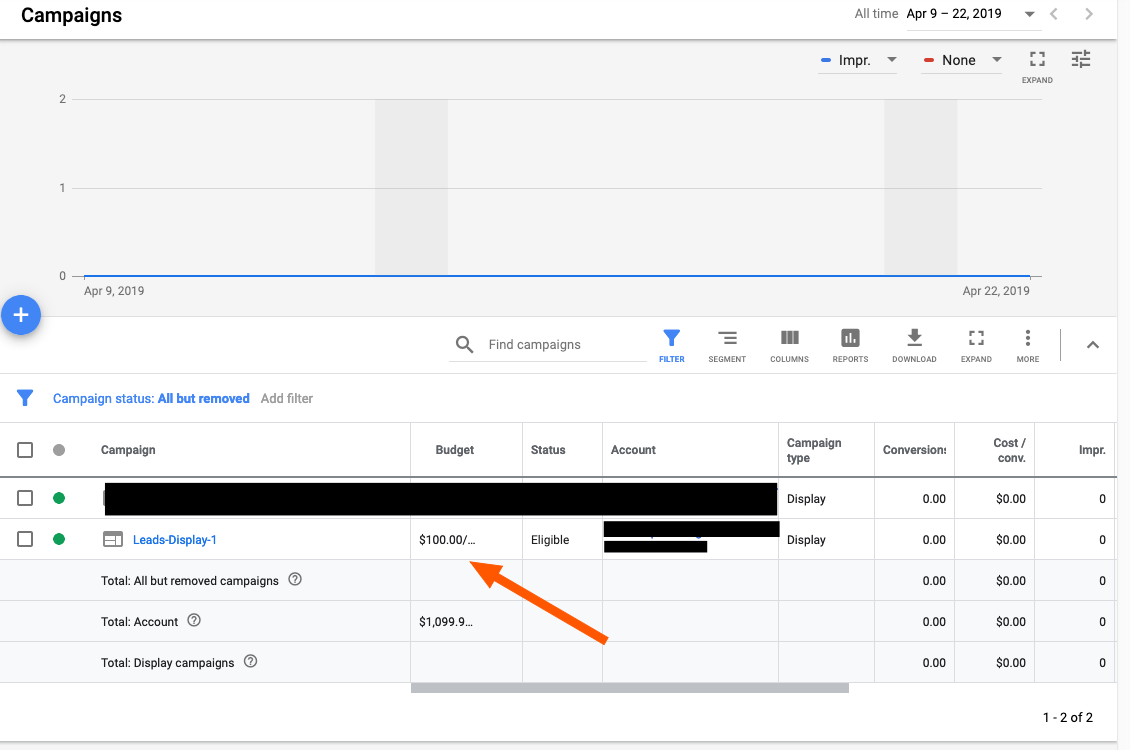
In the Google Ads UI, in my test account, I created a campaign and I set up
a budget and so on and so forth. You can see this here
<https://zappy.zapier.com/03C68A79-8DEA-4FC3-A3F3-3C965126DCB6.png> (sorry
tried to post a photo rather than linking to the photo but the Google
Groups UI seemed to be displeased with that). You can see that there is a
budget allocated there - yet nothing shows up in the response. Any ideas
what I might be doing wrong?

If I can provide any further details please let me know :) - thanks for
your time!

--
--
=~=~=~=~=~=~=~=~=~=~=~=~=~=~=~=~=~=~=~=~=~=~=~=~
Also find us on our blog:
https://googleadsdeveloper.blogspot.com/
=~=~=~=~=~=~=~=~=~=~=~=~=~=~=~=~=~=~=~=~=~=~=~=~

You received this message because you are subscribed to the Google
Groups "AdWords API and Google Ads API Forum" group.
To post to this group, send email to [email protected]
To unsubscribe from this group, send email to
[email protected]
For more options, visit this group at
http://groups.google.com/group/adwords-api?hl=en
---
You received this message because you are subscribed to the Google Groups
"AdWords API and Google Ads API Forum" group.
To unsubscribe from this group and stop receiving emails from it, send an
email to [email protected].
Visit this group at https://groups.google.com/group/adwords-api.
To view this discussion on the web visit
https://groups.google.com/d/msgid/adwords-api/6de469c8-a7a4-442a-9959-957ac2d7b92a%40googlegroups.com
<https://groups.google.com/d/msgid/adwords-api/6de469c8-a7a4-442a-9959-957ac2d7b92a%40googlegroups.com?utm_medium=email&utm_source=footer>
.
For more options, visit https://groups.google.com/d/optout.

--
--
=~=~=~=~=~=~=~=~=~=~=~=~=~=~=~=~=~=~=~=~=~=~=~=~
Also find us on our blog:
https://googleadsdeveloper.blogspot.com/
=~=~=~=~=~=~=~=~=~=~=~=~=~=~=~=~=~=~=~=~=~=~=~=~

You received this message because you are subscribed to the Google
Groups "AdWords API and Google Ads API Forum" group.
To post to this group, send email to [email protected]
To unsubscribe from this group, send email to
[email protected]
For more options, visit this group at
http://groups.google.com/group/adwords-api?hl=en
---
You received this message because you are subscribed to the Google Groups "AdWords API and Google Ads API Forum" group.
To unsubscribe from this group and stop receiving emails from it, send an email
to [email protected].
Visit this group at https://groups.google.com/group/adwords-api.
To view this discussion on the web visit
https://groups.google.com/d/msgid/adwords-api/ujqug1nia00000018t21oq002jj5f0w6kmj2e9g6co30c1g68r30e9k%40mail.gmail.com.
For more options, visit https://groups.google.com/d/optout.