terus baru deh suara mesinnya  bs jd halus dan lembut

----- Original Message -----
From: "mahen" <[email protected]>
To: <[email protected]>
Sent: Tuesday, February 09, 2010 12:49 PM
Subject: Re: ~ aga ~ Setting Gmail pake Outlook
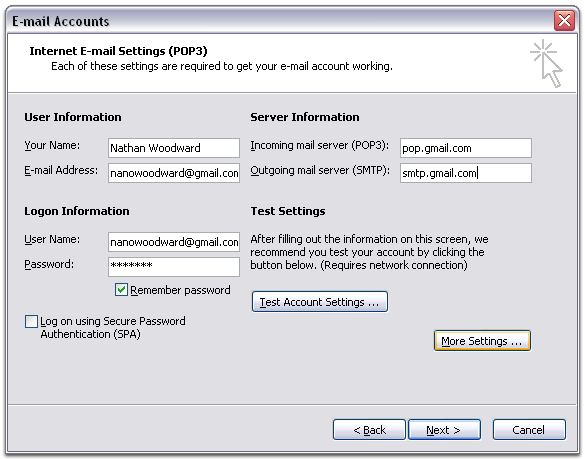
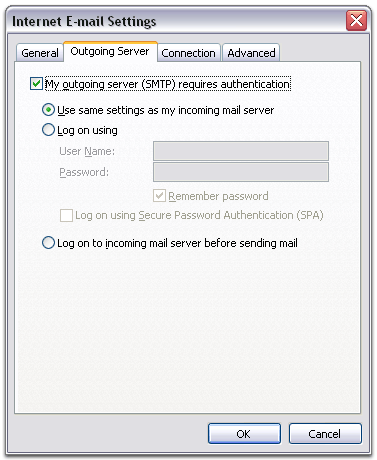
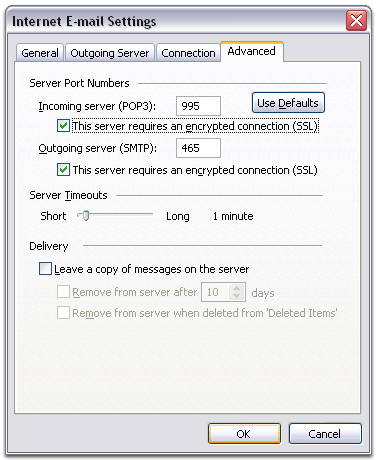
tambahkan sedikit baby oil buat pelumas :-P Edy Haryanto wrote: > > Test berhasil, tinggal penetrasi saja. :p > > -- Edy Haryanto -- > > ------------------------------------------------------------------------ > > *From:* [email protected] > [mailto:[email protected]] *On Behalf Of *Linda_YF > *Sent:* Tuesday, February 09, 2010 12:43 PM > *To:* [email protected] > *Subject:* Re: ~ aga ~ Setting Gmail pake Outlook > > **test** > > ----- Original Message ----- > > *From:* Rochmad Sigit <mailto:[email protected]> > > *To:* [email protected] > <mailto:[email protected]> > > *Sent:* Tuesday, February 09, 2010 11:49 AM > > *Subject:* RE: ~ aga ~ Setting Gmail pake Outlook > > *Pertama setting Gmailnya* > > *Enabling POP* > > You can retrieve your Gmail messages with a client or device that > supports POP, like Microsoft Outlook or Netscape Mail. > > To enable POP in Gmail: > > 1. Sign in to Gmail. > 2. Click *Settings* at the top of any Gmail page. > 3. Click *Forwarding and POP/IMAP*. > > > Gmail POP Settings > > 4. Select *Enable POP for all mail* or *Enable POP for mail > that arrives from now on*. > 5. Choose what to do with your messages after they're accessed > with your POP client or device. > 6. Configure your POP client > <http://mail.google.com/support/bin/answer.py?answer=12103>* > and click *Save Changes*. > > *Kedua setting outlooknya* > > *To set up your Outlook client to work with Gmail:* > > 1. Enable POP in your email account > <http://mail.google.com/support/bin/answer.py?answer=13273>. > Don't forget to click *Save Changes* when you're done. > 2. Open Outlook. > 3. Click the *Tools* menu, and select *E-mail Accounts...* > 4. Click *Add a new e-mail account*, and click *Next*. > 5. Choose *POP3* as your server type by clicking the radio > button, and click *Next*. > 6. Fill in all necessary fields to include the following > information: > > *_User Information_* > *Your Name:* Enter your name as you would like it to appear in the > *From:* field of outgoing messages. > *Email Address:* Enter your full email address > (/[email protected]/ or /usern...@your_domain.com/) > > *_Server Information_* > Google Apps users, enter the server names provided, don't add your > domain name in this step. > *Incoming mail server (POP3):* pop.gmail.com > *Outgoing mail server (SMTP):* smtp.gmail.com > > *_Login Information_* > *User Name:* Enter your Gmail username (including /@gmail.com/). > Google Apps users, enter your full address in the format > /usern...@your_domain.com/ > *Password:* Enter your email password > http://www.google.com/mail/help/images/screenshots/outlook03/email_settings.gif > > 7. Click *More Settings...* and then click the *Outgoing > Server* tab. > 8. Check the box next to *My outgoing server (SMTP) requires > authentication* and select *Use same settings as my incoming > mail server.* > http://www.google.com/mail/help/images/screenshots/outlook03/smtp_server.gif > 9. Click the *Advanced* tab, and check the box next to *This > server requires an encrypted connection (SSL)* under > *Incoming Server (POP3).* > http://www.google.com/mail/help/images/screenshots/outlook03/advanced.gif > 10. Check the box next to *This server requires an encrypted > connection (SSL)* under *Outgoing Server (SMTP),* and enter > 465 in the *Outgoing server (SMTP) *box. > 11. Click *OK*. > 12. Click *Test Account Settings...* After receiving > *Congratulations! All tests completed successfully*, click > *Close*. > 13. Click *Next*, and then click *Finish*. > 14. Download the latest updates > <http://mail.google.com/support/bin/answer.py?answer=70886> > for Outlook from Microsoft. This will help prevent the most > common Outlook errors Gmail users see. > > */Warm regards,/* > > */ /* > > */ /* > > */Rochmad Sigit S./* > > *From:* [email protected] > [mailto:[email protected]] *On Behalf Of *Asean, Anthonius > *Sent:* Tuesday, February 09, 2010 11:32 AM > *To:* [email protected] > *Subject:* RE: ~ aga ~ Setting Gmail pake Outlook > > Tinggal next2 aja gitu bro ? > > ** > > <hr size=2 width="100%" align=center tabindex=-1> > > *From:* [email protected] > [mailto:[email protected]] *On Behalf Of *Edy Haryanto > *Sent:* Tuesday, February 09, 2010 11:29 AM > *To:* [email protected] > *Subject:* RE: ~ aga ~ Setting Gmail pake Outlook > > Liat dari gmailnya aja, diajarin cara settingnya di situ > > -- Edy Haryanto -- > > ---------------------------------------------------------------------- -- > > *From:* [email protected] > [mailto:[email protected]] *On Behalf Of *Asean, Anthonius > *Sent:* Tuesday, February 09, 2010 11:21 AM > *To:* [email protected] > *Subject:* ~ aga ~ Setting Gmail pake Outlook > > AGArs, > > Gimana ya cara setting Outlook biar yg dipake tuh dari G-mail aja? > > Bisa kasih Step by step gak ? > > Trims yoo > > -- > you have this email because you join to "aga-madjid" GoogleGroups. > to post emails, just send to : > [email protected] > to join this group, send blank email to : > [email protected] > to quit from this group, just send email to : > [email protected] > if you wanna know me, please visit my facebook at [email protected] > or add me in Yahoo Messenger at [email protected] > thanks for joinning this group. > > -- > you have this email because you join to "aga-madjid" GoogleGroups. > to post emails, just send to : > [email protected] > to join this group, send blank email to : > [email protected] > to quit from this group, just send email to : > [email protected] > if you wanna know me, please visit my facebook at [email protected] > or add me in Yahoo Messenger at [email protected] > thanks for joinning this group. > > -- > you have this email because you join to "aga-madjid" GoogleGroups. > to post emails, just send to : > [email protected] > to join this group, send blank email to : > [email protected] > to quit from this group, just send email to : > [email protected] > if you wanna know me, please visit my facebook at [email protected] > or add me in Yahoo Messenger at [email protected] > thanks for joinning this group. > > -- > you have this email because you join to "aga-madjid" GoogleGroups. > to post emails, just send to : > [email protected] > to join this group, send blank email to : > [email protected] > to quit from this group, just send email to : > [email protected] > if you wanna know me, please visit my facebook at [email protected] > or add me in Yahoo Messenger at [email protected] > thanks for joinning this group. > > -- > you have this email because you join to "aga-madjid" GoogleGroups. > to post emails, just send to : > [email protected] > to join this group, send blank email to : > [email protected] > to quit from this group, just send email to : > [email protected] > if you wanna know me, please visit my facebook at [email protected] > or add me in Yahoo Messenger at [email protected] > thanks for joinning this group. > -- > you have this email because you join to "aga-madjid" GoogleGroups. > to post emails, just send to : > [email protected] > to join this group, send blank email to : > [email protected] > to quit from this group, just send email to : > [email protected] > if you wanna know me, please visit my facebook at [email protected] > or add me in Yahoo Messenger at [email protected] > thanks for joinning this group. -- you have this email because you join to "aga-madjid" GoogleGroups. to post emails, just send to : [email protected] to join this group, send blank email to : [email protected] to quit from this group, just send email to : [email protected] if you wanna know me, please visit my facebook at [email protected] or add me in Yahoo Messenger at [email protected] thanks for joinning this group. -- you have this email because you join to "aga-madjid" GoogleGroups. to post emails, just send to : [email protected] to join this group, send blank email to : [email protected] to quit from this group, just send email to : [email protected] if you wanna know me, please visit my facebook at [email protected] or add me in Yahoo Messenger at [email protected] thanks for joinning this group.