Terimakasih Pak Eko,...saya akan coba.
Berarti tidak perlu nambah script di AFL ya ? Atau tetap diberikan spt contoh
script di email ?
Sekali lagi terimakasih....walau masih dicoba dan diotak atik....
BTW thanks banget
________________________________
Dari: Eko Widjajanto <[email protected]>
Kepada: [email protected]
Terkirim: Rab, 17 Februari, 2010 17:45:07
Judul: RE: [Komunitas AmiBroker] Ke email


Pak Laksana,
Berikut jawaban dari Amibroker Support, silahkan Bapak
menindaklanjuti:

Hello,

For GMAIL support you need to install SSL add-on and use
the latest beta version - then follow the procedure explained at:
http://www.amibroker.com/gifs/gmailalert.gif

The entire procedure is the following:
1. Download and install AmiBroker 5.21 or higher 2.
Download and run SSL add-on from http://www.amibroker.com/bin/SSLAddOn.exe
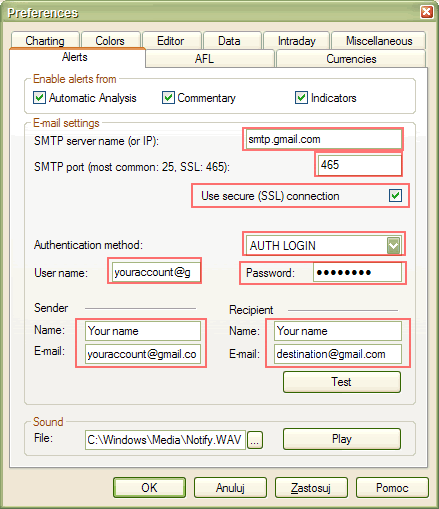
3. Configure (Tools->Preferences->Alerts) with SSL
enabled as shown in this
picture:
http://www.amibroker.com/gifs/gmailalert.gif


Best regards

Marcin Gorzynski
Amibroker.com Technical Support

Salam,
Eko

From:[email protected] [mailto:[email protected]] On
Behalf Of Laksana Laksana
Sent: Wednesday, February 17, 2010 4:18 PM
To: [email protected]
Subject: [Komunitas AmiBroker] Ke email


Rekan2,
Bisa tidak hasil scan di kirim otomatis ke email (yahoo, misalnya)
Kalo bisa, nambahin script di AFL gimana ya caranya ya?

Please bantuannya....


________________________________

Coba Yahoo! Mail baru yang LEBIH CEPAT. Rasakan bedanya sekarang!


      Yahoo! Mail Kini Lebih Cepat dan Lebih Bersih. Rasakan bedanya sekarang!
http://id.mail.yahoo.com