|
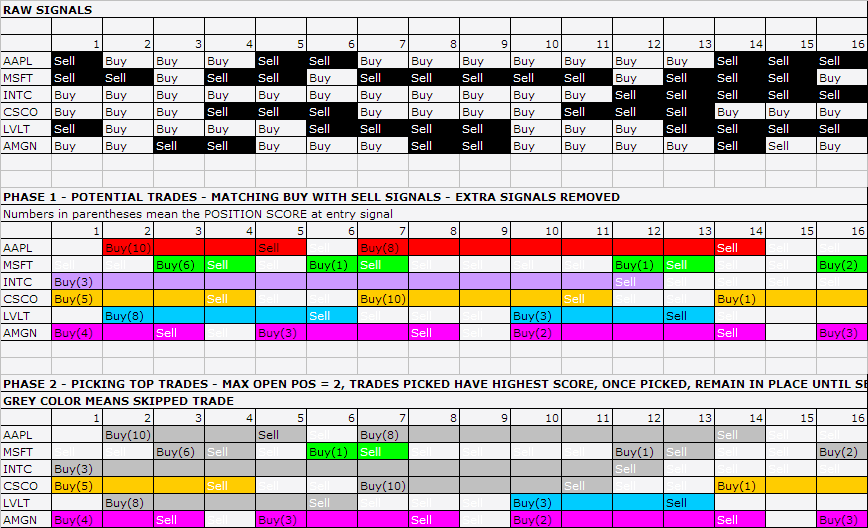
Currently there is no way to do that under regular
trading mode as far as I know. The second buy signal has been removed before
PreProcess().
(see http://www.amibroker.com/gifs/bt_regular.gif to
understand what I mean).
I have figured out a way to work around this by
using rotational mode to simulate regular trading. Under rotational mode, those
redundant signals are not removed.
Here is some code for your reference:
EnableRotationalTrading();
SetOption("WorstRankHeld",160); // this number needs to be big enough. Only 2*WorstRankHeld signals will be held by CBT each bar. SetOption("MaxOpenPositions", 100); SetOption("InitialEquity", 30000); SetOption("CommissionMode", 1); //% per trade SetOption("CommissionAmount", 0.5); SetOption("MarginRequirement", 50); SetOption("UsePrevBarEquityForPosSizing", True); SetOption("MinShares", 100); SetTradeDelays( 1, 1, 1, 1 ); RoundLotSize = 5; ...... ApplyStop( stopTypeNBar, stopModeBars, 10); Sell0 = ...; // Rename sell/buy to sell0/buy0 since you can have sell/buy in rotational mode. Buy0 = ...; Sell0[0] = 1; // trick to remove leading sell signals Sell0 = ExRem( Sell0, Buy0 ); Sell0[0] = 0; RawScore = 100 + ......; // make sure it is greater than 2 PositionScore = 1; for(i = 0; i < BarCount; i++) { if(Buy0[i]) PositionScore[i] = RawScore[i]; else if(Sell0[i]) PositionScore[i] = 2; else PositionScore[i] = C[i]/H[i]; //semi-random } SetOption("UseCustomBacktestProc", True ); if( Status("action")== actionPortfolio ) { bo = GetBacktesterObject(); bo.PreProcess(); // Initialize backtester for(bar=0; bar < BarCount; bar++) { bo.HandleStops(bar-1); // if use bar not bar-1, the n-bar exits have one extra bar delay. don't know why. for ( sig=bo.GetFirstSignal(bar); sig; sig=bo.GetNextSignal(bar) ) { // first handle exit signals (PosScore = 2) if ((sig.PosScore == 2 OR sig.isExit()) AND sig.Price != -1 ) { bo.ExitTrade(bar,sig.symbol,sig.Price); } } // update stats after closing trades bo.UpdateStats(bar, 1 ); for ( sig=bo.GetFirstSignal(bar); sig; sig=bo.GetNextSignal(bar)) { // Entry Signals (PosScore > 2) // Only one position per symbol if (sig.PosScore > 2 AND sig.Price != -1 AND IsNull( bo.FindOpenPos( sig.Symbol ))) { // long only bo.EnterTrade(bar, sig.symbol, True, sig.Price, sig.PosSize, sig.PosScore,sig.RoundLotSize); } } bo.UpdateStats(bar,1); // MAE/MFE is updated when timeinbar is set to 1. bo.UpdateStats(bar,2); } bo.PostProcess(); // Finalize backtester } __._,_.___ Please note that this group is for discussion between users only. To get support from AmiBroker please send an e-mail directly to SUPPORT {at} amibroker.com For other support material please check also: http://www.amibroker.com/support.html
SPONSORED LINKS
YAHOO! GROUPS LINKS
__,_._,___ |
- [amibroker] Losing Trades in Custom Backtester C Alvarez
- Re: [amibroker] Losing Trades in Custom Backtester Mark H
- Re: [amibroker] Losing Trades in Custom Backtester Tomasz Janeczko
- Re: [amibroker] Losing Trades in Custom Backteste... Mark H
- Re: [amibroker] Losing Trades in Custom Backteste... emp62
- [amibroker] Re: Losing Trades in Custom Backteste... C Alvarez
- [amibroker] Re: Losing Trades in Custom Backt... C Alvarez
- [amibroker] Re: Losing Trades in Custom B... C Alvarez
- Re: [amibroker] Re: Losing Trades in... Mark H
- [amibroker] Re: Losing Trades in... C Alvarez
- Re: [amibroker] Re: Losing T... Mark H
- [amibroker] Re: Losing Trade... C Alvarez