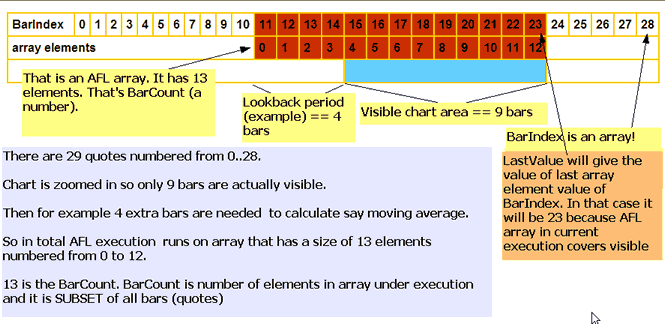
Yes

Best regards,
Tomasz Janeczko
amibroker.com
----- Original Message -----
From: "sidhartha70" <[EMAIL PROTECTED]>
To: <[email protected]>
Sent: Saturday, September 20, 2008 1:45 PM
Subject: [amibroker] Re: Confusing Behaviour...!!!
> TJ,
>
> Just to bring a close to this subject,
>
> It is important to keep an eye on the number of previous bars required
> by a chart ESPECIALLY where you have multiple calls to code within
> functions, as this may end up using far more previous bars than are
> actually required.
>
> Would you say that's a correct statement?
>
> TIA
>
>
> --- In [email protected], "Tomasz Janeczko" <[EMAIL PROTECTED]> wrote:
>>
>> Hello,
>>
>> SetBarsRequired can be called any number of times.
>> Any call, overwrites any previous bar requirements,
>> so the last call is the one that matters.
>> That also allows you to completely overwrite any internally
>> calculated requirements - put SetBarsRequired at the end of the formula
>> and you have full control.
>>
>> Best regards,
>> Tomasz Janeczko
>> amibroker.com
>> ----- Original Message -----
>> From: "sidhartha70" <[EMAIL PROTECTED]>
>> To: <[email protected]>
>> Sent: Saturday, September 20, 2008 11:51 AM
>> Subject: [amibroker] Re: Confusing Behaviour...!!!
>>
>>
>> > Thanks TJ. I've been playing around with code all morning and I'm now
>> > starting to understand the implications of this for chart redraw
> speed.
>> >
>> > I have found this confusing. For example, I have some quite complex
>> > code that only requires 100 previous bars. As such it excutes nice and
>> > fast because it doesn't use a lot of history. However, if I then drag
>> > onto that chart, some ostensibly very simple 'daily pivot' calcualtion
>> > code that requires the use of TimeFrameGetPrice() three times, then
>> > the number of bars required jumps up to 15,000 odd for the reasons you
>> > have outlined. Suddenly the whole chart becomes completely unusably
>> > slow since it is now having to calculate 15,000 bars on ALL code on
>> > the chart I assume?? So simple code added to complex code on a chart
>> > can create a huge calculation overhead?
>> >
>> > As an aside, I assume you can only make one call to Setbarsrequired()
>> > per chart...? What happens if you drag and drop a number of indicators
>> > onto one chart that each have their own settings of
> Setbarsrequired()...?
>> >
>> > Many Thanks for clearing this up for me.
>> >
>> > --- In [email protected], "Tomasz Janeczko" <groups@> wrote:
>> >>
>> >> As written here:
>> >> http://www.amibroker.com/kb/2008/07/03/quickafl/
>> >> and illustrated here:
>> >> http://www.amibroker.com/gifs/barindex_small.gif
>> >>
>> >> BarCount is in direct relation with bar requirements.
>> >> BarCount is actually number of bars visible PLUS calculated
>> > requirements.
>> >>
>> >> > They require 5,000 bars each. Again, why?
>> >> Again as written here:
>> >> http://www.amibroker.com/kb/2008/07/03/quickafl/
>> >> every function has internally known requirements.
>> >> QuickAFL does not really care about "exact" requirements.
>> >> It just needs to have some safe estimate. With safe
>> >> it means that too much is good, too few is not.
>> >> For some functions with dynamic requirements, some kind
>> >> of assumption is being made. For those functions it is 5000.
>> >> Read however the "IMPORTANT NOTES" part of the document
>> >> mentioned already many times.
>> >>
>> >> The difference between in-funciton or out, is very simple.
>> >> If you don't actually CALL the function, it does not add to
>> >> the requirements. The definition does not matter.
>> >> What is important is actual CALL.
>> >> If you call multiple times - the requirements add up.
>> >> Again, this is all really described in detail in the docs
>> >> http://www.amibroker.com/kb/2008/07/03/quickafl/
>> >>
>> >> Note that my documents are condensed and each sentence
>> >> is usually packed with important info, so slow reading is advised.
>> >>
>> >> Best regards,
>> >> Tomasz Janeczko
>> >> amibroker.com
>> >> ----- Original Message -----
>> >> From: "sidhartha70" <sidhartha70@>
>> >> To: <[email protected]>
>> >> Sent: Saturday, September 20, 2008 1:48 AM
>> >> Subject: [amibroker] Re: Confusing Behaviour...!!!
>> >>
>> >>
>> >> > Tj thanks.
>> >> >
>> >> > But I just want to get this 100% clear so I don't have to come
> back to
>> >> > this again.
>> >> >
>> >> > On exactly the same chart... same settings, same zoom etc...
> One line
>> >> > of code requires 5,000 previous bars within a function
> structure, and
>> >> > outside of a function structure it requires 500. Why? It makes no
>> >> > difference if I move around the chart, or zoom the chart etc. The
>> >> > number of pervious bars required doesn't seem dynamic. It's
> very much
>> >> > fixed.
>> >> >
>> >> > In the case of the following lines,
>> >> >
>> >> > H1=SelectedValue(TimeFrameGetPrice( "H", inDaily, -1 ));
>> >> > L1=SelectedValue(TimeFrameGetPrice( "L", inDaily, -1 ));
>> >> > C1=SelectedValue(TimeFrameGetPrice( "C", inDaily, -1 ));
>> >> >
>> >> > They require 5,000 bars each. Again, why? Sorry to be thick
> here, and
>> >> > I'm sure it's blindingly obvious to you... But I don't see how
>> >> > BarCount has anything to do with these two examples...??
>> >> >
>> >> > Thanks Again for taking the time.
>> >> >
>> >> > --- In [email protected], "Tomasz Janeczko" <groups@>
> wrote:
>> >> >>
>> >> >> BarCount is DYNAMIC, it may change with every execution.
>> >> >> You should not think about it as a constant.
>> >> >> It can change with zoom factor, tooltip display (uses less),
>> >> >> interpretation, selected bar, etc, etc.
>> >> >>
>> >> >> Also first execution after applying indicator always uses
>> >> >> all bars, only subsequent runs use less.
>> >> >>
>> >> >> Best regards,
>> >> >> Tomasz Janeczko
>> >> >> amibroker.com
>> >> >> ----- Original Message -----
>> >> >> From: "sidhartha70" <sidhartha70@>
>> >> >> To: <[email protected]>
>> >> >> Sent: Saturday, September 20, 2008 1:15 AM
>> >> >> Subject: [amibroker] Re: Confusing Behaviour...!!!
>> >> >>
>> >> >>
>> >> >> > Thanks TJ. I do know about Quick AFL and I have read that
> document
>> >> >> > throughly before.
>> >> >> >
>> >> >> > But I can't see how it applies in this case with these specific
>> >> >> > examples. And I definately can't see the difference between one
>> > being
>> >> >> > inside a function or not.
>> >> >> >
>> >> >> > Can you explain?
>> >> >> >
>> >> >> > TIA
>> >> >> >
>> >> >> > --- In [email protected], "Tomasz Janeczko" <groups@>
>> > wrote:
>> >> >> >>
>> >> >> >> Please read this:
>> >> >> >>
>> >> >> >> http://www.amibroker.com/kb/2008/07/03/quickafl/
>> >> >> >>
>> >> >> >> Best regards,
>> >> >> >> Tomasz Janeczko
>> >> >> >> amibroker.com
>> >> >> >> ----- Original Message -----
>> >> >> >> From: "sidhartha70" <sidhartha70@>
>> >> >> >> To: <[email protected]>
>> >> >> >> Sent: Saturday, September 20, 2008 12:50 AM
>> >> >> >> Subject: [amibroker] Confusing Behaviour...!!!
>> >> >> >>
>> >> >> >>
>> >> >> >> > Hi,
>> >> >> >> >
>> >> >> >> > I'm trying to get some code to run as fast as possible.
> As such
>> >> > I've
>> >> >> >> > been studying the 'Display Chart Timing' option under
>> >> >> > preferences>misc.
>> >> >> >> >
>> >> >> >> > I've noticed some behaviour that I can't explain. I hope
> others
>> >> > may be
>> >> >> >> > able to.
>> >> >> >> >
>> >> >> >> > Firstly I notice that when my chart requires 10,000+ bars I
>> >> > start to
>> >> >> >> > notice latency in AmiBroker, despite running a very fast
> PC. I
>> >> > assume
>> >> >> >> > that is normal at that number of bars...?
>> >> >> >> >
>> >> >> >> > So here's the problem...
>> >> >> >> >
>> >> >> >> > Under normal circumstances my code requires 297 previous
> bars.
>> >> >> >> >
>> >> >> >> > However, If I add the following lines, the number of
>> > previous bars
>> >> >> >> > required increases by 5,000 for each instance. So after
>> > these three
>> >> >> >> > lines of code I am now needing 15,297 pervious bars.
>> >> >> >> >
>> >> >> >> > H1=SelectedValue(TimeFrameGetPrice( "H", inDaily, -1 ));
>> >> >> >> > L1=SelectedValue(TimeFrameGetPrice( "L", inDaily, -1 ));
>> >> >> >> > C1=SelectedValue(TimeFrameGetPrice( "C", inDaily, -1 ));
>> >> >> >> >
>> >> >> >> > Even stranger, when I add the following line of code into
>> > the main
>> >> >> >> > body of code,
>> >> >> >> >
>> >> >> >> > test=((BarCount - 1) - LastValue(TroughBars(L, 0.05,10)));
>> >> >> >> >
>> >> >> >> > It adds 500 bars to my previous bars required (total new
> 797).
>> >> >> >> >
>> >> >> >> > However if I call a function and simply return the following,
>> >> >> >> >
>> >> >> >> > return ((BarCount - 1) - LastValue(TroughBars(L, 0.05,10)));
>> >> >> >> >
>> >> >> >> > It now requires 5,000 previous bars instead of the 500
> outside
>> >> > of the
>> >> >> >> > function (total now 5,297).
>> >> >> >> >
>> >> >> >> > Can anyone explain this behaviour...?
>> >> >> >> >
>> >> >> >> > Many Thanks
>> >> >> >> >
>> >> >> >> >
>> >> >> >> >
>> >> >> >> >
>> >> >> >> > ------------------------------------
>> >> >> >> >
>> >> >> >> > Please note that this group is for discussion between users
>> > only.
>> >> >> >> >
>> >> >> >> > To get support from AmiBroker please send an e-mail
> directly to
>> >> >> >> > SUPPORT {at} amibroker.com
>> >> >> >> >
>> >> >> >> > For NEW RELEASE ANNOUNCEMENTS and other news always check
>> > DEVLOG:
>> >> >> >> > http://www.amibroker.com/devlog/
>> >> >> >> >
>> >> >> >> > For other support material please check also:
>> >> >> >> > http://www.amibroker.com/support.html
>> >> >> >> > Yahoo! Groups Links
>> >> >> >> >
>> >> >> >> >
>> >> >> >> >
>> >> >> >>
>> >> >> >
>> >> >> >
>> >> >> >
>> >> >> > ------------------------------------
>> >> >> >
>> >> >> > Please note that this group is for discussion between users
> only.
>> >> >> >
>> >> >> > To get support from AmiBroker please send an e-mail directly to
>> >> >> > SUPPORT {at} amibroker.com
>> >> >> >
>> >> >> > For NEW RELEASE ANNOUNCEMENTS and other news always check
> DEVLOG:
>> >> >> > http://www.amibroker.com/devlog/
>> >> >> >
>> >> >> > For other support material please check also:
>> >> >> > http://www.amibroker.com/support.html
>> >> >> > Yahoo! Groups Links
>> >> >> >
>> >> >> >
>> >> >> >
>> >> >>
>> >> >
>> >> >
>> >> >
>> >> > ------------------------------------
>> >> >
>> >> > Please note that this group is for discussion between users only.
>> >> >
>> >> > To get support from AmiBroker please send an e-mail directly to
>> >> > SUPPORT {at} amibroker.com
>> >> >
>> >> > For NEW RELEASE ANNOUNCEMENTS and other news always check DEVLOG:
>> >> > http://www.amibroker.com/devlog/
>> >> >
>> >> > For other support material please check also:
>> >> > http://www.amibroker.com/support.html
>> >> > Yahoo! Groups Links
>> >> >
>> >> >
>> >> >
>> >>
>> >
>> >
>> >
>> > ------------------------------------
>> >
>> > Please note that this group is for discussion between users only.
>> >
>> > To get support from AmiBroker please send an e-mail directly to
>> > SUPPORT {at} amibroker.com
>> >
>> > For NEW RELEASE ANNOUNCEMENTS and other news always check DEVLOG:
>> > http://www.amibroker.com/devlog/
>> >
>> > For other support material please check also:
>> > http://www.amibroker.com/support.html
>> > Yahoo! Groups Links
>> >
>> >
>> >
>>
>
>
>
> ------------------------------------
>
> Please note that this group is for discussion between users only.
>
> To get support from AmiBroker please send an e-mail directly to
> SUPPORT {at} amibroker.com
>
> For NEW RELEASE ANNOUNCEMENTS and other news always check DEVLOG:
> http://www.amibroker.com/devlog/
>
> For other support material please check also:
> http://www.amibroker.com/support.html
> Yahoo! Groups Links
>
>
>