# [Tails 6.12](https://tails.net/news/version_6.12/index.en.html)
# Important security fixes The vulnerabilities described below were identified during an external security audit by [Radically Open Security](https://www.radicallyopensecurity.com/) and disclosed responsibly to our team. We are not aware of these attacks being used against Tails users until now. These vulnerabilities can only be exploited by a powerful attacker who has already exploited another vulnerability to take control of an application in Tails. * Prevent an attacker from monitoring Tor circuits. ([#20733](https://gitlab.tails.boum.org/tails/tails/-/issues/20733) and [#20744](https://gitlab.tails.boum.org/tails/tails/-/issues/20744)) In Tails 6.11 or earlier, an attacker who has already taken control of an application in Tails could then exploit vulnerabilities in _Onion Circuits_ and our _Tor Browser_ wrapper that might lead to deanonymization. * Prevent an attacker from changing the Persistent Storage settings. ([#20745](https://gitlab.tails.boum.org/tails/tails/-/issues/20745)) # Changes and updates * Add a button to check for upgrades from the **About Tails** utility. 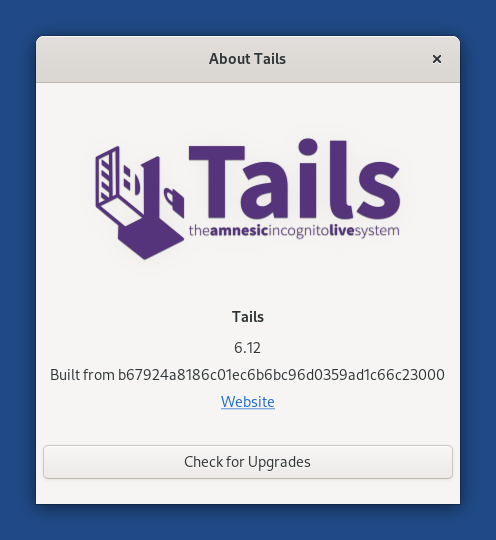 * Add the keyboard shortcut **Ctrl+Alt+T** to open a _Terminal_. * Update _Tor Browser_ to [14.0.5](https://blog.torproject.org/new-release-tor-browser-1405). * Update _Thunderbird_ to [128.6.0esr](https://www.thunderbird.net/en-US/thunderbird/128.6.0esr/releasenotes/). # Fixed problems * Ensure all our Python code keeps running in _isolated mode_. ([#20719](https://gitlab.tails.boum.org/tails/tails/-/issues/20719)) * Simplify the troubleshooting instructions when an automatic upgrade fails. ([#20466](https://gitlab.tails.boum.org/tails/tails/-/issues/20466)) * Avoid freezing the Welcome Screen while activating the Persistent Storage. ([#20635](https://gitlab.tails.boum.org/tails/tails/-/issues/20635)) * Made time synchronization more reliable when restarting Tor. ([#20530](https://gitlab.tails.boum.org/tails/tails/-/issues/20530)) * Display an error message when upgrading the encryption of the Persistent Storage to LUKS2 fails. ([#20634](https://gitlab.tails.boum.org/tails/tails/-/issues/20634)) For more details, read our [changelog](https://gitlab.tails.boum.org/tails/tails/-/blob/master/debian/changelog). # Get Tails 6.12 ## To upgrade your Tails USB stick and keep your Persistent Storage * Automatic upgrades are available from Tails 6.0 or later to 6.12. * If you cannot do an automatic upgrade or if Tails fails to start after an automatic upgrade, please try to do a [manual upgrade](https://tails.net/doc/upgrade/index.en.html#manual). ## To install Tails 6.12 on a new USB stick Follow our installation instructions: * [Install from Windows](https://tails.net/install/windows/index.en.html) * [Install from macOS](https://tails.net/install/mac/index.en.html) * [Install from Linux](https://tails.net/install/linux/index.en.html) * [Install from Debian or Ubuntu using the command line and GnuPG](https://tails.net/install/expert/index.en.html) The Persistent Storage on the USB stick will be lost if you install instead of upgrading. ## To download only If you don't need installation or upgrade instructions, you can download Tails 6.12 directly: * [For USB sticks (USB image)](https://tails.net/install/download/index.en.html) * [For DVDs and virtual machines (ISO image)](https://tails.net/install/download-iso/index.en.html) URL: <https://tails.net/news/version_6.12/index.en.html>
--
Tails News
https://www.autistici.org/mailman/listinfo/amnesia-news
To unsubscribe, send an empty email to [email protected].

