# [Tails 7.6](https://tails.net/news/version_7.6/)
# New features ## Automatic Tor bridges You can now learn about Tor bridges directly from the _Tor Connection_ assistant in Tails. Tor bridges are secret Tor relays that hide that you are connecting to Tor. If connecting to Tor is blocked from where you are, you can use a bridge as your first Tor relay to circumvent this censorship. In Tails 7.6, choose **Connect to Tor automatically** when opening _Tor Connection_. If access to the Tor network is blocked, the bridge configuration screen offers a new option called **Ask for a Tor bridge based on your region**. [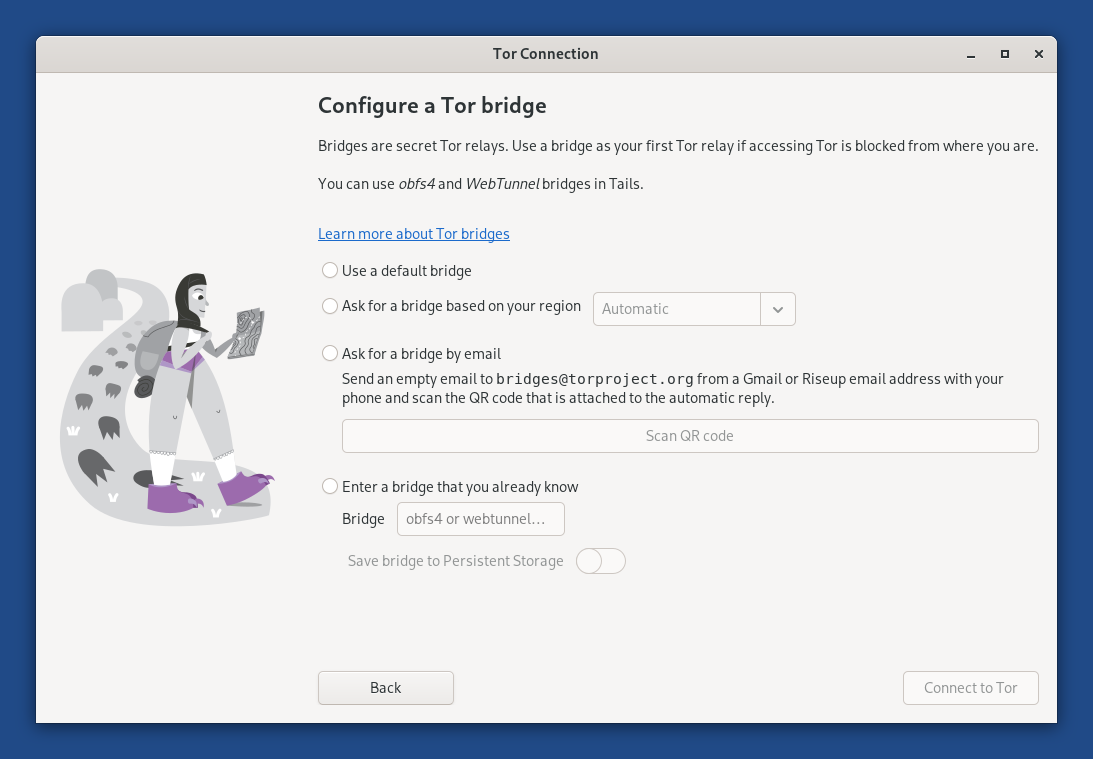](https://tails.net/doc/anonymous_internet/tor/bridge.png) This feature uses the same technology as the connection assistant in _Tor Browser_ outside of Tails, which was introduced in [Tor Browser 11.5](https://blog.torproject.org/new-release-tor-browser-115/) (July 2022). Tails downloads information about bridges that are most likely to work in your region from the [Moat API](https://gitlab.torproject.org/tpo/anti- censorship/rdsys/-/blob/main/doc/moat.md) of the Tor Project. To circumvent censorship, this connection is disguised as a connection to another website using [domain fronting](https://en.wikipedia.org/wiki/domain%20fronting). ## GNOME Secrets In Tails 7.6, the [_Secrets_](https://gitlab.gnome.org/World/secrets) password manager replaces [_KeePassXC_](https://keepassxc.org/). _Secrets_ has a simpler interface and is better integrated in the GNOME desktop. For example, accessibility features, such as the screen keyboard and cursor size, are working again with _Secrets_. _Secrets_ offers to unlock your previous _KeePassXC_ database automatically, because both _Secrets_ and _KeePassXC_ use the same file format to store passwords. If you miss more advanced features from _KeePassXC_ , you can install _KeePassXC_ as [additional software](https://tails.net/doc/persistent_storage/additional_software/index.en.html). [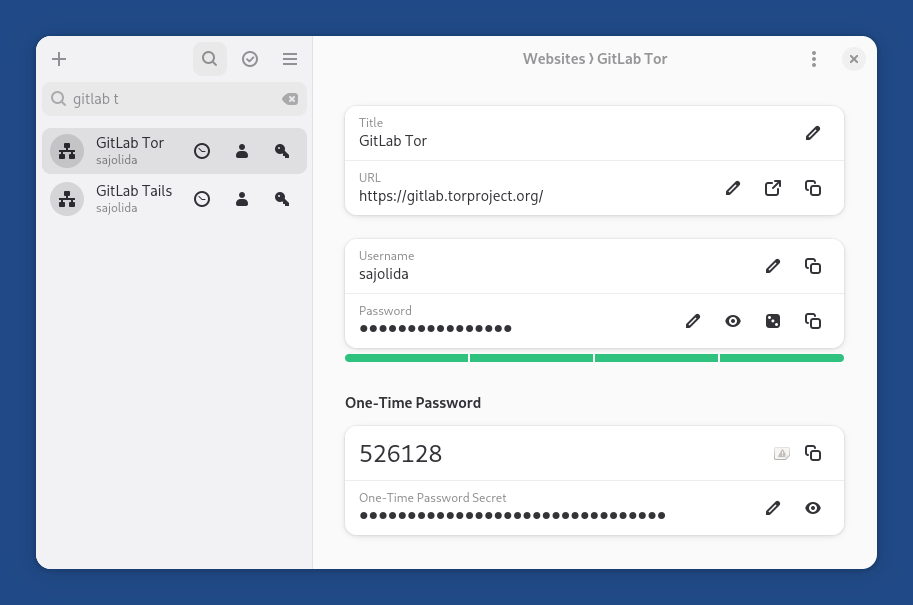](https://tails.net/news/version_7.6/secrets.png) The main keyboard shortcuts of _Secrets_ are similar to the ones of _KeePassXC_ , with **Shift** in addition to **Ctrl** : * **Shift+Ctrl+C** : copy password * **Shift+Ctrl+V** : copy address * **Shift+Ctrl+B** : copy username * **Shift+Ctrl+T** : copy one-time password To see the full list of keyboard shortcuts of _Secrets_ , press **Ctrl+?**. # Changes and updates * Update _Electrum_ from 4.5.8 to [4.7.0](https://github.com/spesmilo/electrum/blob/master/RELEASE-NOTES). * Update _Tor Browser_ to [15.0.8](https://blog.torproject.org/new-release-tor-browser-1508/). * Update _Thunderbird_ to [140.8.0](https://www.thunderbird.net/en-US/thunderbird/140.8.0esr/releasenotes/). * Update most firmware packages. This improves support for newer hardware: graphics, Wi-Fi, and so on. # Fixed problems * Translate the confirmation dialog that appears before saving the language and keyboard layout on the USB stick. ([#21448](https://gitlab.tails.boum.org/tails/tails/-/issues/21448)) [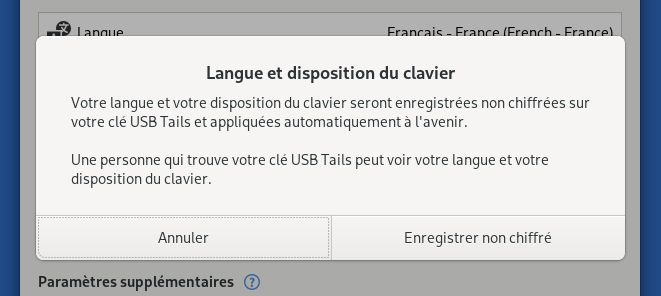](https://tails.net/news/version_7.6/save.png) * Fix the **Learn More** button in the _Thunderbird_ migration notification. ([#21455](https://gitlab.tails.boum.org/tails/tails/-/issues/21455)) [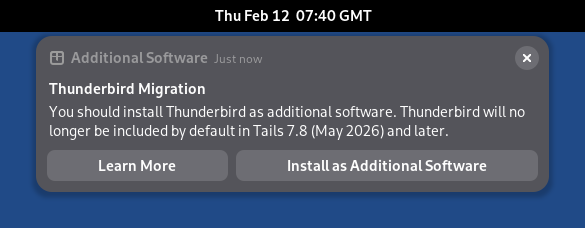](https://tails.net/doc/anonymous_internet/thunderbird/additional_software/manual.png) * Fix automated upgrades in Turkish. ([#21466](https://gitlab.tails.boum.org/tails/tails/-/issues/21466)) For more details, read our [changelog](https://gitlab.tails.boum.org/tails/tails/-/blob/master/debian/changelog). # Get Tails 7.6 ## To upgrade your Tails USB stick and keep your Persistent Storage * Automatic upgrades are available from Tails 7.0 or later to 7.6. * If you cannot do an automatic upgrade or if Tails fails to start after an automatic upgrade, please try to do a [manual upgrade](https://tails.net/doc/upgrade/index.en.html#manual). ## To install Tails 7.6 on a new USB stick Follow our installation instructions: * [Install from Windows](https://tails.net/install/windows/index.en.html) * [Install from macOS](https://tails.net/install/mac/index.en.html) * [Install from Linux](https://tails.net/install/linux/index.en.html) * [Install from Debian or Ubuntu using the command line and GnuPG](https://tails.net/install/expert/index.en.html) The Persistent Storage on the USB stick will be lost if you install instead of upgrading. ## To download only If you don't need installation or upgrade instructions, you can download Tails 7.6 directly: * [For USB sticks (USB image)](https://tails.net/install/download/index.en.html) * [For DVDs and virtual machines (ISO image)](https://tails.net/install/download-iso/index.en.html) URL: <https://tails.net/news/version_7.6/>
--
Tails News
https://www.autistici.org/mailman/listinfo/amnesia-news
To unsubscribe, send an empty email to [email protected].




