You might be better off using jQuery Mobile inside of a webView, and coding
it as a website. I could be totally wrong here.
On Aug 12, 2011 2:28 PM, "darrinps" <[email protected]> wrote:
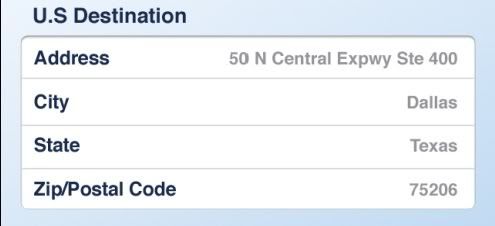
> I am trying to create something that looks like this:
> http://i254.photobucket.com/albums/hh105/darrinps/SameImage.jpg
>
> In short, an area that has borders all the way around it but the
> background is white for the text views and edit boxes inside that area
> which need to be seamless beside one another.
>
> The area housing the word Address is a TextView and the area to the
> right is an EditText. I am having a heck of a time getting this to
> look like the image. It always seems to have a gap in between.
>
> Here is my latest attempt at it with just the first line there for
> brevity sake. Anyone know how to do this sort of thing?
>
> <TextView
> android:text="@string/us_destination"
> android:textSize="16sp"
> android:textColor="#54627F"
> android:textStyle="bold"
> android:singleLine="true"
> android:paddingTop="10px"
> android:paddingLeft="10px"
> android:layout_width="wrap_content"
> android:layout_height="wrap_content">
> </TextView>
>
>
> <TableLayout
> android:id="@+id/destination_entries"
> android:orientation="horizontal"
> android:layout_width="fill_parent"
> android:layout_height="wrap_content"
> android:stretchColumns="1">
>
> <TableRow
> android:paddingLeft="10px"
> android:paddingRight="10px">
> <TextView
> android:text="@string/address"
> android:textSize="14sp"
> android:textColor="#54627F"
> android:background="#ffffff"
> android:textStyle="bold"
> android:singleLine="true"
> android:paddingTop="10px"
> android:layout_width="wrap_content"
> android:layout_height="wrap_content">
> </TextView>
>
> <EditText
> android:id="@+id/destination_address"
> android:text="1313 Mockingbird Lane"
> android:textSize="14sp"
> android:textColor="#54627F"
> android:background="#ffffff"
> android:textStyle="bold"
> android:singleLine="true"
> android:gravity="right|bottom"
> android:layout_gravity="right"
> android:layout_width="fill_parent"
> android:layout_height="fill_parent">
> </EditText>
> </TableRow>
> </TableLayout>
>
> --
> You received this message because you are subscribed to the Google
> Groups "Android Developers" group.
> To post to this group, send email to [email protected]
> To unsubscribe from this group, send email to
> [email protected]
> For more options, visit this group at
> http://groups.google.com/group/android-developers?hl=en
--
You received this message because you are subscribed to the Google
Groups "Android Developers" group.
To post to this group, send email to [email protected]
To unsubscribe from this group, send email to
[email protected]
For more options, visit this group at
http://groups.google.com/group/android-developers?hl=en