I realize that the Eclipse graphical layout editor often (usually?) doesn't
render things the same way that the physical devices or emulator do. I can
usually deal with that. However, I have a situation where I can't figure
out why there is such a big difference, and more importantly, I can't
figure out how to get what I want for a layout on the target devices.
I am attempting to use some custom ImageButton widgets with custom graphics
files as buttons. I simply want the buttons to fill the parent layouts they
are in. In the designer, they look the way I think they should. But when I
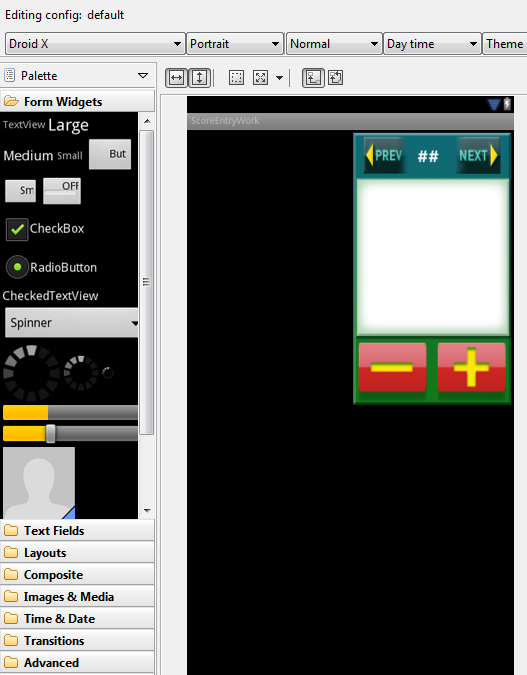
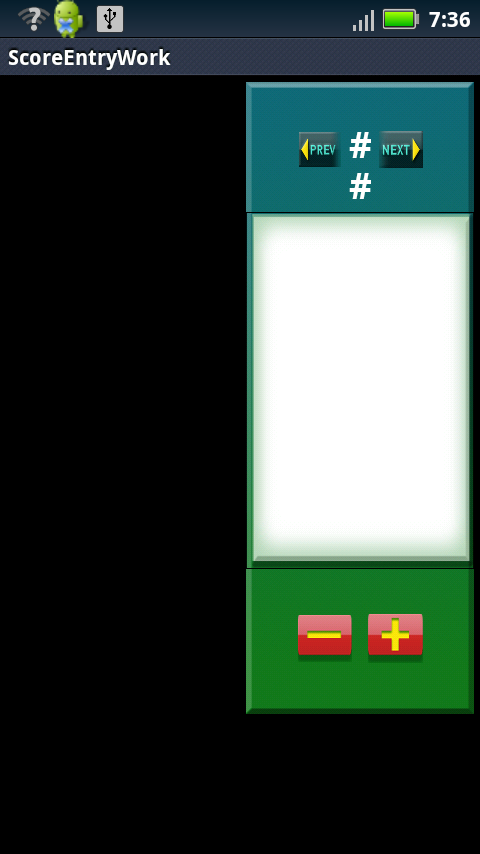
run it on a device, the buttons are way to small. Here is what the design
looks like, using a device that is set up to emulate the Droid X that I am
testing with.

<http://pozzy.com/consulting/LayoutDesignInEclipse.PNG>

<https://lh3.googleusercontent.com/-MiY8HoEMWMw/UASbZg-o53I/AAAAAAAAABg/-Zs-2TheI0w/s1600/LayoutDesignInEclipse.PNG>


Here is a screen capture of the screen when running on my Droid X:

<http://pozzy.com/consulting/ScoreEntryDroidXScreenCapture.png>

<https://lh6.googleusercontent.com/-f1cf69z790Q/UASbhyu2dYI/AAAAAAAAABo/PchCfnoY8ps/s1600/ScoreEntryDroidXScreenCapture.png>


I tried to trim the code down, but it still relies on a number of button
image files. The full project is attached.

Here is the layout XML:

<?xml version="1.0" encoding="utf-8"?>
<RelativeLayout xmlns:android="http://schemas.android.com/apk/res/android";
    android:layout_width="fill_parent"
    Android:layout_height="fill_parent">

     <LinearLayout
         android:id="@+id/scoreEntryPlayersAndMainEntry"
         android:layout_width="fill_parent"
         android:layout_height="wrap_content"
         android:orientation="horizontal" >

         <LinearLayout
             android:id="@+id/scoreEntryPlayers"
             android:layout_width="0dp"
             android:layout_height="fill_parent"
             android:layout_weight=".5"
             android:orientation="vertical"
             android:paddingBottom="4dp"
             android:paddingTop="4dp"
             android:paddingLeft="4dp" >

         </LinearLayout>

         <LinearLayout
             android:id="@+id/scoreEntryMainEntry"
             android:layout_width="0dp"
             android:layout_height="fill_parent"
             android:layout_weight=".5"
             android:maxWidth="100dp"
             android:orientation="vertical"
             android:paddingBottom="4dp"
             android:paddingLeft="4dp"
             android:paddingRight="4dp"
             android:paddingTop="4dp" >

             <LinearLayout android:id="@+id/scoreEntryPreviousHoleNumberNextRow"
                 android:orientation="horizontal"
                   android:background="@drawable/score_entry_background_top"
                 android:layout_width="fill_parent"
                 android:layout_height="wrap_content"
                 android:layout_weight=".1"
                 android:gravity="center|top" >

                 <ImageButton
                     android:id="@+id/previousHoleButton"
                     android:layout_width="0dp"
                     android:layout_height="fill_parent"
                    android:layout_weight="2"
                     android:layout_margin="5dp"
                    android:scaleType="fitCenter"
                     android:background="@null"
                     android:contentDescription="Previous Hole"
                     android:src="@drawable/score_entry_prev" />

                 <TextView
                     android:id="@+id/holeNumber"
                     android:layout_width="0dp"
                     android:layout_height="match_parent"
                     android:layout_weight="1"
                     android:background="@null"
                     android:paddingTop="20dp"
                     android:text="##"
                     android:textColor="#FFFFFF"
                     android:textSize="24sp"
                     android:textStyle="bold" />

                    <ImageButton
                        android:id="@+id/nextHoleButton"
                        android:layout_width="0dp"
                        android:layout_height="fill_parent"
                    android:layout_weight="2"
                        android:layout_margin="5dp"
                        android:scaleType="fitCenter"
                        android:background="@null"
                        android:contentDescription="Next Hole"
                        android:src="@drawable/score_entry_next" />
             </LinearLayout>

             <LinearLayout
                 android:id="@+id/scoreEntryCurrentScore"
                   android:background="@drawable/score_entry_background_middle"
                 android:layout_width="fill_parent"
                 android:layout_height="wrap_content"
                 android:layout_weight=".8" >

                 <FrameLayout
                     android:id="@+id/scoreEntryScoreOverlays"
                     android:layout_width="fill_parent"
                     android:layout_height="wrap_content" >
                     <LinearLayout
                         android:visibility="invisible"
                         android:id="@+id/scoreEntryPlayerScoreLayout"
                         android:layout_width="fill_parent"
                         android:layout_height="wrap_content"
                         android:orientation="vertical" >

                         <TextView
                             android:id="@+id/currentPlayer"
                             android:layout_width="fill_parent"
                             android:layout_height="wrap_content"
                             android:layout_margin="10dp"
                             android:gravity="center"
                             android:text="Player Name"
                             android:textColor="#aaaaaa"
                             android:textSize="16sp"
                             android:textStyle="italic" />

                         <TextView
                             android:id="@+id/currentScore"
                             android:layout_width="fill_parent"
                             android:layout_height="fill_parent"
                             android:text="99"
                             android:gravity="center"
                             android:layout_gravity="bottom"
                             android:textColor="#ff0000"
                             android:textSize="100sp"
                             android:textStyle="bold|italic" />
                     </LinearLayout>
                </FrameLayout>
             </LinearLayout>

             <LinearLayout
                 android:id="@+id/scoreEntryScoreDownUpRow"
                 android:layout_width="fill_parent"
                 android:layout_height="wrap_content"
                 android:background="@drawable/score_entry_background_bottom"
                 android:gravity="bottom"
                 android:layout_weight=".1"
                 android:orientation="horizontal" >
                 <ImageButton
                     android:id="@+id/scoreDownButton"
                     android:layout_width="0dp"
                     android:layout_height="fill_parent"
                     android:layout_margin="5dp"
                     android:layout_weight="1"
                     android:background="@null"
                     android:scaleType="fitCenter"
                     android:src="@drawable/score_entry_minus" />


                 <ImageButton
                     android:id="@+id/scoreUpButton"
                     android:layout_width="0dp"
                     android:layout_height="fill_parent"
                     android:layout_margin="5dp"
                     android:layout_weight="1"
                     android:background="@null"
                     android:scaleType="fitCenter"
                     android:src="@drawable/score_entry_plus" />

             </LinearLayout>

         </LinearLayout>
     </LinearLayout>
</RelativeLayout>

Any help in figuring out how to get the buttons filling their respective areas
would be greatly appreciated!

--
You received this message because you are subscribed to the Google
Groups "Android Developers" group.
To post to this group, send email to [email protected]
To unsubscribe from this group, send email to
[email protected]
For more options, visit this group at
http://groups.google.com/group/android-developers?hl=en