You should be able to make it work with OpenGL ES 1.0 by choosing another
blending equation.
On Wed, Aug 8, 2012 at 4:44 AM, Tobias Reich <[email protected]>wrote:

> Okay, I will try this but after all, it happens in OpenGL 1.0 as well and
> there is no chance to change the shader there.
> What could I do there? And why did it work on older phones/android
> versions like the S1 and the S2 with Android 2.x?
>
> Am Dienstag, 7. August 2012 09:08:57 UTC+2 schrieb Romain Guy (Google):
>>
>> Hi,
>>
>> You should output your colors with premultiplied alpha. Your code should
>> look like this:
>>
>> vec3 color = clamp(textureColor.rgb * lightWeighting.xyz, 0.0, 1.0);
>> color *= 0.5; // premultiply by alpha
>>
>> gl_FragColor = vec4(color, 0.5);
>>
>>
>>
>> On Mon, Aug 6, 2012 at 4:21 PM, Tobias Reich <[email protected]> wrote:
>>
>>> I'm working on a new Galaxy S3 and found a problem that didn't occur on
>>> other phones like my old Galaxy S1 or the Galaxy S2 - which has almost the
>>> same GPU as the S3.
>>> When drawing my OpenGL models on top of my camera image like this:
>>>
>>> mGLView = new GLSurfaceView(this);
>>> mGLView.setOnClickListener(**InputManager.getInstance());
>>> GameRenderer renderer = new GameRenderer(kamera, this);
>>> InputManager.getInstance().**currentActivity = renderer;
>>> mGLView.**setEGLContextClientVersion(2);
>>> mGLView.setEGLConfigChooser(8, 8, 8, 8, 16, 0);
>>> setPreserveEGLContextOnPause
>>> mGLView.getHolder().setFormat(**PixelFormat.TRANSLUCENT);
>>> mGLView.setZOrderOnTop(true); mGLView.setRenderer(renderer);
>>> setContentView(new CameraView(this), new
>>> LayoutParams(LayoutParams.**MATCH_PARENT,
>>> LayoutParams.MATCH_PARENT)); addContentView(mGLView, new
>>> LayoutParams(LayoutParams.**MATCH_PARENT, LayoutParams.MATCH_PARENT));
>>>
>>> So the GLRenderer should be transparent. It actually is. It works fine
>>> for all the objects that are opaque as well as the background (where I see
>>> the image of the camera)
>>>
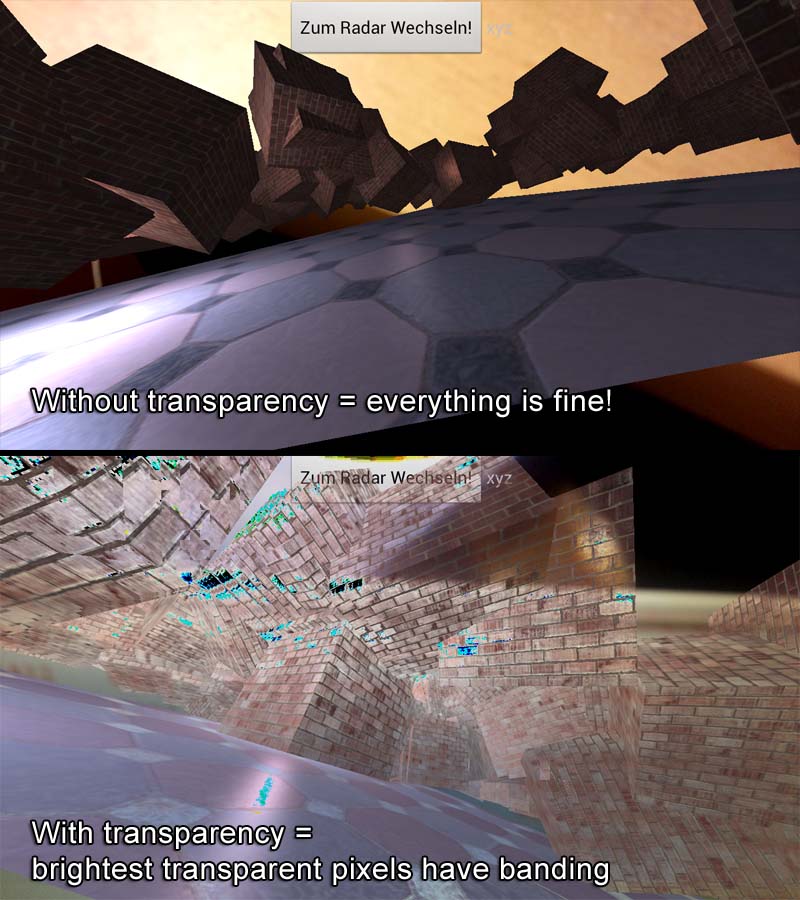
>>> My problem is, when I make the pixels semi-transparent in the fragment
>>> Shader I get a weird result. The brightest pixels seem overexpose when
>>> "blending together". And it looks like they got clamped after so the value
>>> that brighter than white - loosing probably the first bit - got dark again.
>>> So only the brightest pixels are affected. It happens even if I use a
>>> simple call like:
>>>
>>>> gl_FragColor = vec4(clamp(textureColor.rgb * lightWeighting.xyz, 0.0,
>>>> 1.0), 0.5);
>>>>
>>>>
>>>
>>> So the actual GL-Fragment is clamped and I'm pretty sure it comes from
>>> the camera preview itself. Here is an image that describes my problem:
>>>
>>>
>>> <https://lh6.googleusercontent.com/-XhUolY4rNXA/UCBQnwRqb6I/AAAAAAAAAAM/YgzaE-KfGZs/s1600/glProblem.jpg>
>>>
>>> I get more and more convinced that it is an "overflow" for the values
>>> but how can I change this? By the way - perhaps it helps - this effect gets
>>> stronger the lower the alpha value of the fragment (the gl rendered one)
>>> is. So somehow it looks like something is compensating/normalizing the
>>> "semi transparent" values.
>>>
>>> Is there any way of "clamping" both values together since in the Shader
>>> I can only clamp the actual rendered fragment somehow without asking for
>>> the camera preview values. :-(
>>> Thank you very much! I hope it is not a severe problem,
>>>
>>>   Tobias Reich
>>>
>>>
>>>
>>>
>>>  --
>>> You received this message because you are subscribed to the Google
>>> Groups "Android Developers" group.
>>> To post to this group, send email to android-d...@**googlegroups.com
>>> To unsubscribe from this group, send email to
>>> android-developers+**[email protected]
>>> For more options, visit this group at
>>> http://groups.google.com/**group/android-developers?hl=en<http://groups.google.com/group/android-developers?hl=en>
>>
>>
>>
>>
>> --
>> Romain Guy
>> Android framework engineer
>> [email protected]
>>
>>   --
> You received this message because you are subscribed to the Google
> Groups "Android Developers" group.
> To post to this group, send email to [email protected]
> To unsubscribe from this group, send email to
> [email protected]
> For more options, visit this group at
> http://groups.google.com/group/android-developers?hl=en


--
Romain Guy
Android framework engineer
[email protected]

--
You received this message because you are subscribed to the Google
Groups "Android Developers" group.
To post to this group, send email to [email protected]
To unsubscribe from this group, send email to
[email protected]
For more options, visit this group at
http://groups.google.com/group/android-developers?hl=en