Well...

Thanks for help, but I try to implement tabs based on saveInstanceState but
I have a problem, I'm working with 1 SherlockActivityFragment and 3
SherlockFragments.
I'm thinking about to save the fragment. But i'm not sure how do this...

On Friday, November 30, 2012 10:42:30 AM UTC-2, Paul-Peter Tournaris wrote:
>
> As for the state of the tabs i think you should use the saveInstanceState
> method or something like this. It will most likely retain the data on it
> while you are on the TabActivity.
>
> Also make your variables public so that when you click the save button you
> can access them and save them on the way you would like to save them.
>
>
> On Fri, Nov 30, 2012 at 2:30 PM, Guilherme Bernardi
> <[email protected]<javascript:>
> > wrote:
>
>> Hi
>>
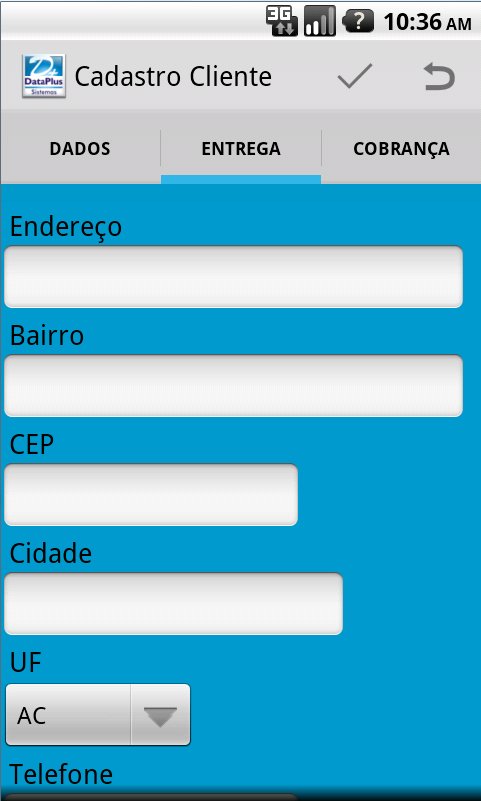
>> I'm using the lastest ActionBar Sherlock version and I'm developing an
>> application with layout with ActionBar and 3 Tabs for the navigation.
>>
>> These tabs will load two attribute classes:
>>
>> *1st Tab - (Dados): Class Cliente.*
>> *2nd and 3rd Tabs - (Entrega, Cobrança): Class ClienteEndereco.*
>>
>> Could I start the whole save of three tabs by the action of Save on the
>> actionBar?
>> And Could I fill the 1st Tab for example and when I change to the 2nd
>> Tab, the 1st doesn't lose the data?
>>
>> More information about the structure:
>>
>> I'd structured the tabs and activities this way:
>>
>> I have a SherlockFragmentActivity (*CadastroCliente*) where I
>> implemented the ActionBar and the Menu with Save, Cancel (You can see at
>> the print below).
>>
>> And I have three SherlockFragment for each Tab:
>>
>> *CadastroClienteDados*
>> *CadastroClienteEntrega*
>> *CadastroClienteCobranca*
>>
>> I've made the layout with 4 xm layout:
>>
>> One for the SherlockFragmentActivity with a FrameLayout inside that will
>> be inflate.
>> One for each SherlockFragment with components(EditText, CheckBox...)
>>
>> I'm working with a Persistence Class with a overridable method grava(),
>> this method will be override on attribute classes to persist the objects in
>> a SQLite databases.
>>
>> <https://lh5.googleusercontent.com/-FdScOx8GzfY/ULieweRT2VI/AAAAAAAAAiw/Du9SmKV7RE4/s1600/tabDados.png>
>>
>>
>> <https://lh5.googleusercontent.com/-LUvbCEaMVCE/ULiezrViBMI/AAAAAAAAAi4/0Xc-Xv9GkYA/s1600/tabEntrega.png>
>>
>>
>> <https://lh3.googleusercontent.com/-akSpw289j1U/ULie3q_o9oI/AAAAAAAAAjA/YmImPD-HmZM/s1600/tabCobranca.png>
>>
>> Thanks in advance.
>>
>> --
>> You received this message because you are subscribed to the Google
>> Groups "Android Developers" group.
>> To post to this group, send email to
>> [email protected]<javascript:>
>> To unsubscribe from this group, send email to
>> [email protected] <javascript:>
>> For more options, visit this group at
>> http://groups.google.com/group/android-developers?hl=en
>
>
>

--
You received this message because you are subscribed to the Google
Groups "Android Developers" group.
To post to this group, send email to [email protected]
To unsubscribe from this group, send email to
[email protected]
For more options, visit this group at
http://groups.google.com/group/android-developers?hl=en