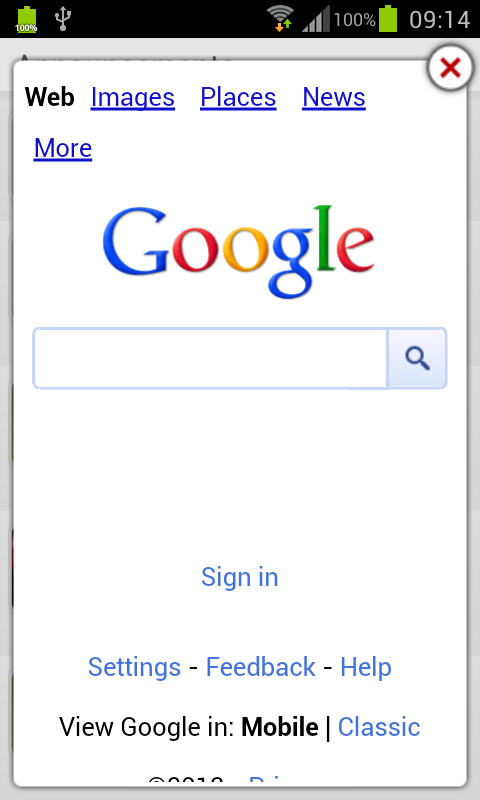
WebView does not have a concept of a floating window. Neither does the
stock Android browser or any other Android browser I know of. However you
could do the following:
Provide a JavaScript
interface<http://developer.android.com/reference/android/webkit/WebView.html#addJavascriptInterface%28java.lang.Object,%20java.lang.String%29>method
 in your app that opens your popup window as a modal dialog which
itself contains another WebView. Load in that new WebView the target URL to
display.

On Tuesday, January 22, 2013 8:40:34 AM UTC-6, Mr cool wrote:
>
> i have developed web applictaion in android here i need to show the pop
> inside the webview,
> i tried in many way when i using window.open means it open on the same
> webview or it can load in browser.
>
>  i have done the following settings
>
>     WebSettings settings = Browser.getSettings();
>         settings.setSupportMultipleWindows(false);
>         settings.setJavaScriptEnabled(true);
>         Browser.setWebViewClient(new WebViewClient());
>             Browser.setWebChromeClient(new WebChromeClient());
>             settings.setJavaScriptCanOpenWindowsAutomatically(false);
>         settings.setBuiltInZoomControls(true);
>         Browser.requestFocusFromTouch();
>
>  but i want show the poplike this do any idea about how to show the popup
> in side the webview.
>
>
> <https://lh3.googleusercontent.com/-YmVjPkl096E/UP6k19dBviI/AAAAAAAAAIE/s1pCg3_NmKI/s1600/z0KQk.png>
>
>

--
You received this message because you are subscribed to the Google
Groups "Android Developers" group.
To post to this group, send email to [email protected]
To unsubscribe from this group, send email to
[email protected]
For more options, visit this group at
http://groups.google.com/group/android-developers?hl=en