Android OS does as it can't tell the difference between a process kill due
to low memory and a process terminated - so it gets restarted.
Try pressing [home] before killing the process - I have read somewhere
(trying to find the reference) that this should kill the process and it
will not get restarted.

On Tuesday, February 5, 2013 8:14:13 PM UTC, bob wrote:
>
> You are right.  The process gets killed.
>
>
> But, then something automatically restarts it.
>
>
> So, I guess the question I have is why does it automatically get
> restarted?  Is Eclipse doing that?
>
>
>
> On Tuesday, February 5, 2013 12:45:59 PM UTC-6, Kostya Vasilyev wrote:
>>
>> No, that red buttons kills the process -- watch the device's process list
>> right there in DDMS, you will see your app's process disappear, and then
>> get recreated with a new PID, easy to spot.
>>
>> You should also see something like this in the logcat:
>>
>> 02-05 22:41:43.746 W/ActivityManager(  389): Force removing
>> ActivityRecord{417dab48 u0 org.kman.AquaMail/.ui.AboutActivity}: app died,
>> no saved state
>> 02-05 22:41:43.746 I/WindowState(  389): WIN DEATH: Window{41ade3f8 u0
>> org.kman.AquaMail/org.kman.AquaMail.ui.AccountListActivity}
>> 02-05 22:41:43.777 D/dalvikvm(10347): Late-enabling CheckJNI
>> 02-05 22:41:43.777 I/ActivityManager(  389): Start proc org.kman.AquaMail
>> for activity org.kman.AquaMail/.ui.AccountListActivity: pid=10347 uid=10065
>> gids={50065, 3003, 1015, 1028}
>> 02-05 22:41:43.817 D/Zygote  (  130): Process 10230 exited cleanly (1)
>>
>> ... followed by the relaunch of the new process for your application
>> (although this depends on logging in your own app -- I don't see anything
>> logged by the system when this happens... unlike with services, for
>> example).
>>
>> Back to the original issue -- perhaps moveTaskToBack() followed by a
>> System.exit() after a delay?
>>
>> -- K
>>
>> 2013/2/5 bob <[email protected]>
>>
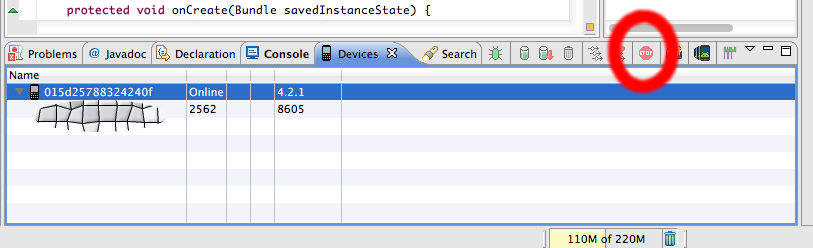
>>> I pressed the stop sign button which the tool tip says will "Stop
>>> Process".
>>>
>>>
>>> However, it looks like it is just killing the activity rather than the
>>> process.
>>>
>>>
>>> <https://lh4.googleusercontent.com/-kFe1nlLUdbo/URFPlTjZvWI/AAAAAAAAALw/W2_DWGX7x6A/s1600/stopsign.png>
>>>
>>>
>>>
>>> On Tuesday, February 5, 2013 10:26:29 AM UTC-6, Kostya Vasilyev wrote:
>>>
>>>>  I thought you mentioned killing the activity (which I understood as
>>>> killing the app's process)?
>>>>
>>>> bob 5 пїЅпїЅпїЅпїЅпїЅпїЅпїЅ 2013пїЅпїЅ. 19:16:44 пїЅпїЅпїЅпїЅпїЅпїЅпїЅ:
>>>>
>>>> The activity did not crash.  The BSOD was because the TCP server is
>>>> down.
>>>>
>>>>
>>>> When the app gets restarted, the TCP server may very well still be down.
>>>>
>>>>
>>>>
>>>> On Tuesday, February 5, 2013 4:57:51 AM UTC-6, Kostya Vasilyev wrote:
>>>>>
>>>>> That's standard Android system behavior, AFAIK. Makes sense to me --
>>>>> if an activity crashed, restart the app in last known good state, at
>>>>> activity granularity level.
>>>>>
>>>>> -- K
>>>>>
>>>>> On Tuesday, February 5, 2013 2:43:46 AM UTC+4, bob wrote:
>>>>>>
>>>>>> No.
>>>>>>
>>>>>>
>>>>>> Basically, the activity I am killing is a Blue Screen of Death
>>>>>> Activity that I made to show an error.  When I kill it, I think the
>>>>>> original activity that generated the error gets restarted.  Then, it
>>>>>> generates the error again.
>>>>>>
>>>>>>
>>>>>> I guess there is something wrong with my design?  How should I have
>>>>>> done this?
>>>>>>
>>>>>>
>>>>>>
>>>>>>
>>>>>> On Monday, February 4, 2013 3:51:20 PM UTC-6, lbendlin wrote:
>>>>>>>
>>>>>>> Does your app include a foreground service?
>>>>>>>
>>>>>>> On Monday, February 4, 2013 10:57:51 AM UTC-5, bob wrote:
>>>>>>>>
>>>>>>>> Sometimes I look at the Devices window in Eclipse.
>>>>>>>>
>>>>>>>>
>>>>>>>> Then I select my app.  And, I press the stop sign button to kill it.
>>>>>>>>
>>>>>>>>
>>>>>>>> Then, for some reason, it starts up again on its own a second later.
>>>>>>>>
>>>>>>>>
>>>>>>>> Anyone know exactly what causes this strange restarting?
>>>>>>>>
>>>>>>>>
>>>>>>>>  --
>>>> --
>>>> You received this message because you are subscribed to the Google
>>>> Groups "Android Developers" group.
>>>> To post to this group, send email to android-d...@**googlegroups.com
>>>>
>>>> To unsubscribe from this group, send email to
>>>> android-developers+**[email protected]
>>>> For more options, visit this group at
>>>> http://groups.google.com/**group/android-developers?hl=en<http://groups.google.com/group/android-developers?hl=en>
>>>> ---
>>>> You received this message because you are subscribed to the Google
>>>> Groups "Android Developers" group.
>>>> To unsubscribe from this group and stop receiving emails from it, send
>>>> an email to android-developers+**[email protected].
>>>> For more options, visit
>>>> https://groups.google.com/**groups/opt_out<https://groups.google.com/groups/opt_out>
>>>> .
>>>>
>>>>
>>>>
>>>>   --
>>> --
>>> You received this message because you are subscribed to the Google
>>> Groups "Android Developers" group.
>>> To post to this group, send email to [email protected]
>>> To unsubscribe from this group, send email to
>>> [email protected]
>>> For more options, visit this group at
>>> http://groups.google.com/group/android-developers?hl=en
>>> ---
>>> You received this message because you are subscribed to the Google
>>> Groups "Android Developers" group.
>>> To unsubscribe from this group and stop receiving emails from it, send
>>> an email to [email protected].
>>> For more options, visit https://groups.google.com/groups/opt_out.
>>>
>>>
>>>
>>
>>

--
--
You received this message because you are subscribed to the Google
Groups "Android Developers" group.
To post to this group, send email to [email protected]
To unsubscribe from this group, send email to
[email protected]
For more options, visit this group at
http://groups.google.com/group/android-developers?hl=en
---
You received this message because you are subscribed to the Google Groups
"Android Developers" group.
To unsubscribe from this group and stop receiving emails from it, send an email
to [email protected].
For more options, visit https://groups.google.com/groups/opt_out.