I'm trying to work with pdfbox and groovy together. I wrote a code that
takes some information in a format of string and creates a pdf document
with that info.
I want to integrate this code to an android app I'm creating.


I ran the code in intellij IDEA and it works very well, but when I try to
run the code in Android Studio, I get a MissingPropertyException in some
part of the code which works perfectly not on Android Studio.


The code in this part use a method called getWidth() from the PDRectangle
class. I know for sure that there is a method like this in this specific
class. So why do I still keep getting this MissingMethodExceptions?

Here is the activity's code which I run the groovy code in:


package com.silverfix.groovytestapp;
import android.support.v7.app.AppCompatActivity;import android.os.Bundle;import
android.view.View;import android.widget.Button;
import java.util.ArrayList;import java.util.List;
import dgdlib.Constants;import dgdlib.DGDExecuter;import
dgdlib.components.entities.DGObject;

public class MainActivity extends AppCompatActivity {

    private Button button;

    @Override
    protected void onCreate(Bundle savedInstanceState) {
        super.onCreate(savedInstanceState);
        setContentView(R.layout.activity_main);

        button = (Button) findViewById(R.id.create_doc);

        // DGObject class represents a specific object which has its own
attributes that needs to be inserted to the pdf
        final List<DGObject> goods = new ArrayList();

        DGObject object = new DGObject("3456", "2.3", "Packing Group",
"Description", "Qunatity Type"
                ,"Packing Instructions", "Authorization");

        goods.add(object);

        final Bundle properties = new Bundle();

        // Insert some information to this bundle

        button.setOnClickListener(new View.OnClickListener() {
            @Override
            public void onClick(View view) {
                new DGDExecuter().execute(MainActivity.this, properties, goods);
            }
        });
    }}


The part in the groovy code which fails in runtime:


PDAnnotationWidget widget = field.getWidgets().get(0)PDRectangle rectangle =
widget.getRectangle()
float width = rectangle.getWidth()


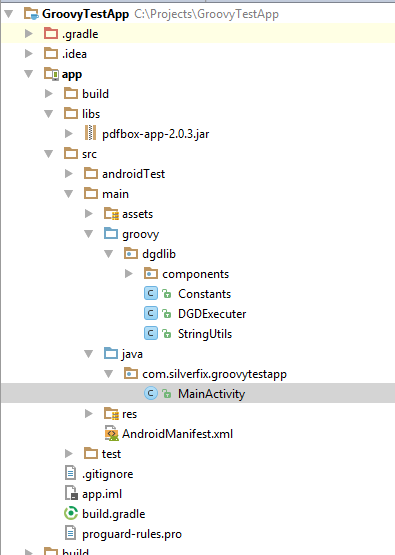
Here is an image of the project hierarchy:

https://i.gyazo.com/70a3683f6f78d7b02d63defc4e7b2c2c.png

And here is an image of the class PDRectangle, specifically the part where
the method getWidth()is:

 https://i.gyazo.com/5086b7536c690005127b76fff41cae83.png


--
You received this message because you are subscribed to the Google Groups
"Android Developers" group.
To unsubscribe from this group and stop receiving emails from it, send an email
to [email protected].
To post to this group, send email to [email protected].
Visit this group at https://groups.google.com/group/android-developers.
To view this discussion on the web visit
https://groups.google.com/d/msgid/android-developers/732a6d28-9edb-4618-aaca-84ba6e3ef043%40googlegroups.com.
For more options, visit https://groups.google.com/d/optout.