$scope.$apply was what did it.

On Tuesday, July 29, 2014 7:36:58 PM UTC-5, Kyle Pennell wrote:
>
> Thanks for the response, Eric.  I'll build a plunker and consider your
> suggestions for this.
>
> On Tuesday, July 29, 2014 6:31:21 PM UTC-5, Eric Eslinger wrote:
>>
>> A plunker would be helpful, as code of this complexity is hard to debug
>> blind.
>>
>> However, it looks like you're using jquery events to fire off your
>> pointMouse handlers. Those events (IIRC) happen outside the digest / apply
>> cycle, so angular isn't notified of a change to $scope.hoveritem (and
>> therefore doesn't recalculate the ng-class).
>>
>> I'd consider trying to use $scope.apply(function() {$scope.hoveritem =
>> bla} instead to see if that works. Or apply ng-mouseover to those as well,
>> which fires inside an $apply context.
>>
>> Finally, I've run into issues with hover as a class vs hover as a
>> pseudo-class. Ng-class adds an actual class selector to the div (so it
>> looks like div class="potato hover", and is selected with .hover in your
>> css declaration, rather than div:hover. the pseudo classes happen
>> independent of angular, but can often get conflicted with angular's
>> ng-class thing, because it seems to be common to define :hover and .hover
>> with the same properties.
>>
>> hth
>>
>> e
>>
>>
>>
>>
>> On Tue, Jul 29, 2014 at 3:03 PM, Kyle Pennell <[email protected]> wrote:
>>
>>> I've got a doozy of an ng-class problem.
>>>
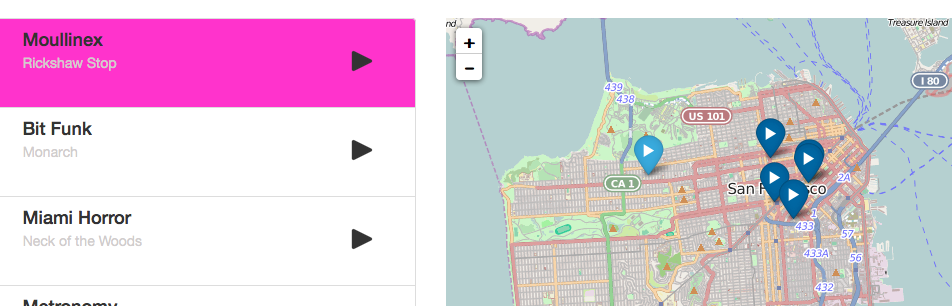
>>> So I have an app with a map/markers on the right and a list-item menu on
>>> the left with info about the markers (like Yelp or Foursquare).
>>>
>>> With some of my beginner hacking, I got the hover events to sort of work:
>>>
>>> <http://i.stack.imgur.com/RHZmo.png>
>>>
>>> But it's odd, the list-item (pink background on hover) only works when I
>>> mouseout of the marker.  I'm trying to set it up so that when you mouse
>>> over the marker, the appropriate list-item's background changes and when
>>> you mouseout, it goes back to white.  Most of the other ng-class
>>> examples/questions I read through seem to work quite differently (they're
>>> going for a different functionality).
>>>
>>> Ok, to the code:
>>>
>>> *HTML*
>>>
>>>     <div class="col-md-6" id="leftCol">
>>>>     <div class="list-group" ng-controller="ShowsCtrl">
>>>>         <div class="nav nav-stacked list-group-item" id="sidebar"
>>>> ng-repeat="(key, show) in shows.features" ng-mouseover="menuMouse(show)"
>>>> ng-mouseout="menuMouseout(show)" ng-class="{hover: $index == hoveritem}">
>>>>
>>>
>>>
>>> The key part there is the ng-class="{hover: $index == hoveritem}"
>>>
>>> Now I'll show you where hoveritem comes from
>>>
>>> *Controller*
>>>
>>>
>>>>     $scope.hoveritem = {};
>>>>
>>>>         function pointMouseover(leafletEvent) {
>>>>             var layer = leafletEvent.target;
>>>>             //console.log(layer.feature.properties.id);
>>>>             layer.setIcon(mouseoverMarker);
>>>>             $scope.hoveritem = layer.feature.properties.id;
>>>>             console.log($scope.hoveritem);
>>>>         }
>>>>
>>>>         function pointMouseout(leafletEvent) {
>>>>             var layer = leafletEvent.target;
>>>>             layer.setIcon(defaultMarker);
>>>>         }
>>>>
>>>>         $scope.menuMouse = function(show){
>>>>             var layer = layers[show.properties.id];
>>>>             //console.log(layer);
>>>>             layer.setIcon(mouseoverMarker);
>>>>         }
>>>>
>>>>         $scope.menuMouseout = function(show){
>>>>             var layer = layers[show.properties.id];
>>>>             layer.setIcon(defaultMarker);
>>>>         }
>>>>
>>>>
>>>>
>>>>
>>>>         // Get the countries geojson data from a JSON
>>>>         $http.get('/json/shows.geojson').success(function (data,
>>>> status) {
>>>>
>>>>             angular.extend($scope, {
>>>>                 geojson: {
>>>>                     data: data,
>>>>                     onEachFeature: function (feature, layer) {
>>>>                         layer.bindPopup(feature.properties.artist);
>>>>                         layer.setIcon(defaultMarker);
>>>>                         layer.on({
>>>>                             mouseover: pointMouseover,
>>>>                             mouseout: pointMouseout
>>>>                         });
>>>>                         layers[feature.properties.id] = layer;
>>>>                         //console.log(layers);
>>>>                     }
>>>>                 }
>>>>
>>>>             });
>>>>         });
>>>>
>>>>     }]);
>>>
>>>
>>> So mousing over a marker
>>> (`layer.on({
>>>                         mouseover: pointMouseover,
>>>                         mouseout: pointMouseout
>>>                     });`)
>>>
>>> fires the appropriate functions which then changes the icon colors.
>>>
>>> I connected the layer.feature.properties.id; to $scope.hoveritem so
>>> that my HTML can then use that as the index c.  When you mouseover a
>>> marker, it then feeds the marker id through to $scope.hoveritem which then
>>> it turn goes into the $index part of the HTML, thus changing it's CSS class.
>>>
>>> But something is awry.  It only changes to the correct list item on
>>> mouseout instead of mouseover.  Furthermore, I can't figure out to get it
>>> to return to the default white state.  None of the list items should look
>>> active if the mouse is not on a marker.
>>>
>>> Any ideas or hints on this would be very appreciated.
>>>
>>>
>>>  --
>>> You received this message because you are subscribed to the Google
>>> Groups "AngularJS" group.
>>> To unsubscribe from this group and stop receiving emails from it, send
>>> an email to [email protected].
>>> To post to this group, send email to [email protected].
>>> Visit this group at http://groups.google.com/group/angular.
>>> For more options, visit https://groups.google.com/d/optout.
>>>
>>
>>
--
You received this message because you are subscribed to the Google Groups
"AngularJS" group.
To unsubscribe from this group and stop receiving emails from it, send an email
to [email protected].
To post to this group, send email to [email protected].
Visit this group at http://groups.google.com/group/angular.
For more options, visit https://groups.google.com/d/optout.