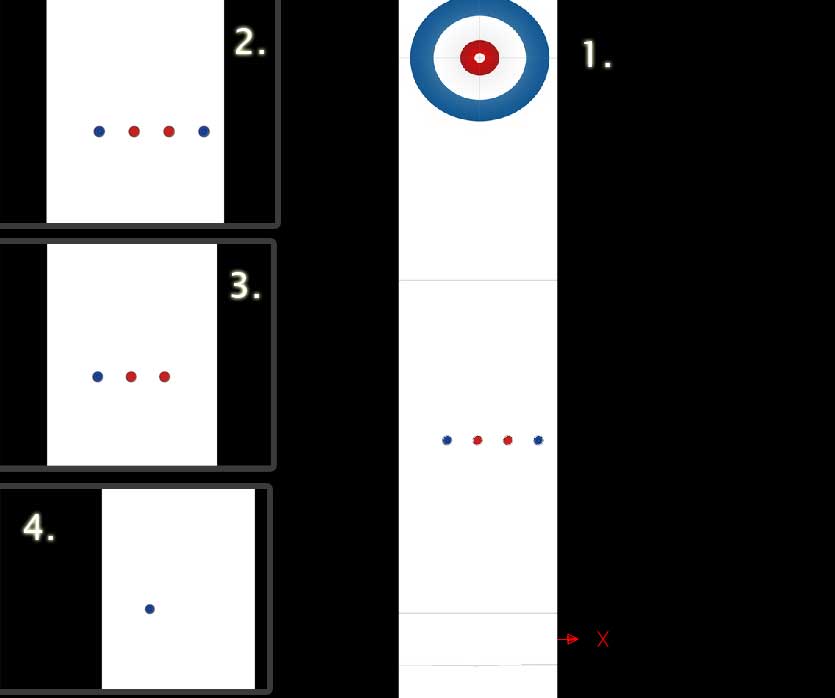
Try

lane.handle.pushback=true;
in your Lane init.
Let me know if it helps.
-Pete
On Mon, Dec 7, 2009 at 3:02 PM, Freddixx <[email protected]> wrote:

> Hi there,
>
> I am a student of media informatics and right into the middle of
> writing my term paper =) The field is infotainment and I've chosen to
> start a curling project..
>
> I made a few *.3ds models (incl. UVs), imported them to my Away3d
> project. But when I move the camera, the curlingstones somehow
> disappear depending on the camera position.
>
> Image (topdown camera): http://fpolitz.de/pub/curlingprob.jpg
>
> The code:
>
> // #######################
> // THE MAIN AS FILE
> // #######################
>
> package {
>        // import the required parts of Away3D
>        import away3d.cameras.Camera3D;
>        import away3d.containers.Scene3D;
>        import away3d.containers.View3D;
>        import away3d.core.base.Object3D;
>        import away3d.core.math.Number3D;
>        import away3d.containers.*;
>    import away3d.core.*;
>    import away3d.loaders.*;
>        import away3d.materials.*;
>        import away3d.primitives.Trident;
>
>        // import the box2d physics engine
>        import Box2D.Collision.Shapes.*;
>    import Box2D.Collision.b2AABB;
>    import Box2D.Common.Math.b2Vec2;
>    import Box2D.Dynamics.Joints.*;
>    import Box2D.Dynamics.*;
>
>        // import the flash stuff
>        import flash.display.Sprite;
>        import flash.display.StageAlign;
>        import flash.display.StageScaleMode;
>        import flash.events.*;
>        import flash.ui.*;
>
>        // my own files
>        import Curlingstone;
>
>        [SWF(backgroundColor="#000000")]
>
>        public class Curling extends Sprite {
>
>                // Scene, view, camera
>                private var scene:Scene3D;
>        private var camera:Camera3D;
>        private var view:View3D;
>                // Everything needed for model import
>                private var loader:LoaderCube;
>                private var max3ds:Max3DS;
>                private var model:ObjectContainer3D;
>                // Base objects
>                private var lane:*;
>                private var curlingstein_red1:*;
>
>
>                public function Curling() {
>                        // Set up the stage, world, camera
>                        initWorld();
>                        // Set up the needed objects
>                        initObjects();
>                        // Initialise Event loop
>                this.addEventListener(Event.ENTER_FRAME, onEnterFrame);
>                        stage.addEventListener(KeyboardEvent.KEY_DOWN,
> keyPressed);
>                }
>
>                private function initWorld():void{
>                        // First off: create a new scene
>                        scene = new Scene3D();
>                        // Add a camera
>                        camera = new Camera3D();
>                        // Set cam coords to have a 2d world lookalike
>                        camera.y = 400;
>                        camera.x = 0;
>                        camera.z = -200;
>                        // set zoom & focus
>                        camera.zoom = 900 / camera.focus + 1;
>                        //camera.zoom = 20;
>                        //camera.focus = 10;
>                        camera.lookAt(new Number3D(0, 400, 0));
>                        // Produce a view referring to the given scene and
> camera
>                        view = new View3D({scene:scene, camera:camera});
>                        // The passed coords should ALWAYS be the middle of
> the screen
>                        view.x = 512;
>                view.y = 384;
>                addChild(view);
>                }
>
>                private function initObjects():void{
>                        // Next up add a coord system
>                        var origin:Trident = new Trident(100, true);
>                        origin.x=0;
>                        origin.y=0;
>                        origin.z=0;
>                        scene.addChild(origin);
>                        // Add the lane
>                        lane = Max3DS.load("models/lane.3ds");
>                        lane.x = 500;
>                        lane.rotationX = 0;
>            lane.rotationZ = 90;
>                        lane.rotationY = 0;
>            lane.addOnSuccess(initLane);
>                        scene.addChild(lane);
>                        // Add the stone(s)
>                        var stone_mat_red:BitmapFileMaterial = new
> BitmapFileMaterial
> ("textures/curlingstein_red.jpg");
>                        var stone_mat_blue:BitmapFileMaterial = new
> BitmapFileMaterial
> ("textures/curlingstein_blue.jpg");
>                        var curlingstone_red1:Curlingstone = new
> Curlingstone
> (stone_mat_red, 0, 200);
>                        var curlingstone_red2:Curlingstone = new
> Curlingstone
> (stone_mat_red, 30, 200);
>                        var curlingstone_blue1:Curlingstone = new
> Curlingstone
> (stone_mat_blue, 60, 200);
>                        var curlingstone_blue2:Curlingstone = new
> Curlingstone
> (stone_mat_blue, -30, 200);
>                        scene.addChild(curlingstone_red1.model);
>                        scene.addChild(curlingstone_red2.model);
>                        scene.addChild(curlingstone_blue1.model);
>                        scene.addChild(curlingstone_blue2.model);
>                }
>
>                public function initLane(event:Event):void{
>            //scale
>            lane.handle.scale(10);
>            //adjust internal coords
>            (lane.handle as ObjectContainer3D).movePivot
> ((lane.handle.maxX + lane.handle.minX)/2, (lane.handle.maxY +
> lane.handle.minY)/2, (lane.handle.maxZ + lane.handle.minZ)/2);
>            //recenter
>            lane.handle.x = lane.handle.y = lane.handle.z = 0;
>        }
>
>                private function initPhysics():void{
>
>                }
>
>
>
>                private function onEnterFrame(e:Event):void
>                {
>                        view.render();
>                }
>
>                private function keyPressed(event:KeyboardEvent):void {
>                        switch(event.keyCode) {
>                                case Keyboard.UP:
>                                        camera.moveUp(5);
>                                        break;
>                                case Keyboard.DOWN:
>                                        camera.moveUp(-5);
>                                        break;
>                                case Keyboard.RIGHT:
>                                        camera.moveLeft(-5);
>                                        break;
>                                case Keyboard.LEFT:
>                                        camera.moveLeft(5);
>                                        break;
>                        }
>        }
>
>        }
> }
>
> // ###########################
> //  The importer for the stones
> // ###########################
>
> package{
>        import flash.events.*;
>
>        import away3d.loaders.*;
>        import away3d.containers.*;
>        import away3d.materials.BitmapFileMaterial;
>
>        public class Curlingstone{
>                public var model:LoaderCube;
>                public var material: BitmapFileMaterial;
>                public var max3ds:Max3DS;
>                public var handler: ObjectContainer3D;
>
>                public function Curlingstone(material:BitmapFileMaterial,
> x:int,
> y:int){
>                        this.material = material;
>                        max3ds = new Max3DS();
>                max3ds.centerMeshes = true;
>                max3ds.material = material;
>                model = new LoaderCube();
>                model.loadersize = 200;
>                model.ownCanvas = true;
>                model.loadGeometry("models/curlingstein.3ds", max3ds);
>                        model.x = x;
>                        model.y = y;
>                        model.z = -10;
>                        handler = model.handle as ObjectContainer3D;
>                handler.scale(10);
>                }
>
>        }
> }
>


--
___________________

Actionscript 3.0 Flash 3D Graphics Engine

HTTP://AWAY3D.COM