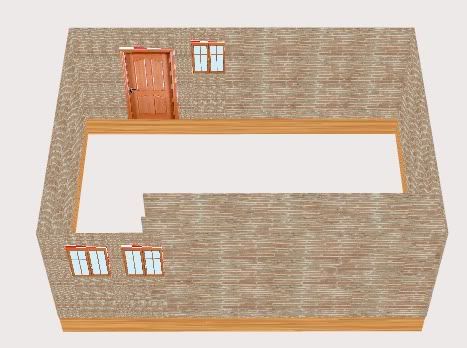
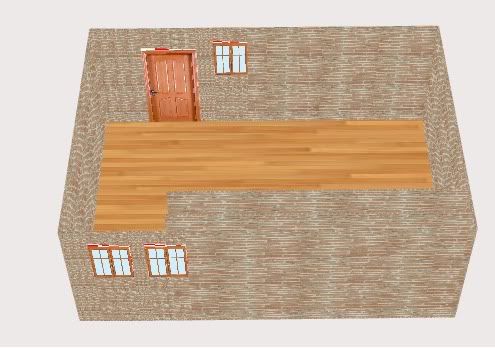
if the shape is a "L"

in ascii (art) :))
a----------f
i               i
i               i
i               e----------d
i                               i
b----------------------c

then skin extrude would like to receive

[ [a,f], [b,e], [c,d] ]

the texture will then be distorted
use once generated the materials.utils.Projector class and project as "top"
(depending on your object orientation of course)

if the image gets too stretched for your taste, just set repeat:true, scaleX,
scaleY accordingly in your BitmapMaterial.

Fabrice


On Jan 19, 2010, at 5:15 PM, Irati wrote:

> Hi again!
> I'm trying to use SkinExtrude and I have a question, I think I don't
> understand how it works. What i whant to do is to show a kind of
> floor, that actually is rectangular but it is supones to be any shape
> giving an ordered array.
>
> So I have the points in an ArrayCollection, I get it as argument in a
> function but it would be somethin like this:
>
>
>                       var floorHeight:Number = 30;
>                       var coordinates:ArrayCollection  = new
> ArrayCollection();
>                       var coord1:Number3D = new
> Number3D(coord.x,coord.y,coord.z);
>                       var coord2:Number3D = new
> Number3D(coord.x+width,coord.y,coord.z);
>                       var coord3:Number3D = new
> Number3D(coord.x+width,coord.y,coord.z
> +height);
>                       var coord4:Number3D = new
> Number3D(coord.x,coord.y,coord.z+height);
>                       coordinates.addItem(coord1);
>                       coordinates.addItem(coord2);
>                       coordinates.addItem(coord3);
>                       coordinates.addItem(coord4);
>
> And then I'm trying to do the "floor":
>
>
>                       var auxCoord:Number3D;
>                       var pts:Array = new Array();
>                       var pts2:Array = new Array();
>                       for(var i:uint = 0; i < coordinates.length; i++)
>                       {
>                               auxCoord = coordinates.getItemAt(i) as Number3D;
>                               var point1:Number3D = new Number3D
> (auxCoord.x,auxCoord.y,auxCoord.z);
>                               var point2:Number3D = new
> Number3D(auxCoord.x,auxCoord.y-
> floorHeight,auxCoord.z);
>
>                               pts.push(point1);
>                               pts2.push(point2);
>
>                       }
>                       auxCoord = coordinates.getItemAt(0) as Number3D;
>                       var point1:Number3D = new Number3D
> (auxCoord.x,auxCoord.y,auxCoord.z);
>                       var point2:Number3D = new
> Number3D(auxCoord.x,auxCoord.y-
> floorHeight,auxCoord.z);
>                       pts.push(point1);
>                       pts2.push(point2);
>
>                       var plane:SkinExtrude = new SkinExtrude([pts, pts2],
>                                               {material:material, flip:false,
> subdivision:.5, scaling:1,
> coverall:true,
>                                               recenter:true,
> bothsides:true,closepath:false});
>                       view.scene.addChild(plane);
>
>
> So, what i want is to have one shape where one of the faces is on y =
> coord.y and the other one in y'=coord.y-floorHeight, like a union of
> two planes one over the other (sorry, I'm very bad to explain myself).
> But what I see with this example is more like the borders of the plane
> with "floorHeight" deep, just the union between the planes.
>
> This is what I get:
> http://i238.photobucket.com/albums/ff80/irati86/whatISee.jpg
> An this is what I want:
> http://i238.photobucket.com/albums/ff80/irati86/WhatIWouldLike.jpg
>
> What should I change to get that?
>
>
> On 19 ene, 14:50, Irati <[email protected]> wrote:
>> I think I could what I want with SkinExtrude.
>> Thank you so much for the answer!
>>
>> Irati.
>>
>> On 19 ene, 12:25, Fabrice3D <[email protected]> wrote:
>>
>>> there is no solution yet standard in the engine.
>>> except SkinExtrude, if the points are organized in a regular fashion.
>>
>>> you will not be helped with this info, but just know its high on my todo
>>> list.
>>
>>> Fabrice
>>
>>> On Jan 19, 2010, at 9:38 AM, Irati wrote:
>>
>>>> I would like to know this too.
>>
>>>> On 21 nov 2009, 23:53, Qutaibah Hamadah <[email protected]> wrote:
>>>>> Hi,
>>
>>>>> How do I go about drawing anirregularshape.
>>>>> Is there a method that can create thisshapeby passing it an array of
>>>>> vertices?
>>>>> I am looking for something similar toShapeA in this
>>>>> diagram:http://qutaibah.com/media/shapes.jpg
>>
>>>>> Qutaibah