Hey George

looks pretty close! looking at your code, you should probably try just
adjusting the zoom property of the camera after you have applied the
perpspectivelens object - this should give you the full range of possible
projections with the lens, and as long as your z distance is correct (which
looks like a difficult calc as well) you should be able to hit hte same
projection exactly. let me know how you get on
cheers

Rob

On Sat, Jan 30, 2010 at 5:51 PM, George Profenza <[email protected]> wrote:

> Hello,
>
> I've managed to get a closer match from a Blender scene to an Away3d
> scene.
>
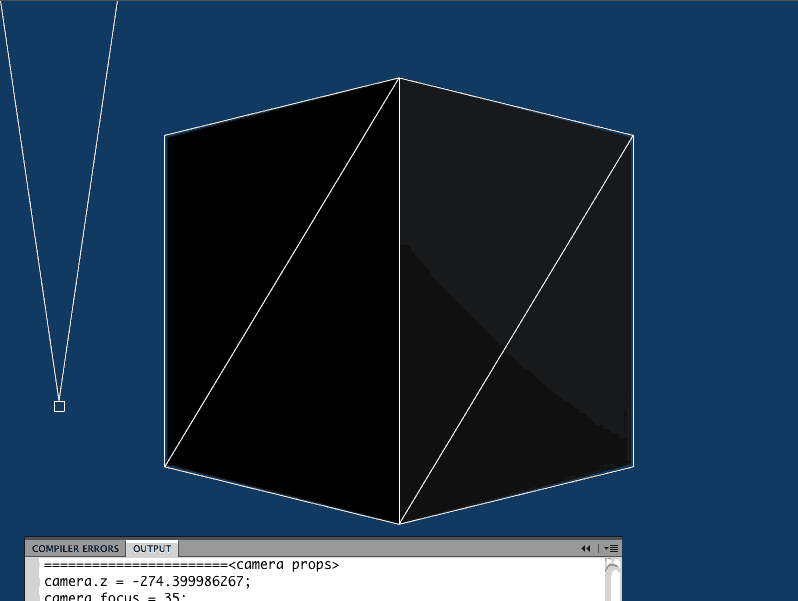
> Here is a screenshot of how close I got:
> http://i984.photobucket.com/albums/ae330/orgicus/blender2awayCamera.gif
>
> The white WireframeMaterial cube is from Away3D, the background is a
> default render
> from Blender.
>
> I've uploaded a simplified version of my test filed (.as, .fla, .jpg
> (for tracing), .blend and .py)
> here:
>
> http://groups.google.com/group/away3d-dev/web/georgeprofenza_blender2Away3DSetupSimple.zip
>
> At this point, I'm just using a camera facing forward a cube. I've
> played with the z and fov properties
> to match the look than used the numbers to change the script. I have
> tested the view
> with a cube with no rotation at all, and then the view with the cube
> rotated by 45 degrees on Y in Away3D
> and it matches the Blender look close enough.
>
> At this point, it is not exact science, I'm just tinkering, but
> hopefully I can get this to be useful.
>
> Rob and Dennis,
> Thanks for the input at LFPUG.
>
> All the best,
> George
>
> On Jan 5, 6:40 pm, George Profenza <[email protected]> wrote:
> > Hi Rob,
> >
> > Thanks for the input.
> >
> > I've looked atcameraproperties a bit.
> > As far as I can see:
> >
> > FP10 fieldOfView(in PerspectiveProjection) is equivalent tocamera.fov
> > in away3d and equivalent toCamera.angle inBlenderPython
> > FP10 focalLength(in PerspectiveProjection) is equivalent tocamera.focus
> in away3d and equivalent toCamera.lens inBlenderPython
> >
> > Here are the relevant API links:
> > FP10:
> http://help.adobe.com/en_US/AS3LCR/Flash_10.0/flash/geom/PerspectiveP...
> > Away3D:
> http://away3d.com/livedocs/away3d/cameras/Camera3D.htmlBlender:http://www.blender.org/documentation/249PythonDoc/Camera.Camera-class.
> ..
> >
> > I have attached my current setup here:
> >
> > http://groups.google.com/group/away3d-dev/web/georgeprofenza_blender2...
> >
> > The zip contains image screenshots, ablenderscene, a small python
> > snippet that prints numbers to the console
> > and the test .as file.
> >
> > What am I missing ? Thecameraand objects seem to be in the right
> > position, not so sure aboutblendercameralens and angle
> > matching up with Away3D'scamerafocus and fov.
> >
> > Any input to get me unstuck will help,
> > I'll tinker away in 3d meantime :)
> >
> > On Dec 10 2009, 2:58 am, Rob Bateman <[email protected]> wrote:
> >
> > > Hey George
> >
> > > In Away3d, thecameraclass comes with its fov property which should work
> as
> > > expected to set the vertical fov in degrees. Also, to match the
> perspective
> > > projection of theblenderview i would use Perspectivelens instead of the
> > > default. If you play with the fov values, you should be able to get a
> > > perfect match
> >
> > > Rob
> >
> > > On Fri, Nov 27, 2009 at 4:40 PM, George Profenza <[email protected]>
> wrote:
> > > > Hi,
> >
> > > > I'm trying to match thecamerasettings fromblenderin away3d.
> >
> > > >Blender'scameramain property is Lens as far as I can see.
> >
> > > > Camera3D in away3d has focus and zoom.
> > > > No fov, or anything else
> >
> > > > How can I match the away3dcamerawith theblenderone ?
> > > > I am using away3dlite, but I see there is a lenses package in the
> > > > away3d api.
> > > > Any starting points ?
> >
> > > > Thanks,
> > > > George
> >
> > > --
> > > Rob Bateman
> > > Flash Development & Consultancy
> >
> > > [email protected]
>


--
Rob Bateman
Flash Development & Consultancy

[email protected]
www.infiniteturtles.co.uk
www.away3d.com