Hello,

There is several ways of having it. The easiest is for debian user to
use the debian menu generator for awful.menu. The script is somewhere
in the wiki.
The second option is https://github.com/terceiro/awesome-freedesktop .
This module has a desktop and file menu that works relatively well.
Its main issue is the spped. On laptop with hard drive, it can take up
to 20 seconds to load.

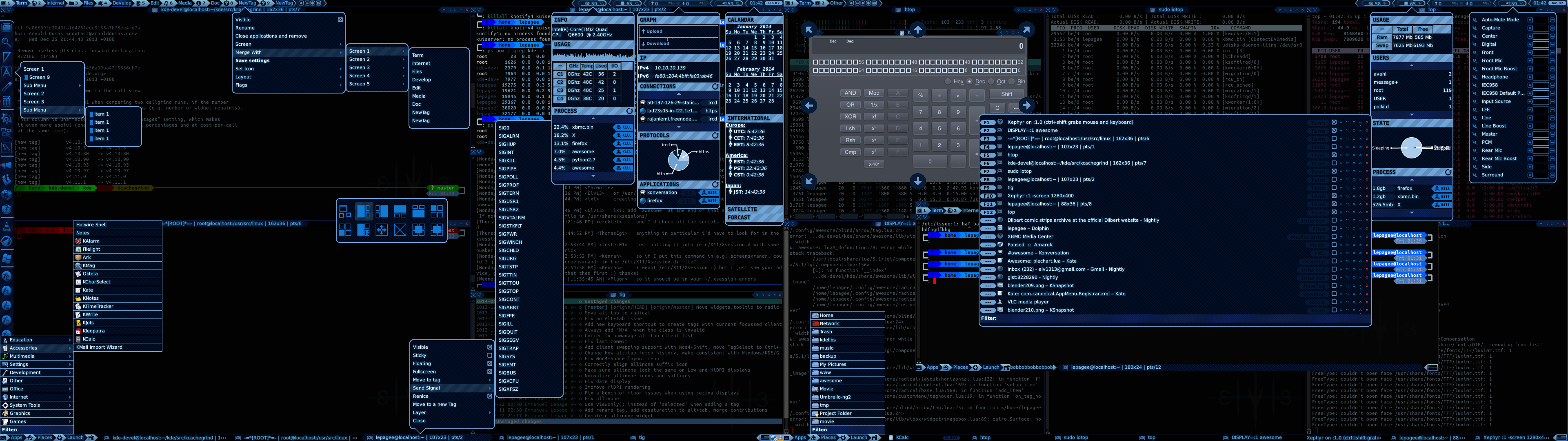
The third option is to use mine from my config (bottom left in
https://raw.githubusercontent.com/Elv13/radical/master/screenshot/all.png
). This version has full asynchronous support and is backed by the
same engine as the Gnome 2 menu. It is, in theory, as fast as it can
get and simple enough to install. It require appmenu.lua, df_async.lua
and the Radical module. All available at http://github.com/Elv13
(require Awesome 3.5+, a 3.4 version is available but is really old)

Finally, you can use mod4+p. While not a real menu, it has most of the
feature and is already there by default on Awesome 3.5+.

I hope this help!

On 14 September 2014 05:57, David Sorkovsky <[email protected]> wrote:
> Categorized / Grouped? Here's part of mine...
>
>         MythTVMenu =    {
>                                                 { "Play", "mythfrontend" },
>                                                 { "Stop", "sudo stop
> mythtv-backend" },
>                                                 { "Start", "sudo start
> mythtv-backend" },
>                                                 { "Restart", "sudo restart
> mythtv-backend" },
>                                                 { "Setup", "sudo
> mythtv-setup" }
>                                         }
>
>         TVMenu =        {
>                                         { "MythTV", MythTVMenu },
>                                         { "XBMC", "xbmc" },
>                                         { "Kaffeine", "kaffeine" }
>                                 }
>
>         AwesomeMenu = {
>                                                 { "Debian",
> debian.menu.Debian_menu.Debian },
>                                                 { "manual", terminal .. " -e
> man awesome" },
>                                                 { "edit config", editor_cmd
> .. " " .. awful.util.getdir("config") .. "/rc.lua" },
>                                                 { "edit theme", editor_cmd
> .. " " .. awful.util.getdir("config") .. "/theme.lua" },
>                                                 { "restart", awesome.restart
> },
>                                                 { "quit", awesome.quit }
>                                          }
>
>         mymainmenu = awful.menu({
>                                                         items = {
>
> { "Web Browser (Firefox)", "/usr/bin/firefox" },
>
> { "File Manager (Xfe)", "/usr/bin/xfe", "/usr/share/pixmaps/xfe.xpm" },
>
> { "Drives", "sudo gnome-disks" },
>
> { "Text Editor (from Xfe)", "/usr/bin/xfwrite", "/usr/share/pixmaps/xfw.xpm"
> },
>
> { "Terminal (from Xfe)", terminal },
>
> { "Mixer", terminal .. " alsamixer" },
>
> { "VLC", myMenu4 },
>
> { "TV", TVMenu },
>
> { "awesome", AwesomeMenu, beautiful.awesome_icon }
>                                         }
>                                                      })
>
>
> -----Original Message-----
> From: Kevin Clay [mailto:[email protected]]
> Sent: Sunday, 14 September 2014 6:47 PM
> To: [email protected]
> Subject: Awesome Menu Applicaions
>
> I have been through the wiki on installing Awesome for the first time
> and I see screenshots in which the awesome menu has categorized lists of
> applications. The wiki doesn't explain how to do this or if it supposed
> to do this automagically. My menu doesn't show any applicaions and I was
> wondering how to get it to do this.
>
> Thanks.
>
> --
> To unsubscribe, send mail to [email protected].
>
>
> --
> To unsubscribe, send mail to [email protected].

--
To unsubscribe, send mail to [email protected].