I have an SVG file which uses Japanese characters (unicode?) and they aren't
rendered correctly using the Batik Rasterizer. Does anyone know a quick way
to get the Japanese characters to show up correctly? Do I need to install a
font somewhere?
I've attached a svg file as well as a rasterized JPG of the SVG file.

The rasterizing was done on a Linux machine using the Batik rasterizer, but
the characters also appear as blocks in the Adobe-SVG-plugin-ized Windows
Explorer on my Win2K machine. If you view the SVG file as an XML file in
Windows Explorer (instead of SVG), the characters are correct. The
SVGAsXML.gif file shows how some of the characters should look. Apologies
for the three attachments. Hope they're not too big.

Linux machine: Linux touchverse.crc.ricoh.com 2.2.14-VA.5.1 #1 Tue Sep 12
18:08:18 PDT 2000 i686 unknown
Windows machine: Win 2000, IE v. 5.00.2920..., Adobe SVG plugin 3.0

Thanks for your help.

John B.
<<attachment: imagemap.jpg>>
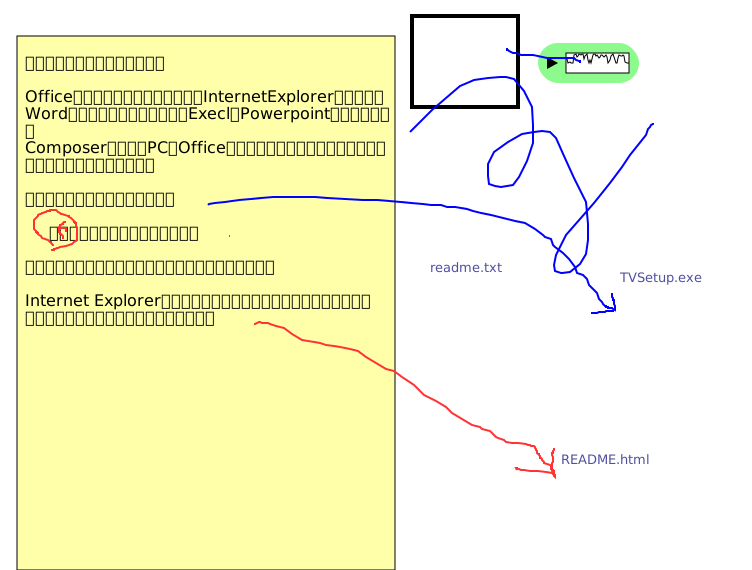 msg_layout.svg
Description: image/svg
 SVGAsXML.gif
Description: GIF image
---------------------------------------------------------------------
To unsubscribe, e-mail: [EMAIL PROTECTED]
For additional commands, e-mail: [EMAIL PROTECTED]
