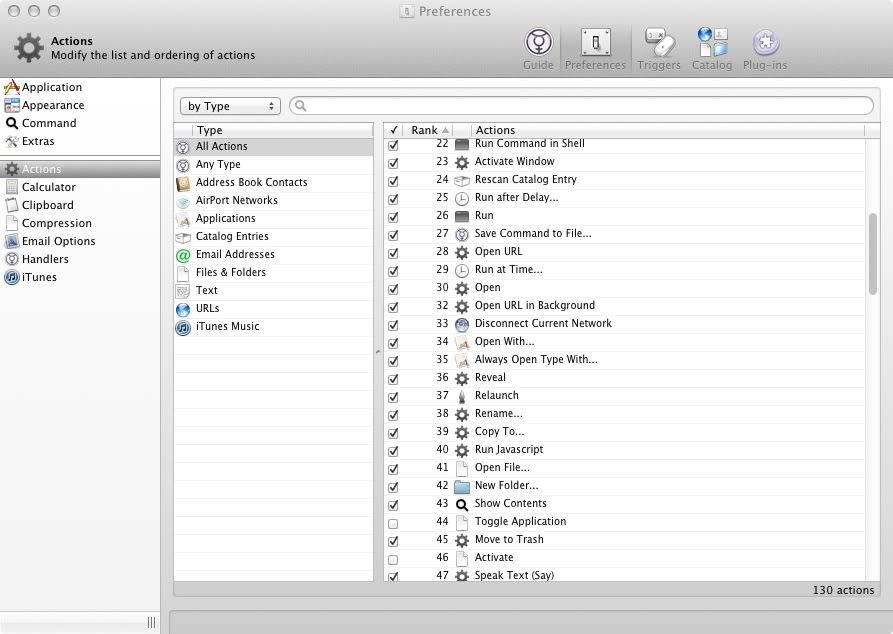
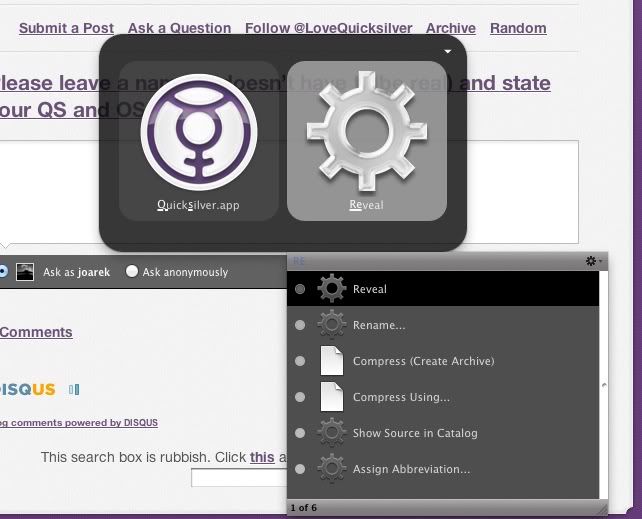
I think I can explain:
When the "show icon in dock" option isn't activated, Quicksilver isn't
counted as an running application. It's a background application. And
the relaunch action only appears for running application (makes sense,
since you wouldn't RElaunch an application that's not running, but
rather just launch it :-)).
I think it used to be different, but changed when the "Running
Applications" proxy object was changed so it wouldn't include such
background applications anymore.

But your right, the relaunch action should still work on background
applications. Would you file a bug report at
https://github.com/quicksilver/Quicksilver/issues/ ?


On Fri, Oct 14, 2011 at 5:52 PM, Ian Hay <[email protected]> wrote:
> ah yes, sorry I checked on my 10.7.2 and like yours it is ticked but does not
> show :(
>
> maybe a dev can explain as that's about the limit of my knowledge !
>
> On 14 Oct 2011, at 16:14, Joarek wrote:
>
>> Hi Ian, thanks for getting back to me.
>>
>> It is indeed ticked. And as stated it works with other applications.
>>
>> Another image:
>> http://img.photobucket.com/albums/v185/joarek/mac/qsactions.jpg
>>
>>
>> On Oct 14, 9:24 am, Ian Hay <[email protected]> wrote:
>>> i get the option to relaunch on 10.6.8 and QS ß60 (3850)
>>>
>>> have you checked in Actions that it is ticked ?
>>>
>>> On 13 Oct 2011, at 23:09, Joarek wrote:
>>>
>>>
>>>
>>>
>>>
>>>
>>>
>>>> I think i was able to do this before. That is relaunch Quicksilver by
>>>> typing "qs tab rel". But now the option to relaunch is not even
>>>> showing in the list. It works for other applications though.
>>>
>>>> 10.7.2 and QS ß60 (3850)
>>>
>>>> Image
>>>> example:http://img.photobucket.com/albums/v185/joarek/mac/relaunchqs.jpg
>
>