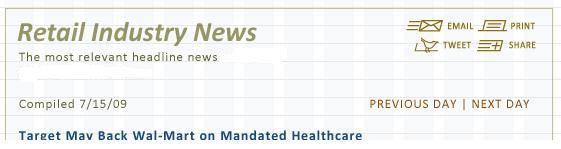
Since borders are added to the outside of any box it will mess up the
alignment of the grid. Those few pixels can throw things off.
This is a sample of how I would do it:
http://www.lendinglibrary.org/

The left version has 20 px of padding on a containing div. The right
version uses the pure grid with append-1 and prepend-1.

The only only hacky thing is the left and right border which is an
image. I made it 20 px tall (I like being able to see them) but it
could be 470x1 px.

The additional CSS is below. The section-border class could be a lot
shorter if you want to combine some of it.

.section-border{
        background-image: url(../images/470x20-borders.gif);
        background-repeat: repeat-y;
        border-top: 1px solid black;
        border-bottom: 1px solid black;
}

#padding-inside{
        padding:20px;
}

This has been tested in IE6, along with the current Firefox (mac) and
Safari (mac) and it all looks pretty good.

Sunny

On Mon, Feb 1, 2010 at 5:37 PM, oranuf <[email protected]> wrote:
> Given the following photoshop mockup example:
>
> http://www.advantex.net/images/help/blueprint-css-border-and-padding-problem.jpg
>
> As you can see, the span-14 column has a 1px colored border, and the
> content within that column has some padding applied.  I have tried
> everything I know to do, to get this client's mockup to work in
> blueprint.  The closest thing I have is similar to the following
> markup:
>
>                                <!--- column --->
>                                <div id="RinColumn21" class="column span-14">
>
>                                <!--- column border div --->
>                                <div class="column border span-14 last">
>
>                                                <div class="pageHeader span-13
> padHalf last">
>
>                                                        <div class="span-9">
>
>                                                                <h1>Retail
> Industry News</h1>
>
>                                                                <p>
>                                                                        The
> most relevant headline news, selected
>                                                                        <br>
>                                                                        by
> RetailWire editors.
>                                                                </p>
>
>                                                        </div>
>
>                                                        <div class="span-4
> last debug">
>                                                                <p>links
> here</p>
>                                                        </div>
>
>                                                </div>
>
>
>                                                <div class="span-13 padHalf
> last">
>                                                        <p>content here.</p>
>                                                </div>
>
>                                </div>
>                                </div>
>                                <!--- end column21 --->
>
> the column "border" class uses this CSS:
>
> .border {
>        border: 1px solid #949564;
> }
>
> and the padHalf class uses this CSS:
>
> /* to use this, make your content one grid column smaller.
> This will pad the content one-half column on top and left (and right,
> by way of the span you assign) */
> .padHalf {
>        margin: 20px 0 0 20px
> }
>
>
> This is hacky, and worse, it the next column on the page, to the right
> of this one that is span-14, still gets wrapped to the next line in IE
> 6 and lower.
>
> We need this CSS framework to support the addition of padding and
> borders to columns somehow, without getting really hacky... and every
> solution I've seen elsewhere when searching this group doesn't seem to
> fit my need here.
>
> I've killed an entire day on this, and I still don't have what I
> need.  Please help!
>
> Thanks much!
>
> --
> You received this message because you are subscribed to the Google Groups
> "Blueprint CSS" group.
> To post to this group, send email to [email protected].
> To unsubscribe from this group, send email to
> [email protected].
> For more options, visit this group at
> http://groups.google.com/group/blueprintcss?hl=en.
>
>

--
You received this message because you are subscribed to the Google Groups
"Blueprint CSS" group.
To post to this group, send email to [email protected].
To unsubscribe from this group, send email to
[email protected].
For more options, visit this group at
http://groups.google.com/group/blueprintcss?hl=en.