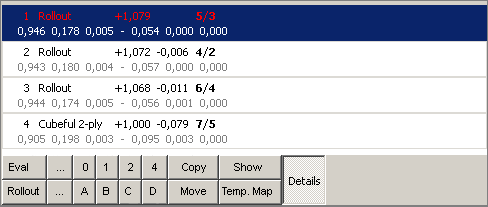
I like the look of this, though you are missing the mwc button.
Clicking on a button could then load the a saved set of rollouts, e.g.
pressing "a" could load a.rol and then do a rollout.
Christian.

On 7/11/07, Hardy Hübener <[EMAIL PROTECTED]> wrote:
Hi,


I am still not satisfied with the way, different settings are handled by
gnubg. Especially for rollouts I have to change a lot of settings
frequently. Easily you can mis-tune gnubg if you are not very carefully.

I understand that via the command line you can save and load settings.
Still, I am not really impressed by features that can only be controlled
by a command line. Okay, perhaps I am too much a windows user ... ;-)

I therfore make the following proposal: Offer both in the analysis
window and the hint window the possibility, to conduct rollouts at
different settings. Those sets can be definded by the user and are
available in the two windows as buttons, similar like the 1,2,3,4
buttons for the evaluation.

That's how it could look:

http://www.hardyhuebener.de/tmp/bug-gnubg_improved_rollout_funtionality.png

The buttons "A" to "D" represent the different rollout settings. This is
somehow similar to Snowie's feature, which offers two buttons for
rollouts: "Mini-Rollout" and "Rollout". Just a bit better even.


Sorry if I am pressing too hard to turn gnubg from a Mercedes into a
Porsche ;-)


Hardy ....a spoiled user :)

--
Hardy's Backgammon Pages --> www.hardys-backgammon-pages.com


_______________________________________________
Bug-gnubg mailing list
[email protected]
http://lists.gnu.org/mailman/listinfo/bug-gnubg
_______________________________________________
Bug-gnubg mailing list
[email protected]
http://lists.gnu.org/mailman/listinfo/bug-gnubg