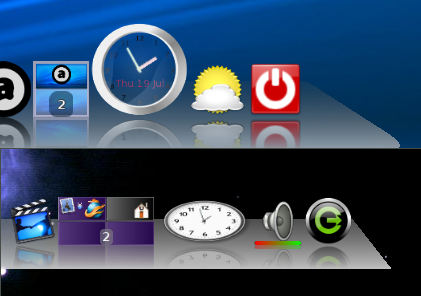
I will give the BZR version a try.

I think you might have misunderstood my post slightly: I do not normally
have non-square icons on the dock. My clock icon was equal in height and
width until the upgrade, but bigger than the other icons. After the
upgrade, it became oval -- width was retained but height was
constrained.
(However, with the bug, my switcher icon on the dock now also has non-
square proportions, but I like that! It shows widescreen desktops more
similar in shape to the full-size screens.)

I'll attach a couple of screenshots. They're from different machines,
one upgraded and one not. The docks aren't set up identically, but I
hope it will show the difference.

** Attachment added: "before and after"

https://bugs.launchpad.net/cairo-dock-core/+bug/1025706/+attachment/3228440/+files/screenshot-cairo-dock.png

--
You received this bug notification because you are a member of Cairo-
Dock Team, which is subscribed to Cairo-Dock Core.
https://bugs.launchpad.net/bugs/1025706

Title:
  icons now constrained in height (but not width)

Status in Cairo-Dock : Core:
  Fix Committed

Bug description:
  I upgraded cairo-dock on Debian Unstable (AMD64) from 2.4.0 to 3.0.0-2

  A minor display problem is that I had icons on the main dock which
  previously were larger than the default size. For example, the default
  icon size is 48x48, but clock applet was configured to display an icon
  of 64x64 pixels.

  Under 3.0.0-2 the clock is rendered as an oval of size 64x48. (i.e.
  the desired height is ignored, but the width setting is applied).

  I run cairo-dock on opengl rendering, with openbox and xcompmgr. No
  session management etc.

To manage notifications about this bug go to:
https://bugs.launchpad.net/cairo-dock-core/+bug/1025706/+subscriptions

_______________________________________________
Mailing list: https://launchpad.net/~cairo-dock-team
Post to     : [email protected]
Unsubscribe : https://launchpad.net/~cairo-dock-team
More help   : https://help.launchpad.net/ListHelp