Hi,
the theme of your desktop is defined by gnome-settings-daemon on Gnome,
XFCE has its own daemon, KDE its own too, you get the idea.
The settings daemon is a tool that sets some properties shared over all
applications (like what is the icons theme, the cursor theme, etc).
GTK use these info, gvfs too (gvfs is used by the Shortcuts applet for
instance).

Now, Cairo-Dock doesn't require gnome-settings-daemon, nor any other one,
but if you want to have a nice look, the properties need to be set. You can
do it yourself (see
http://www.freedesktop.org/wiki/Specifications/xsettings-spec/) if you
prefer not relying on gnome-settings-daemon.


2013/9/18 Jehan <[email protected]>

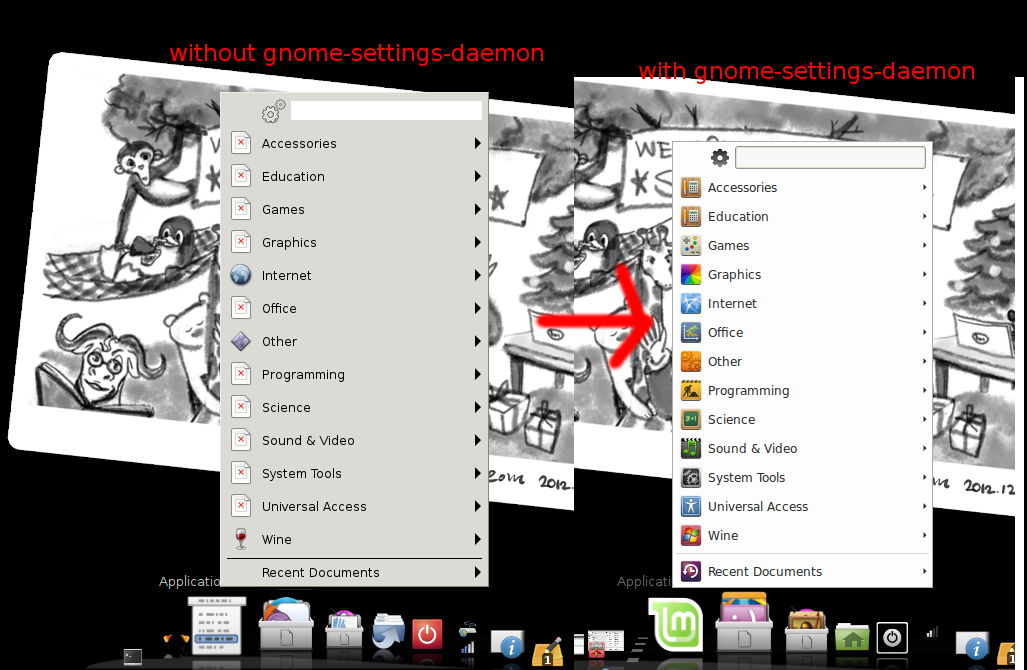
> ** Attachment added: "Same for Applications Menu: without and with the
> gnome-settings-daemon running."
>
> https://bugs.launchpad.net/cairo-dock-core/+bug/1226925/+attachment/3826374/+files/cairo-dock-icons-menu.png
>
> --
> You received this bug notification because you are a member of Cairo-
> Dock Devs, which is subscribed to Cairo-Dock Core.
> https://bugs.launchpad.net/bugs/1226925
>
> Title:
>   gnome-settings-daemon necessary to have icons
>
> Status in Cairo-Dock : Core:
>   New
>
> Bug description:
>   I was using cairo-dock in a bare openbox session (no GNOME/KDE) and
>   many of the icons in various plug-ins were broken (ok so maybe that is
>   a bug report which should go in cairo-dock-plug-ins then, but since it
>   happened all over the place, I was unsure if this is not rather a core
>   issue.
>
>   For instance in the attached image, you can see that all icons in
>   shortcuts are question-mark icons instead of usual partition/folder
>   icons. In the Applications Menu plug-ins, they would be ugly red-
>   crossed "no icon" icon.
>
>   But if I run `gnome-settings-daemon &` in my autostart script *before*
>   I run cairo-dock, then I have nice icons in shortcuts/Applications
>   Menu (and even the application menu icon itself would change to the
>   Mint icon for some reason).
>
>   Why is that? Can't you run cairo-dock without some minimum of GNOME
>   running (or KDE or other, I have not tried if it fixes the issue
>   there) and have nice-looking icons? It would be nice to have a nice-
>   looking system, even without any desktop environment running in
>   background. :-)
>
> To manage notifications about this bug go to:
> https://bugs.launchpad.net/cairo-dock-core/+bug/1226925/+subscriptions
>
> _______________________________________________
> Mailing list: https://launchpad.net/~cairo-dock-team
> Post to     : [email protected]
> Unsubscribe : https://launchpad.net/~cairo-dock-team
> More help   : https://help.launchpad.net/ListHelp
>

--
You received this bug notification because you are a member of Cairo-
Dock Devs, which is subscribed to Cairo-Dock Core.
https://bugs.launchpad.net/bugs/1226925

Title:
  gnome-settings-daemon necessary to have icons

Status in Cairo-Dock : Core:
  New

Bug description:
  I was using cairo-dock in a bare openbox session (no GNOME/KDE) and
  many of the icons in various plug-ins were broken (ok so maybe that is
  a bug report which should go in cairo-dock-plug-ins then, but since it
  happened all over the place, I was unsure if this is not rather a core
  issue.

  For instance in the attached image, you can see that all icons in
  shortcuts are question-mark icons instead of usual partition/folder
  icons. In the Applications Menu plug-ins, they would be ugly red-
  crossed "no icon" icon.

  But if I run `gnome-settings-daemon &` in my autostart script *before*
  I run cairo-dock, then I have nice icons in shortcuts/Applications
  Menu (and even the application menu icon itself would change to the
  Mint icon for some reason).

  Why is that? Can't you run cairo-dock without some minimum of GNOME
  running (or KDE or other, I have not tried if it fixes the issue
  there) and have nice-looking icons? It would be nice to have a nice-
  looking system, even without any desktop environment running in
  background. :-)

To manage notifications about this bug go to:
https://bugs.launchpad.net/cairo-dock-core/+bug/1226925/+subscriptions

_______________________________________________
Mailing list: https://launchpad.net/~cairo-dock-team
Post to     : [email protected]
Unsubscribe : https://launchpad.net/~cairo-dock-team
More help   : https://help.launchpad.net/ListHelp