On Mon, 21 Feb 2011 15:15:17 +0000, Carl wrote:

> I recommend you try viewing the page in a browser that will let you
> see all network requests - e.g. firefox with the firebug plugin
> running.
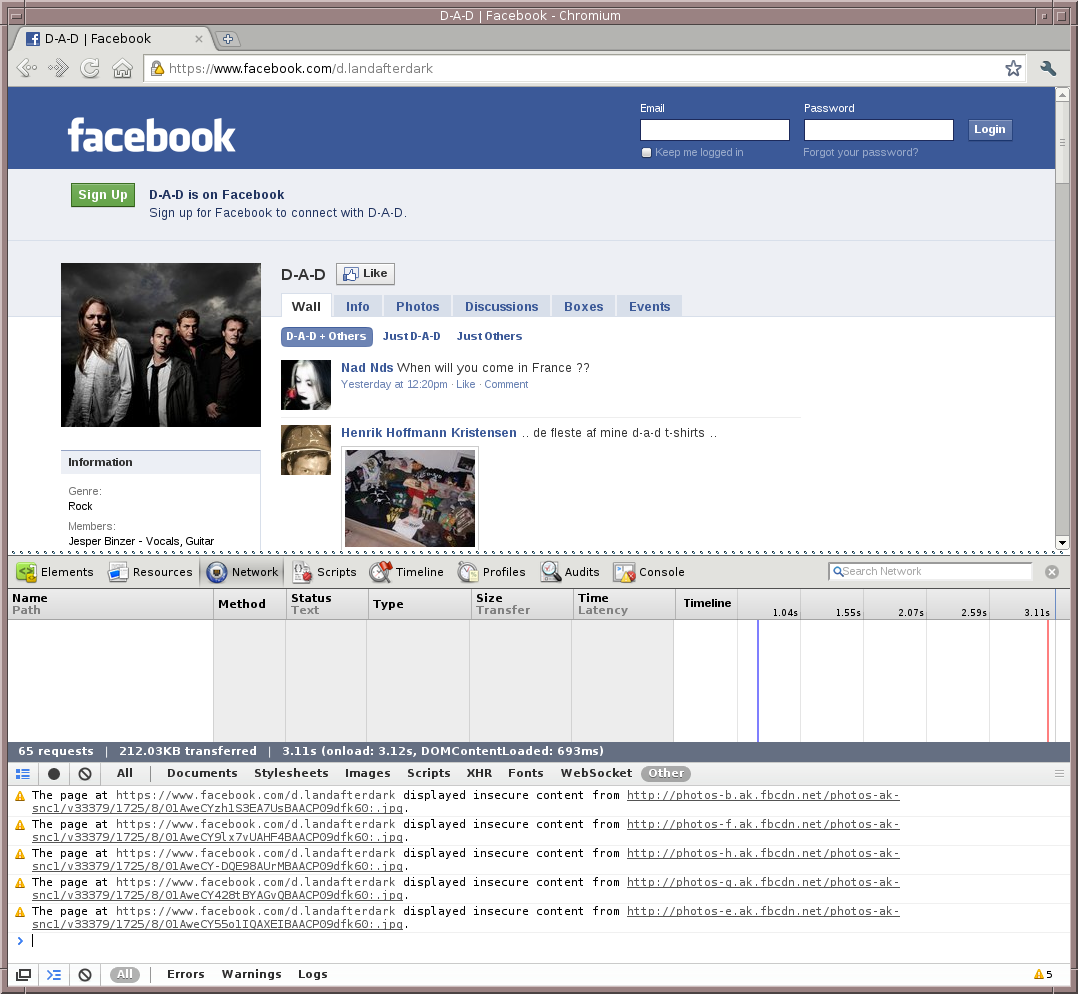
Another nice tool is included in Chrom{e,ium} under Tools → Developer
Tools, where - if you load an https-page, you get a little warning-sign
and a number in the bottom-right corner, which, when clicked, pops up a
list showing exactly what Chrome{e,ium} fetched that was insecure.

Example screenshot:

 * http://koldfront.dk/misc/browsers/chromium-insecure-content.png


  Best regards,

    Adam

--
 "Examination and mastering of a new highly                   Adam Sjøgren
  intellectual equipment was a hard labour."             [email protected]

_______________________________________________
List: [email protected]
Listinfo: http://lists.scsys.co.uk/cgi-bin/mailman/listinfo/catalyst
Searchable archive: http://www.mail-archive.com/[email protected]/
Dev site: http://dev.catalyst.perl.org/