Hmmm, it helps if you add the timezone on R1 as well :)

R1(config)#clock timezone PST -8
R1(config)#do sh clock
Oct 29 16:51:04.771: %SYS-6-CLOCKUPDATE: System clock has been updated from
16:51:04 UTC Fri Oct 29 2010 to 08:51:04 PST Fri Oct 29 2010,
Both clocks

R2(config)#do sh clock
08:51:45.727 PST Fri Oct 29 2010

R1(config)#do sh clock
08:51:45.721 PST Fri Oct 29 2010


________________________________
From: Di Bias, Steve
Sent: Friday, October 29, 2010 8:42 AM
To: 'Jason Maynard'; 'Adam Booth'
Cc: [email protected]
Subject: RE: [OSL | CCIE_RS] Question 160

From a real world perspective your clocks need to be synchronized when
monitoring jitter, so my solution would have included NTP and IP SLA. Even if
your timestamps are off by only a few seconds your results will be skewed.
Other than that Adam's solution looks good. Also the command syntax and options
I see on (C3725-ADVIPSERVICESK9-M), Version 12.4(25b) differ from what I see in
Adams config.

R2

clock timezone PST -8
clock set 08:30:00 29 Oct 2010
ntp master 3

interface FastEthernet0/0
 ip address 10.186.12.2 255.255.255.0

ip sla monitor 10
 type jitter dest-ipaddr 10.186.12.1 dest-port 16384 source-ipaddr 10.186.12.2
codec g729a
ip sla monitor schedule 10 life forever start-time now

R2(config)#do sh clock
08:30:14.735 PST Fri Oct 29 2010

R2(config)#do sh ntp stat | in Clo
Clock is synchronized, stratum 3, reference is 127.127.7.1

R1

interface FastEthernet0/0
 ip address 10.186.12.2 255.255.255.0

R1(config)#ip sla mon responder

R1(config)#do sh ntp stat | in Clock
Clock is synchronized, stratum 4, reference is 10.186.12.2

R1(config)#do sh ntp ass
      address         ref clock     st  when  poll reach  delay  offset    disp
*~10.186.12.2      127.127.7.1       3    47    64   37     1.9    3.38   875.3


both clocks

R1(config)#do sh clock
16:44:16.337 UTC Fri Oct 29 2010

R2(config)#do sh clock
08:44:16.383 PST Fri Oct 29 2010

R2(config)#do sh ip sla mon stat
Round trip time (RTT)   Index 10
        Latest RTT: 2 ms
Latest operation start time: 08:45:44.923 PST Fri Oct 29 2010
Latest operation return code: OK
RTT Values
        Number Of RTT: 1000
        RTT Min/Avg/Max: 1/2/3 ms
Latency one-way time milliseconds
        Number of one-way Samples: 0
        Source to Destination one way Min/Avg/Max: 0/0/0 ms
        Destination to Source one way Min/Avg/Max: 0/0/0 ms
Jitter time milliseconds
        Number of SD Jitter Samples: 999
        Number of DS Jitter Samples: 999
        Source to Destination Jitter Min/Avg/Max: 0/1/1 ms
        Destination to Source Jitter Min/Avg/Max: 0/1/2 ms
Packet Loss Values
        Loss Source to Destination: 0           Loss Destination to Source: 0
        Out Of Sequence: 0      Tail Drop: 0    Packet Late Arrival: 0
Voice Score Values
        Calculated Planning Impairment Factor (ICPIF): 11
MOS score: 4.06
Number of successes: 8
Number of failures: 3
Operation time to live: Forever


Thank you,

Steve Di Bias
Network Engineer - Information Systems
Valley Health System - Las Vegas
Office - 702- 369-7594
Cell - 702-241-1801
[email protected]<mailto:[email protected]>

________________________________
From: [email protected]
[mailto:[email protected]] On Behalf Of Jason Maynard
Sent: Friday, October 29, 2010 5:09 AM
To: 'Adam Booth'
Cc: [email protected]
Subject: Re: [OSL | CCIE_RS] Question 160

Hey Adam,

Looks good

I wanted to keep it vague to show that all that really matters is what is in
front of  you and in this case it is "Monitor" and "Jitter" between devices. I
struggled in the past with not having all (what I believe is all) the
requirements but learned that all I needed to do was meet the requirement. Some
things that were left up to you were type, codec, ports, etc.
I believe "ip sla" is only on legacy IOS's and the newer IOS's use "ip sla
monitor" - Please correct me if I am wrong

I would like to how others put their solutions together


Thanks Adam!


From: Adam Booth [mailto:[email protected]]
Sent: October-29-10 12:34 AM
To: Jason Maynard
Cc: [email protected]
Subject: Re: [OSL | CCIE_RS] Question 160

Hi Jason,

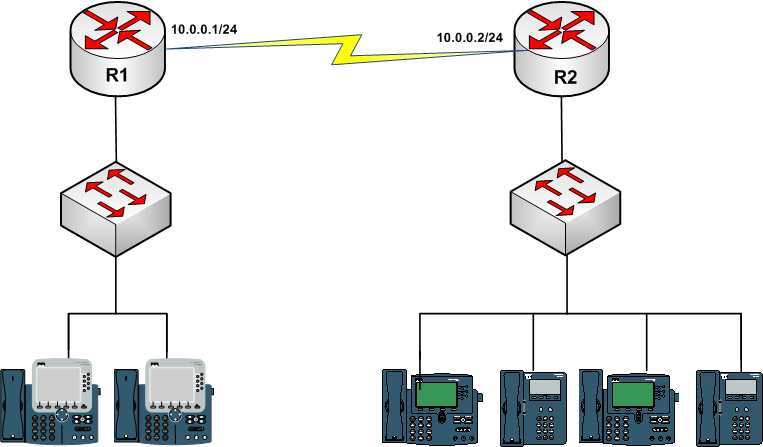
There's a number of jitter measurement options available using ip sla, I took
the assumption that since your picture had IP phones, that udp jitter
simulating a voip call may be appropriate.

Below are my proposed configs.


hostname R1
!
interface FastEthernet0/0
 ip address 10.0.0.1 255.255.255.0
 no shutdown
!
ip sla 10
 udp-jitter 10.0.0.2 16384 codec g729a
ip sla schedule 10 life forever start-time now


hostname R2
!
interface FastEthernet0/0
 ip address 10.0.0.2 255.255.255.0
 no shutdown
!
ip sla responder


R1#sh ip sla stati 10

Round Trip Time (RTT) for       Index 10
        Latest RTT: 22 milliseconds
Latest operation start time: *00:14:19.003 UTC Fri Mar 1 2002
Latest operation return code: OK
RTT Values:
        Number Of RTT: 1000             RTT Min/Avg/Max: 1/22/493 milliseconds
Latency one-way time:
        Number of Latency one-way Samples: 0
        Source to Destination Latency one way Min/Avg/Max: 0/0/0 milliseconds
        Destination to Source Latency one way Min/Avg/Max: 0/0/0 milliseconds
Jitter Time:
        Number of SD Jitter Samples: 999
        Number of DS Jitter Samples: 999
        Source to Destination Jitter Min/Avg/Max: 0/17/67 milliseconds
        Destination to Source Jitter Min/Avg/Max: 0/7/496 milliseconds
Packet Loss Values:
        Loss Source to Destination: 0           Loss Destination to Source: 0
        Out Of Sequence: 0      Tail Drop: 0
        Packet Late Arrival: 0  Packet Skipped: 0
Voice Score Values:
        Calculated Planning Impairment Factor (ICPIF): 4209067962
MOS score: 4.50
Number of successes: 1
Number of failures: 0
Operation time to live: Forever

It is possible to reflect the configuration for R1 and R2 but since we get both
Source to Destination and Destination to Source jitter this way, it's probably
not required.

Cheers,
Adam
On Fri, Oct 29, 2010 at 1:30 PM, Jason Maynard
<[email protected]<mailto:[email protected]>> wrote:
Here is another question to test your skills.
What would you configure to monitor jitter? You must provide an example using
R1 and R2.
Error! Filename not
specified.<http://4.bp.blogspot.com/_RcSjgG49QBc/TMo8YRb73lI/AAAAAAAAAEY/SD-bnXKSdXM/s1600/Phone.png>
Error! Filename not specified.
Error! Filename not specified.


_______________________________________________
For more information regarding industry leading CCIE Lab training, please visit
www.ipexpert.com<http://www.ipexpert.com>


UHS Confidentiality Notice:  This e-mail message, including any attachments, is
for the sole use of the intended recipient (s) and may contain confidential and
privileged information.  Any unauthorized review, use, disclosure or
distribution of this information is prohibited.  If this was sent to you in
error, please notify the sender by reply e-mail and destroy all copies of the
original message.
_______________________________________________
For more information regarding industry leading CCIE Lab training, please visit
www.ipexpert.com