Hi,

> Yes. In a mean time I got several conformations that it's K3b's fault and
> that the code has not been maintained for a long time.
Obviously it is more appealing to start GUI projects
rather than to keep them up to date.


> I'll try xfburn. Can you comment on stability and feature completeness of
> libburn? I think I never used any app that's built upon it.

I am the current developer of the libraries.
Also developer of cdrskin and xorriso.
I do not use anything else for burning and every day
i risk my personal multi-session backups by expanding
them by the development version of xorriso.
(I have more than one backup per day. But it would hurt
my pride to lose a BD-RE with 530 days of recoverable
history.)


> Yes, my device path is /dev/sr0, though I'm trying to burn an ISO image, not
> udf one, but I suppose it's the same.

Whatever you want to burn.

> I've read about BD's defect management and it seems like a smart feature

Your mileage may vary ...

> but I wonder would my standalone (Panasonic) BD player be able to read defect
> managed disk and could I experience so hiccups during movie play because it?

The hickup might then be out of different reasons, if
the player does not read ahead by some dozen MB.
If a defect sector was replaced, then the substitute
is located at the inner rim of the disc. So depending
on the current read position, the head has to make a
long move. And maybe back and forth quite often.

I use Defect Management for the first 50 MB of single
session on BD-RE because that's usually enough to take
the ISO 9660 directory tree of a 23 GB backup.
And i use it for incremental backups which normally
write only 100+ MB per session.
On the wide range i prefer 2x speed and post-burn
checkreading over Defect Management.

With 6x BD-R it makes few difference because my local
filesystem cannot collect data fast enough from single
to feed more than 3x effective speed.
With an image file as input, this would be different.
(To my personal experience, BD-R with Defect Management
fail at least as often as those without. But the
statistical base is not very large.)


> I didn't get that part - does growisofs have broaken
> "BD defect management"?

The upstream version has problems caused by its habit
to automatically format yet unformatted BD-R. After
formatting, it still has a flag set that indicates
unformatted BD-R. This flag causes an inappropriate
SCSI command to be emitted at the end of the burn run
  https://bugs.launchpad.net/ubuntu/+source/dvd+rw-tools/+bug/1113679
This is on its way to be fixed in the distros.

Next problem is that it does the check for predictable
medium overflow before formatting, using the unformatted
size. If the input size is larger than the formatted
size but smaller than unformatted, then the burn on
automatically formatted medium will end badly after
having used up the whole medium.
  https://bugs.launchpad.net/ubuntu/+source/dvd+rw-tools/+bug/1424215

But as stated, my growisofs proposals circumvent the
situation. Either by presenting an already formatted
BD-R, or by telling growisofs not to format.


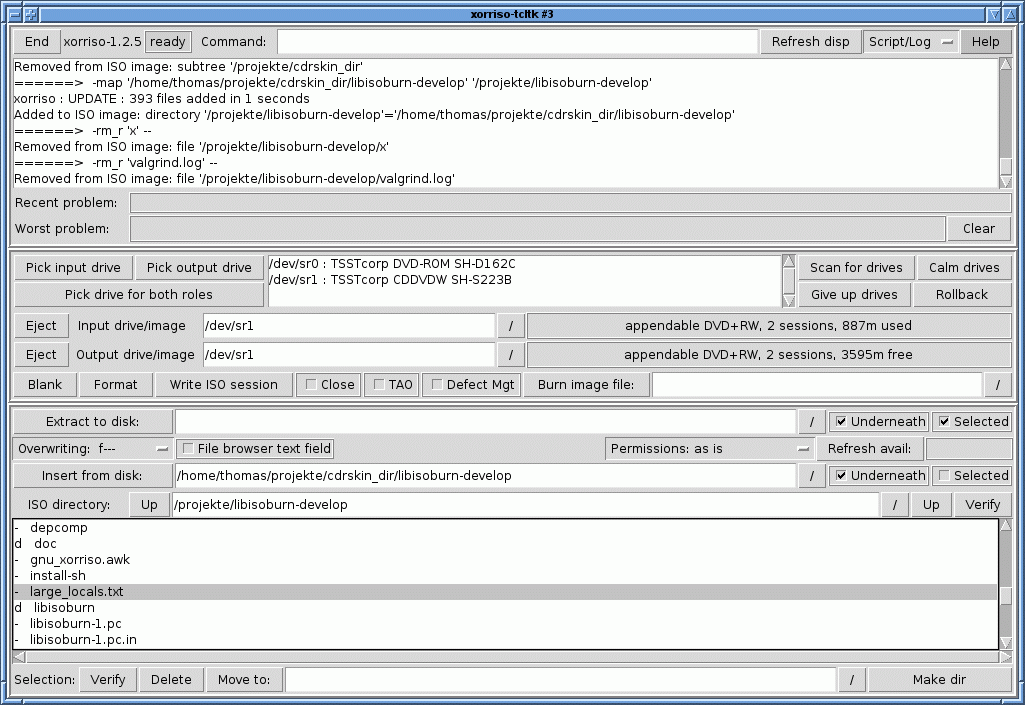
> >   http://www.gnu.org/software/xorriso/xorriso-tcltk-screen.gif
> Wow! :) That's great! Didn't know about that program. Thanks!

It is mainly intended to demonstrate the capability
of xorriso to serve graphical frontends as dialog partner
and not as child worker.
I.e. the frontend does the presentation and xorriso
does the ISO 9660 and MMC stuff. No duplicate file trees
in GUI and backend. No hald or udev which tell nonsense
about drive and medium.

I used Tcl/Tk because it is easy, quite incapable of
serious computing, and lightweight.
My hope is that some GUI programmer uses a real
programming language and a fancy look+feel.
But currently there are a lot of half-dead frontends
lying around.

Clicking right mouse button on button "Burn image file:"
yields a pop-up window with:

  The "Burn image file:" button executes command -as "cdrecord" to
  burn a data file from hard disk onto the output drive.
  The address of the disk file is taken from the neighboring text field.

  If you do not plan to append further data to the medium, then consider
  to enable the "Close" switch.

  No input drive may be aquired. (Delete all characters from the field
  "Input drive/image" and hit Return to give up the input drive.)

  The medium in the drive must be blank.
  (It is well possible to burn image files to appendable media. But the
  image needs to be prepared for the address offset. Who can do that can
  as well use one of the command line tools for burning the result. E.g.
    xorriso -as cdrecord -v dev=/dev/sr0 -multi stream_recording=32s image.iso
  )

It is worth to read man xorriso about xorriso commands
mentioned in the help texts of xorriso-tcltk.


Have a nice day :)

Thomas


--
To UNSUBSCRIBE, email to [email protected]
with a subject of "unsubscribe". Trouble? Contact [email protected]
Archive: https://lists.debian.org/[email protected]