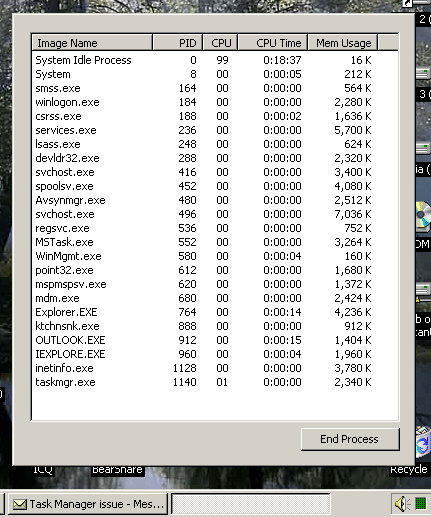
> Ok, I got a wierd one today. A few minutes ago I noticed my system was
> begining to get cranky, so I figured I should reboot. I took a
> look at the
> Task Manager to see if anything was amis, and all of a sudden, the task
> manager changed how it look. It removed the buttons to show memory and
> running programs. I knew that low system resources could screw
> up how things
> look so I just rebooted. But after the reboot, my task manager is still
> screwy. I've uploaded a screen shot here:
>
> http://www.deathclock.com/images/shot.gif
>
> Notice also that the button in the bottom bar is nameless. Anyone see
> anything like this before?

Raymond, it's a feature, not a bug. Double-click on a Win2K Task Manager
in the grey area around the main window, and the buttons and menus and
labels dissappear. Double-click again on the grey, and they magically come
back. No reboot necessary. :)

Ron Hornbaker
President/CTO
Humankind Systems, Inc.

..�_�.���) http://www.BookCrossing.com ~ Read and Release! (�`�.�_�.


~~~~~~~~~~~~~~~~~~~~~~~~~~~~~~~~~~~~~~~~~~~~~~~~~~
Structure your ColdFusion code with Fusebox. Get the official book at
http://www.fusionauthority.com/bkinfo.cfm
~~~~~~~~~~~~~~~~~~~~~~~~~~~~~~~~~~~~~~~~~~~~~~~~~~
Structure your ColdFusion code with Fusebox. Get the official book at
http://www.fusionauthority.com/bkinfo.cfm

Archives: http://www.mail-archive.com/[email protected]/
Unsubscribe: http://www.houseoffusion.com/index.cfm?sidebar=lists