Man! this is ingenious.
Georg
On Wednesday, 30. May 2007 01:26, Ichthyostega wrote:
> Hello all,
>
> recently, I had some problems with creating special maskings,
> and I didn't find any solution with the existing plugins.
> So I wrote a new plugin, see the attached diff.
>
> The Problem
> -----------
>
> On the "Mask Track" we have some interesting Footage, in my case
> some animated fractals. By using Color correction, Histogram and
> Chromakey, we can create an animated Mask out of this
>
> But now we want to apply this mask to the "Content Track", which
> contains quite different footage. We deliberately don't want to
> apply Chroma keying to the Content Track, as much as we don't want
> to overlay the Mask Track ontop of the Content Track (Which could
> be done with the overlay plugin, e.g. with "Multiply" mode).
>
> We just want the content to use the Alpha Channel of the Mask track.
>
> "Reroute" Plugin
> ----------------
> This new Plugin is a multitrack video realtime effect, similar to the
> Overlayer, i.e. it works only as a shared effect, it has to be applied
> simultanousely to two tracks. You can chosse which of this tracks
> will be the target (output) track. Further, you can choose between
> three operation modes:
>
>  - replace Target: just overwrite everything on the target track with
>    the contents of the source track /at the point where the plugins
>    are inserted in the render pipeline/
>  - Components only: replace the Components (RGB or YUV) of the target
>    track by the Components of the source track (again at the point
>    where the plugins are inserted), but retain the Alpha of the
>    target track
>  - Alpha replace: same principle, other way round: overwrite the
>    Alpha of the target and retain the Component content.
>
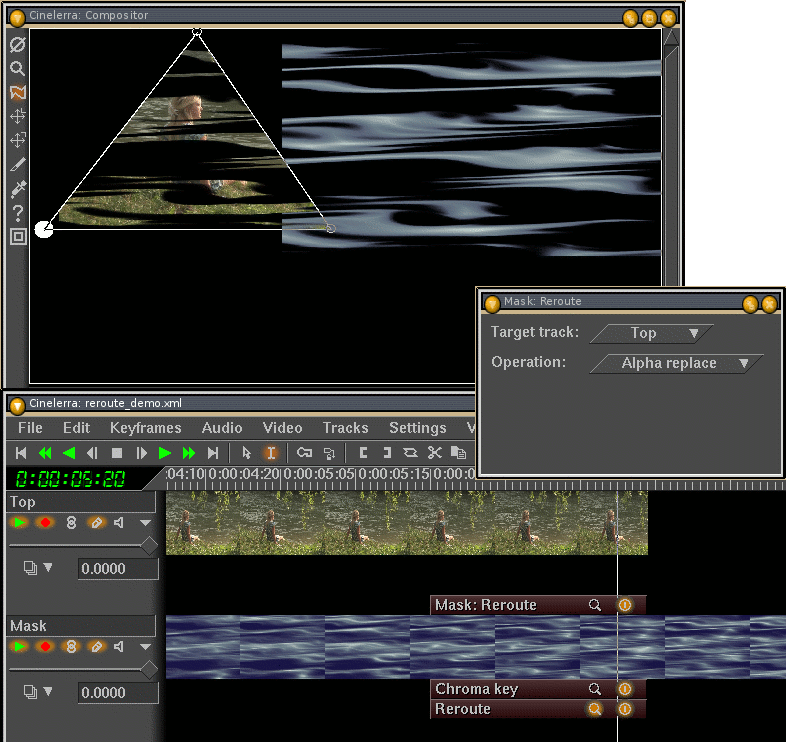
> See the screenshot:
> http://ichthyostega.de/cinelerra/plugin/reroute-demo1.png
>
> Here the Content Track "Top" is pojected to the left, and the Mask track
> with the animated Fractal is shown at the right side. The Content Track
> has its own Mask (applied after plugins of course, otherwise it would
> be replaced by the new alpha). On the Mask Track, I use a Chromakey
> to mask out some of the middle blue shades. Finally, my new plugin
> overwrites the Alpha channel of the target Track (which here is the
> top one) with the contents of the Alpha channel in the Mask track.
>
> Needless to say, because the contents of the Mask track can be
> processed further (blur, color correction, further masking)
> after the plugin, this openes endles masking and compositing
> possibilities.
>
>
> Question to the Cinelerra-Gurus: did I miss something?
> Did I overlook the obvious solution? Is my Plugin acceptable?
>
> Cheers,
> Hermann Vosseler

--

dr.k.g.hooss
wissenschaftliche medienberatung
tel. +49-(0)451-3003-474
www.schoepfung-und-wandel.de


_______________________________________________
Cinelerra mailing list
[email protected]
https://init.linpro.no/mailman/skolelinux.no/listinfo/cinelerra