Send cisco-voip mailing list submissions to
        [email protected]
To subscribe or unsubscribe via the World Wide Web, visit
        https://puck.nether.net/mailman/listinfo/cisco-voip
or, via email, send a message with subject or body 'help' to
        [email protected]

You can reach the person managing the list at
        [email protected]

When replying, please edit your Subject line so it is more specific
than "Re: Contents of cisco-voip digest..."


Today's Topics:

   1. Re: Cisco Voice Implementation Checklist (Nick Parece)
   2. Re: uccx menu will not time out (Leetun, Rob)
   3. Re: uccx menu will not time out (Leetun, Rob)
   4. Re: uccx menu will not time out (Anthony Holloway)
   5. Re: E.164 without PSTN access code (Heim, Dennis)
   6. Re: buying Cisco equipment from the 'Internet - how to get it
      on SmartNet/SASU (Dan Letkeman)
   7. Cisco IM and Presence 9.0(1) ? (Jason Aarons (AM))
   8. Re: Cisco IM and Presence 9.0(1) ? (Matthew Loraditch)
   9. Re: Cisco IM and Presence 9.0(1) ? (Jason Aarons (AM))


----------------------------------------------------------------------

Message: 1
Date: Thu, 4 Oct 2012 17:08:28 +0000
From: Nick Parece <[email protected]>
To: "Rittenhouse, Robert (LACA)" <[email protected]>, "cisco-voip
        ([email protected])" <[email protected]>
Subject: Re: [cisco-voip] Cisco Voice Implementation Checklist
Message-ID:
        <a510c20fc16c3441a5f7a95d177fdca810e6a...@wndmail02.vistaprint.net>
Content-Type: text/plain; charset="us-ascii"

Hi Robert,

Welcome to the fun and exciting world of Cisco implementations... You pose a
tough question as there are SO very many deployment options for the complete
solution. The CUCM deployment guide has a great set of steps to follow, but
there's also the different options and platforms for gateways, analog devices,
TFTP options, dial-plan, licensing(!) and more. It's hard to have a generic one
work for many different customers.

With all of that said, I'd recommend taking a stab at it and sharing it with
the list. I'm sure there will be a lot of input on anything you may have missed.

Best regards,

Nick

Nick Parece
Corporate Voice Lead, Capabilities Operations
E: [email protected]
T: 1.781.652.6383
M: 1.781.708.5402
AIM: [email protected]
Vistaprint Make an Impression.

Business Cards are FREE at www.vistaprint.com<http://www.vistaprint.com/>!


From: [email protected]
[mailto:[email protected]] On Behalf Of Rittenhouse, Robert
(LACA)
Sent: Thursday, October 04, 2012 8:56 AM
To: cisco-voip ([email protected])
Subject: [cisco-voip] Cisco Voice Implementation Checklist

I'm starting to make an ordered checklist that can be followed for a basic
Cisco voice implementation. Now, before I go and possibly re-create the wheel,
does Cisco (or someone else) already provide such a checklist? I've searched
the Internet over and I haven't found anything too promising. I am at the point
where I am probably going to just develop one for my purposes and release it.

I also had the thought of making a web form that would first step you through
asking the basic questions for an implementation. Then it could allow you to
fill out all of the gory details for each building in the entire project and
then build a PDF of the entire implementation as a TODO check-list. Would
releasing something like this even be useful for others I wonder? I'm rather
new to the Cisco voice implementation scene and that might be part of my want
to over-prepare but I think that it could be a useful guide.

Thanks,

Robert Rittenhouse
Network Coordinator
Licking Area Computer Association (LACA)
(740) 345-3400 ext. 220
[email protected]<mailto:[email protected]>
________________________________
PLEASE NOTE: This message and any response to it may constitute a public
record, and therefore may be available upon request in accordance with Ohio
public records law. (ORC 149.43)
This e-mail message, including any attachments, is for the sole use of the
intended recipient(s) and may contain private, confidential, and/or privileged
information. Any unauthorized review, use, disclosure, or distribution is
prohibited. If you are not the intended recipient, employee, or agent
responsible for delivering this message, please contact the sender by reply
e-mail and destroy all copies of the original e-mail message.
-------------- next part --------------
An HTML attachment was scrubbed...
URL:
<https://puck.nether.net/pipermail/cisco-voip/attachments/20121004/ca6c7d67/attachment-0001.html>

------------------------------

Message: 2
Date: Thu, 4 Oct 2012 19:39:34 +0000
From: "Leetun, Rob" <[email protected]>
To: Anthony Holloway <[email protected]>
Cc: "[email protected]" <[email protected]>
Subject: Re: [cisco-voip] uccx menu will not time out
Message-ID:

<493392cd07c6d045837bae6ad397be9c12b74...@mailbox2.boco.co.boulder.co.us>

Content-Type: text/plain; charset="utf-8"

Thank you for the response, Anthony.

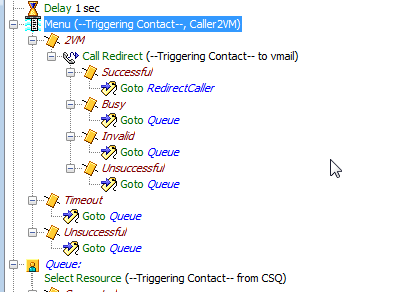
With being a once in a while scripter I had the menu in the wrong position
within the script.  I moved it into the queue.  Everything is working as
designed.

I like your proposal for the wrong key entry, which I am going to write into
this app.

Thanks again.

Have a great day!

Rob

Rob Leetun
Network Engineer
Boulder County Information Services
303-441-3866 (W)

From: [email protected] [mailto:[email protected]] On Behalf Of Anthony
Holloway
Sent: Wednesday, October 03, 2012 12:56 PM
To: Leetun, Rob
Cc: [email protected]
Subject: Re: [cisco-voip] uccx menu will not time out

I have not seen this and I am running 8.5(1)SU2.

A couple of things:

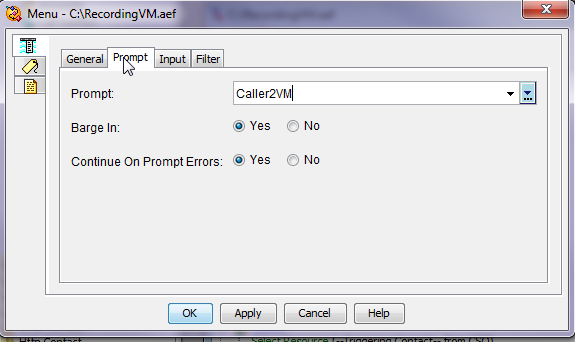
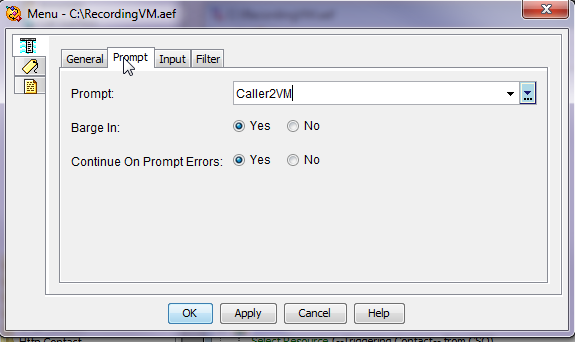
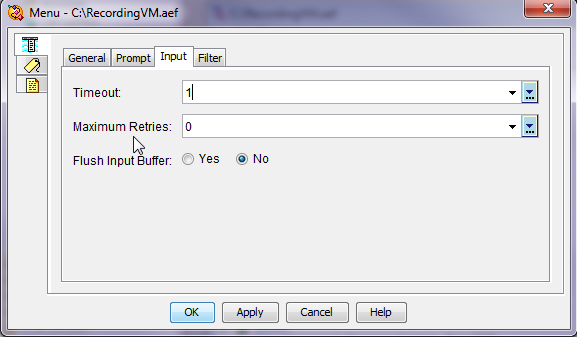
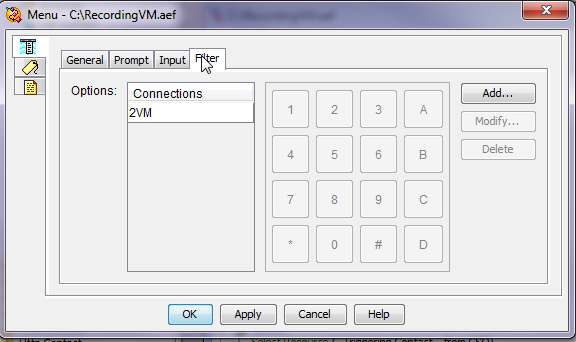
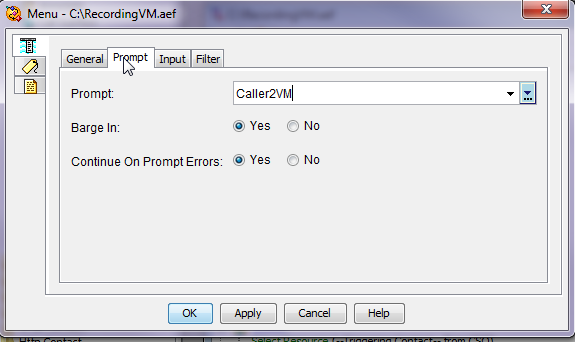
  *   Your wav file in Caller2VM could have a lot of silence on the end, making
it appear as though the timeout is not working.  Could you attach it?
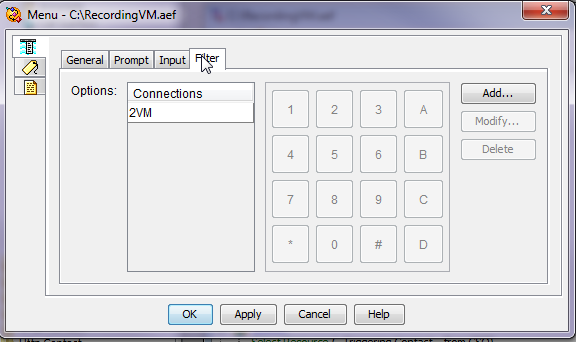
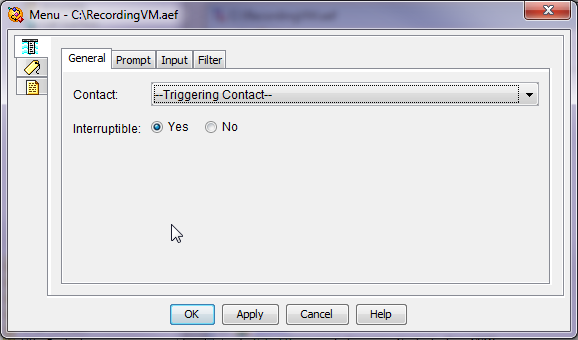
  *   I cannot see which option you have mapped to the 2VM Connection. Could
you highlight it, then post that screenshot?
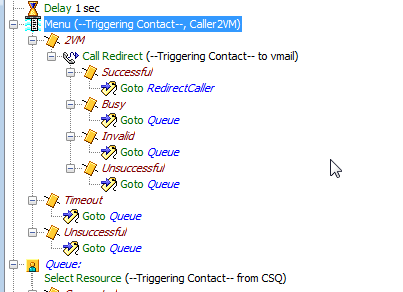
  *   You didn't explain what the script is doing.  Does it repeat the message?
 Does it go to unsuccessful?  What happens?
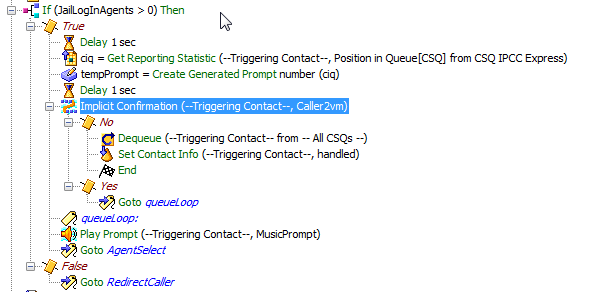
  *   For these single option choices such as this, sometime using the Implicit
Confirmation step is best.  It works like this:  you play a prompt to the
caller, and if they press anykey, they "abort" the default action.  E.g.,
"Press 1 for voice mail, otherwise stay on the line"  The otherwise part is the
default action.  So if they press a key, you can catch that, and then Redirect
to voice mail.  It's personal preference really, and thus up to you, but I
wanted to point that out to you in case you didn't know what that step was for.
I look forward to your reply.

Anthony Holloway
On Tue, Oct 2, 2012 at 11:00 AM, Leetun, Rob
<[email protected]<mailto:[email protected]>> wrote:
Hi,

Has anyone ran into this error, which the menu in uccx 8.5 will not time out.

[cid:[email protected]]

[cid:[email protected]]

[cid:[email protected]]

[cid:[email protected]]

[cid:[email protected]]

Thanks.

Rob

Robert E. Leetun, CCNA, CCNA+Voice
Network Engineer
Boulder County Information Services
2025 14th Street
Boulder, Colorado 80302
303-441-3866<tel:303-441-3866> (W)
303-441-3983<tel:303-441-3983> (F)


_______________________________________________
cisco-voip mailing list
[email protected]<mailto:[email protected]>
https://puck.nether.net/mailman/listinfo/cisco-voip

-------------- next part --------------
An HTML attachment was scrubbed...
URL:
<https://puck.nether.net/pipermail/cisco-voip/attachments/20121004/5a42a955/attachment-0001.html>
-------------- next part --------------
A non-text attachment was scrubbed...
Name: image001.png
Type: image/png
Size: 19341 bytes
Desc: image001.png
URL:
<https://puck.nether.net/pipermail/cisco-voip/attachments/20121004/5a42a955/attachment-0005.png>
-------------- next part --------------
A non-text attachment was scrubbed...
Name: image002.png
Type: image/png
Size: 36135 bytes
Desc: image002.png
URL:
<https://puck.nether.net/pipermail/cisco-voip/attachments/20121004/5a42a955/attachment-0006.png>
-------------- next part --------------
A non-text attachment was scrubbed...
Name: image003.png
Type: image/png
Size: 37628 bytes
Desc: image003.png
URL:
<https://puck.nether.net/pipermail/cisco-voip/attachments/20121004/5a42a955/attachment-0007.png>
-------------- next part --------------
A non-text attachment was scrubbed...
Name: image004.png
Type: image/png
Size: 35145 bytes
Desc: image004.png
URL:
<https://puck.nether.net/pipermail/cisco-voip/attachments/20121004/5a42a955/attachment-0008.png>
-------------- next part --------------
A non-text attachment was scrubbed...
Name: image005.png
Type: image/png
Size: 40003 bytes
Desc: image005.png
URL:
<https://puck.nether.net/pipermail/cisco-voip/attachments/20121004/5a42a955/attachment-0009.png>

------------------------------

Message: 3
Date: Thu, 4 Oct 2012 20:36:48 +0000
From: "Leetun, Rob" <[email protected]>
To: Anthony Holloway <[email protected]>
Cc: "[email protected]" <[email protected]>
Subject: Re: [cisco-voip] uccx menu will not time out
Message-ID:

<493392cd07c6d045837bae6ad397be9c12b74...@mailbox2.boco.co.boulder.co.us>

Content-Type: text/plain; charset="utf-8"

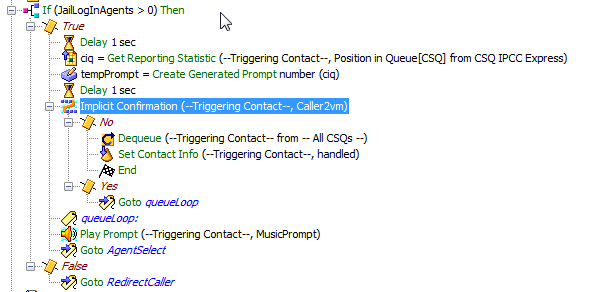
In response to your 4th bullet it would scripted like this possibly?  Where if
they press any key they would go to voice mail otherwise the caller is routed
to the original queue.

[cid:[email protected]]

Rob

Rob Leetun
Network Engineer
Boulder County Information Services
303-441-3866 (W)

From: [email protected] [mailto:[email protected]] On Behalf Of Anthony
Holloway
Sent: Wednesday, October 03, 2012 12:56 PM
To: Leetun, Rob
Cc: [email protected]
Subject: Re: [cisco-voip] uccx menu will not time out

I have not seen this and I am running 8.5(1)SU2.

A couple of things:

  *   Your wav file in Caller2VM could have a lot of silence on the end, making
it appear as though the timeout is not working.  Could you attach it?
  *   I cannot see which option you have mapped to the 2VM Connection. Could
you highlight it, then post that screenshot?
  *   You didn't explain what the script is doing.  Does it repeat the message?
 Does it go to unsuccessful?  What happens?
  *   For these single option choices such as this, sometime using the Implicit
Confirmation step is best.  It works like this:  you play a prompt to the
caller, and if they press anykey, they "abort" the default action.  E.g.,
"Press 1 for voice mail, otherwise stay on the line"  The otherwise part is the
default action.  So if they press a key, you can catch that, and then Redirect
to voice mail.  It's personal preference really, and thus up to you, but I
wanted to point that out to you in case you didn't know what that step was for.
I look forward to your reply.

Anthony Holloway
On Tue, Oct 2, 2012 at 11:00 AM, Leetun, Rob
<[email protected]<mailto:[email protected]>> wrote:
Hi,

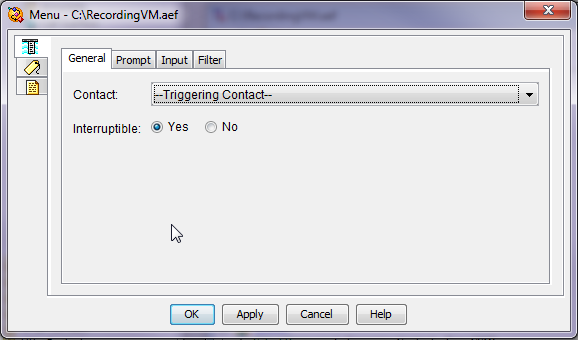
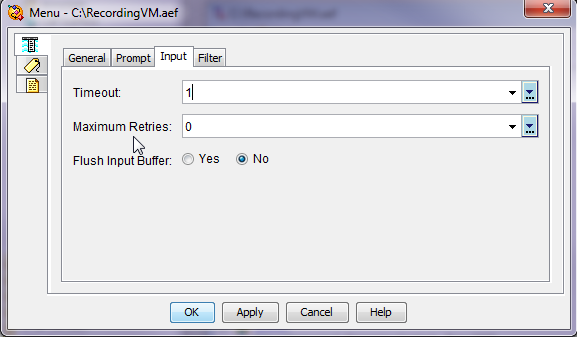
Has anyone ran into this error, which the menu in uccx 8.5 will not time out.

[cid:[email protected]]

[cid:[email protected]]

[cid:[email protected]]

[cid:[email protected]]

[cid:[email protected]]

Thanks.

Rob

Robert E. Leetun, CCNA, CCNA+Voice
Network Engineer
Boulder County Information Services
2025 14th Street
Boulder, Colorado 80302
303-441-3866<tel:303-441-3866> (W)
303-441-3983<tel:303-441-3983> (F)


_______________________________________________
cisco-voip mailing list
[email protected]<mailto:[email protected]>
https://puck.nether.net/mailman/listinfo/cisco-voip

-------------- next part --------------
An HTML attachment was scrubbed...
URL:
<https://puck.nether.net/pipermail/cisco-voip/attachments/20121004/890bd606/attachment-0001.html>
-------------- next part --------------
A non-text attachment was scrubbed...
Name: image006.png
Type: image/png
Size: 22971 bytes
Desc: image006.png
URL:
<https://puck.nether.net/pipermail/cisco-voip/attachments/20121004/890bd606/attachment-0006.png>
-------------- next part --------------
A non-text attachment was scrubbed...
Name: image007.png
Type: image/png
Size: 19341 bytes
Desc: image007.png
URL:
<https://puck.nether.net/pipermail/cisco-voip/attachments/20121004/890bd606/attachment-0007.png>
-------------- next part --------------
A non-text attachment was scrubbed...
Name: image008.png
Type: image/png
Size: 36135 bytes
Desc: image008.png
URL:
<https://puck.nether.net/pipermail/cisco-voip/attachments/20121004/890bd606/attachment-0008.png>
-------------- next part --------------
A non-text attachment was scrubbed...
Name: image009.png
Type: image/png
Size: 37628 bytes
Desc: image009.png
URL:
<https://puck.nether.net/pipermail/cisco-voip/attachments/20121004/890bd606/attachment-0009.png>
-------------- next part --------------
A non-text attachment was scrubbed...
Name: image010.png
Type: image/png
Size: 35145 bytes
Desc: image010.png
URL:
<https://puck.nether.net/pipermail/cisco-voip/attachments/20121004/890bd606/attachment-0010.png>
-------------- next part --------------
A non-text attachment was scrubbed...
Name: image011.png
Type: image/png
Size: 40003 bytes
Desc: image011.png
URL:
<https://puck.nether.net/pipermail/cisco-voip/attachments/20121004/890bd606/attachment-0011.png>

------------------------------

Message: 4
Date: Thu, 4 Oct 2012 15:51:54 -0500
From: Anthony Holloway <[email protected]>
To: "Leetun, Rob" <[email protected]>
Cc: "[email protected]" <[email protected]>
Subject: Re: [cisco-voip] uccx menu will not time out
Message-ID:
        <cacrcjojo+8kivi4mdcaxznkzg+e7tt3jtysagcfds2mvo5q...@mail.gmail.com>
Content-Type: text/plain; charset="utf-8"

Yes, you got it... only... you are currently ending the script, as opposed
to redirecting the caller.  I hope you weren't under the impression that
the Implicit confirmation step sent people to voicemail
automagically...sorry if I confused you on the usage of that step.  The
menu is just fine, I was merely offering an alternative solution.

So, it would look more like this:

*implicit confirm*
**
*no
*
*redirect
*
*successful
*
*set contact info
end
*
*...
*
*yes
*
*goto queueLoop*

Anthony

On Thu, Oct 4, 2012 at 3:36 PM, Leetun, Rob <[email protected]>wrote:

>  In response to your 4th bullet it would scripted like this possibly?
> Where if they press any key they would go to voice mail otherwise the
> caller is routed to the original queue.****
>
> ** **
>
> ****
>
> ** **
>
> Rob****
>
> ** **
>
> Rob Leetun****
>
> Network Engineer****
>
> Boulder County Information Services****
>
> 303-441-3866 (W)****
>
> ** **
>
> *From:* [email protected] [mailto:[email protected]] *On Behalf Of
> *Anthony
> Holloway
> *Sent:* Wednesday, October 03, 2012 12:56 PM
> *To:* Leetun, Rob
> *Cc:* [email protected]
> *Subject:* Re: [cisco-voip] uccx menu will not time out****
>
> ** **
>
> I have not seen this and I am running 8.5(1)SU2.
>
> A couple of things:****
>
>    - Your wav file in Caller2VM could have a lot of silence on the end,
>    making it appear as though the timeout is not working.  Could you attach
> it?
>    ****
>    - I cannot see which option you have mapped to the 2VM Connection.
>    Could you highlight it, then post that screenshot?****
>    - You didn't explain what the script is doing.  Does it repeat the
>    message?  Does it go to unsuccessful?  What happens?****
>    - For these single option choices such as this, sometime using the
>    Implicit Confirmation step is best.  It works like this:  you play a prompt
>    to the caller, and if they press anykey, they "abort" the default action.
>    E.g., "Press 1 for voice mail, otherwise stay on the line"  The otherwise
>    part is the default action.  So if they press a key, you can catch that,
>    and then Redirect to voice mail.  It's personal preference really, and thus
>    up to you, but I wanted to point that out to you in case you didn't know
>    what that step was for.****
>
> I look forward to your reply.
>
> Anthony Holloway****
>
> On Tue, Oct 2, 2012 at 11:00 AM, Leetun, Rob <[email protected]>
> wrote:****
>
> Hi,****
>
>  ****
>
> Has anyone ran into this error, which the menu in uccx 8.5 will not time
> out.****
>
>  ****
>
> ****
>
>  ****
>
> ****
>
>  ****
>
> ****
>
>  ****
>
> ****
>
>  ****
>
> ****
>
>  ****
>
> Thanks.****
>
>  ****
>
> Rob****
>
>  ****
>
> Robert E. Leetun, CCNA, CCNA+Voice****
>
> Network Engineer****
>
> Boulder County Information Services****
>
> 2025 14th Street****
>
> Boulder, Colorado 80302****
>
> 303-441-3866 (W)****
>
> 303-441-3983 (F)****
>
>  ****
>
>
> _______________________________________________
> cisco-voip mailing list
> [email protected]
> https://puck.nether.net/mailman/listinfo/cisco-voip****
>
> ** **
>
-------------- next part --------------
An HTML attachment was scrubbed...
URL:
<https://puck.nether.net/pipermail/cisco-voip/attachments/20121004/f65a8a1b/attachment-0001.html>
-------------- next part --------------
A non-text attachment was scrubbed...
Name: image010.png
Type: image/png
Size: 35145 bytes
Desc: not available
URL:
<https://puck.nether.net/pipermail/cisco-voip/attachments/20121004/f65a8a1b/attachment-0006.png>
-------------- next part --------------
A non-text attachment was scrubbed...
Name: image011.png
Type: image/png
Size: 40003 bytes
Desc: not available
URL:
<https://puck.nether.net/pipermail/cisco-voip/attachments/20121004/f65a8a1b/attachment-0007.png>
-------------- next part --------------
A non-text attachment was scrubbed...
Name: image009.png
Type: image/png
Size: 37628 bytes
Desc: not available
URL:
<https://puck.nether.net/pipermail/cisco-voip/attachments/20121004/f65a8a1b/attachment-0008.png>
-------------- next part --------------
A non-text attachment was scrubbed...
Name: image007.png
Type: image/png
Size: 19341 bytes
Desc: not available
URL:
<https://puck.nether.net/pipermail/cisco-voip/attachments/20121004/f65a8a1b/attachment-0009.png>
-------------- next part --------------
A non-text attachment was scrubbed...
Name: image008.png
Type: image/png
Size: 36135 bytes
Desc: not available
URL:
<https://puck.nether.net/pipermail/cisco-voip/attachments/20121004/f65a8a1b/attachment-0010.png>
-------------- next part --------------
A non-text attachment was scrubbed...
Name: image006.png
Type: image/png
Size: 22971 bytes
Desc: not available
URL:
<https://puck.nether.net/pipermail/cisco-voip/attachments/20121004/f65a8a1b/attachment-0011.png>

------------------------------

Message: 5
Date: Thu, 4 Oct 2012 18:05:43 -0500
From: "Heim, Dennis" <[email protected]>
To: "Heim, Dennis" <[email protected]>, "Jason Aarons (AM)"
        <[email protected]>, Nate VanMaren
        <[email protected]>, "[email protected]"
        <[email protected]>
Subject: Re: [cisco-voip] E.164 without PSTN access code
Message-ID:
        <[email protected]>
Content-Type: text/plain; charset="us-ascii"

I see that works with ATA's. Does it also work on vg224/ios gateway when the
port is running in SCCP mode?

Dennis Heim
Sr. UC Engineer
World Wide Technology
Office: 314.212.1814
Email: [email protected]<mailto:[email protected]>
www.wwt.com<http://www.wwt.com/>

From: [email protected]
[mailto:[email protected]] On Behalf Of Heim, Dennis
Sent: Thursday, October 04, 2012 11:54 AM
To: Jason Aarons (AM); Nate VanMaren; [email protected]
Subject: Re: [cisco-voip] E.164 without PSTN access code

I just found that out, which I think is fantastic.

Dennis Heim
Sr. UC Engineer
World Wide Technology
Office: 314.212.1814
Email: [email protected]<mailto:[email protected]>
www.wwt.com<http://www.wwt.com/>

From: Jason Aarons (AM)
[mailto:[email protected]]<mailto:[mailto:[email protected]]>
Sent: Thursday, October 04, 2012 11:50 AM
To: Nate VanMaren; Heim, Dennis;
[email protected]<mailto:[email protected]>
Subject: RE: E.164 without PSTN access code

At the gateway you convert to how carrier wants to see it -jason

The newer loads you can press * for 2 seconds and a plus sign appears on phone
display.

From:
[email protected]<mailto:[email protected]>
[mailto:[email protected]]<mailto:[mailto:[email protected]]>
 On Behalf Of Nate VanMaren
Sent: Thursday, October 04, 2012 10:24 AM
To: Heim, Dennis; [email protected]<mailto:[email protected]>
Subject: Re: [cisco-voip] E.164 without PSTN access code


How does the PSTN handle it?

I have to assume inter digit timeout.

From:
[email protected]<mailto:[email protected]>
[mailto:[email protected]]<mailto:[mailto:[email protected]]>
 On Behalf Of Heim, Dennis
Sent: Thursday, October 04, 2012 7:29 AM
To: [email protected]<mailto:[email protected]>
Subject: [cisco-voip] E.164 without PSTN access code

I am thinking of doing E.164 dialing and allowing dialing without a trunk code.
My question is how to handle dialing 0 for an operator and the usual
international dialing pattern of 011. I know I could do 0#, but that would be a
change for users. What have others done regarding this?

Dennis Heim
Sr. UC Engineer
World Wide Technology
Office: 314.212.1814
Email: [email protected]<mailto:[email protected]>
www.wwt.com<http://www.wwt.com/>


itevomcid
-------------- next part --------------
An HTML attachment was scrubbed...
URL:
<https://puck.nether.net/pipermail/cisco-voip/attachments/20121004/7a2fe39c/attachment-0001.html>

------------------------------

Message: 6
Date: Thu, 4 Oct 2012 18:26:09 -0500
From: Dan Letkeman <[email protected]>
To: Lelio Fulgenzi <[email protected]>
Cc: Cisco VoIPoE List <[email protected]>
Subject: Re: [cisco-voip] buying Cisco equipment from the 'Internet -
        how to get it on SmartNet/SASU
Message-ID:
        <CAPY==j=htvf4md-ogrggqpuaaqq1fmmpp9os8_pxqphb2lx...@mail.gmail.com>
Content-Type: text/plain; charset=ISO-8859-1

Sure there is.  We buy refurbished all the time from suppliers in
Canada.  Feel free to email me directly.

Dan.


On Tue, Oct 2, 2012 at 8:50 AM, Lelio Fulgenzi <[email protected]> wrote:
> Thanks Mike,
>
> Is there no 're-certification' process of any kind? Even if I have to send
> the units to Cisco? We're between a rock and a hard place here, and I'm just
> trying to find a way to bridge us between now and upgrading these routers.
>
> Lelio
>
>
> ---
> Lelio Fulgenzi, B.A.
> Senior Analyst (CCS) * University of Guelph * Guelph, Ontario N1G 2W1
> (519) 824-4120 x56354 (519) 767-1060 FAX (ANNU)
> ^^^^^^^^^^^^^^^^^^^^^^^^^^^^^^^^^^^^^^^^^^^^^^^^^^^^^^^^^^^^^^^^^^^^^^
> Cooking with unix is easy. You just sed it and forget it.
>                               - LFJ (with apologies to Mr. Popeil)
>
>
> ________________________________
> From: "Mike Wilusz (miwilusz)" <[email protected]>
> To: "Lelio Fulgenzi" <[email protected]>, "Erick" <[email protected]>
>
> Cc: "Cisco VoIPoE List" <[email protected]>
> Sent: Tuesday, October 2, 2012 8:47:47 AM
> Subject: RE: [cisco-voip] buying Cisco equipment from the 'Internet - how to
> get it on SmartNet/SASU
>
>
> Lelio,
>
>
>
> The only supported way to purchased used Cisco equipment is through a Cisco
> Authorized Reseller.  There are MANY companies that are not authorized that
> will sell used equipment and their own branded SmartNet, but this will not
> give you TAC support, nor access to software upgrades.
>
>
>
> -mike
>
>
>
> From: [email protected]
> [mailto:[email protected]] On Behalf Of Lelio Fulgenzi
> Sent: Monday, October 01, 2012 4:53 PM
> To: Erick
> Cc: Cisco VoIPoE List
> Subject: Re: [cisco-voip] buying Cisco equipment from the 'Internet - how to
> get it on SmartNet/SASU
>
>
>
> I guess I could always ask for the serial numbers first and go through some
> process of checking that they are valid? I know they could counterfeit
> serial numbers as well, but there should be some tracking in place as who
> owned it last. hmmmmm
>
> ---
> Lelio Fulgenzi, B.A.
> Senior Analyst (CCS) * University of Guelph * Guelph, Ontario N1G 2W1
> (519) 824-4120 x56354 (519) 767-1060 FAX (ANNU)
> ^^^^^^^^^^^^^^^^^^^^^^^^^^^^^^^^^^^^^^^^^^^^^^^^^^^^^^^^^^^^^^^^^^^^^^
> Cooking with unix is easy. You just sed it and forget it.
>                               - LFJ (with apologies to Mr. Popeil)
>
> ________________________________
>
> From: "Erick" <[email protected]>
> To: "Lelio Fulgenzi" <[email protected]>
> Cc: "Cisco VoIPoE List" <[email protected]>
> Sent: Monday, October 1, 2012 4:50:23 PM
> Subject: Re: [cisco-voip] buying Cisco equipment from the 'Internet - how to
> get it on SmartNet/SASU
>
> A few years back i ran across a company that went that route and ended up
> with counterfeit products.
>
>
> Beware buying from unknown sources for production use.
>
>
> On Oct 1, 2012, at 2:20 PM, Lelio Fulgenzi <[email protected]> wrote:
>
>
> Unfortunately, our AIM-CUE modules don't support CUE v8.6.4 which is the
> required version to integrate with CUCM v9.0. An AIM2-CUE would work, but
> they're EOS and there are no refurb's in stock at Cisco.
>
> Has anyone had any luck buying off internet based resellers (new/used) and
> getting these components on a valid SmarNet/SASU contract.
>
> This is really only a stopgap measure for us to bridge until we upgrade our
> 3945s to 3945s sometime in the next couple of years.
>
> ATTN Resellers: I have no problem if you want to contact me via EMAIL with
> comments. You can even include availability and pricing for the components
> mentioned. If you can sell SASU as part of the deal, please mention this.
> NOTE: This is for budgetary purposes only and no commitment to purchase is
> made or implied.
>
> ---
> Lelio Fulgenzi, B.A.
> Senior Analyst (CCS) * University of Guelph * Guelph, Ontario N1G 2W1
> (519) 824-4120 x56354 (519) 767-1060 FAX (ANNU)
> ^^^^^^^^^^^^^^^^^^^^^^^^^^^^^^^^^^^^^^^^^^^^^^^^^^^^^^^^^^^^^^^^^^^^^^
> Cooking with unix is easy. You just sed it and forget it.
>                               - LFJ (with apologies to Mr. Popeil)
>
> _______________________________________________
> cisco-voip mailing list
> [email protected]
> https://puck.nether.net/mailman/listinfo/cisco-voip
>
>
> _______________________________________________
> cisco-voip mailing list
> [email protected]
> https://puck.nether.net/mailman/listinfo/cisco-voip
>


------------------------------

Message: 7
Date: Thu, 4 Oct 2012 20:01:29 -0400
From: "Jason Aarons (AM)" <[email protected]>
To: "cisco-voip ([email protected])"
        <[email protected]>
Subject: [cisco-voip] Cisco IM and Presence 9.0(1) ?
Message-ID:

<4e38db0a1959b04c8c83edcf069b53ed0d2a175...@usispclexdb01.na.didata.local>

Content-Type: text/plain; charset="windows-1252"

How come CallManager/Connection 9.0(1) is orderable via PUT and downloadable
via eDelivery, but Cisco IM and Presence is not?

I upgraded my lab CallManager to 9.0(1) and realize I need to upgrade CUPS 8.6
to 9.0(1) to be supported, yet ucss-support is saying Cisco IM and Presence
isn't available on PUT?

-jason

-------------- next part --------------
An HTML attachment was scrubbed...
URL:
<https://puck.nether.net/pipermail/cisco-voip/attachments/20121004/da00ac50/attachment-0001.html>

------------------------------

Message: 8
Date: Fri, 5 Oct 2012 00:03:51 +0000
From: Matthew Loraditch <[email protected]>
To: "Jason Aarons (AM)" <[email protected]>
Cc: "cisco-voip \([email protected]\)"
        <[email protected]>
Subject: Re: [cisco-voip] Cisco IM and Presence 9.0(1) ?
Message-ID:
        <[email protected]>
Content-Type: text/plain; charset="windows-1252"

The CUCMs order includes the cups Iso

Sent from my iPad

On Oct 4, 2012, at 8:02 PM, "Jason Aarons (AM)"
<[email protected]<mailto:[email protected]>> wrote:

How come CallManager/Connection 9.0(1) is orderable via PUT and downloadable
via eDelivery, but Cisco IM and Presence is not?

I upgraded my lab CallManager to 9.0(1) and realize I need to upgrade CUPS 8.6
to 9.0(1) to be supported, yet ucss-support is saying Cisco IM and Presence
isn?t available on PUT?

-jason


_______________________________________________
cisco-voip mailing list
[email protected]<mailto:[email protected]>
https://puck.nether.net/mailman/listinfo/cisco-voip
-------------- next part --------------
An HTML attachment was scrubbed...
URL:
<https://puck.nether.net/pipermail/cisco-voip/attachments/20121005/a8817cf0/attachment-0001.html>

------------------------------

Message: 9
Date: Fri, 5 Oct 2012 07:45:17 -0400
From: "Jason Aarons (AM)" <[email protected]>
To: Matthew Loraditch <[email protected]>
Cc: "cisco-voip \([email protected]\)"
        <[email protected]>
Subject: Re: [cisco-voip] Cisco IM and Presence 9.0(1) ?
Message-ID:

<4e38db0a1959b04c8c83edcf069b53ed0d2a175...@usispclexdb01.na.didata.local>

Content-Type: text/plain; charset="windows-1252"

I re-accessed the eDelivery from the PUT R-UCM-9.0-SW-K9= (CallManager) and see
the download link I had missed previously!  This is good news!

PMEDIA; CUCM - IM & Presence (Cottus)  New    1
PMEDIA; CUP 9.0 System Recovery  New    1
PMEDIA; CUP 9.0 Server Software, Installation

From: Matthew Loraditch [mailto:[email protected]]
Sent: Thursday, October 04, 2012 8:04 PM
To: Jason Aarons (AM)
Cc: cisco-voip ([email protected])
Subject: Re: [cisco-voip] Cisco IM and Presence 9.0(1) ?


The CUCMs order includes the cups Iso

Sent from my iPad

On Oct 4, 2012, at 8:02 PM, "Jason Aarons (AM)"
<[email protected]<mailto:[email protected]>> wrote:
How come CallManager/Connection 9.0(1) is orderable via PUT and downloadable
via eDelivery, but Cisco IM and Presence is not?

I upgraded my lab CallManager to 9.0(1) and realize I need to upgrade CUPS 8.6
to 9.0(1) to be supported, yet ucss-support is saying Cisco IM and Presence
isn't available on PUT?

-jason


_______________________________________________
cisco-voip mailing list
[email protected]<mailto:[email protected]>
https://puck.nether.net/mailman/listinfo/cisco-voip


itevomcid
-------------- next part --------------
An HTML attachment was scrubbed...
URL:
<https://puck.nether.net/pipermail/cisco-voip/attachments/20121005/d46d8598/attachment-0001.html>

------------------------------

_______________________________________________
cisco-voip mailing list
[email protected]
https://puck.nether.net/mailman/listinfo/cisco-voip


End of cisco-voip Digest, Vol 108, Issue 5
******************************************