Send cisco-voip mailing list submissions to
        [email protected]
To subscribe or unsubscribe via the World Wide Web, visit
        https://puck.nether.net/mailman/listinfo/cisco-voip
or, via email, send a message with subject or body 'help' to
        [email protected]

You can reach the person managing the list at
        [email protected]

When replying, please edit your Subject line so it is more specific
than "Re: Contents of cisco-voip digest..."


Today's Topics:

   1. UCSC-C200m2-SFF and UCSC-C210M2-VCD3 (Cristina Petre)
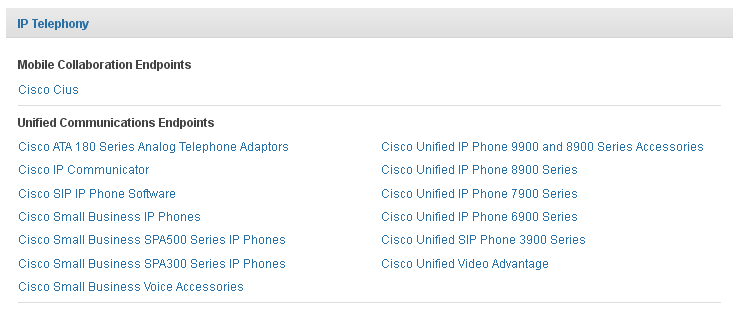
   2. IP Phone 9900 series link on CCO? gone? (Lelio Fulgenzi)
   3. Re: UCSC-C200m2-SFF and UCSC-C210M2-VCD3 (Lelio Fulgenzi)
   4. phone background (Sean Knight)
   5. Re: phone background (Ted Nugent)


----------------------------------------------------------------------

Message: 1
Date: Mon, 15 Oct 2012 12:21:40 +0200
From: Cristina Petre <[email protected]>
To: "[email protected]" <[email protected]>
Subject: [cisco-voip] UCSC-C200m2-SFF and UCSC-C210M2-VCD3
Message-ID: <[email protected]>
Content-Type: text/plain;       charset=us-ascii

Hi all,

How many server can I virtualize on these both UCS hardware?

Many thanks

Von meinem iPhone gesendet


------------------------------

Message: 2
Date: Mon, 15 Oct 2012 09:55:23 -0400 (EDT)
From: Lelio Fulgenzi <[email protected]>
To: "cisco-voip ([email protected])"
        <[email protected]>
Subject: [cisco-voip] IP Phone 9900 series link on CCO? gone?
Message-ID:
        <2143298527.37397.1350309323670.javamail.r...@squeaky.cs.uoguelph.ca>
Content-Type: text/plain; charset="utf-8"

anyone else notice that the IP Phone 9900 series link to the datasheets and
docs is gone?

http://www.cisco.com/en/US/products/sw/voicesw/products.html

only the accessories link appears (no phone information there)


---
Lelio Fulgenzi, B.A.
Senior Analyst (CCS) * University of Guelph * Guelph, Ontario N1G 2W1
(519) 824-4120 x56354 (519) 767-1060 FAX (ANNU)
^^^^^^^^^^^^^^^^^^^^^^^^^^^^^^^^^^^^^^^^^^^^^^^^^^^^^^^^^^^^^^^^^^^^^^
Cooking with unix is easy. You just sed it and forget it.
- LFJ (with apologies to Mr. Popeil)


-------------- next part --------------
An HTML attachment was scrubbed...
URL:
<https://puck.nether.net/pipermail/cisco-voip/attachments/20121015/3b014a02/attachment-0001.html>
-------------- next part --------------
A non-text attachment was scrubbed...
Name: no-9900.png
Type: image/png
Size: 8011 bytes
Desc: not available
URL:
<https://puck.nether.net/pipermail/cisco-voip/attachments/20121015/3b014a02/attachment-0001.png>

------------------------------

Message: 3
Date: Mon, 15 Oct 2012 10:01:52 -0400 (EDT)
From: Lelio Fulgenzi <[email protected]>
To: Cristina Petre <[email protected]>
Cc: [email protected]
Subject: Re: [cisco-voip] UCSC-C200m2-SFF and UCSC-C210M2-VCD3
Message-ID:
        <35050656.37485.1350309712347.javamail.r...@squeaky.cs.uoguelph.ca>
Content-Type: text/plain; charset="utf-8"

If you're looking for UC on UCS, you'll have to look at the OVA templates. Each
UC server, based on sizing, has CPU, disk and memory requirements.

You can find that information (or pointers) here:

http://docwiki.cisco.com/wiki/Unified_Communications_Virtualization_Downloads_%28including_OVA/OVF_Templates%29


I'm pretty sure, as long as you plan for overhead, i.e. memory and disk for
VMware & one spare CPU for connection group, you can stick as many as can fit.


Lelio


---
Lelio Fulgenzi, B.A.
Senior Analyst (CCS) * University of Guelph * Guelph, Ontario N1G 2W1
(519) 824-4120 x56354 (519) 767-1060 FAX (ANNU)
^^^^^^^^^^^^^^^^^^^^^^^^^^^^^^^^^^^^^^^^^^^^^^^^^^^^^^^^^^^^^^^^^^^^^^
Cooking with unix is easy. You just sed it and forget it.
- LFJ (with apologies to Mr. Popeil)


----- Original Message -----
From: "Cristina Petre" <[email protected]>
To: [email protected]
Sent: Monday, October 15, 2012 6:21:40 AM
Subject: [cisco-voip] UCSC-C200m2-SFF and UCSC-C210M2-VCD3

Hi all,

How many server can I virtualize on these both UCS hardware?

Many thanks

Von meinem iPhone gesendet
_______________________________________________
cisco-voip mailing list
[email protected]
https://puck.nether.net/mailman/listinfo/cisco-voip
-------------- next part --------------
An HTML attachment was scrubbed...
URL:
<https://puck.nether.net/pipermail/cisco-voip/attachments/20121015/0ce88447/attachment-0001.html>

------------------------------

Message: 4
Date: Mon, 15 Oct 2012 10:33:42 -0400
From: "Sean Knight" <[email protected]>
To: <[email protected]>
Subject: [cisco-voip] phone background
Message-ID:
        <[email protected]>
Content-Type: text/plain; charset="us-ascii"

Hello,  I have CUCM 7.1 and I uploaded pictures with the correct format
to the TFTP server in the desktops directory and can see them uploaded.


7945/7965

320x212

80x53

Desktops/320x212x16/


So now it says that I need to edit the List.XML file.  How do I do this?
And should I be able to make an .XML file for the particular phone type
or actually edit the existing List.XML file on the Linux server?


Any help is appreciated.


thanks


-------------- next part --------------
An HTML attachment was scrubbed...
URL:
<https://puck.nether.net/pipermail/cisco-voip/attachments/20121015/1aa610fb/attachment-0001.html>

------------------------------

Message: 5
Date: Mon, 15 Oct 2012 11:18:07 -0400
From: Ted Nugent <[email protected]>
To: Sean Knight <[email protected]>
Cc: [email protected]
Subject: Re: [cisco-voip] phone background
Message-ID:
        <CAHs2VYs3v65fq_6SPiYwrNceMY6gy+sXm=8akjn0qjb2f7r...@mail.gmail.com>
Content-Type: text/plain; charset="iso-8859-1"

You can download one that is allready there, using a tftp client, then edit
it and put it back in the same directory as the images you uploaded,
otherwise just edit this and upload it

<CiscoIPPhoneImageList>
<ImageItem Image="TFTP:Desktops/320x212x16/XXYYZZ-TN.png"
URL="TFTP:Desktops/320x212x16/XXYYZZ.png"/>
</CiscoIPPhoneImageList>


On Mon, Oct 15, 2012 at 10:33 AM, Sean Knight <[email protected]> wrote:

> Hello,  I have CUCM 7.1 and I uploaded pictures with the correct format to
> the TFTP server in the desktops directory and can see them uploaded.  ****
>
> ** **
>
> 7945/7965****
>
> 320x212****
>
> 80x53****
>
> Desktops/320x212x16/****
>
> ** **
>
> ** **
>
> So now it says that I need to edit the List.XML file.  How do I do this?
> And should I be able to make an .XML file for the particular phone type or
> actually edit the existing List.XML file on the Linux server?****
>
> ** **
>
> Any help is appreciated.****
>
> ** **
>
> ** **
>
> ** **
>
> thanks****
>
> ** **
>
> _______________________________________________
> cisco-voip mailing list
> [email protected]
> https://puck.nether.net/mailman/listinfo/cisco-voip
>
>
-------------- next part --------------
An HTML attachment was scrubbed...
URL:
<https://puck.nether.net/pipermail/cisco-voip/attachments/20121015/b9c0510b/attachment-0001.html>

------------------------------

_______________________________________________
cisco-voip mailing list
[email protected]
https://puck.nether.net/mailman/listinfo/cisco-voip


End of cisco-voip Digest, Vol 108, Issue 16
*******************************************