Send cisco-voip mailing list submissions to
        [email protected]
To subscribe or unsubscribe via the World Wide Web, visit
        https://puck.nether.net/mailman/listinfo/cisco-voip
or, via email, send a message with subject or body 'help' to
        [email protected]

You can reach the person managing the list at
        [email protected]

When replying, please edit your Subject line so it is more specific
than "Re: Contents of cisco-voip digest..."


Today's Topics:

   1. Re: Changing PUB's IP (ver 8.0.3) (Wes Sisk (wsisk))
   2. Re: Changing PUB's IP (ver 8.0.3) (Mike )
   3. Extension Mobility on DX650 (Ruben Trujillo)
   4. Re: Changing PUB's IP (ver 8.0.3) (Ryan Ratliff (rratliff))
   5. Re: Changing PUB's IP (ver 8.0.3) (Mike )
   6. Re: Upgrading from UCCX 5.0.2 to 7.0.2 Screen Pop not working
      (Grace Maximuangu)
   7. Re: Extension Mobility on DX650 (Scott Voll)
   8. Re: Extension Mobility on DX650 (Joe Martini)
   9. Re: Extension Mobility on DX650 (Ruben Trujillo)
  10. Re: Extension Mobility on DX650 (Ruben Trujillo)
  11. Re: Upgrading from UCCX 5.0.2 to 7.0.2 Screen Pop not     working
      (Anthony Holloway)


----------------------------------------------------------------------

Message: 1
Date: Tue, 27 Aug 2013 16:18:26 +0000
From: "Wes Sisk (wsisk)" <[email protected]>
To: Mike <[email protected]>
Cc: "<[email protected]>" <[email protected]>
Subject: Re: [cisco-voip] Changing PUB's IP (ver 8.0.3)
Message-ID:
        <[email protected]>
Content-Type: text/plain; charset="windows-1252"

Perhaps start here:
http://www.cisco.com/en/US/docs/voice_ip_comm/cucm/install/9_1_1/ipchange/ipchg911.html

changing IP on a crippled cluster (some servers off-line) I would generally
consider a recipe for disaster

I believe there are *many* fixes for the change IP feature in versions after
8.0.3.

-wes

On Aug 27, 2013, at 9:40 AM, Mike <[email protected]<mailto:[email protected]>> wrote:

What?s the ramifications of changing the publisher?s IP address while the subs
are offline?


_______________________________________________
cisco-voip mailing list
[email protected]<mailto:[email protected]>
https://puck.nether.net/mailman/listinfo/cisco-voip

-------------- next part --------------
An HTML attachment was scrubbed...
URL:
<https://puck.nether.net/pipermail/cisco-voip/attachments/20130827/8c05dd79/attachment-0001.html>

------------------------------

Message: 2
Date: Tue, 27 Aug 2013 12:28:42 -0400
From: "Mike " <[email protected]>
To: "'Wes Sisk \(wsisk\)'" <[email protected]>
Cc: [email protected]
Subject: Re: [cisco-voip] Changing PUB's IP (ver 8.0.3)
Message-ID: <[email protected]>
Content-Type: text/plain; charset="us-ascii"

I'm using a swing box to jump from 6.1.4 to 8.0.3 (on 7825H3) then to Vmware
but the client wants IP addresses changed. I'll have to change it back put
the cluster in a closed environment and then change IPs.


Thanks Wes!


From: cisco-voip [mailto:[email protected]] On Behalf Of
Wes Sisk (wsisk)
Sent: Tuesday, August 27, 2013 12:18 PM
To: Mike
Cc: <[email protected]>
Subject: Re: [cisco-voip] Changing PUB's IP (ver 8.0.3)


Perhaps start here:

http://www.cisco.com/en/US/docs/voice_ip_comm/cucm/install/9_1_1/ipchange/ip
chg911.html


changing IP on a crippled cluster (some servers off-line) I would generally
consider a recipe for disaster


I believe there are *many* fixes for the change IP feature in versions after
8.0.3.


-wes


On Aug 27, 2013, at 9:40 AM, Mike <[email protected]> wrote:


What's the ramifications of changing the publisher's IP address while the
subs are offline?


_______________________________________________
cisco-voip mailing list
 <mailto:[email protected]> [email protected]
 <https://puck.nether.net/mailman/listinfo/cisco-voip>
https://puck.nether.net/mailman/listinfo/cisco-voip


-------------- next part --------------
An HTML attachment was scrubbed...
URL:
<https://puck.nether.net/pipermail/cisco-voip/attachments/20130827/a27e51d3/attachment-0001.html>

------------------------------

Message: 3
Date: Tue, 27 Aug 2013 09:50:54 -0700
From: Ruben Trujillo <[email protected]>
To: "[email protected]" <[email protected]>
Subject: [cisco-voip] Extension Mobility on DX650
Message-ID:
        <eabbc65627a5ed4198d12ca1ad053a3a55c39e5...@nambx03.corp.adobe.com>
Content-Type: text/plain; charset="us-ascii"

Hello,

I have a DX650 and I'm trying to find out how to access Extension Mobility.
According to the Cisco documentation it does support it but I don't see the
option where the documentation says it should be.  I do have the device enabled
for this feature in CUCM.  Can anyone shed some light on this?

Thanks,
Ruben

[cid:[email protected]]

Ruben Trujillo
Telecom Engineer
Adobe

408.536.6006 (tel)
415.407.1646 (cell)
[email protected]<mailto:[email protected]>

345 Park Ave
San Jose, CA, 95110
www.adobe.com<http://www.adobe.com>


-------------- next part --------------
An HTML attachment was scrubbed...
URL:
<https://puck.nether.net/pipermail/cisco-voip/attachments/20130827/25abddc3/attachment-0001.html>
-------------- next part --------------
A non-text attachment was scrubbed...
Name: image001.png
Type: image/png
Size: 871 bytes
Desc: image001.png
URL:
<https://puck.nether.net/pipermail/cisco-voip/attachments/20130827/25abddc3/attachment-0001.png>

------------------------------

Message: 4
Date: Tue, 27 Aug 2013 17:28:40 +0000
From: "Ryan Ratliff (rratliff)" <[email protected]>
To: Mike <[email protected]>
Cc: "<[email protected]>" <[email protected]>
Subject: Re: [cisco-voip] Changing PUB's IP (ver 8.0.3)
Message-ID:
        <[email protected]>
Content-Type: text/plain; charset="windows-1252"

Are you planning to stop at 8.0(3) or just using that to get virtualized?

It's been stated before but your life will be much easier using the (supported)
jump upgrade to go to 9.1(2) virtualized without having to use a swing box.

-Ryan

On Aug 27, 2013, at 12:28 PM, Mike <[email protected]<mailto:[email protected]>>
wrote:

I?m using a swing box to jump from 6.1.4 to 8.0.3 (on 7825H3) then to Vmware
but the client wants IP addresses changed. I?ll have to change it back put the
cluster in a closed environment and then change IPs.

Thanks Wes!

From: cisco-voip
[mailto:[email protected]<mailto:[email protected]>]
 On Behalf Of Wes Sisk (wsisk)
Sent: Tuesday, August 27, 2013 12:18 PM
To: Mike
Cc: <[email protected]<mailto:[email protected]>>
Subject: Re: [cisco-voip] Changing PUB's IP (ver 8.0.3)

Perhaps start here:
http://www.cisco.com/en/US/docs/voice_ip_comm/cucm/install/9_1_1/ipchange/ipchg911.html

changing IP on a crippled cluster (some servers off-line) I would generally
consider a recipe for disaster

I believe there are *many* fixes for the change IP feature in versions after
8.0.3.

-wes

On Aug 27, 2013, at 9:40 AM, Mike <[email protected]<mailto:[email protected]>> wrote:

What?s the ramifications of changing the publisher?s IP address while the subs
are offline?


_______________________________________________
cisco-voip mailing list
[email protected]<mailto:[email protected]>
https://puck.nether.net/mailman/listinfo/cisco-voip

_______________________________________________
cisco-voip mailing list
[email protected]<mailto:[email protected]>
https://puck.nether.net/mailman/listinfo/cisco-voip

-------------- next part --------------
An HTML attachment was scrubbed...
URL:
<https://puck.nether.net/pipermail/cisco-voip/attachments/20130827/05e87b7c/attachment-0001.html>

------------------------------

Message: 5
Date: Tue, 27 Aug 2013 13:44:00 -0400
From: "Mike " <[email protected]>
To: "'Ryan Ratliff \(rratliff\)'" <[email protected]>
Cc: [email protected]
Subject: Re: [cisco-voip] Changing PUB's IP (ver 8.0.3)
Message-ID: <[email protected]>
Content-Type: text/plain; charset="us-ascii"

I know I tried to get them to jump to 9.1.(2), but they want to stay on 8.6.
I'm using 8.0.3 to avoid the USB drive issues with 7825H3's then going to
8.6 once in vmware.


From: cisco-voip [mailto:[email protected]] On Behalf Of
Ryan Ratliff (rratliff)
Sent: Tuesday, August 27, 2013 1:29 PM
To: Mike
Cc: <[email protected]>
Subject: Re: [cisco-voip] Changing PUB's IP (ver 8.0.3)


Are you planning to stop at 8.0(3) or just using that to get virtualized?


It's been stated before but your life will be much easier using the
(supported) jump upgrade to go to 9.1(2) virtualized without having to use a
swing box.


-Ryan


On Aug 27, 2013, at 12:28 PM, Mike <[email protected]> wrote:


I'm using a swing box to jump from 6.1.4 to 8.0.3 (on 7825H3) then to Vmware
but the client wants IP addresses changed. I'll have to change it back put
the cluster in a closed environment and then change IPs.


Thanks Wes!


From: cisco-voip [mailto:[email protected]] On Behalf Of
Wes Sisk (wsisk)
Sent: Tuesday, August 27, 2013 12:18 PM
To: Mike
Cc: <[email protected]>
Subject: Re: [cisco-voip] Changing PUB's IP (ver 8.0.3)


Perhaps start here:


<http://www.cisco.com/en/US/docs/voice_ip_comm/cucm/install/9_1_1/ipchange/i
pchg911.html>
http://www.cisco.com/en/US/docs/voice_ip_comm/cucm/install/9_1_1/ipchange/ip
chg911.html


changing IP on a crippled cluster (some servers off-line) I would generally
consider a recipe for disaster


I believe there are *many* fixes for the change IP feature in versions after
8.0.3.


-wes


On Aug 27, 2013, at 9:40 AM, Mike < <mailto:[email protected]> [email protected]>
wrote:


What's the ramifications of changing the publisher's IP address while the
subs are offline?


_______________________________________________
cisco-voip mailing list
 <mailto:[email protected]> [email protected]
 <https://puck.nether.net/mailman/listinfo/cisco-voip>
https://puck.nether.net/mailman/listinfo/cisco-voip


_______________________________________________
cisco-voip mailing list
[email protected]
https://puck.nether.net/mailman/listinfo/cisco-voip


-------------- next part --------------
An HTML attachment was scrubbed...
URL:
<https://puck.nether.net/pipermail/cisco-voip/attachments/20130827/ce4261d3/attachment-0001.html>

------------------------------

Message: 6
Date: Tue, 27 Aug 2013 14:01:01 -0400
From: Grace Maximuangu <[email protected]>
To: Anthony Holloway <[email protected]>
Cc: "[email protected]" <[email protected]>
Subject: Re: [cisco-voip] Upgrading from UCCX 5.0.2 to 7.0.2 Screen
        Pop not working
Message-ID:
        <[email protected]>
Content-Type: text/plain; charset="utf-8"

So after unchecking the ?Enable Condition?
Fired up CAD and placed a test call we ran into the same screen pop issues, and
the data field
it did not populate any of the data in the data field and there was no screen
pop, it did not error out either.
It?s obvious that 7x seems to be expecting a different variable, than what is
passed, and which is causing the account number not to be recognized. How do we
proceed then?
Any other ideas?  We can?t proceed with the upgrade if we don?t have a
resolution to this issue


:-:gm

Grace Maximuangu
Voice Solutions Engineer
Black Box Network Services
Cell: 213.268.6342
[email protected]<mailto:[email protected]>
www.blackbox.com<http://www.blackbox.com/>

[cid:[email protected]]

From: [email protected] [mailto:[email protected]] On Behalf Of Anthony
Holloway
Sent: Tuesday, August 27, 2013 8:23 AM
To: Grace Maximuangu
Cc: Ryan LaFountain (rlafount); [email protected]
Subject: Re: [cisco-voip] Upgrading from UCCX 5.0.2 to 7.0.2 Screen Pop not
working

Grace,
It's hard to say without digging into the CAD log files; however, at the most
basic level, there could have been a defect in CDA for UCCX 5x which was fixed
either in, or along the way to, UCCX 7x, and now it's affecting your
implementation.  This wouldn't be the first time an upgrade to UCCX has broken
a customer's environment.  Write Document step anyone?
I look forward to the results of disabling the rule all together.  Good luck.

On Tue, Aug 27, 2013 at 9:55 AM, Grace Maximuangu
<[email protected]<mailto:[email protected]>> wrote:
Anthony, Ryan,
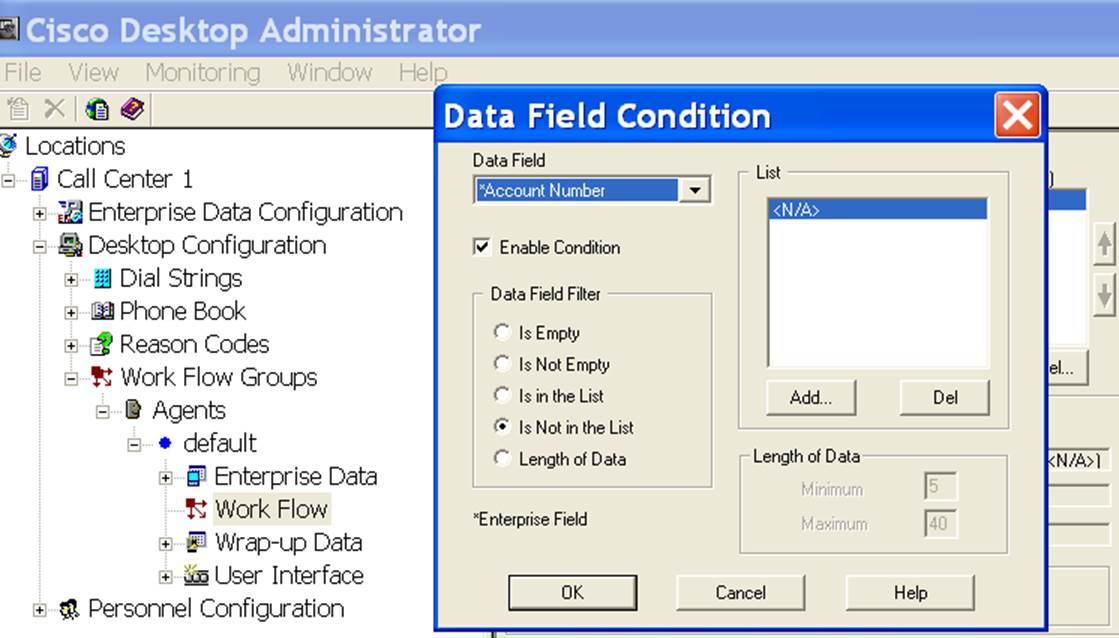
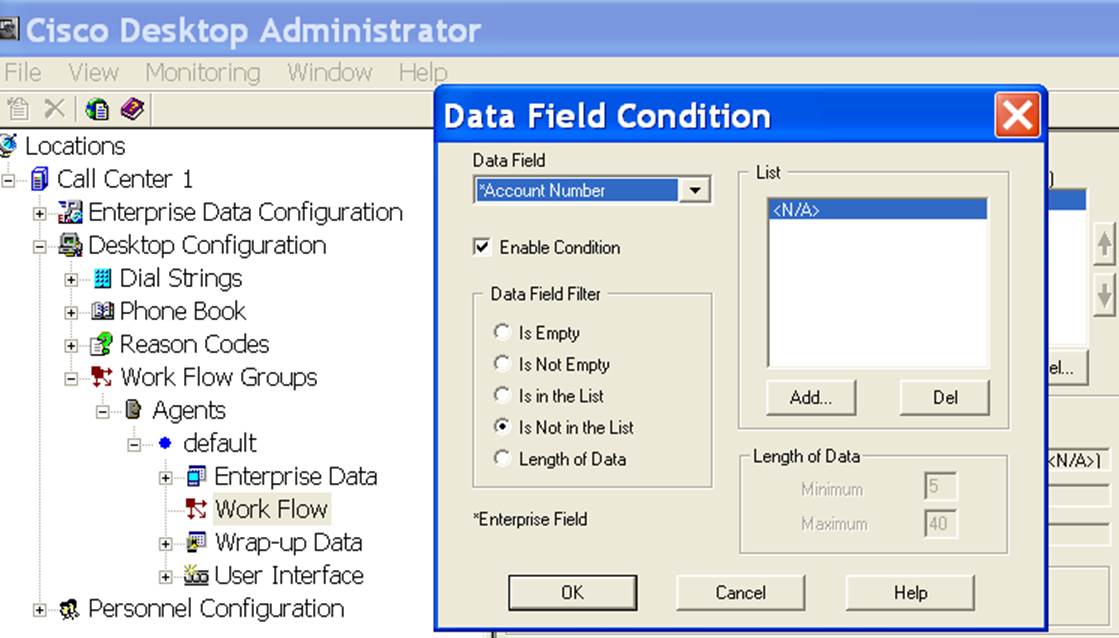
The interesting thing I found out is that ?rule to check for an Account Number
which IS NOT in a list, where the list is <NA>?
That is exactly how it is working in CCX 5.0, in the existing production
environment.
Is there a feature in 7.0.2 that probably is not accepting these values as they
are working fine in the previous version. I know the GUI?s look different
between the versions.
Perhaps it would help if you guys can explain why these values need to be
configured differently or are handled differently in 5x and the new 7x.
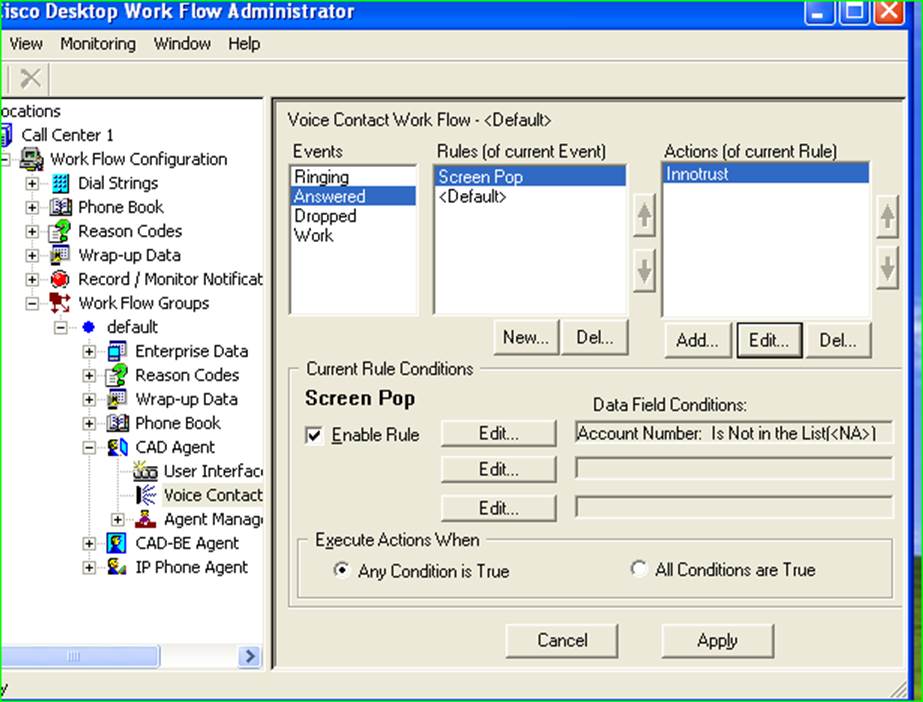
See Screenshot for Existing 5.0 environment, and that is working fine with no
issues

[cid:[email protected]]

:-:gm

Grace Maximuangu
Voice Solutions Engineer
Black Box Network Services
Cell: 213.268.6342<tel:213.268.6342>
[email protected]<mailto:[email protected]>
www.blackbox.com<http://www.blackbox.com/>

[cid:[email protected]]

From: [email protected]<mailto:[email protected]>
[mailto:[email protected]<mailto:[email protected]>] On Behalf Of Anthony
Holloway

Sent: Monday, August 26, 2013 10:59 AM
To: Grace Maximuangu
Cc: Ryan LaFountain (rlafount);
[email protected]<mailto:[email protected]>

Subject: Re: [cisco-voip] Upgrading from UCCX 5.0.2 to 7.0.2 Screen Pop not
working

HI Grace,

I have been watching your request to see if I could offer any assistance.
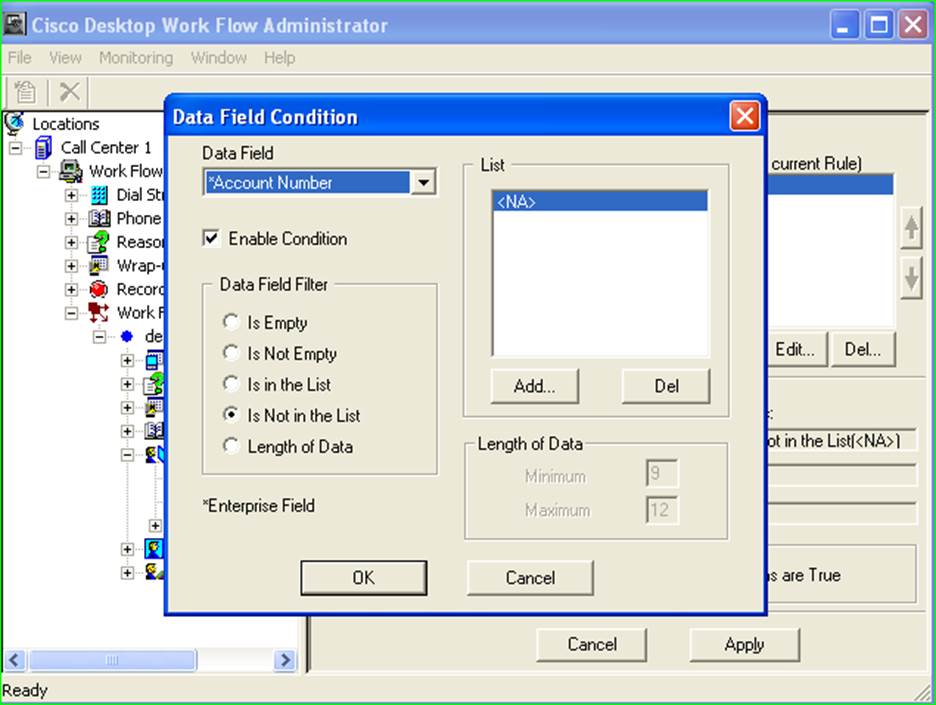
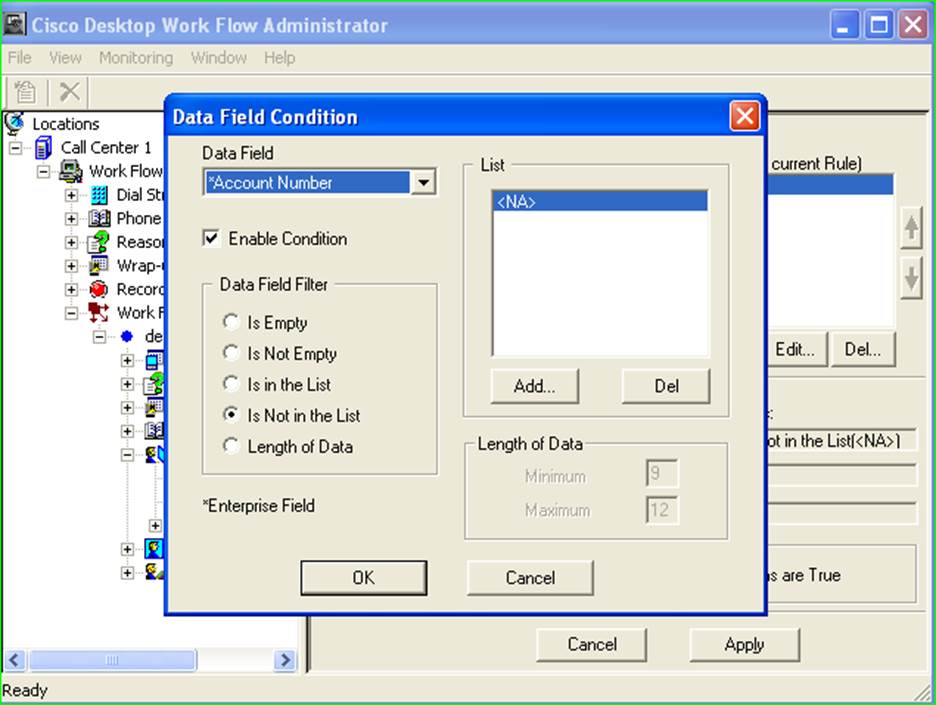
Today I see your screenshots, so thank you for that.  What is the logic behind
having a rule to check for an Account Number which IS NOT in a list, where the
list is <NA>?  Wouldn't just having no rule at all be more efficient and easier
to understand?  Perhaps it is this rule that is preventing your action from
happening.  Can you uncheck the "Enable Rule" checkbox to see if it will fire?

On Fri, Aug 23, 2013 at 3:12 PM, Grace Maximuangu
<[email protected]<mailto:[email protected]>> wrote:

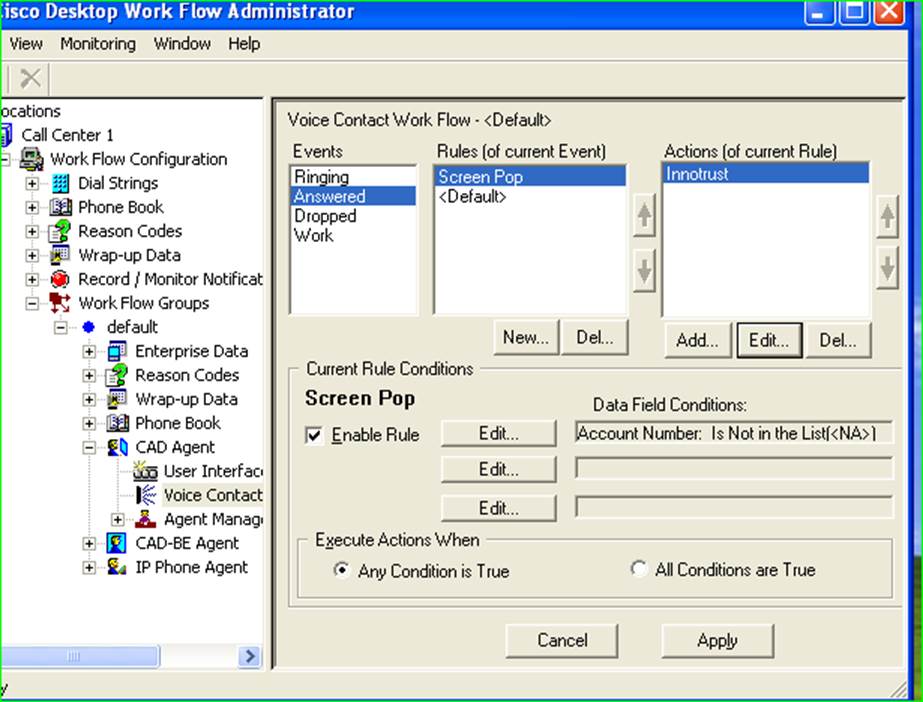
>>Goto>>>Voice Contact Workflow
>>Select Event >>>Answered
>>Rules of Event>>>Screen Pop
>>Action of Rule>>>Innotrust
[cid:[email protected]]

>>>Edit Rule Conditions>>>
[cid:[email protected]]

:-:gm

Grace Maximuangu
Voice Solutions Engineer
Black Box Network Services
Cell: 213.268.6342<tel:213.268.6342>
[email protected]<mailto:[email protected]>
www.blackbox.com<http://www.blackbox.com/>

[cid:[email protected]]

From: Ryan LaFountain (rlafount)
[mailto:[email protected]<mailto:[email protected]>]
Sent: Tuesday, August 20, 2013 7:36 AM
To: Grace Maximuangu;
[email protected]<mailto:[email protected]>
Subject: Re: [cisco-voip] Upgrading from UCCX 5.0.2 to 7.0.2 Screen Pop not
working

Hi Grace,

This sounds like two issues here. The first is that the workflow configuration
went missing during the upgrade to 7.0(2). There have been a couple of issues
around this, some known like those listed on page 27 in the link below and some
unknown where we've never been able to get to the bottom of why workflow
information wasn't retained after the upgrade.

http://www.cisco.com/en/US/docs/voice_ip_comm/cust_contact/contact_center/crs/express_7_0/installation/guide/cad702ccxig-cm.pdf

The second issue seems to be that even after you've recreated the workflow, the
screen pop doesn't work. Can you describe or send screenshots of what the
workflow configuration is and what the agent is experiencing when it 'does not
work'?

Thank you,

Ryan LaFountain
Unified Contact Center
Cisco Services
Direct: +1 919 392 9898<tel:%2B1%20919%20392%209898>
Email: [email protected]<mailto:[email protected]>
Hours: M ? F 9:00am ? 5:00pm

From: Grace Maximuangu
<[email protected]<mailto:[email protected]>>
Date: Monday, August 19, 2013 4:14 PM
To: "[email protected]<mailto:[email protected]>"
<[email protected]<mailto:[email protected]>>
Subject: [cisco-voip] Upgrading from UCCX 5.0.2 to 7.0.2 Screen Pop not working

Please advice, the after the upgrade, workflows had to be manually added, but
Screen Pop does not work, I just saw a post on Cisco UCCX forum, please has
anyone ran into the issue and how did this get resolved. And any references on
how to solve this issue would be highly appreciated


CAD is only capable of passing enterprise data to another application. It
cannot perform database lookups on its own. Your options are:

1)    If it is browser-based, you can execute an HTTP POST or GET within the
integrated browser.

2)    If the application will accept it, you can pass an IPC call
(Inter-Process Communication) to it. This is a formatted UDP packet that CAD
would send, typically on a loopback address, to a port the other application is
listening on.

3)    If the action can be repeated with a consistent series of key strokes,
you can call a macro to replay that key sequence, effectively paste the data
into the correct field, and execute the search.


You can use the Cisco Desktop Administrator User Guide for CAD 6.6 for Unified
CM<http://www.cisco.com/en/US/docs/voice_ip_comm/cust_contact/contact_center/crs/express_7_0/user/guide/cda66ug-cm.pdf>
 as documentation on how to setup workflows within CAD.


You will need to use Enterprise Data to pass the caller ID information (or
anything else you want CAD to get). This has been covered on the forum many
times. Here is one example to get you
started:https://supportforums.cisco.com/message/1047577#1047577

Please see the post from Cisco forum

:-:gm

Grace Maximuangu
Voice Solutions Engineer
Black Box Network Services
[cid:[email protected]]


________________________________
This email and any files transmitted with it are confidential and are intended
for the sole use of the individual to whom they are addressed. Black Box
Corporation reserves the right to scan all e-mail traffic for restricted
content and to monitor all e-mail in general. If you are not the intended
recipient or you have received this email in error, any use, dissemination or
forwarding of this email is strictly prohibited. If you have received this
email in error, please notify the sender by replying to this email.

_______________________________________________
cisco-voip mailing list
[email protected]<mailto:[email protected]>
https://puck.nether.net/mailman/listinfo/cisco-voip


-------------- next part --------------
An HTML attachment was scrubbed...
URL:
<https://puck.nether.net/pipermail/cisco-voip/attachments/20130827/0f257414/attachment-0001.html>
-------------- next part --------------
A non-text attachment was scrubbed...
Name: image004.jpg
Type: image/jpeg
Size: 85064 bytes
Desc: image004.jpg
URL:
<https://puck.nether.net/pipermail/cisco-voip/attachments/20130827/0f257414/attachment-0005.jpg>
-------------- next part --------------
A non-text attachment was scrubbed...
Name: image005.jpg
Type: image/jpeg
Size: 4336 bytes
Desc: image005.jpg
URL:
<https://puck.nether.net/pipermail/cisco-voip/attachments/20130827/0f257414/attachment-0006.jpg>
-------------- next part --------------
A non-text attachment was scrubbed...
Name: image006.jpg
Type: image/jpeg
Size: 87636 bytes
Desc: image006.jpg
URL:
<https://puck.nether.net/pipermail/cisco-voip/attachments/20130827/0f257414/attachment-0007.jpg>
-------------- next part --------------
A non-text attachment was scrubbed...
Name: image007.jpg
Type: image/jpeg
Size: 75220 bytes
Desc: image007.jpg
URL:
<https://puck.nether.net/pipermail/cisco-voip/attachments/20130827/0f257414/attachment-0008.jpg>
-------------- next part --------------
A non-text attachment was scrubbed...
Name: image002.jpg
Type: image/jpeg
Size: 4336 bytes
Desc: image002.jpg
URL:
<https://puck.nether.net/pipermail/cisco-voip/attachments/20130827/0f257414/attachment-0009.jpg>

------------------------------

Message: 7
Date: Tue, 27 Aug 2013 11:03:14 -0700
From: Scott Voll <[email protected]>
To: Ruben Trujillo <[email protected]>
Cc: "[email protected]" <[email protected]>
Subject: Re: [cisco-voip] Extension Mobility on DX650
Message-ID:
        <cahgd+38qx6wcdq6_yrjm3vho28p8tzsr76t4pbj2wc4onhf...@mail.gmail.com>
Content-Type: text/plain; charset="windows-1252"

im assuming that the device has the service enabled on it or it's an
enterprise service?

Scott


On Tue, Aug 27, 2013 at 9:50 AM, Ruben Trujillo <[email protected]> wrote:

> Hello,****
>
> ** **
>
> I have a DX650 and I?m trying to find out how to access Extension
> Mobility.  According to the Cisco documentation it does support it but I
> don?t see the option where the documentation says it should be.  I do have
> the device enabled for this feature in CUCM.  Can anyone shed some light on
> this?****
>
> ** **
>
> Thanks,****
>
> Ruben****
>
> ** **
>
> [image: cid:[email protected]]****
>
> *Ruben Trujillo*
> Telecom Engineer
> Adobe****
>
> 408.536.6006 (tel)
> 415.407.1646 (cell)****
>
> [email protected]****
>
> 345 Park Ave
> San Jose, CA, 95110
> www.adobe.com****
>
>  ****
>
> ** **
>
> ** **
>
> _______________________________________________
> cisco-voip mailing list
> [email protected]
> https://puck.nether.net/mailman/listinfo/cisco-voip
>
>
-------------- next part --------------
An HTML attachment was scrubbed...
URL:
<https://puck.nether.net/pipermail/cisco-voip/attachments/20130827/4d2a6070/attachment-0001.html>
-------------- next part --------------
A non-text attachment was scrubbed...
Name: image001.png
Type: image/png
Size: 871 bytes
Desc: not available
URL:
<https://puck.nether.net/pipermail/cisco-voip/attachments/20130827/4d2a6070/attachment-0001.png>

------------------------------

Message: 8
Date: Tue, 27 Aug 2013 14:39:45 -0400
From: Joe Martini <[email protected]>
To: Ruben Trujillo <[email protected]>
Cc: "[email protected] VOIP" <[email protected]>
Subject: Re: [cisco-voip] Extension Mobility on DX650
Message-ID: <[email protected]>
Content-Type: text/plain; charset="windows-1252"

Ruben,

Extension Mobility (EM) on the DX650 has to be turned on in one additional
place on the device by setting "Multi-User: Enabled".  This will cause the
login option to appear on the phone.  This is supposed to be changed in later
releases.  Once Multi-User has been enabled you can access EM from Settings >
Personal > Extension Mobility or from the lock screen "Sign in as New User".

Joe


On Aug 27, 2013, at 2:03 PM, Scott Voll <[email protected]> wrote:

im assuming that the device has the service enabled on it or it's an enterprise
service?

Scott


On Tue, Aug 27, 2013 at 9:50 AM, Ruben Trujillo <[email protected]> wrote:
Hello,


I have a DX650 and I?m trying to find out how to access Extension Mobility.
According to the Cisco documentation it does support it but I don?t see the
option where the documentation says it should be.  I do have the device enabled
for this feature in CUCM.  Can anyone shed some light on this?


Thanks,

Ruben


<image001.png>

Ruben Trujillo
Telecom Engineer
Adobe

408.536.6006 (tel)
415.407.1646 (cell)

[email protected]

345 Park Ave
San Jose, CA, 95110
www.adobe.com


_______________________________________________
cisco-voip mailing list
[email protected]
https://puck.nether.net/mailman/listinfo/cisco-voip


_______________________________________________
cisco-voip mailing list
[email protected]
https://puck.nether.net/mailman/listinfo/cisco-voip

-------------- next part --------------
An HTML attachment was scrubbed...
URL:
<https://puck.nether.net/pipermail/cisco-voip/attachments/20130827/cdf8e375/attachment-0001.html>

------------------------------

Message: 9
Date: Tue, 27 Aug 2013 12:04:42 -0700
From: Ruben Trujillo <[email protected]>
To: Scott Voll <[email protected]>
Cc: "[email protected]" <[email protected]>
Subject: Re: [cisco-voip] Extension Mobility on DX650
Message-ID:
        <eabbc65627a5ed4198d12ca1ad053a3a55c39e5...@nambx03.corp.adobe.com>
Content-Type: text/plain; charset="us-ascii"

This is an enterprise service.

Thanks,
Ruben Trujillo
IT Telecom

From: Scott Voll [mailto:[email protected]]
Sent: Tuesday, August 27, 2013 11:03 AM
To: Ruben Trujillo
Cc: [email protected]
Subject: Re: [cisco-voip] Extension Mobility on DX650

im assuming that the device has the service enabled on it or it's an enterprise
service?

Scott

On Tue, Aug 27, 2013 at 9:50 AM, Ruben Trujillo
<[email protected]<mailto:[email protected]>> wrote:
Hello,

I have a DX650 and I'm trying to find out how to access Extension Mobility.
According to the Cisco documentation it does support it but I don't see the
option where the documentation says it should be.  I do have the device enabled
for this feature in CUCM.  Can anyone shed some light on this?

Thanks,
Ruben

[cid:[email protected]]

Ruben Trujillo
Telecom Engineer
Adobe

408.536.6006<tel:408.536.6006> (tel)
415.407.1646<tel:415.407.1646> (cell)
[email protected]<mailto:[email protected]>

345 Park Ave
San Jose, CA, 95110
www.adobe.com<http://www.adobe.com>


_______________________________________________
cisco-voip mailing list
[email protected]<mailto:[email protected]>
https://puck.nether.net/mailman/listinfo/cisco-voip

-------------- next part --------------
An HTML attachment was scrubbed...
URL:
<https://puck.nether.net/pipermail/cisco-voip/attachments/20130827/be130702/attachment-0001.html>
-------------- next part --------------
A non-text attachment was scrubbed...
Name: image001.png
Type: image/png
Size: 871 bytes
Desc: image001.png
URL:
<https://puck.nether.net/pipermail/cisco-voip/attachments/20130827/be130702/attachment-0001.png>

------------------------------

Message: 10
Date: Tue, 27 Aug 2013 12:06:07 -0700
From: Ruben Trujillo <[email protected]>
To: Joe Martini <[email protected]>
Cc: "[email protected] VOIP" <[email protected]>
Subject: Re: [cisco-voip] Extension Mobility on DX650
Message-ID:
        <eabbc65627a5ed4198d12ca1ad053a3a55c39e5...@nambx03.corp.adobe.com>
Content-Type: text/plain; charset="us-ascii"

Joe,

I read about that feature but didn't see anything that stated that this feature
must be turned on in order for regular EM to work.  I'll turn it on and see
what happens.

Thanks,
Ruben Trujillo
IT Telecom

From: Joe Martini [mailto:[email protected]]
Sent: Tuesday, August 27, 2013 11:40 AM
To: Ruben Trujillo
Cc: [email protected] VOIP; Scott Voll
Subject: Re: [cisco-voip] Extension Mobility on DX650

Ruben,

Extension Mobility (EM) on the DX650 has to be turned on in one additional
place on the device by setting "Multi-User: Enabled".  This will cause the
login option to appear on the phone.  This is supposed to be changed in later
releases.  Once Multi-User has been enabled you can access EM from Settings >
Personal > Extension Mobility or from the lock screen "Sign in as New User".

Joe


On Aug 27, 2013, at 2:03 PM, Scott Voll
<[email protected]<mailto:[email protected]>> wrote:

im assuming that the device has the service enabled on it or it's an enterprise
service?

Scott

On Tue, Aug 27, 2013 at 9:50 AM, Ruben Trujillo
<[email protected]<mailto:[email protected]>> wrote:
Hello,

I have a DX650 and I'm trying to find out how to access Extension Mobility.
According to the Cisco documentation it does support it but I don't see the
option where the documentation says it should be.  I do have the device enabled
for this feature in CUCM.  Can anyone shed some light on this?

Thanks,
Ruben

<image001.png>

Ruben Trujillo
Telecom Engineer
Adobe

408.536.6006<tel:408.536.6006> (tel)
415.407.1646<tel:415.407.1646> (cell)
[email protected]<mailto:[email protected]>

345 Park Ave
San Jose, CA, 95110
www.adobe.com<http://www.adobe.com/>


_______________________________________________
cisco-voip mailing list
[email protected]<mailto:[email protected]>
https://puck.nether.net/mailman/listinfo/cisco-voip

_______________________________________________
cisco-voip mailing list
[email protected]<mailto:[email protected]>
https://puck.nether.net/mailman/listinfo/cisco-voip

-------------- next part --------------
An HTML attachment was scrubbed...
URL:
<https://puck.nether.net/pipermail/cisco-voip/attachments/20130827/c1f2468c/attachment-0001.html>

------------------------------

Message: 11
Date: Tue, 27 Aug 2013 14:46:49 -0500
From: Anthony Holloway <[email protected]>
To: Grace Maximuangu <[email protected]>
Cc: "[email protected]" <[email protected]>
Subject: Re: [cisco-voip] Upgrading from UCCX 5.0.2 to 7.0.2 Screen
        Pop not working
Message-ID:
        <cacrcjogvixlxa6zsycvwcu4or_1tsidosywlj1ydkbbcu+0...@mail.gmail.com>
Content-Type: text/plain; charset="utf-8"

Asking a basic question here: but it sounds like you have parallel systems
(5x and 7x), and are you connecting to the UCCX 7x with a CAD 7x client,
and not an older CAD 5x client?

Also, I don't think you have said what exactly your InnoTrust Action is
doing, or the type of Action that it is.  E.g., It is a Macro Action that
is sending keystrokes to Excel.

The first thing I would do is determine if the problem was with CAD firing
the event.  I would do that by creating a new Work Flow group from scratch,
create a new Voice Contact workflow for Answered, skip the rule, create the
Action for Agent Notification (this is a simple Action and requires no
external apps to work), and finally assign a test Agent to the new Work
Flow group in CDA Web Administration.  If you cannot even get that simple
of a solution working, then your problem is either with the upgrade, or
with your workstations.  You could try to reinstall the client, or
re-perform the upgrade.  Do you know how to turn up debug level tracing in
CAD?  If so, feel free to capture the logs upon Answering a call, to see
what the logs say.

Lastly, whether this ends up being the problem or not, I would say just
remove your rule (<NA> List) as it's doing nothing positive and only
serving up confusion.

I hope that's all helpful information.  And I didn't mean to take over for
Ryan, it just seemed like he was busy and I saw an opportunity to ask a few
questions.  I look forward to your response.


On Tue, Aug 27, 2013 at 1:01 PM, Grace Maximuangu <
[email protected]> wrote:

> So after unchecking the ?Enable Condition?****
>
> Fired up CAD and placed a test call we ran into the same screen pop
> issues, and the data field****
>
> it did not populate any of the data in the data field and there was no
> screen pop, it did not error out either.****
>
> It?s obvious that 7x seems to be expecting a different variable, than what
> is passed, and which is causing the account number not to be recognized.
> How do we proceed then?****
>
> Any other ideas?  We can?t proceed with the upgrade if we don?t have a
> resolution to this issue****
>
> ** **
>
> ** **
>
> :-:gm****
>
> ** **
>
> Grace Maximuangu****
>
> Voice Solutions Engineer****
>
> *Black Box Network Services*
>
> Cell: 213.268.6342****
>
> [email protected]****
>
> www.blackbox.com ****
>
> ** **
>
> [image: bbox logo.JPG]****
>
> ** **
>
> *From:* [email protected] [mailto:[email protected]] *On Behalf Of
> *Anthony
> Holloway
> *Sent:* Tuesday, August 27, 2013 8:23 AM
>
> *To:* Grace Maximuangu
> *Cc:* Ryan LaFountain (rlafount); [email protected]
> *Subject:* Re: [cisco-voip] Upgrading from UCCX 5.0.2 to 7.0.2 Screen Pop
> not working****
>
> ** **
>
> Grace,****
>
> It's hard to say without digging into the CAD log files; however, at the
> most basic level, there could have been a defect in CDA for UCCX 5x which
> was fixed either in, or along the way to, UCCX 7x, and now it's affecting
> your implementation.  This wouldn't be the first time an upgrade to UCCX
> has broken a customer's environment.  Write Document step anyone?****
>
> I look forward to the results of disabling the rule all together.  Good
> luck.****
>
> ** **
>
> On Tue, Aug 27, 2013 at 9:55 AM, Grace Maximuangu <
> [email protected]> wrote:****
>
> Anthony, Ryan,****
>
> The interesting thing I found out is that ?rule to check for an Account
> Number which IS NOT in a list, where the list is <NA>?****
>
> That is exactly how it is working in CCX 5.0, in the existing production
> environment.****
>
> Is there a feature in 7.0.2 that probably is not accepting these values as
> they are working fine in the previous version. I know the GUI?s look
> different between the versions.****
>
> Perhaps it would help if you guys can explain why these values need to be
> configured differently or are handled differently in 5x and the new 7x.***
> *
>
> See Screenshot for Existing 5.0 environment, and that is working fine with
> no issues****
>
>  ****
>
> ****
>
>  ****
>
> :-:gm****
>
>  ****
>
> Grace Maximuangu****
>
> Voice Solutions Engineer****
>
> *Black Box Network Services*****
>
> Cell: 213.268.6342****
>
> [email protected]****
>
> www.blackbox.com ****
>
>  ****
>
> [image: bbox logo.JPG]****
>
>  ****
>
> *From:* [email protected] [mailto:[email protected]] *On Behalf Of
> *Anthony
> Holloway****
>
>
> *Sent:* Monday, August 26, 2013 10:59 AM
> *To:* Grace Maximuangu****
>
> *Cc:* Ryan LaFountain (rlafount); [email protected]****
>
>
> *Subject:* Re: [cisco-voip] Upgrading from UCCX 5.0.2 to 7.0.2 Screen Pop
> not working****
>
>  ****
>
> HI Grace,
>
> I have been watching your request to see if I could offer any assistance.
> Today I see your screenshots, so thank you for that.  What is the logic
> behind having a rule to check for an Account Number which IS NOT in a list,
> where the list is <NA>?  Wouldn't just having no rule at all be more
> efficient and easier to understand?  Perhaps it is this rule that is
> preventing your action from happening.  Can you uncheck the "Enable Rule"
> checkbox to see if it will fire?****
>
>  ****
>
> On Fri, Aug 23, 2013 at 3:12 PM, Grace Maximuangu <
> [email protected]> wrote:****
>
>  ****
>
> >>Goto>>>Voice Contact Workflow****
>
> >>Select Event >>>Answered****
>
> >>Rules of Event>>>Screen Pop****
>
> >>Action of Rule>>>Innotrust****
>
> ****
>
>  ****
>
> >>>Edit Rule Conditions>>>****
>
> ****
>
>  ****
>
> :-:gm****
>
>  ****
>
> Grace Maximuangu****
>
> Voice Solutions Engineer****
>
> *Black Box Network Services*****
>
> Cell: 213.268.6342****
>
> [email protected]****
>
> www.blackbox.com ****
>
>  ****
>
> [image: bbox logo.JPG]****
>
>  ****
>
> *From:* Ryan LaFountain (rlafount) [mailto:[email protected]]
> *Sent:* Tuesday, August 20, 2013 7:36 AM
> *To:* Grace Maximuangu; [email protected]****
>
> *Subject:* Re: [cisco-voip] Upgrading from UCCX 5.0.2 to 7.0.2 Screen Pop
> not working****
>
>  ****
>
> Hi Grace, ****
>
>  ****
>
> This sounds like two issues here. The first is that the workflow
> configuration went missing during the upgrade to 7.0(2). There have been a
> couple of issues around this, some known like those listed on page 27 in
> the link below and some unknown where we've never been able to get to the
> bottom of why workflow information wasn't retained after the upgrade. ****
>
>  ****
>
>
> http://www.cisco.com/en/US/docs/voice_ip_comm/cust_contact/contact_center/crs/express_7_0/installation/guide/cad702ccxig-cm.pdf
> ****
>
>  ****
>
> The second issue seems to be that even after you've recreated the
> workflow, the screen pop doesn't work. Can you describe or send screenshots
> of what the workflow configuration is and what the agent is experiencing
> when it 'does not work'? ****
>
>  ****
>
> Thank you, ****
>
>  ****
>
> Ryan LaFountain****
>
> Unified Contact Center****
>
> Cisco Services****
>
> Direct: +1 919 392 9898****
>
> Email: [email protected]****
>
> Hours: M ? F 9:00am ? 5:00pm****
>
>  ****
>
> *From: *Grace Maximuangu <[email protected]>
> *Date: *Monday, August 19, 2013 4:14 PM
> *To: *"[email protected]" <[email protected]>
> *Subject: *[cisco-voip] Upgrading from UCCX 5.0.2 to 7.0.2 Screen Pop not
> working****
>
>  ****
>
> Please advice, the after the upgrade, workflows had to be manually added,
> but Screen Pop does not work, I just saw a post on Cisco UCCX forum, please
> has anyone ran into the issue and how did this get resolved. And any
> references on how to solve this issue would be highly appreciated****
>
>  ****
>
> CAD is only capable of passing enterprise data to another application. It
> cannot perform database lookups on its own. Your options are:****
>
> 1)    If it is browser-based, you can execute an HTTP POST or GET within
> the integrated browser.****
>
> 2)    If the application will accept it, you can pass an IPC call
> (Inter-Process Communication) to it. This is a formatted UDP packet that
> CAD would send, typically on a loopback address, to a port the other
> application is listening on.****
>
> 3)    If the action can be repeated with a consistent series of key
> strokes, you can call a macro to replay that key sequence, effectively
> paste the data into the correct field, and execute the search.****
>
>  ****
>
> You can use the Cisco Desktop Administrator User Guide for CAD 6.6 for
> Unified
> CM<http://www.cisco.com/en/US/docs/voice_ip_comm/cust_contact/contact_center/crs/express_7_0/user/guide/cda66ug-cm.pdf>
>  as
> documentation on how to setup workflows within CAD.****
>
>  ****
>
> You will need to use Enterprise Data to pass the caller ID information (or
> anything else you want CAD to get). This has been covered on the forum many
> times. Here is one example to get you started:
> https://supportforums.cisco.com/message/1047577#1047577****
>
>  ****
>
> Please see the post from Cisco forum ****
>
>  ****
>
> :-:gm****
>
>  ****
>
> Grace Maximuangu****
>
> Voice Solutions Engineer****
>
> *Black Box Network Services*****
>
> [image: bbox logo.JPG]****
>
>  ****
>
>  ****
> ------------------------------
>
> This email and any files transmitted with it are confidential and are
> intended for the sole use of the individual to whom they are addressed.
> Black Box Corporation reserves the right to scan all e-mail traffic for
> restricted content and to monitor all e-mail in general. If you are not the
> intended recipient or you have received this email in error, any use,
> dissemination or forwarding of this email is strictly prohibited. If you
> have received this email in error, please notify the sender by replying to
> this email.****
>
>
> _______________________________________________
> cisco-voip mailing list
> [email protected]
> https://puck.nether.net/mailman/listinfo/cisco-voip****
>
>  ****
>
> ** **
>
-------------- next part --------------
An HTML attachment was scrubbed...
URL:
<https://puck.nether.net/pipermail/cisco-voip/attachments/20130827/55e3578b/attachment-0001.html>
-------------- next part --------------
A non-text attachment was scrubbed...
Name: image005.jpg
Type: image/jpeg
Size: 4336 bytes
Desc: not available
URL:
<https://puck.nether.net/pipermail/cisco-voip/attachments/20130827/55e3578b/attachment-0005.jpg>
-------------- next part --------------
A non-text attachment was scrubbed...
Name: image007.jpg
Type: image/jpeg
Size: 75220 bytes
Desc: not available
URL:
<https://puck.nether.net/pipermail/cisco-voip/attachments/20130827/55e3578b/attachment-0006.jpg>
-------------- next part --------------
A non-text attachment was scrubbed...
Name: image006.jpg
Type: image/jpeg
Size: 87636 bytes
Desc: not available
URL:
<https://puck.nether.net/pipermail/cisco-voip/attachments/20130827/55e3578b/attachment-0007.jpg>
-------------- next part --------------
A non-text attachment was scrubbed...
Name: image002.jpg
Type: image/jpeg
Size: 4336 bytes
Desc: not available
URL:
<https://puck.nether.net/pipermail/cisco-voip/attachments/20130827/55e3578b/attachment-0008.jpg>
-------------- next part --------------
A non-text attachment was scrubbed...
Name: image004.jpg
Type: image/jpeg
Size: 85064 bytes
Desc: not available
URL:
<https://puck.nether.net/pipermail/cisco-voip/attachments/20130827/55e3578b/attachment-0009.jpg>

------------------------------

Subject: Digest Footer

_______________________________________________
cisco-voip mailing list
[email protected]
https://puck.nether.net/mailman/listinfo/cisco-voip


------------------------------

End of cisco-voip Digest, Vol 118, Issue 25
*******************************************