Script 'mail_helper' called by obssrc
Hello community,

here is the log from the commit of package python-qtconsole for
openSUSE:Factory checked in at 2021-11-15 15:26:41
++++++++++++++++++++++++++++++++++++++++++++++++++++++++++++++++++++++++
Comparing /work/SRC/openSUSE:Factory/python-qtconsole (Old)
 and      /work/SRC/openSUSE:Factory/.python-qtconsole.new.1890 (New)
++++++++++++++++++++++++++++++++++++++++++++++++++++++++++++++++++++++++
Package is "python-qtconsole"
Mon Nov 15 15:26:41 2021 rev:20 rq:931397 version:5.2.0
Changes:
--------
--- /work/SRC/openSUSE:Factory/python-qtconsole/python-qtconsole.changes
2021-10-29 22:35:29.415710608 +0200
+++
/work/SRC/openSUSE:Factory/.python-qtconsole.new.1890/python-qtconsole.changes
2021-11-15 15:28:25.701857575 +0100
@@ -1,0 +2,7 @@
+Sun Nov 14 14:14:46 UTC 2021 - Ben Greiner <[email protected]>
+
+- Update to version 5.2.0
+ * Fix hidden execution requests.
+ * Fix ANSI code for erase line.
+
+-------------------------------------------------------------------
Old:
----
qtconsole-5.1.1.tar.gz
New:
----
qtconsole-5.2.0.tar.gz
++++++++++++++++++++++++++++++++++++++++++++++++++++++++++++++++++++++++
Other differences:
------------------
++++++ python-qtconsole.spec ++++++
--- /var/tmp/diff_new_pack.VEfeeQ/_old 2021-11-15 15:28:26.117857691 +0100
+++ /var/tmp/diff_new_pack.VEfeeQ/_new 2021-11-15 15:28:26.121857693 +0100
@@ -19,7 +19,7 @@
%{?!python_module:%define python_module() python-%{**} python3-%{**}}
%define skip_python2 1
Name: python-qtconsole
-Version: 5.1.1
+Version: 5.2.0
Release: 0
Summary: Jupyter Qt console
License: BSD-3-Clause
++++++ qtconsole-5.1.1.tar.gz -> qtconsole-5.2.0.tar.gz ++++++
diff -urN '--exclude=CVS' '--exclude=.cvsignore' '--exclude=.svn'
'--exclude=.svnignore' old/qtconsole-5.1.1/PKG-INFO new/qtconsole-5.2.0/PKG-INFO
--- old/qtconsole-5.1.1/PKG-INFO 2021-06-29 19:20:59.933856500 +0200
+++ new/qtconsole-5.2.0/PKG-INFO 2021-11-08 18:18:56.063938900 +0100
@@ -1,12 +1,88 @@
Metadata-Version: 2.1
Name: qtconsole
-Version: 5.1.1
+Version: 5.2.0
Summary: Jupyter Qt console
Home-page: http://jupyter.org
Author: Jupyter Development Team
Author-email: [email protected]
Maintainer: Spyder Development Team
License: BSD
+Description: # Jupyter QtConsole
+
+ 
+ 
+ 
+ [](https://coveralls.io/github/jupyter/qtconsole?branch=master)
+ [](https://qtconsole.readthedocs.io/en/stable/)
+ [](https://groups.google.com/forum/#!forum/jupyter)
+
+ A rich Qt-based console for working with Jupyter kernels,
+ supporting rich media output, session export, and more.
+
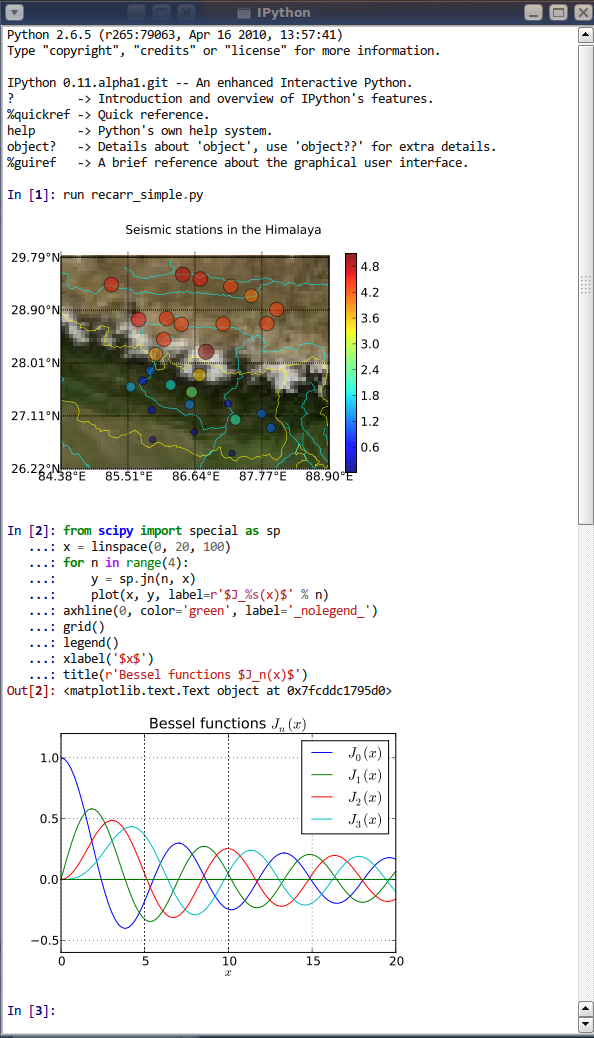
+ The Qtconsole is a very lightweight application that largely feels
like a terminal, but
+ provides a number of enhancements only possible in a GUI, such as
inline
+ figures, proper multiline editing with syntax highlighting, graphical
calltips,
+ and more.
+
+
+
+ ## Install Qtconsole
+ The Qtconsole requires Python bindings for Qt, such as
[PyQt5](http://www.riverbankcomputing.com/software/pyqt/intro),
+ [PyQt4](https://www.riverbankcomputing.com/software/pyqt/download),
+ or [PySide](http://pyside.github.io/docs/pyside).
+
+ Although [pip](https://pypi.python.org/pypi/pip) and
+ [conda](http://conda.pydata.org/docs) may be used to install the
Qtconsole, conda
+ is simpler to use since it automatically installs PyQt5. Alternatively,
+ the Qtconsole installation with pip needs additional steps since pip
doesn't install
+ the Qt requirement.
+
+ ### Install using conda
+ To install:
+
+ conda install qtconsole
+
+ **Note:** If the Qtconsole is installed using conda, it will
**automatically**
+ install the Qt requirement as well.
+
+ ### Install using pip
+ To install:
+
+ pip install qtconsole
+
+ **Note:** Make sure that Qt is installed. Unfortunately, Qt is not
+ installed when using pip. The next section gives instructions on doing
it.
+
+ ### Installing Qt (if needed)
+ You can install PyQt5 with pip using the following command:
+
+ pip install pyqt5
+
+ or with a system package manager on Linux. For Windows, PyQt binary
packages may be
+ used.
+
+ **Note:** Additional information about using a system package manager
may be
+ found in the [qtconsole
documentation](https://qtconsole.readthedocs.io).
+
+ More installation instructions for PyQt can be found in the [PyQt5
documentation](http://pyqt.sourceforge.net/Docs/PyQt5/installation.html) and
[PyQt4 documentation](http://pyqt.sourceforge.net/Docs/PyQt4/installation.html)
+
+ Source packages for Windows/Linux/MacOS can be found here:
[PyQt5](https://www.riverbankcomputing.com/software/pyqt/download5) and
[PyQt4](https://riverbankcomputing.com/software/pyqt/download).
+
+
+ ## Usage
+ To run the Qtconsole:
+
+ jupyter qtconsole
+
+ ## Resources
+ - [Project Jupyter website](https://jupyter.org)
+ - Documentation for the Qtconsole
+ * [latest version](https://qtconsole.readthedocs.io/en/latest/)
[[PDF](https://media.readthedocs.org/pdf/qtconsole/latest/qtconsole.pdf)]
+ * [stable version](https://qtconsole.readthedocs.io/en/stable/)
[[PDF](https://media.readthedocs.org/pdf/qtconsole/stable/qtconsole.pdf)]
+ - [Documentation for Project
Jupyter](https://jupyter.readthedocs.io/en/latest/index.html)
[[PDF](https://media.readthedocs.org/pdf/jupyter/latest/jupyter.pdf)]
+ - [Issues](https://github.com/jupyter/qtconsole/issues)
+ - [Technical support - Jupyter Google
Group](https://groups.google.com/forum/#!forum/jupyter)
+
Keywords: Interactive,Interpreter,Shell
Platform: Linux
Platform: Mac OS X
@@ -23,84 +99,5 @@
Classifier: Programming Language :: Python :: 3.9
Requires-Python: >= 3.6
Description-Content-Type: text/markdown
-Provides-Extra: test
Provides-Extra: doc
-License-File: LICENSE
-
-# Jupyter QtConsole
-
-
-
-
-[](https://coveralls.io/github/jupyter/qtconsole?branch=master)
-[](https://qtconsole.readthedocs.io/en/stable/)
-[](https://groups.google.com/forum/#!forum/jupyter)
-
-A rich Qt-based console for working with Jupyter kernels,
-supporting rich media output, session export, and more.
-
-The Qtconsole is a very lightweight application that largely feels like a
terminal, but
-provides a number of enhancements only possible in a GUI, such as inline
-figures, proper multiline editing with syntax highlighting, graphical calltips,
-and more.
-
-
-
-## Install Qtconsole
-The Qtconsole requires Python bindings for Qt, such as
[PyQt5](http://www.riverbankcomputing.com/software/pyqt/intro),
-[PyQt4](https://www.riverbankcomputing.com/software/pyqt/download),
-or [PySide](http://pyside.github.io/docs/pyside).
-
-Although [pip](https://pypi.python.org/pypi/pip) and
-[conda](http://conda.pydata.org/docs) may be used to install the Qtconsole,
conda
-is simpler to use since it automatically installs PyQt5. Alternatively,
-the Qtconsole installation with pip needs additional steps since pip doesn't
install
-the Qt requirement.
-
-### Install using conda
-To install:
-
- conda install qtconsole
-
-**Note:** If the Qtconsole is installed using conda, it will **automatically**
-install the Qt requirement as well.
-
-### Install using pip
-To install:
-
- pip install qtconsole
-
-**Note:** Make sure that Qt is installed. Unfortunately, Qt is not
-installed when using pip. The next section gives instructions on doing it.
-
-### Installing Qt (if needed)
-You can install PyQt5 with pip using the following command:
-
- pip install pyqt5
-
-or with a system package manager on Linux. For Windows, PyQt binary packages
may be
-used.
-
-**Note:** Additional information about using a system package manager may be
-found in the [qtconsole documentation](https://qtconsole.readthedocs.io).
-
-More installation instructions for PyQt can be found in the [PyQt5
documentation](http://pyqt.sourceforge.net/Docs/PyQt5/installation.html) and
[PyQt4 documentation](http://pyqt.sourceforge.net/Docs/PyQt4/installation.html)
-
-Source packages for Windows/Linux/MacOS can be found here:
[PyQt5](https://www.riverbankcomputing.com/software/pyqt/download5) and
[PyQt4](https://riverbankcomputing.com/software/pyqt/download).
-
-
-## Usage
-To run the Qtconsole:
-
- jupyter qtconsole
-
-## Resources
-- [Project Jupyter website](https://jupyter.org)
-- Documentation for the Qtconsole
- * [latest version](https://qtconsole.readthedocs.io/en/latest/)
[[PDF](https://media.readthedocs.org/pdf/qtconsole/latest/qtconsole.pdf)]
- * [stable version](https://qtconsole.readthedocs.io/en/stable/)
[[PDF](https://media.readthedocs.org/pdf/qtconsole/stable/qtconsole.pdf)]
-- [Documentation for Project
Jupyter](https://jupyter.readthedocs.io/en/latest/index.html)
[[PDF](https://media.readthedocs.org/pdf/jupyter/latest/jupyter.pdf)]
-- [Issues](https://github.com/jupyter/qtconsole/issues)
-- [Technical support - Jupyter Google
Group](https://groups.google.com/forum/#!forum/jupyter)
-
-
+Provides-Extra: test
diff -urN '--exclude=CVS' '--exclude=.cvsignore' '--exclude=.svn'
'--exclude=.svnignore' old/qtconsole-5.1.1/docs/source/changelog.rst
new/qtconsole-5.2.0/docs/source/changelog.rst
--- old/qtconsole-5.1.1/docs/source/changelog.rst 2021-06-29
18:22:04.000000000 +0200
+++ new/qtconsole-5.2.0/docs/source/changelog.rst 2021-11-08
18:16:48.000000000 +0100
@@ -3,6 +3,22 @@
Changes in Jupyter Qt console
=============================
+.. _5.2:
+
+5.2
+~~~
+
+5.2.0
+-----
+
+`5.2.0 on GitHub <https://github.com/jupyter/qtconsole/milestones/5.2.0>`__
+
+Changes
++++++++
+
+- Fix hidden execution requests.
+- Fix ANSI code for erase line.
+
.. _5.1:
5.1
diff -urN '--exclude=CVS' '--exclude=.cvsignore' '--exclude=.svn'
'--exclude=.svnignore' old/qtconsole-5.1.1/qtconsole/_version.py
new/qtconsole-5.2.0/qtconsole/_version.py
--- old/qtconsole-5.1.1/qtconsole/_version.py 2021-06-29 19:19:46.000000000
+0200
+++ new/qtconsole-5.2.0/qtconsole/_version.py 2021-11-08 18:18:10.000000000
+0100
@@ -1,2 +1,2 @@
-version_info = (5, 1, 1)
+version_info = (5, 2, 0)
__version__ = '.'.join(map(str, version_info))
diff -urN '--exclude=CVS' '--exclude=.cvsignore' '--exclude=.svn'
'--exclude=.svnignore' old/qtconsole-5.1.1/qtconsole/ansi_code_processor.py
new/qtconsole-5.2.0/qtconsole/ansi_code_processor.py
--- old/qtconsole-5.1.1/qtconsole/ansi_code_processor.py 2021-03-17
02:07:09.000000000 +0100
+++ new/qtconsole-5.2.0/qtconsole/ansi_code_processor.py 2021-11-07
20:52:39.000000000 +0100
@@ -43,8 +43,8 @@
# Regular expressions.
CSI_COMMANDS = 'ABCDEFGHJKSTfmnsu'
-CSI_SUBPATTERN = '\[(.*?)([%s])' % CSI_COMMANDS
-OSC_SUBPATTERN = '\](.*?)[\x07\x1b]'
+CSI_SUBPATTERN = '\\[(.*?)([%s])' % CSI_COMMANDS
+OSC_SUBPATTERN = '\\](.*?)[\x07\x1b]'
ANSI_PATTERN = ('\x01?\x1b(%s|%s)\x02?' % \
(CSI_SUBPATTERN, OSC_SUBPATTERN))
ANSI_OR_SPECIAL_PATTERN = re.compile('(\a|\b|\r(?!\n)|\r?\n)|(?:%s)' %
ANSI_PATTERN)
diff -urN '--exclude=CVS' '--exclude=.cvsignore' '--exclude=.svn'
'--exclude=.svnignore' old/qtconsole-5.1.1/qtconsole/base_frontend_mixin.py
new/qtconsole-5.2.0/qtconsole/base_frontend_mixin.py
--- old/qtconsole-5.1.1/qtconsole/base_frontend_mixin.py 2020-10-24
17:40:21.000000000 +0200
+++ new/qtconsole-5.2.0/qtconsole/base_frontend_mixin.py 2021-11-07
20:52:39.000000000 +0100
@@ -144,8 +144,12 @@
def include_output(self, msg):
"""Return whether we should include a given output message"""
- if self._hidden:
- return False
+ if msg['parent_header']:
+ # If parent message is from hidden execution, don't include it.
+ msg_id = msg['parent_header']['msg_id']
+ info = self._request_info['execute'].get(msg_id)
+ if info and info.hidden:
+ return False
from_here = self.from_here(msg)
if msg['msg_type'] == 'execute_input':
# only echo inputs not from here
diff -urN '--exclude=CVS' '--exclude=.cvsignore' '--exclude=.svn'
'--exclude=.svnignore' old/qtconsole-5.1.1/qtconsole/call_tip_widget.py
new/qtconsole-5.2.0/qtconsole/call_tip_widget.py
--- old/qtconsole-5.1.1/qtconsole/call_tip_widget.py 2021-03-17
02:07:09.000000000 +0100
+++ new/qtconsole-5.2.0/qtconsole/call_tip_widget.py 2021-11-07
20:52:39.000000000 +0100
@@ -20,6 +20,7 @@
"""
assert isinstance(text_edit, (QtWidgets.QTextEdit,
QtWidgets.QPlainTextEdit))
super().__init__(None, QtCore.Qt.ToolTip)
+ text_edit.destroyed.connect(lambda: self.deleteLater())
self._hide_timer = QtCore.QBasicTimer()
self._text_edit = text_edit
diff -urN '--exclude=CVS' '--exclude=.cvsignore' '--exclude=.svn'
'--exclude=.svnignore' old/qtconsole-5.1.1/qtconsole/console_widget.py
new/qtconsole-5.2.0/qtconsole/console_widget.py
--- old/qtconsole-5.1.1/qtconsole/console_widget.py 2021-06-28
18:18:20.000000000 +0200
+++ new/qtconsole-5.2.0/qtconsole/console_widget.py 2021-11-07
20:52:39.000000000 +0100
@@ -984,6 +984,7 @@
cursor = self._control.textCursor()
if before_prompt and (self._reading or not self._executing):
self._flush_pending_stream()
+ cursor._insert_mode=True
cursor.setPosition(self._append_before_prompt_pos)
else:
if insert != self._insert_plain_text:
@@ -2128,9 +2129,27 @@
# Unlike real terminal emulators, we don't distinguish
# between the screen and the scrollback buffer. A screen
# erase request clears everything.
- if act.action == 'erase' and act.area == 'screen':
- cursor.select(QtGui.QTextCursor.Document)
- cursor.removeSelectedText()
+ if act.action == 'erase':
+ remove = False
+ fill = False
+ if act.area == 'screen':
+ cursor.select(cursor.Document)
+ remove = True
+ if act.area == 'line':
+ if act.erase_to == 'all':
+ cursor.select(cursor.LineUnderCursor)
+ remove = True
+ elif act.erase_to == 'start':
+ cursor.movePosition(cursor.StartOfLine,
cursor.KeepAnchor)
+ remove = True
+ fill = True
+ elif act.erase_to == 'end':
+ cursor.movePosition(cursor.EndOfLine,
cursor.KeepAnchor)
+ remove = True
+ if remove:
+
nspace=cursor.selectionEnd()-cursor.selectionStart() if fill else 0
+ cursor.removeSelectedText()
+ if nspace>0: cursor.insertText(' '*nspace) #
replace text by space, to keep cursor position as specified
# Simulate a form feed by scrolling just past the last
line.
elif act.action == 'scroll' and act.unit == 'page':
@@ -2141,12 +2160,12 @@
cursor.deletePreviousChar()
if os.name == 'nt':
- cursor.select(QtGui.QTextCursor.Document)
+ cursor.select(cursor.Document)
cursor.removeSelectedText()
elif act.action == 'carriage-return':
cursor.movePosition(
- cursor.StartOfLine, cursor.KeepAnchor)
+ cursor.StartOfLine, cursor.MoveAnchor)
elif act.action == 'beep':
QtWidgets.QApplication.instance().beep()
@@ -2154,28 +2173,21 @@
elif act.action == 'backspace':
if not cursor.atBlockStart():
cursor.movePosition(
- cursor.PreviousCharacter, cursor.KeepAnchor)
+ cursor.PreviousCharacter, cursor.MoveAnchor)
elif act.action == 'newline':
cursor.movePosition(cursor.EndOfLine)
- format = self._ansi_processor.get_format()
-
- selection = cursor.selectedText()
- if len(selection) == 0:
- cursor.insertText(substring, format)
- elif substring is not None:
- # BS and CR are treated as a change in print
- # position, rather than a backwards character
- # deletion for output equivalence with (I)Python
- # terminal.
- if len(substring) >= len(selection):
- cursor.insertText(substring, format)
- else:
- old_text = selection[len(substring):]
- cursor.insertText(substring + old_text, format)
- cursor.movePosition(cursor.PreviousCharacter,
- cursor.KeepAnchor, len(old_text))
+ # simulate replacement mode
+ if substring is not None:
+ format = self._ansi_processor.get_format()
+ if not (hasattr(cursor,'_insert_mode') and
cursor._insert_mode):
+ pos = cursor.position()
+ remain=self._get_line_end_pos()-pos
+ n=len(substring)
+ swallow=min(n,remain)
+ cursor.setPosition(pos+swallow,cursor.KeepAnchor)
+ cursor.insertText(substring,format)
else:
cursor.insertText(text)
cursor.endEditBlock()
diff -urN '--exclude=CVS' '--exclude=.cvsignore' '--exclude=.svn'
'--exclude=.svnignore' old/qtconsole-5.1.1/qtconsole/frontend_widget.py
new/qtconsole-5.2.0/qtconsole/frontend_widget.py
--- old/qtconsole-5.1.1/qtconsole/frontend_widget.py 2021-06-24
07:58:34.000000000 +0200
+++ new/qtconsole-5.2.0/qtconsole/frontend_widget.py 2021-11-07
20:52:39.000000000 +0100
@@ -152,7 +152,8 @@
_CallTipRequest = namedtuple('_CallTipRequest', ['id', 'pos'])
_CompletionRequest = namedtuple('_CompletionRequest',
['id', 'code', 'pos'])
- _ExecutionRequest = namedtuple('_ExecutionRequest', ['id', 'kind'])
+ _ExecutionRequest = namedtuple(
+ '_ExecutionRequest', ['id', 'kind', 'hidden'])
_local_kernel = False
_highlighter = Instance(FrontendHighlighter, allow_none=True)
@@ -166,7 +167,6 @@
self._bracket_matcher = BracketMatcher(self._control)
self._call_tip_widget = CallTipWidget(self._control)
self._copy_raw_action = QtWidgets.QAction('Copy (Raw Text)', None)
- self._hidden = False
self._highlighter = FrontendHighlighter(self, lexer=self.lexer)
self._kernel_manager = None
self._kernel_client = None
@@ -283,8 +283,8 @@
See parent class :meth:`execute` docstring for full details.
"""
msg_id = self.kernel_client.execute(source, hidden)
- self._request_info['execute'][msg_id] = self._ExecutionRequest(msg_id,
'user')
- self._hidden = hidden
+ self._request_info['execute'][msg_id] = self._ExecutionRequest(
+ msg_id, 'user', hidden)
if not hidden:
self.executing.emit(source)
@@ -419,7 +419,8 @@
msg_id = self.kernel_client.execute('',
silent=True, user_expressions={ local_uuid:expr })
self._callback_dict[local_uuid] = callback
- self._request_info['execute'][msg_id] = self._ExecutionRequest(msg_id,
'silent_exec_callback')
+ self._request_info['execute'][msg_id] = self._ExecutionRequest(
+ msg_id, 'silent_exec_callback', False)
def _handle_exec_callback(self, msg):
"""Execute `callback` corresponding to `msg` reply, after
``_silent_exec_callback``
@@ -455,7 +456,9 @@
# still be pending.
self._reading = False
# Note: If info is NoneType, this is ignored
- if info and info.kind == 'user' and not self._hidden:
+ if not info or info.hidden:
+ return
+ if info.kind == 'user':
# Make sure that all output from the SUB channel has been processed
# before writing a new prompt.
self.kernel_client.iopub_channel.flush()
@@ -476,10 +479,10 @@
self._show_interpreter_prompt_for_reply(msg)
self.executed.emit(msg)
self._request_info['execute'].pop(msg_id)
- elif info and info.kind == 'silent_exec_callback' and not self._hidden:
+ elif info.kind == 'silent_exec_callback':
self._handle_exec_callback(msg)
self._request_info['execute'].pop(msg_id)
- elif info and not self._hidden:
+ else:
raise RuntimeError("Unknown handler for %s" % info.kind)
def _handle_error(self, msg):
@@ -491,7 +494,9 @@
""" Handle requests for raw_input.
"""
self.log.debug("input: %s", msg.get('content', ''))
- if self._hidden:
+ msg_id = msg['parent_header']['msg_id']
+ info = self._request_info['execute'].get(msg_id)
+ if info and info.hidden:
raise RuntimeError('Request for raw input during hidden
execution.')
# Make sure that all output from the SUB channel has been processed
@@ -564,7 +569,12 @@
"""
self.log.debug("shutdown: %s", msg.get('content', ''))
restart = msg.get('content', {}).get('restart', False)
- if not self._hidden and not self.from_here(msg):
+ if msg['parent_header']:
+ msg_id = msg['parent_header']['msg_id']
+ info = self._request_info['execute'].get(msg_id)
+ if info and info.hidden:
+ return
+ if not self.from_here(msg):
# got shutdown reply, request came from session other than ours
if restart:
# someone restarted the kernel, handle it
diff -urN '--exclude=CVS' '--exclude=.cvsignore' '--exclude=.svn'
'--exclude=.svnignore' old/qtconsole-5.1.1/qtconsole/jupyter_widget.py
new/qtconsole-5.2.0/qtconsole/jupyter_widget.py
--- old/qtconsole-5.1.1/qtconsole/jupyter_widget.py 2021-06-24
08:04:42.000000000 +0200
+++ new/qtconsole-5.2.0/qtconsole/jupyter_widget.py 2021-11-07
20:52:39.000000000 +0100
@@ -135,6 +135,7 @@
# Initialize language name.
self.language_name = None
+ self._prompt_requested = False
#---------------------------------------------------------------------------
# 'BaseFrontendMixin' abstract interface
@@ -183,6 +184,7 @@
msg_id = msg['parent_header'].get('msg_id')
info = self._request_info['execute'].get(msg_id)
if info and info.kind == 'prompt':
+ self._prompt_requested = False
content = msg['content']
if content['status'] == 'aborted':
self._show_interpreter_prompt()
@@ -371,8 +373,12 @@
"""
# If a number was not specified, make a prompt number request.
if number is None:
+ if self._prompt_requested:
+ # Already asked for prompt, avoid multiple prompts.
+ return
+ self._prompt_requested = True
msg_id = self.kernel_client.execute('', silent=True)
- info = self._ExecutionRequest(msg_id, 'prompt')
+ info = self._ExecutionRequest(msg_id, 'prompt', False)
self._request_info['execute'][msg_id] = info
return
diff -urN '--exclude=CVS' '--exclude=.cvsignore' '--exclude=.svn'
'--exclude=.svnignore'
old/qtconsole-5.1.1/qtconsole/tests/test_00_console_widget.py
new/qtconsole-5.2.0/qtconsole/tests/test_00_console_widget.py
--- old/qtconsole-5.1.1/qtconsole/tests/test_00_console_widget.py
2021-03-17 02:07:09.000000000 +0100
+++ new/qtconsole-5.2.0/qtconsole/tests/test_00_console_widget.py
2021-11-07 20:52:39.000000000 +0100
@@ -246,6 +246,31 @@
# clear all the text
cursor.insertText('')
+ def test_erase_in_line(self):
+ """ Do control sequences for clearing the line work?
+ """
+ w = ConsoleWidget()
+ cursor = w._get_prompt_cursor()
+
+ test_inputs = ['Hello\x1b[1KBye',
+ 'Hello\x1b[0KBye',
+ 'Hello\r\x1b[0KBye',
+ 'Hello\r\x1b[1KBye',
+ 'Hello\r\x1b[2KBye',
+ 'Hello\x1b[2K\rBye']
+
+ expected_outputs = [' Bye',
+ 'HelloBye',
+ 'Bye',
+ 'Byelo',
+ 'Bye',
+ 'Bye']
+ for i, text in enumerate(test_inputs):
+ w._insert_plain_text(cursor, text)
+ self.assert_text_equal(cursor, expected_outputs[i])
+ # clear all the text
+ cursor.insertText('')
+
def test_link_handling(self):
noKeys = QtCore.Qt
noButton = QtCore.Qt.MouseButton(0)
diff -urN '--exclude=CVS' '--exclude=.cvsignore' '--exclude=.svn'
'--exclude=.svnignore'
old/qtconsole-5.1.1/qtconsole/tests/test_ansi_code_processor.py
new/qtconsole-5.2.0/qtconsole/tests/test_ansi_code_processor.py
--- old/qtconsole-5.1.1/qtconsole/tests/test_ansi_code_processor.py
2020-10-24 17:40:22.000000000 +0200
+++ new/qtconsole-5.2.0/qtconsole/tests/test_ansi_code_processor.py
2021-11-07 20:52:39.000000000 +0100
@@ -31,6 +31,8 @@
else:
self.fail('Too many substrings.')
self.assertEqual(i, 1, 'Too few substrings.')
+
+ #test_erase_in_line() is in test_00_console_widget.py, because it needs
the console
def test_colors(self):
""" Do basic controls sequences for colors work?
diff -urN '--exclude=CVS' '--exclude=.cvsignore' '--exclude=.svn'
'--exclude=.svnignore' old/qtconsole-5.1.1/qtconsole.egg-info/PKG-INFO
new/qtconsole-5.2.0/qtconsole.egg-info/PKG-INFO
--- old/qtconsole-5.1.1/qtconsole.egg-info/PKG-INFO 2021-06-29
19:20:57.000000000 +0200
+++ new/qtconsole-5.2.0/qtconsole.egg-info/PKG-INFO 2021-11-08
18:18:55.000000000 +0100
@@ -1,12 +1,88 @@
Metadata-Version: 2.1
Name: qtconsole
-Version: 5.1.1
+Version: 5.2.0
Summary: Jupyter Qt console
Home-page: http://jupyter.org
Author: Jupyter Development Team
Author-email: [email protected]
Maintainer: Spyder Development Team
License: BSD
+Description: # Jupyter QtConsole
+
+ 
+ 
+ 
+ [](https://coveralls.io/github/jupyter/qtconsole?branch=master)
+ [](https://qtconsole.readthedocs.io/en/stable/)
+ [](https://groups.google.com/forum/#!forum/jupyter)
+
+ A rich Qt-based console for working with Jupyter kernels,
+ supporting rich media output, session export, and more.
+
+ The Qtconsole is a very lightweight application that largely feels
like a terminal, but
+ provides a number of enhancements only possible in a GUI, such as
inline
+ figures, proper multiline editing with syntax highlighting, graphical
calltips,
+ and more.
+
+

+
+ ## Install Qtconsole
+ The Qtconsole requires Python bindings for Qt, such as
[PyQt5](http://www.riverbankcomputing.com/software/pyqt/intro),
+ [PyQt4](https://www.riverbankcomputing.com/software/pyqt/download),
+ or [PySide](http://pyside.github.io/docs/pyside).
+
+ Although [pip](https://pypi.python.org/pypi/pip) and
+ [conda](http://conda.pydata.org/docs) may be used to install the
Qtconsole, conda
+ is simpler to use since it automatically installs PyQt5. Alternatively,
+ the Qtconsole installation with pip needs additional steps since pip
doesn't install
+ the Qt requirement.
+
+ ### Install using conda
+ To install:
+
+ conda install qtconsole
+
+ **Note:** If the Qtconsole is installed using conda, it will
**automatically**
+ install the Qt requirement as well.
+
+ ### Install using pip
+ To install:
+
+ pip install qtconsole
+
+ **Note:** Make sure that Qt is installed. Unfortunately, Qt is not
+ installed when using pip. The next section gives instructions on doing
it.
+
+ ### Installing Qt (if needed)
+ You can install PyQt5 with pip using the following command:
+
+ pip install pyqt5
+
+ or with a system package manager on Linux. For Windows, PyQt binary
packages may be
+ used.
+
+ **Note:** Additional information about using a system package manager
may be
+ found in the [qtconsole
documentation](https://qtconsole.readthedocs.io).
+
+ More installation instructions for PyQt can be found in the [PyQt5
documentation](http://pyqt.sourceforge.net/Docs/PyQt5/installation.html) and
[PyQt4 documentation](http://pyqt.sourceforge.net/Docs/PyQt4/installation.html)
+
+ Source packages for Windows/Linux/MacOS can be found here:
[PyQt5](https://www.riverbankcomputing.com/software/pyqt/download5) and
[PyQt4](https://riverbankcomputing.com/software/pyqt/download).
+
+
+ ## Usage
+ To run the Qtconsole:
+
+ jupyter qtconsole
+
+ ## Resources
+ - [Project Jupyter website](https://jupyter.org)
+ - Documentation for the Qtconsole
+ * [latest version](https://qtconsole.readthedocs.io/en/latest/)
[[PDF](https://media.readthedocs.org/pdf/qtconsole/latest/qtconsole.pdf)]
+ * [stable version](https://qtconsole.readthedocs.io/en/stable/)
[[PDF](https://media.readthedocs.org/pdf/qtconsole/stable/qtconsole.pdf)]
+ - [Documentation for Project
Jupyter](https://jupyter.readthedocs.io/en/latest/index.html)
[[PDF](https://media.readthedocs.org/pdf/jupyter/latest/jupyter.pdf)]
+ - [Issues](https://github.com/jupyter/qtconsole/issues)
+ - [Technical support - Jupyter Google
Group](https://groups.google.com/forum/#!forum/jupyter)
+
Keywords: Interactive,Interpreter,Shell
Platform: Linux
Platform: Mac OS X
@@ -23,84 +99,5 @@
Classifier: Programming Language :: Python :: 3.9
Requires-Python: >= 3.6
Description-Content-Type: text/markdown
-Provides-Extra: test
Provides-Extra: doc
-License-File: LICENSE
-
-# Jupyter QtConsole
-
-
-
-
-[](https://coveralls.io/github/jupyter/qtconsole?branch=master)
-[](https://qtconsole.readthedocs.io/en/stable/)
-[](https://groups.google.com/forum/#!forum/jupyter)
-
-A rich Qt-based console for working with Jupyter kernels,
-supporting rich media output, session export, and more.
-
-The Qtconsole is a very lightweight application that largely feels like a
terminal, but
-provides a number of enhancements only possible in a GUI, such as inline
-figures, proper multiline editing with syntax highlighting, graphical calltips,
-and more.
-
-
-
-## Install Qtconsole
-The Qtconsole requires Python bindings for Qt, such as
[PyQt5](http://www.riverbankcomputing.com/software/pyqt/intro),
-[PyQt4](https://www.riverbankcomputing.com/software/pyqt/download),
-or [PySide](http://pyside.github.io/docs/pyside).
-
-Although [pip](https://pypi.python.org/pypi/pip) and
-[conda](http://conda.pydata.org/docs) may be used to install the Qtconsole,
conda
-is simpler to use since it automatically installs PyQt5. Alternatively,
-the Qtconsole installation with pip needs additional steps since pip doesn't
install
-the Qt requirement.
-
-### Install using conda
-To install:
-
- conda install qtconsole
-
-**Note:** If the Qtconsole is installed using conda, it will **automatically**
-install the Qt requirement as well.
-
-### Install using pip
-To install:
-
- pip install qtconsole
-
-**Note:** Make sure that Qt is installed. Unfortunately, Qt is not
-installed when using pip. The next section gives instructions on doing it.
-
-### Installing Qt (if needed)
-You can install PyQt5 with pip using the following command:
-
- pip install pyqt5
-
-or with a system package manager on Linux. For Windows, PyQt binary packages
may be
-used.
-
-**Note:** Additional information about using a system package manager may be
-found in the [qtconsole documentation](https://qtconsole.readthedocs.io).
-
-More installation instructions for PyQt can be found in the [PyQt5
documentation](http://pyqt.sourceforge.net/Docs/PyQt5/installation.html) and
[PyQt4 documentation](http://pyqt.sourceforge.net/Docs/PyQt4/installation.html)
-
-Source packages for Windows/Linux/MacOS can be found here:
[PyQt5](https://www.riverbankcomputing.com/software/pyqt/download5) and
[PyQt4](https://riverbankcomputing.com/software/pyqt/download).
-
-
-## Usage
-To run the Qtconsole:
-
- jupyter qtconsole
-
-## Resources
-- [Project Jupyter website](https://jupyter.org)
-- Documentation for the Qtconsole
- * [latest version](https://qtconsole.readthedocs.io/en/latest/)
[[PDF](https://media.readthedocs.org/pdf/qtconsole/latest/qtconsole.pdf)]
- * [stable version](https://qtconsole.readthedocs.io/en/stable/)
[[PDF](https://media.readthedocs.org/pdf/qtconsole/stable/qtconsole.pdf)]
-- [Documentation for Project
Jupyter](https://jupyter.readthedocs.io/en/latest/index.html)
[[PDF](https://media.readthedocs.org/pdf/jupyter/latest/jupyter.pdf)]
-- [Issues](https://github.com/jupyter/qtconsole/issues)
-- [Technical support - Jupyter Google
Group](https://groups.google.com/forum/#!forum/jupyter)
-
-
+Provides-Extra: test
diff -urN '--exclude=CVS' '--exclude=.cvsignore' '--exclude=.svn'
'--exclude=.svnignore' old/qtconsole-5.1.1/qtconsole.egg-info/requires.txt
new/qtconsole-5.2.0/qtconsole.egg-info/requires.txt
--- old/qtconsole-5.1.1/qtconsole.egg-info/requires.txt 2021-06-29
19:20:57.000000000 +0200
+++ new/qtconsole-5.2.0/qtconsole.egg-info/requires.txt 2021-11-08
18:18:55.000000000 +0100
@@ -1,11 +1,11 @@
-traitlets
+ipykernel>=4.1
ipython_genutils
-jupyter_core
jupyter_client>=4.1
+jupyter_core
pygments
-ipykernel>=4.1
-qtpy
pyzmq>=17.1
+qtpy
+traitlets
[doc]
Sphinx>=1.3






