Script 'mail_helper' called by obssrc
Hello community,

here is the log from the commit of package python-altair for openSUSE:Factory
checked in at 2023-01-28 18:45:33
++++++++++++++++++++++++++++++++++++++++++++++++++++++++++++++++++++++++
Comparing /work/SRC/openSUSE:Factory/python-altair (Old)
 and      /work/SRC/openSUSE:Factory/.python-altair.new.32243 (New)
++++++++++++++++++++++++++++++++++++++++++++++++++++++++++++++++++++++++
Package is "python-altair" Sat Jan 28 18:45:33 2023 rev:12 rq:1061737 version:4.2.2 Changes: -------- --- /work/SRC/openSUSE:Factory/python-altair/python-altair.changes 2022-05-25 20:36:09.764361647 +0200 +++ /work/SRC/openSUSE:Factory/.python-altair.new.32243/python-altair.changes 2023-01-28 19:00:18.419716077 +0100 @@ -1,0 +2,7 @@ +Sat Jan 28 13:22:23 UTC 2023 - Dirk Müller <[email protected]> + +- update to 4.2.2: + * Disable uri-reference format check in jsonsschema (#2771). + * Replace iteritems with items due to pandas deprecation (#2683). + +------------------------------------------------------------------- Old: ---- altair-4.2.0.tar.gz New: ---- altair-4.2.2.tar.gz ++++++++++++++++++++++++++++++++++++++++++++++++++++++++++++++++++++++++ Other differences: ------------------ ++++++ python-altair.spec ++++++ --- /var/tmp/diff_new_pack.FFsOXK/_old 2023-01-28 19:00:18.863718592 +0100 +++ /var/tmp/diff_new_pack.FFsOXK/_new 2023-01-28 19:00:18.867718614 +0100 @@ -1,7 +1,7 @@ # # spec file for package python-altair # -# Copyright (c) 2022 SUSE LLC +# Copyright (c) 2023 SUSE LLC # # All modifications and additions to the file contributed by third parties # remain the property of their copyright owners, unless otherwise agreed @@ -20,7 +20,7 @@ %define skip_python2 1 %define skip_python36 1 Name: python-altair -Version: 4.2.0 +Version: 4.2.2 Release: 0 Summary: Declarative statistical visualization library for Python License: BSD-3-Clause ++++++ altair-4.2.0.tar.gz -> altair-4.2.2.tar.gz ++++++ diff -urN '--exclude=CVS' '--exclude=.cvsignore' '--exclude=.svn' '--exclude=.svnignore' old/altair-4.2.0/PKG-INFO new/altair-4.2.2/PKG-INFO --- old/altair-4.2.0/PKG-INFO 2021-12-29 14:24:48.416319600 +0100 +++ new/altair-4.2.2/PKG-INFO 2023-01-27 23:50:19.976601000 +0100 @@ -1,295 +1,12 @@ Metadata-Version: 2.1 Name: altair -Version: 4.2.0 +Version: 4.2.2 Summary: Altair: A declarative statistical visualization library for Python. Home-page: http://altair-viz.github.io +Download-URL: http://github.com/altair-viz/altair/ Author: Brian E. Granger / Jake VanderPlas Author-email: [email protected] License: BSD 3-clause -Download-URL: http://github.com/altair-viz/altair/ -Description: # Altair <a href="https://altair-viz.github.io/";><img align="right" src="https://altair-viz.github.io/_static/altair-logo-light.png"; height="50"></img></a> - - [](https://travis-ci.org/altair-viz/altair) - [](https://github.com/altair-viz/altair/actions?query=workflow%3Abuild) - [](https://github.com/psf/black) - [](https://joss.theoj.org/papers/10.21105/joss.01057) - [](https://pypi.org/project/altair) - [](https://mybinder.org/v2/gh/altair-viz/altair_notebooks/master?urlpath=lab/tree/notebooks/Index.ipynb) - [](https://colab.research.google.com/github/altair-viz/altair_notebooks/blob/master/notebooks/Index.ipynb) - - [https://altair-viz.github.io](https://altair-viz.github.io) - - **Altair** is a declarative statistical visualization library for Python. With Altair, you can spend more time understanding your data and its meaning. Altair's - API is simple, friendly and consistent and built on top of the powerful - [Vega-Lite](https://github.com/vega/vega-lite) JSON specification. This elegant - simplicity produces beautiful and effective visualizations with a minimal amount of code. *Altair is developed by [Jake Vanderplas](https://github.com/jakevdp) and [Brian - Granger](https://github.com/ellisonbg) in close collaboration with the [UW - Interactive Data Lab](https://idl.cs.washington.edu/).* - - ## Altair Documentation - - See [Altair's Documentation Site](https://altair-viz.github.io), - as well as Altair's [Tutorial Notebooks](https://github.com/altair-viz/altair_notebooks). - - ## Example - - Here is an example using Altair to quickly visualize and display a dataset with the native Vega-Lite renderer in the JupyterLab: - - ```python - import altair as alt - - # load a simple dataset as a pandas DataFrame - from vega_datasets import data - cars = data.cars() - - alt.Chart(cars).mark_point().encode( - x='Horsepower', - y='Miles_per_Gallon', - color='Origin', - ) - ``` - - 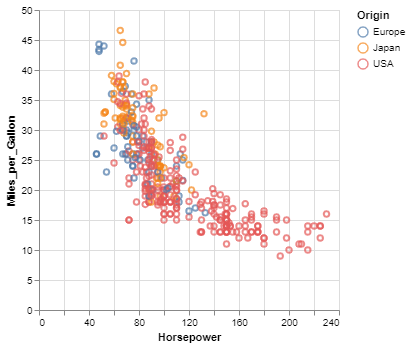 - - One of the unique features of Altair, inherited from Vega-Lite, is a declarative grammar of not just visualization, but _interaction_. - With a few modifications to the example above we can create a linked histogram that is filtered based on a selection of the scatter plot. - - ```python - import altair as alt - from vega_datasets import data - - source = data.cars() - - brush = alt.selection(type='interval') - - points = alt.Chart(source).mark_point().encode( - x='Horsepower', - y='Miles_per_Gallon', - color=alt.condition(brush, 'Origin', alt.value('lightgray')) - ).add_selection( - brush - ) - - bars = alt.Chart(source).mark_bar().encode( - y='Origin', - color='Origin', - x='count(Origin)' - ).transform_filter( - brush - ) - - points & bars - ``` - - 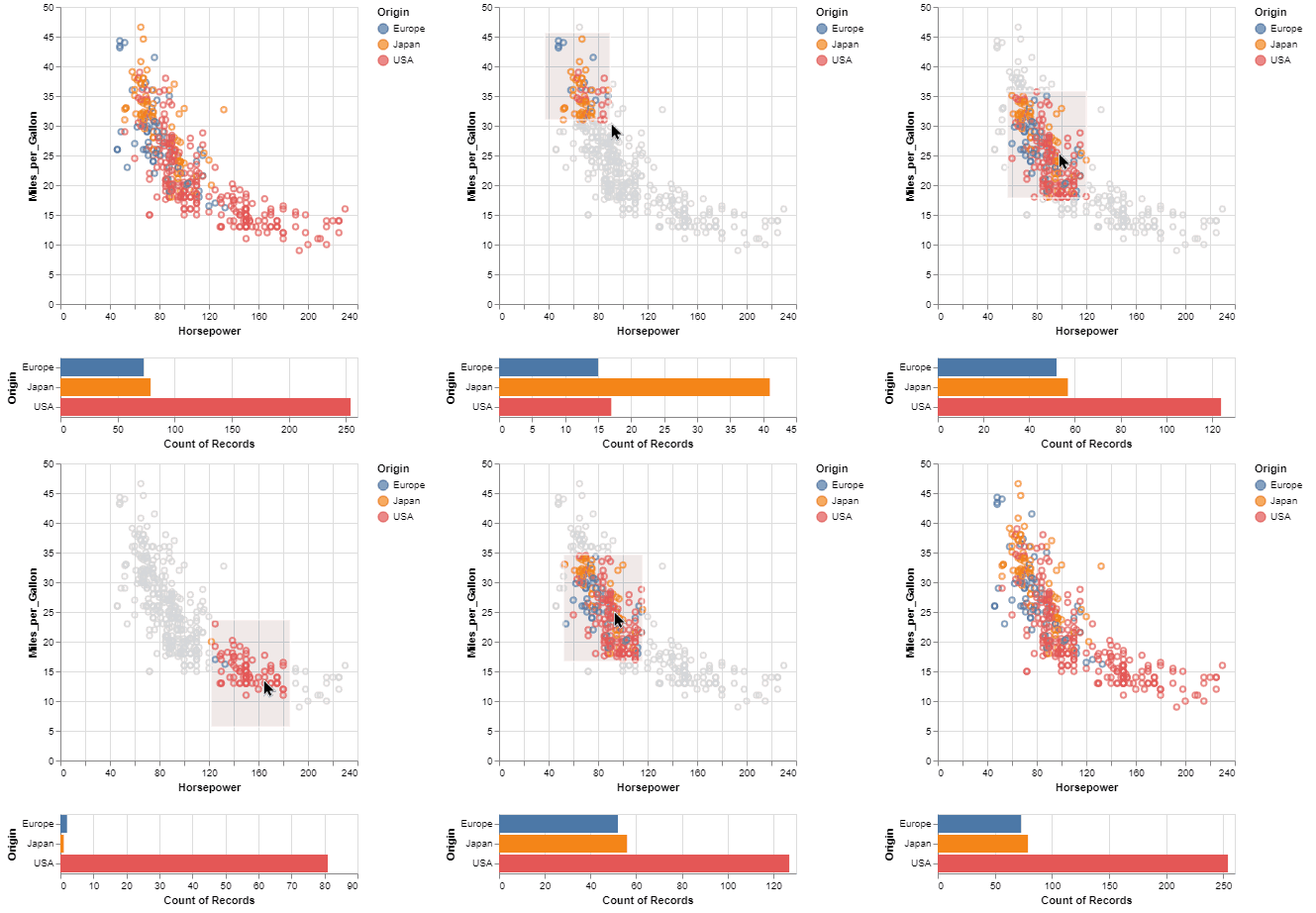 - - - ## Getting your Questions Answered - - If you have a question that is not addressed in the documentation, there are several ways to ask: - - - open a [Github Issue](https://github.com/altair-viz/altair/issues) - - post a [StackOverflow Question](https://stackoverflow.com/questions/tagged/altair) (be sure to use the `altair` tag) - - ask on the [Altair Google Group](https://groups.google.com/forum/#!forum/altair-viz) - - We'll do our best to get your question answered - - ## A Python API for statistical visualizations - - Altair provides a Python API for building statistical visualizations in a declarative - manner. By statistical visualization we mean: - - * The **data source** is a `DataFrame` that consists of columns of different data types (quantitative, ordinal, nominal and date/time). - * The `DataFrame` is in a [tidy format](https://vita.had.co.nz/papers/tidy-data.pdf) - where the rows correspond to samples and the columns correspond to the observed variables. - * The data is mapped to the **visual properties** (position, color, size, shape, - faceting, etc.) using the group-by data transformation. - - The Altair API contains no actual visualization rendering code but instead - emits JSON data structures following the - [Vega-Lite](https://github.com/vega/vega-lite) specification. The resulting - Vega-Lite JSON data can be rendered in the following user-interfaces: - - * [Jupyter Notebook](https://github.com/jupyter/notebook) (by installing [ipyvega](https://github.com/vega/ipyvega)). - * [JupyterLab](https://github.com/jupyterlab/jupyterlab) (no additional dependencies needed). - * [nteract](https://github.com/nteract/nteract) (no additional dependencies needed). - - ## Features - - * Carefully-designed, declarative Python API based on - [traitlets](https://github.com/ipython/traitlets). - * Auto-generated internal Python API that guarantees visualizations are type-checked and - in full conformance with the [Vega-Lite](https://github.com/vega/vega-lite) - specification. - * Auto-generate Altair Python code from a Vega-Lite JSON spec. - * Display visualizations in the live Jupyter Notebook, JupyterLab, nteract, on GitHub and - [nbviewer](https://nbviewer.jupyter.org/). - * Export visualizations to PNG/SVG images, stand-alone HTML pages and the - [Online Vega-Lite Editor](https://vega.github.io/editor/#/). - * Serialize visualizations as JSON files. - * Explore Altair with dozens of examples in the [Example Gallery](https://altair-viz.github.io/gallery/index.html) - - ## Installation - - To use Altair for visualization, you need to install two sets of tools - - 1. The core Altair Package and its dependencies - - 2. The renderer for the frontend you wish to use (i.e. `Jupyter Notebook`, - `JupyterLab`, or `nteract`) - - Altair can be installed with either ``pip`` or with ``conda``. - For full installation instructions, please see - https://altair-viz.github.io/getting_started/installation.html - - ## Example and tutorial notebooks - - We maintain a separate Github repository of Jupyter Notebooks that contain an - interactive tutorial and examples: - - https://github.com/altair-viz/altair_notebooks - - To launch a live notebook server with those notebook using [binder](https://mybinder.org/) or - [Colab](https://colab.research.google.com), click on one of the following badges: - - [](https://beta.mybinder.org/v2/gh/altair-viz/altair_notebooks/master) - [](https://colab.research.google.com/github/altair-viz/altair_notebooks/blob/master/notebooks/Index.ipynb) - - ## Project philosophy - - Many excellent plotting libraries exist in Python, including the main ones: - - * [Matplotlib](https://matplotlib.org/) - * [Bokeh](https://bokeh.pydata.org/en/latest/) - * [Seaborn](https://seaborn.pydata.org/) - * [Lightning](https://github.com/lightning-viz/lightning) - * [Plotly](https://plot.ly/) - * [Pandas built-in plotting](https://pandas.pydata.org/pandas-docs/stable/visualization.html) - * [HoloViews](https://holoviews.org) - * [VisPy](https://vispy.org/) - * [pygg](https://www.github.com/sirrice/pygg) - - Each library does a particular set of things well. - - ### User challenges - - However, such a proliferation of options creates great difficulty for users - as they have to wade through all of these APIs to find which of them is the - best for the task at hand. None of these libraries are optimized for - high-level statistical visualization, so users have to assemble their own - using a mishmash of APIs. For individuals just learning data science, this - forces them to focus on learning APIs rather than exploring their data. - - Another challenge is current plotting APIs require the user to write code, - even for incidental details of a visualization. This results in an unfortunate - and unnecessary cognitive burden as the visualization type (histogram, - scatterplot, etc.) can often be inferred using basic information such as the - columns of interest and the data types of those columns. - - For example, if you are interested in the visualization of two numerical - columns, a scatterplot is almost certainly a good starting point. If you add - a categorical column to that, you probably want to encode that column using - colors or facets. If inferring the visualization proves difficult at times, a - simple user interface can construct a visualization without any coding. - [Tableau](https://www.tableau.com/) and the [Interactive Data - Lab's](https://idl.cs.washington.edu/) - [Polestar](https://github.com/vega/polestar) and - [Voyager](https://github.com/vega/voyager) are excellent examples of such UIs. - - ### Design approach and solution - - We believe that these challenges can be addressed without the creation of yet - another visualization library that has a programmatic API and built-in - rendering. Altair's approach to building visualizations uses a layered design - that leverages the full capabilities of existing visualization libraries: - - 1. Create a constrained, simple Python API (Altair) that is purely declarative - 2. Use the API (Altair) to emit JSON output that follows the Vega-Lite spec - 3. Render that spec using existing visualization libraries - - This approach enables users to perform exploratory visualizations with a much - simpler API initially, pick an appropriate renderer for their usage case, and - then leverage the full capabilities of that renderer for more advanced plot - customization. - - We realize that a declarative API will necessarily be limited compared to the - full programmatic APIs of Matplotlib, Bokeh, etc. That is a deliberate design - choice we feel is needed to simplify the user experience of exploratory - visualization. - - ## Development install - - Altair requires the following dependencies: - - * [pandas](https://pandas.pydata.org/) - * [traitlets](https://github.com/ipython/traitlets) - * [IPython](https://github.com/ipython/ipython) - - If you have cloned the repository, run the following command from the root of the repository: - - ``` - pip install -e .[dev] - ``` - - If you do not wish to clone the repository, you can install using: - - ``` - pip install git+https://github.com/altair-viz/altair - ``` - - ## Testing - - To run the test suite you must have [py.test](https://pytest.org/latest/) installed. - To run the tests, use - - ``` - py.test --pyargs altair - ``` - (you can omit the `--pyargs` flag if you are running the tests from a source checkout). - - ## Feedback and Contribution - - See [`CONTRIBUTING.md`](https://github.com/altair-viz/altair/blob/master/CONTRIBUTING.md) - - ## Citing Altair - - [](https://joss.theoj.org/papers/10.21105/joss.01057) - - If you use Altair in academic work, please consider citing https://joss.theoj.org/papers/10.21105/joss.01057 as - - ```bib - @article{VanderPlas2018, - doi = {10.21105/joss.01057}, - url = {https://doi.org/10.21105/joss.01057}, - year = {2018}, - publisher = {The Open Journal}, - volume = {3}, - number = {32}, - pages = {1057}, - author = {Jacob VanderPlas and Brian Granger and Jeffrey Heer and Dominik Moritz and Kanit Wongsuphasawat and Arvind Satyanarayan and Eitan Lees and Ilia Timofeev and Ben Welsh and Scott Sievert}, - title = {Altair: Interactive Statistical Visualizations for Python}, - journal = {Journal of Open Source Software} - } - ``` - Please additionally consider citing the [vega-lite](https://vega.github.io/vega-lite/) project, which Altair is based on: https://dl.acm.org/doi/10.1109/TVCG.2016.2599030 - ```bib - @article{Satyanarayan2017, - author={Satyanarayan, Arvind and Moritz, Dominik and Wongsuphasawat, Kanit and Heer, Jeffrey}, - title={Vega-Lite: A Grammar of Interactive Graphics}, - journal={IEEE transactions on visualization and computer graphics}, - year={2017}, - volume={23}, - number={1}, - pages={341-350}, - publisher={IEEE} - } - ``` - - ## Whence Altair? - - Altair is the [brightest star](https://en.wikipedia.org/wiki/Altair) in the constellation Aquila, and along with Deneb and Vega forms the northern-hemisphere asterism known as the [Summer Triangle](https://en.wikipedia.org/wiki/Summer_Triangle). - -Platform: UNKNOWN Classifier: Development Status :: 5 - Production/Stable Classifier: Environment :: Console Classifier: Intended Audience :: Science/Research @@ -302,3 +19,286 @@ Requires-Python: >=3.7 Description-Content-Type: text/markdown Provides-Extra: dev +License-File: LICENSE + +# Altair <a href="https://altair-viz.github.io/";><img align="right" src="https://altair-viz.github.io/_static/altair-logo-light.png"; height="50"></img></a> + +[](https://travis-ci.org/altair-viz/altair) +[](https://github.com/altair-viz/altair/actions?query=workflow%3Abuild) +[](https://github.com/psf/black) +[](https://joss.theoj.org/papers/10.21105/joss.01057) +[](https://pypi.org/project/altair) +[](https://mybinder.org/v2/gh/altair-viz/altair_notebooks/master?urlpath=lab/tree/notebooks/Index.ipynb) +[](https://colab.research.google.com/github/altair-viz/altair_notebooks/blob/master/notebooks/Index.ipynb) + +[https://altair-viz.github.io](https://altair-viz.github.io) + +**Altair** is a declarative statistical visualization library for Python. With Altair, you can spend more time understanding your data and its meaning. Altair's +API is simple, friendly and consistent and built on top of the powerful +[Vega-Lite](https://github.com/vega/vega-lite) JSON specification. This elegant +simplicity produces beautiful and effective visualizations with a minimal amount of code. *Altair is developed by [Jake Vanderplas](https://github.com/jakevdp) and [Brian +Granger](https://github.com/ellisonbg) in close collaboration with the [UW +Interactive Data Lab](https://idl.cs.washington.edu/).* + +## Altair Documentation + +See [Altair's Documentation Site](https://altair-viz.github.io), +as well as Altair's [Tutorial Notebooks](https://github.com/altair-viz/altair_notebooks). + +## Example + +Here is an example using Altair to quickly visualize and display a dataset with the native Vega-Lite renderer in the JupyterLab: + +```python +import altair as alt + +# load a simple dataset as a pandas DataFrame +from vega_datasets import data +cars = data.cars() + +alt.Chart(cars).mark_point().encode( + x='Horsepower', + y='Miles_per_Gallon', + color='Origin', +) +``` + + + +One of the unique features of Altair, inherited from Vega-Lite, is a declarative grammar of not just visualization, but _interaction_. +With a few modifications to the example above we can create a linked histogram that is filtered based on a selection of the scatter plot. + +```python +import altair as alt +from vega_datasets import data + +source = data.cars() + +brush = alt.selection(type='interval') + +points = alt.Chart(source).mark_point().encode( + x='Horsepower', + y='Miles_per_Gallon', + color=alt.condition(brush, 'Origin', alt.value('lightgray')) +).add_selection( + brush +) + +bars = alt.Chart(source).mark_bar().encode( + y='Origin', + color='Origin', + x='count(Origin)' +).transform_filter( + brush +) + +points & bars +``` + + + + +## Getting your Questions Answered + +If you have a question that is not addressed in the documentation, there are several ways to ask: + +- open a [Github Issue](https://github.com/altair-viz/altair/issues) +- post a [StackOverflow Question](https://stackoverflow.com/questions/tagged/altair) (be sure to use the `altair` tag) +- ask on the [Altair Google Group](https://groups.google.com/forum/#!forum/altair-viz) + +We'll do our best to get your question answered + +## A Python API for statistical visualizations + +Altair provides a Python API for building statistical visualizations in a declarative +manner. By statistical visualization we mean: + +* The **data source** is a `DataFrame` that consists of columns of different data types (quantitative, ordinal, nominal and date/time). +* The `DataFrame` is in a [tidy format](https://vita.had.co.nz/papers/tidy-data.pdf) + where the rows correspond to samples and the columns correspond to the observed variables. +* The data is mapped to the **visual properties** (position, color, size, shape, + faceting, etc.) using the group-by data transformation. + +The Altair API contains no actual visualization rendering code but instead +emits JSON data structures following the +[Vega-Lite](https://github.com/vega/vega-lite) specification. The resulting +Vega-Lite JSON data can be rendered in the following user-interfaces: + +* [Jupyter Notebook](https://github.com/jupyter/notebook) (by installing [ipyvega](https://github.com/vega/ipyvega)). +* [JupyterLab](https://github.com/jupyterlab/jupyterlab) (no additional dependencies needed). +* [nteract](https://github.com/nteract/nteract) (no additional dependencies needed). + +## Features + +* Carefully-designed, declarative Python API based on + [traitlets](https://github.com/ipython/traitlets). +* Auto-generated internal Python API that guarantees visualizations are type-checked and + in full conformance with the [Vega-Lite](https://github.com/vega/vega-lite) + specification. +* Auto-generate Altair Python code from a Vega-Lite JSON spec. +* Display visualizations in the live Jupyter Notebook, JupyterLab, nteract, on GitHub and + [nbviewer](https://nbviewer.jupyter.org/). +* Export visualizations to PNG/SVG images, stand-alone HTML pages and the +[Online Vega-Lite Editor](https://vega.github.io/editor/#/). +* Serialize visualizations as JSON files. +* Explore Altair with dozens of examples in the [Example Gallery](https://altair-viz.github.io/gallery/index.html) + +## Installation + +To use Altair for visualization, you need to install two sets of tools + +1. The core Altair Package and its dependencies + +2. The renderer for the frontend you wish to use (i.e. `Jupyter Notebook`, + `JupyterLab`, or `nteract`) + +Altair can be installed with either ``pip`` or with ``conda``. +For full installation instructions, please see +https://altair-viz.github.io/getting_started/installation.html + +## Example and tutorial notebooks + +We maintain a separate Github repository of Jupyter Notebooks that contain an +interactive tutorial and examples: + +https://github.com/altair-viz/altair_notebooks + +To launch a live notebook server with those notebook using [binder](https://mybinder.org/) or +[Colab](https://colab.research.google.com), click on one of the following badges: + +[](https://beta.mybinder.org/v2/gh/altair-viz/altair_notebooks/master) +[](https://colab.research.google.com/github/altair-viz/altair_notebooks/blob/master/notebooks/Index.ipynb) + +## Project philosophy + +Many excellent plotting libraries exist in Python, including the main ones: + +* [Matplotlib](https://matplotlib.org/) +* [Bokeh](https://bokeh.pydata.org/en/latest/) +* [Seaborn](https://seaborn.pydata.org/) +* [Lightning](https://github.com/lightning-viz/lightning) +* [Plotly](https://plot.ly/) +* [Pandas built-in plotting](https://pandas.pydata.org/pandas-docs/stable/visualization.html) +* [HoloViews](https://holoviews.org) +* [VisPy](https://vispy.org/) +* [pygg](https://www.github.com/sirrice/pygg) + +Each library does a particular set of things well. + +### User challenges + +However, such a proliferation of options creates great difficulty for users +as they have to wade through all of these APIs to find which of them is the +best for the task at hand. None of these libraries are optimized for +high-level statistical visualization, so users have to assemble their own +using a mishmash of APIs. For individuals just learning data science, this +forces them to focus on learning APIs rather than exploring their data. + +Another challenge is current plotting APIs require the user to write code, +even for incidental details of a visualization. This results in an unfortunate +and unnecessary cognitive burden as the visualization type (histogram, +scatterplot, etc.) can often be inferred using basic information such as the +columns of interest and the data types of those columns. + +For example, if you are interested in the visualization of two numerical +columns, a scatterplot is almost certainly a good starting point. If you add +a categorical column to that, you probably want to encode that column using +colors or facets. If inferring the visualization proves difficult at times, a +simple user interface can construct a visualization without any coding. +[Tableau](https://www.tableau.com/) and the [Interactive Data +Lab's](https://idl.cs.washington.edu/) +[Polestar](https://github.com/vega/polestar) and +[Voyager](https://github.com/vega/voyager) are excellent examples of such UIs. + +### Design approach and solution + +We believe that these challenges can be addressed without the creation of yet +another visualization library that has a programmatic API and built-in +rendering. Altair's approach to building visualizations uses a layered design +that leverages the full capabilities of existing visualization libraries: + +1. Create a constrained, simple Python API (Altair) that is purely declarative +2. Use the API (Altair) to emit JSON output that follows the Vega-Lite spec +3. Render that spec using existing visualization libraries + +This approach enables users to perform exploratory visualizations with a much +simpler API initially, pick an appropriate renderer for their usage case, and +then leverage the full capabilities of that renderer for more advanced plot +customization. + +We realize that a declarative API will necessarily be limited compared to the +full programmatic APIs of Matplotlib, Bokeh, etc. That is a deliberate design +choice we feel is needed to simplify the user experience of exploratory +visualization. + +## Development install + +Altair requires the following dependencies: + +* [pandas](https://pandas.pydata.org/) +* [traitlets](https://github.com/ipython/traitlets) +* [IPython](https://github.com/ipython/ipython) + +If you have cloned the repository, run the following command from the root of the repository: + +``` +pip install -e .[dev] +``` + +If you do not wish to clone the repository, you can install using: + +``` +pip install git+https://github.com/altair-viz/altair +``` + +## Testing + +To run the test suite you must have [py.test](https://pytest.org/latest/) installed. +To run the tests, use + +``` +py.test --pyargs altair +``` +(you can omit the `--pyargs` flag if you are running the tests from a source checkout). + +## Feedback and Contribution + +See [`CONTRIBUTING.md`](https://github.com/altair-viz/altair/blob/master/CONTRIBUTING.md) + +## Citing Altair + +[](https://joss.theoj.org/papers/10.21105/joss.01057) + +If you use Altair in academic work, please consider citing https://joss.theoj.org/papers/10.21105/joss.01057 as + +```bib +@article{VanderPlas2018, + doi = {10.21105/joss.01057}, + url = {https://doi.org/10.21105/joss.01057}, + year = {2018}, + publisher = {The Open Journal}, + volume = {3}, + number = {32}, + pages = {1057}, + author = {Jacob VanderPlas and Brian Granger and Jeffrey Heer and Dominik Moritz and Kanit Wongsuphasawat and Arvind Satyanarayan and Eitan Lees and Ilia Timofeev and Ben Welsh and Scott Sievert}, + title = {Altair: Interactive Statistical Visualizations for Python}, + journal = {Journal of Open Source Software} +} +``` +Please additionally consider citing the [vega-lite](https://vega.github.io/vega-lite/) project, which Altair is based on: https://dl.acm.org/doi/10.1109/TVCG.2016.2599030 +```bib +@article{Satyanarayan2017, + author={Satyanarayan, Arvind and Moritz, Dominik and Wongsuphasawat, Kanit and Heer, Jeffrey}, + title={Vega-Lite: A Grammar of Interactive Graphics}, + journal={IEEE transactions on visualization and computer graphics}, + year={2017}, + volume={23}, + number={1}, + pages={341-350}, + publisher={IEEE} +} +``` + +## Whence Altair? + +Altair is the [brightest star](https://en.wikipedia.org/wiki/Altair) in the constellation Aquila, and along with Deneb and Vega forms the northern-hemisphere asterism known as the [Summer Triangle](https://en.wikipedia.org/wiki/Summer_Triangle). diff -urN '--exclude=CVS' '--exclude=.cvsignore' '--exclude=.svn' '--exclude=.svnignore' old/altair-4.2.0/altair/__init__.py new/altair-4.2.2/altair/__init__.py --- old/altair-4.2.0/altair/__init__.py 2021-12-29 14:21:23.000000000 +0100 +++ new/altair-4.2.2/altair/__init__.py 2023-01-27 22:51:29.000000000 +0100 @@ -1,5 +1,5 @@ # flake8: noqa -__version__ = "4.2.0" +__version__ = "4.2.2" from .vegalite import * from . import examples diff -urN '--exclude=CVS' '--exclude=.cvsignore' '--exclude=.svn' '--exclude=.svnignore' old/altair-4.2.0/altair/utils/core.py new/altair-4.2.2/altair/utils/core.py --- old/altair-4.2.0/altair/utils/core.py 2021-11-19 14:13:17.000000000 +0100 +++ new/altair-4.2.2/altair/utils/core.py 2023-01-26 22:05:44.000000000 +0100 @@ -314,7 +314,7 @@ else: return val - for col_name, dtype in df.dtypes.iteritems(): + for col_name, dtype in df.dtypes.items(): if str(dtype) == "category": # XXXX: work around bug in to_json for categorical types # https://github.com/pydata/pandas/issues/10778 diff -urN '--exclude=CVS' '--exclude=.cvsignore' '--exclude=.svn' '--exclude=.svnignore' old/altair-4.2.0/altair/utils/display.py new/altair-4.2.2/altair/utils/display.py --- old/altair-4.2.0/altair/utils/display.py 2020-03-29 17:45:56.000000000 +0200 +++ new/altair-4.2.2/altair/utils/display.py 2023-01-26 22:05:44.000000000 +0100 @@ -4,10 +4,9 @@ from typing import Callable, Dict import uuid -from jsonschema import validate - from .plugin_registry import PluginRegistry from .mimebundle import spec_to_mimebundle +from .schemapi import validate_jsonschema # ============================================================================== @@ -126,7 +125,7 @@ # type: () -> None """Validate the spec against the schema.""" schema_dict = json.loads(pkgutil.get_data(*self.schema_path).decode("utf-8")) - validate(self.spec, schema_dict) + validate_jsonschema(self.spec, schema_dict) def _repr_mimebundle_(self, include=None, exclude=None): """Return a MIME bundle for display in Jupyter frontends.""" diff -urN '--exclude=CVS' '--exclude=.cvsignore' '--exclude=.svn' '--exclude=.svnignore' old/altair-4.2.0/altair/utils/schemapi.py new/altair-4.2.2/altair/utils/schemapi.py --- old/altair-4.2.0/altair/utils/schemapi.py 2021-11-08 15:09:25.000000000 +0100 +++ new/altair-4.2.2/altair/utils/schemapi.py 2023-01-27 22:44:40.000000000 +0100 @@ -6,10 +6,11 @@ import json import jsonschema +import jsonschema.exceptions import numpy as np import pandas as pd - +JSONSCHEMA_VALIDATOR = jsonschema.Draft7Validator # If DEBUG_MODE is True, then schema objects are converted to dict and # validated at creation time. This slows things down, particularly for # larger specs, but leads to much more useful tracebacks for the user. @@ -39,6 +40,25 @@ DEBUG_MODE = original +def validate_jsonschema(spec, schema, resolver=None): + # We don't use jsonschema.validate as this would validate the schema itself. + # Instead, we pass the schema directly to the validator class. This is done for + # two reasons: The schema comes from Vega-Lite and is not based on the user + # input, therefore there is no need to validate it in the first place. Furthermore, + # the "uri-reference" format checker fails for some of the references as URIs in + # "$ref" are not encoded, + # e.g. '#/definitions/ValueDefWithCondition<MarkPropFieldOrDatumDef, + # (Gradient|string|null)>' would be a valid $ref in a Vega-Lite schema but + # it is not a valid URI reference due to the characters such as '<'. + validator_kwargs = {"resolver": resolver} + if hasattr(JSONSCHEMA_VALIDATOR, "FORMAT_CHECKER"): + validator_kwargs["format_checker"] = JSONSCHEMA_VALIDATOR.FORMAT_CHECKER + validator = JSONSCHEMA_VALIDATOR(schema, **validator_kwargs) + error = jsonschema.exceptions.best_match(validator.iter_errors(spec)) + if error is not None: + raise error + + def _subclasses(cls): """Breadth-first sequence of all classes which inherit from cls.""" seen = set() @@ -150,7 +170,7 @@ _schema = None _rootschema = None _class_is_valid_at_instantiation = True - _validator = jsonschema.Draft7Validator + _validator = JSONSCHEMA_VALIDATOR def __init__(self, *args, **kwds): # Two valid options for initialization, which should be handled by @@ -440,9 +460,7 @@ if schema is None: schema = cls._schema resolver = jsonschema.RefResolver.from_schema(cls._rootschema or cls._schema) - return jsonschema.validate( - instance, schema, cls=cls._validator, resolver=resolver - ) + return validate_jsonschema(instance, schema, resolver=resolver) @classmethod def resolve_references(cls, schema=None): @@ -461,7 +479,7 @@ value = _todict(value, validate=False, context={}) props = cls.resolve_references(schema or cls._schema).get("properties", {}) resolver = jsonschema.RefResolver.from_schema(cls._rootschema or cls._schema) - return jsonschema.validate(value, props.get(name, {}), resolver=resolver) + return validate_jsonschema(value, props.get(name, {}), resolver=resolver) def __dir__(self): return list(self._kwds.keys()) @@ -555,7 +573,7 @@ for possible_schema in schemas: resolver = jsonschema.RefResolver.from_schema(rootschema) try: - jsonschema.validate(dct, possible_schema, resolver=resolver) + validate_jsonschema(dct, possible_schema, resolver=resolver) except jsonschema.ValidationError: continue else: diff -urN '--exclude=CVS' '--exclude=.cvsignore' '--exclude=.svn' '--exclude=.svnignore' old/altair-4.2.0/altair/utils/tests/test_plugin_registry.py new/altair-4.2.2/altair/utils/tests/test_plugin_registry.py --- old/altair-4.2.0/altair/utils/tests/test_plugin_registry.py 2020-03-06 15:32:30.000000000 +0100 +++ new/altair-4.2.2/altair/utils/tests/test_plugin_registry.py 2023-01-26 22:05:44.000000000 +0100 @@ -26,7 +26,7 @@ assert plugins.get() is None assert repr(plugins) == "TypedCallableRegistry(active='', registered=[])" - plugins.register("new_plugin", lambda x: x ** 2) + plugins.register("new_plugin", lambda x: x**2) assert plugins.names() == ["new_plugin"] assert plugins.active == "" assert plugins.get() is None @@ -46,7 +46,7 @@ def test_plugin_registry_extra_options(): plugins = GeneralCallableRegistry() - plugins.register("metadata_plugin", lambda x, p=2: x ** p) + plugins.register("metadata_plugin", lambda x, p=2: x**p) plugins.enable("metadata_plugin") assert plugins.get()(3) == 9 @@ -86,7 +86,7 @@ def test_plugin_registry_context(): plugins = GeneralCallableRegistry() - plugins.register("default", lambda x, p=2: x ** p) + plugins.register("default", lambda x, p=2: x**p) # At first there is no plugin enabled assert plugins.active == "" diff -urN '--exclude=CVS' '--exclude=.cvsignore' '--exclude=.svn' '--exclude=.svnignore' old/altair-4.2.0/altair/utils/tests/test_utils.py new/altair-4.2.2/altair/utils/tests/test_utils.py --- old/altair-4.2.0/altair/utils/tests/test_utils.py 2020-03-06 15:32:30.000000000 +0100 +++ new/altair-4.2.2/altair/utils/tests/test_utils.py 2023-01-26 22:05:44.000000000 +0100 @@ -129,9 +129,9 @@ ) df_clean = sanitize_dataframe(df) - assert {col.dtype.name for _, col in df_clean.iteritems()} == {"object"} + assert {col.dtype.name for _, col in df_clean.items()} == {"object"} - result_python = {col_name: list(col) for col_name, col in df_clean.iteritems()} + result_python = {col_name: list(col) for col_name, col in df_clean.items()} assert result_python == { "int_np": [1, 2, 3, 4, 5], "int64": [1, 2, 3, None, 5], @@ -157,9 +157,9 @@ ) df_clean = sanitize_dataframe(df) - assert {col.dtype.name for _, col in df_clean.iteritems()} == {"object"} + assert {col.dtype.name for _, col in df_clean.items()} == {"object"} - result_python = {col_name: list(col) for col_name, col in df_clean.iteritems()} + result_python = {col_name: list(col) for col_name, col in df_clean.items()} assert result_python == { "string_object": ["a", "b", "c", "d"], "string_string": ["a", "b", "c", "d"], @@ -182,9 +182,9 @@ ) df_clean = sanitize_dataframe(df) - assert {col.dtype.name for _, col in df_clean.iteritems()} == {"object"} + assert {col.dtype.name for _, col in df_clean.items()} == {"object"} - result_python = {col_name: list(col) for col_name, col in df_clean.iteritems()} + result_python = {col_name: list(col) for col_name, col in df_clean.items()} assert result_python == { "bool_none": [True, False, None], "none": [None, None, None], diff -urN '--exclude=CVS' '--exclude=.cvsignore' '--exclude=.svn' '--exclude=.svnignore' old/altair-4.2.0/altair/vega/v5/__init__.py new/altair-4.2.2/altair/vega/v5/__init__.py --- old/altair-4.2.0/altair/vega/v5/__init__.py 2020-03-06 15:32:30.000000000 +0100 +++ new/altair-4.2.2/altair/vega/v5/__init__.py 2023-01-26 22:05:44.000000000 +0100 @@ -1,4 +1,6 @@ # flake8: noqa +import warnings +from ...utils.deprecation import AltairDeprecationWarning from .display import vega, Vega, renderers from .schema import * @@ -12,3 +14,8 @@ to_values, default_data_transformer, ) + +warnings.warn( + "The module altair.vega.v5 is deprecated and will be removed in Altair 5.", + AltairDeprecationWarning, +) diff -urN '--exclude=CVS' '--exclude=.cvsignore' '--exclude=.svn' '--exclude=.svnignore' old/altair-4.2.0/altair/vega/v5/display.py new/altair-4.2.2/altair/vega/v5/display.py --- old/altair-4.2.0/altair/vega/v5/display.py 2020-03-06 15:32:30.000000000 +0100 +++ new/altair-4.2.2/altair/vega/v5/display.py 2023-01-26 22:05:44.000000000 +0100 @@ -1,6 +1,7 @@ import os from ...utils import PluginRegistry +from ...utils.deprecation import deprecated from ..display import Displayable from ..display import default_renderer_base from ..display import json_renderer_base @@ -93,6 +94,9 @@ schema_path = (__name__, "schema/vega-schema.json") +@deprecated( + "Rendering Vega specifications is deprecated and will be removed in Altair 5." +) def vega(spec, validate=True): """Render and optionally validate a Vega 5 spec. diff -urN '--exclude=CVS' '--exclude=.cvsignore' '--exclude=.svn' '--exclude=.svnignore' old/altair-4.2.0/altair/vegalite/v3/__init__.py new/altair-4.2.2/altair/vegalite/v3/__init__.py --- old/altair-4.2.0/altair/vegalite/v3/__init__.py 2020-03-06 15:32:30.000000000 +0100 +++ new/altair-4.2.2/altair/vegalite/v3/__init__.py 2023-01-26 22:05:44.000000000 +0100 @@ -1,4 +1,7 @@ # flake8: noqa +import warnings +from ...utils.deprecation import AltairDeprecationWarning + from .schema import * from .api import * from ._deprecated import * @@ -22,3 +25,9 @@ default_data_transformer, data_transformers, ) + +warnings.warn( + "The module altair.vegalite.v3 is deprecated and will be removed in Altair 5. " + "Use `import altair as alt` instead of `import altair.vegalite.v3 as alt`.", + AltairDeprecationWarning, +) diff -urN '--exclude=CVS' '--exclude=.cvsignore' '--exclude=.svn' '--exclude=.svnignore' old/altair-4.2.0/altair/vegalite/v3/display.py new/altair-4.2.2/altair/vegalite/v3/display.py --- old/altair-4.2.0/altair/vegalite/v3/display.py 2020-03-06 15:32:30.000000000 +0100 +++ new/altair-4.2.2/altair/vegalite/v3/display.py 2023-01-26 22:05:44.000000000 +0100 @@ -1,6 +1,7 @@ import os from ...utils.mimebundle import spec_to_mimebundle +from ...utils.deprecation import deprecated from ..display import Displayable from ..display import default_renderer_base from ..display import json_renderer_base @@ -129,6 +130,10 @@ schema_path = (__name__, "schema/vega-lite-schema.json") +@deprecated( + "Rendering VegaLite 3 specifications is deprecated and will be removed in Altair 5. " + "Use `import altair as alt` instead of `import altair.vegalite.v3 as alt`." +) def vegalite(spec, validate=True): """Render and optionally validate a VegaLite 3 spec. diff -urN '--exclude=CVS' '--exclude=.cvsignore' '--exclude=.svn' '--exclude=.svnignore' old/altair-4.2.0/altair.egg-info/PKG-INFO new/altair-4.2.2/altair.egg-info/PKG-INFO --- old/altair-4.2.0/altair.egg-info/PKG-INFO 2021-12-29 14:24:47.000000000 +0100 +++ new/altair-4.2.2/altair.egg-info/PKG-INFO 2023-01-27 23:50:18.000000000 +0100 @@ -1,295 +1,12 @@ Metadata-Version: 2.1 Name: altair -Version: 4.2.0 +Version: 4.2.2 Summary: Altair: A declarative statistical visualization library for Python. Home-page: http://altair-viz.github.io +Download-URL: http://github.com/altair-viz/altair/ Author: Brian E. Granger / Jake VanderPlas Author-email: [email protected] License: BSD 3-clause -Download-URL: http://github.com/altair-viz/altair/ -Description: # Altair <a href="https://altair-viz.github.io/";><img align="right" src="https://altair-viz.github.io/_static/altair-logo-light.png"; height="50"></img></a> - - [](https://travis-ci.org/altair-viz/altair) - [](https://github.com/altair-viz/altair/actions?query=workflow%3Abuild) - [](https://github.com/psf/black) - [](https://joss.theoj.org/papers/10.21105/joss.01057) - [](https://pypi.org/project/altair) - [](https://mybinder.org/v2/gh/altair-viz/altair_notebooks/master?urlpath=lab/tree/notebooks/Index.ipynb) - [](https://colab.research.google.com/github/altair-viz/altair_notebooks/blob/master/notebooks/Index.ipynb) - - [https://altair-viz.github.io](https://altair-viz.github.io) - - **Altair** is a declarative statistical visualization library for Python. With Altair, you can spend more time understanding your data and its meaning. Altair's - API is simple, friendly and consistent and built on top of the powerful - [Vega-Lite](https://github.com/vega/vega-lite) JSON specification. This elegant - simplicity produces beautiful and effective visualizations with a minimal amount of code. *Altair is developed by [Jake Vanderplas](https://github.com/jakevdp) and [Brian - Granger](https://github.com/ellisonbg) in close collaboration with the [UW - Interactive Data Lab](https://idl.cs.washington.edu/).* - - ## Altair Documentation - - See [Altair's Documentation Site](https://altair-viz.github.io), - as well as Altair's [Tutorial Notebooks](https://github.com/altair-viz/altair_notebooks). - - ## Example - - Here is an example using Altair to quickly visualize and display a dataset with the native Vega-Lite renderer in the JupyterLab: - - ```python - import altair as alt - - # load a simple dataset as a pandas DataFrame - from vega_datasets import data - cars = data.cars() - - alt.Chart(cars).mark_point().encode( - x='Horsepower', - y='Miles_per_Gallon', - color='Origin', - ) - ``` - -  - - One of the unique features of Altair, inherited from Vega-Lite, is a declarative grammar of not just visualization, but _interaction_. - With a few modifications to the example above we can create a linked histogram that is filtered based on a selection of the scatter plot. - - ```python - import altair as alt - from vega_datasets import data - - source = data.cars() - - brush = alt.selection(type='interval') - - points = alt.Chart(source).mark_point().encode( - x='Horsepower', - y='Miles_per_Gallon', - color=alt.condition(brush, 'Origin', alt.value('lightgray')) - ).add_selection( - brush - ) - - bars = alt.Chart(source).mark_bar().encode( - y='Origin', - color='Origin', - x='count(Origin)' - ).transform_filter( - brush - ) - - points & bars - ``` - -  - - - ## Getting your Questions Answered - - If you have a question that is not addressed in the documentation, there are several ways to ask: - - - open a [Github Issue](https://github.com/altair-viz/altair/issues) - - post a [StackOverflow Question](https://stackoverflow.com/questions/tagged/altair) (be sure to use the `altair` tag) - - ask on the [Altair Google Group](https://groups.google.com/forum/#!forum/altair-viz) - - We'll do our best to get your question answered - - ## A Python API for statistical visualizations - - Altair provides a Python API for building statistical visualizations in a declarative - manner. By statistical visualization we mean: - - * The **data source** is a `DataFrame` that consists of columns of different data types (quantitative, ordinal, nominal and date/time). - * The `DataFrame` is in a [tidy format](https://vita.had.co.nz/papers/tidy-data.pdf) - where the rows correspond to samples and the columns correspond to the observed variables. - * The data is mapped to the **visual properties** (position, color, size, shape, - faceting, etc.) using the group-by data transformation. - - The Altair API contains no actual visualization rendering code but instead - emits JSON data structures following the - [Vega-Lite](https://github.com/vega/vega-lite) specification. The resulting - Vega-Lite JSON data can be rendered in the following user-interfaces: - - * [Jupyter Notebook](https://github.com/jupyter/notebook) (by installing [ipyvega](https://github.com/vega/ipyvega)). - * [JupyterLab](https://github.com/jupyterlab/jupyterlab) (no additional dependencies needed). - * [nteract](https://github.com/nteract/nteract) (no additional dependencies needed). - - ## Features - - * Carefully-designed, declarative Python API based on - [traitlets](https://github.com/ipython/traitlets). - * Auto-generated internal Python API that guarantees visualizations are type-checked and - in full conformance with the [Vega-Lite](https://github.com/vega/vega-lite) - specification. - * Auto-generate Altair Python code from a Vega-Lite JSON spec. - * Display visualizations in the live Jupyter Notebook, JupyterLab, nteract, on GitHub and - [nbviewer](https://nbviewer.jupyter.org/). - * Export visualizations to PNG/SVG images, stand-alone HTML pages and the - [Online Vega-Lite Editor](https://vega.github.io/editor/#/). - * Serialize visualizations as JSON files. - * Explore Altair with dozens of examples in the [Example Gallery](https://altair-viz.github.io/gallery/index.html) - - ## Installation - - To use Altair for visualization, you need to install two sets of tools - - 1. The core Altair Package and its dependencies - - 2. The renderer for the frontend you wish to use (i.e. `Jupyter Notebook`, - `JupyterLab`, or `nteract`) - - Altair can be installed with either ``pip`` or with ``conda``. - For full installation instructions, please see - https://altair-viz.github.io/getting_started/installation.html - - ## Example and tutorial notebooks - - We maintain a separate Github repository of Jupyter Notebooks that contain an - interactive tutorial and examples: - - https://github.com/altair-viz/altair_notebooks - - To launch a live notebook server with those notebook using [binder](https://mybinder.org/) or - [Colab](https://colab.research.google.com), click on one of the following badges: - - [](https://beta.mybinder.org/v2/gh/altair-viz/altair_notebooks/master) - [](https://colab.research.google.com/github/altair-viz/altair_notebooks/blob/master/notebooks/Index.ipynb) - - ## Project philosophy - - Many excellent plotting libraries exist in Python, including the main ones: - - * [Matplotlib](https://matplotlib.org/) - * [Bokeh](https://bokeh.pydata.org/en/latest/) - * [Seaborn](https://seaborn.pydata.org/) - * [Lightning](https://github.com/lightning-viz/lightning) - * [Plotly](https://plot.ly/) - * [Pandas built-in plotting](https://pandas.pydata.org/pandas-docs/stable/visualization.html) - * [HoloViews](https://holoviews.org) - * [VisPy](https://vispy.org/) - * [pygg](https://www.github.com/sirrice/pygg) - - Each library does a particular set of things well. - - ### User challenges - - However, such a proliferation of options creates great difficulty for users - as they have to wade through all of these APIs to find which of them is the - best for the task at hand. None of these libraries are optimized for - high-level statistical visualization, so users have to assemble their own - using a mishmash of APIs. For individuals just learning data science, this - forces them to focus on learning APIs rather than exploring their data. - - Another challenge is current plotting APIs require the user to write code, - even for incidental details of a visualization. This results in an unfortunate - and unnecessary cognitive burden as the visualization type (histogram, - scatterplot, etc.) can often be inferred using basic information such as the - columns of interest and the data types of those columns. - - For example, if you are interested in the visualization of two numerical - columns, a scatterplot is almost certainly a good starting point. If you add - a categorical column to that, you probably want to encode that column using - colors or facets. If inferring the visualization proves difficult at times, a - simple user interface can construct a visualization without any coding. - [Tableau](https://www.tableau.com/) and the [Interactive Data - Lab's](https://idl.cs.washington.edu/) - [Polestar](https://github.com/vega/polestar) and - [Voyager](https://github.com/vega/voyager) are excellent examples of such UIs. - - ### Design approach and solution - - We believe that these challenges can be addressed without the creation of yet - another visualization library that has a programmatic API and built-in - rendering. Altair's approach to building visualizations uses a layered design - that leverages the full capabilities of existing visualization libraries: - - 1. Create a constrained, simple Python API (Altair) that is purely declarative - 2. Use the API (Altair) to emit JSON output that follows the Vega-Lite spec - 3. Render that spec using existing visualization libraries - - This approach enables users to perform exploratory visualizations with a much - simpler API initially, pick an appropriate renderer for their usage case, and - then leverage the full capabilities of that renderer for more advanced plot - customization. - - We realize that a declarative API will necessarily be limited compared to the - full programmatic APIs of Matplotlib, Bokeh, etc. That is a deliberate design - choice we feel is needed to simplify the user experience of exploratory - visualization. - - ## Development install - - Altair requires the following dependencies: - - * [pandas](https://pandas.pydata.org/) - * [traitlets](https://github.com/ipython/traitlets) - * [IPython](https://github.com/ipython/ipython) - - If you have cloned the repository, run the following command from the root of the repository: - - ``` - pip install -e .[dev] - ``` - - If you do not wish to clone the repository, you can install using: - - ``` - pip install git+https://github.com/altair-viz/altair - ``` - - ## Testing - - To run the test suite you must have [py.test](https://pytest.org/latest/) installed. - To run the tests, use - - ``` - py.test --pyargs altair - ``` - (you can omit the `--pyargs` flag if you are running the tests from a source checkout). - - ## Feedback and Contribution - - See [`CONTRIBUTING.md`](https://github.com/altair-viz/altair/blob/master/CONTRIBUTING.md) - - ## Citing Altair - - [](https://joss.theoj.org/papers/10.21105/joss.01057) - - If you use Altair in academic work, please consider citing https://joss.theoj.org/papers/10.21105/joss.01057 as - - ```bib - @article{VanderPlas2018, - doi = {10.21105/joss.01057}, - url = {https://doi.org/10.21105/joss.01057}, - year = {2018}, - publisher = {The Open Journal}, - volume = {3}, - number = {32}, - pages = {1057}, - author = {Jacob VanderPlas and Brian Granger and Jeffrey Heer and Dominik Moritz and Kanit Wongsuphasawat and Arvind Satyanarayan and Eitan Lees and Ilia Timofeev and Ben Welsh and Scott Sievert}, - title = {Altair: Interactive Statistical Visualizations for Python}, - journal = {Journal of Open Source Software} - } - ``` - Please additionally consider citing the [vega-lite](https://vega.github.io/vega-lite/) project, which Altair is based on: https://dl.acm.org/doi/10.1109/TVCG.2016.2599030 - ```bib - @article{Satyanarayan2017, - author={Satyanarayan, Arvind and Moritz, Dominik and Wongsuphasawat, Kanit and Heer, Jeffrey}, - title={Vega-Lite: A Grammar of Interactive Graphics}, - journal={IEEE transactions on visualization and computer graphics}, - year={2017}, - volume={23}, - number={1}, - pages={341-350}, - publisher={IEEE} - } - ``` - - ## Whence Altair? - - Altair is the [brightest star](https://en.wikipedia.org/wiki/Altair) in the constellation Aquila, and along with Deneb and Vega forms the northern-hemisphere asterism known as the [Summer Triangle](https://en.wikipedia.org/wiki/Summer_Triangle). - -Platform: UNKNOWN Classifier: Development Status :: 5 - Production/Stable Classifier: Environment :: Console Classifier: Intended Audience :: Science/Research @@ -302,3 +19,286 @@ Requires-Python: >=3.7 Description-Content-Type: text/markdown Provides-Extra: dev +License-File: LICENSE + +# Altair <a href="https://altair-viz.github.io/";><img align="right" src="https://altair-viz.github.io/_static/altair-logo-light.png"; height="50"></img></a> + +[](https://travis-ci.org/altair-viz/altair) +[](https://github.com/altair-viz/altair/actions?query=workflow%3Abuild) +[](https://github.com/psf/black) +[](https://joss.theoj.org/papers/10.21105/joss.01057) +[](https://pypi.org/project/altair) +[](https://mybinder.org/v2/gh/altair-viz/altair_notebooks/master?urlpath=lab/tree/notebooks/Index.ipynb) +[](https://colab.research.google.com/github/altair-viz/altair_notebooks/blob/master/notebooks/Index.ipynb) + +[https://altair-viz.github.io](https://altair-viz.github.io) + +**Altair** is a declarative statistical visualization library for Python. With Altair, you can spend more time understanding your data and its meaning. Altair's +API is simple, friendly and consistent and built on top of the powerful +[Vega-Lite](https://github.com/vega/vega-lite) JSON specification. This elegant +simplicity produces beautiful and effective visualizations with a minimal amount of code. *Altair is developed by [Jake Vanderplas](https://github.com/jakevdp) and [Brian +Granger](https://github.com/ellisonbg) in close collaboration with the [UW +Interactive Data Lab](https://idl.cs.washington.edu/).* + +## Altair Documentation + +See [Altair's Documentation Site](https://altair-viz.github.io), +as well as Altair's [Tutorial Notebooks](https://github.com/altair-viz/altair_notebooks). + +## Example + +Here is an example using Altair to quickly visualize and display a dataset with the native Vega-Lite renderer in the JupyterLab: + +```python +import altair as alt + +# load a simple dataset as a pandas DataFrame +from vega_datasets import data +cars = data.cars() + +alt.Chart(cars).mark_point().encode( + x='Horsepower', + y='Miles_per_Gallon', + color='Origin', +) +``` + + + +One of the unique features of Altair, inherited from Vega-Lite, is a declarative grammar of not just visualization, but _interaction_. +With a few modifications to the example above we can create a linked histogram that is filtered based on a selection of the scatter plot. + +```python +import altair as alt +from vega_datasets import data + +source = data.cars() + +brush = alt.selection(type='interval') + +points = alt.Chart(source).mark_point().encode( + x='Horsepower', + y='Miles_per_Gallon', + color=alt.condition(brush, 'Origin', alt.value('lightgray')) +).add_selection( + brush +) + +bars = alt.Chart(source).mark_bar().encode( + y='Origin', + color='Origin', + x='count(Origin)' +).transform_filter( + brush +) + +points & bars +``` + + + + +## Getting your Questions Answered + +If you have a question that is not addressed in the documentation, there are several ways to ask: + +- open a [Github Issue](https://github.com/altair-viz/altair/issues) +- post a [StackOverflow Question](https://stackoverflow.com/questions/tagged/altair) (be sure to use the `altair` tag) +- ask on the [Altair Google Group](https://groups.google.com/forum/#!forum/altair-viz) + +We'll do our best to get your question answered + +## A Python API for statistical visualizations + +Altair provides a Python API for building statistical visualizations in a declarative +manner. By statistical visualization we mean: + +* The **data source** is a `DataFrame` that consists of columns of different data types (quantitative, ordinal, nominal and date/time). +* The `DataFrame` is in a [tidy format](https://vita.had.co.nz/papers/tidy-data.pdf) + where the rows correspond to samples and the columns correspond to the observed variables. +* The data is mapped to the **visual properties** (position, color, size, shape, + faceting, etc.) using the group-by data transformation. + +The Altair API contains no actual visualization rendering code but instead +emits JSON data structures following the +[Vega-Lite](https://github.com/vega/vega-lite) specification. The resulting +Vega-Lite JSON data can be rendered in the following user-interfaces: + +* [Jupyter Notebook](https://github.com/jupyter/notebook) (by installing [ipyvega](https://github.com/vega/ipyvega)). +* [JupyterLab](https://github.com/jupyterlab/jupyterlab) (no additional dependencies needed). +* [nteract](https://github.com/nteract/nteract) (no additional dependencies needed). + +## Features + +* Carefully-designed, declarative Python API based on + [traitlets](https://github.com/ipython/traitlets). +* Auto-generated internal Python API that guarantees visualizations are type-checked and + in full conformance with the [Vega-Lite](https://github.com/vega/vega-lite) + specification. +* Auto-generate Altair Python code from a Vega-Lite JSON spec. +* Display visualizations in the live Jupyter Notebook, JupyterLab, nteract, on GitHub and + [nbviewer](https://nbviewer.jupyter.org/). +* Export visualizations to PNG/SVG images, stand-alone HTML pages and the +[Online Vega-Lite Editor](https://vega.github.io/editor/#/). +* Serialize visualizations as JSON files. +* Explore Altair with dozens of examples in the [Example Gallery](https://altair-viz.github.io/gallery/index.html) + +## Installation + +To use Altair for visualization, you need to install two sets of tools + +1. The core Altair Package and its dependencies + +2. The renderer for the frontend you wish to use (i.e. `Jupyter Notebook`, + `JupyterLab`, or `nteract`) + +Altair can be installed with either ``pip`` or with ``conda``. +For full installation instructions, please see +https://altair-viz.github.io/getting_started/installation.html + +## Example and tutorial notebooks + +We maintain a separate Github repository of Jupyter Notebooks that contain an +interactive tutorial and examples: + +https://github.com/altair-viz/altair_notebooks + +To launch a live notebook server with those notebook using [binder](https://mybinder.org/) or +[Colab](https://colab.research.google.com), click on one of the following badges: + +[](https://beta.mybinder.org/v2/gh/altair-viz/altair_notebooks/master) +[](https://colab.research.google.com/github/altair-viz/altair_notebooks/blob/master/notebooks/Index.ipynb) + +## Project philosophy + +Many excellent plotting libraries exist in Python, including the main ones: + +* [Matplotlib](https://matplotlib.org/) +* [Bokeh](https://bokeh.pydata.org/en/latest/) +* [Seaborn](https://seaborn.pydata.org/) +* [Lightning](https://github.com/lightning-viz/lightning) +* [Plotly](https://plot.ly/) +* [Pandas built-in plotting](https://pandas.pydata.org/pandas-docs/stable/visualization.html) +* [HoloViews](https://holoviews.org) +* [VisPy](https://vispy.org/) +* [pygg](https://www.github.com/sirrice/pygg) + +Each library does a particular set of things well. + +### User challenges + +However, such a proliferation of options creates great difficulty for users +as they have to wade through all of these APIs to find which of them is the +best for the task at hand. None of these libraries are optimized for +high-level statistical visualization, so users have to assemble their own +using a mishmash of APIs. For individuals just learning data science, this +forces them to focus on learning APIs rather than exploring their data. + +Another challenge is current plotting APIs require the user to write code, +even for incidental details of a visualization. This results in an unfortunate +and unnecessary cognitive burden as the visualization type (histogram, +scatterplot, etc.) can often be inferred using basic information such as the +columns of interest and the data types of those columns. + +For example, if you are interested in the visualization of two numerical +columns, a scatterplot is almost certainly a good starting point. If you add +a categorical column to that, you probably want to encode that column using +colors or facets. If inferring the visualization proves difficult at times, a +simple user interface can construct a visualization without any coding. +[Tableau](https://www.tableau.com/) and the [Interactive Data +Lab's](https://idl.cs.washington.edu/) +[Polestar](https://github.com/vega/polestar) and +[Voyager](https://github.com/vega/voyager) are excellent examples of such UIs. + +### Design approach and solution + +We believe that these challenges can be addressed without the creation of yet +another visualization library that has a programmatic API and built-in +rendering. Altair's approach to building visualizations uses a layered design +that leverages the full capabilities of existing visualization libraries: + +1. Create a constrained, simple Python API (Altair) that is purely declarative +2. Use the API (Altair) to emit JSON output that follows the Vega-Lite spec +3. Render that spec using existing visualization libraries + +This approach enables users to perform exploratory visualizations with a much +simpler API initially, pick an appropriate renderer for their usage case, and +then leverage the full capabilities of that renderer for more advanced plot +customization. + +We realize that a declarative API will necessarily be limited compared to the +full programmatic APIs of Matplotlib, Bokeh, etc. That is a deliberate design +choice we feel is needed to simplify the user experience of exploratory +visualization. + +## Development install + +Altair requires the following dependencies: + +* [pandas](https://pandas.pydata.org/) +* [traitlets](https://github.com/ipython/traitlets) +* [IPython](https://github.com/ipython/ipython) + +If you have cloned the repository, run the following command from the root of the repository: + +``` +pip install -e .[dev] +``` + +If you do not wish to clone the repository, you can install using: + +``` +pip install git+https://github.com/altair-viz/altair +``` + +## Testing + +To run the test suite you must have [py.test](https://pytest.org/latest/) installed. +To run the tests, use + +``` +py.test --pyargs altair +``` +(you can omit the `--pyargs` flag if you are running the tests from a source checkout). + +## Feedback and Contribution + +See [`CONTRIBUTING.md`](https://github.com/altair-viz/altair/blob/master/CONTRIBUTING.md) + +## Citing Altair + +[](https://joss.theoj.org/papers/10.21105/joss.01057) + +If you use Altair in academic work, please consider citing https://joss.theoj.org/papers/10.21105/joss.01057 as + +```bib +@article{VanderPlas2018, + doi = {10.21105/joss.01057}, + url = {https://doi.org/10.21105/joss.01057}, + year = {2018}, + publisher = {The Open Journal}, + volume = {3}, + number = {32}, + pages = {1057}, + author = {Jacob VanderPlas and Brian Granger and Jeffrey Heer and Dominik Moritz and Kanit Wongsuphasawat and Arvind Satyanarayan and Eitan Lees and Ilia Timofeev and Ben Welsh and Scott Sievert}, + title = {Altair: Interactive Statistical Visualizations for Python}, + journal = {Journal of Open Source Software} +} +``` +Please additionally consider citing the [vega-lite](https://vega.github.io/vega-lite/) project, which Altair is based on: https://dl.acm.org/doi/10.1109/TVCG.2016.2599030 +```bib +@article{Satyanarayan2017, + author={Satyanarayan, Arvind and Moritz, Dominik and Wongsuphasawat, Kanit and Heer, Jeffrey}, + title={Vega-Lite: A Grammar of Interactive Graphics}, + journal={IEEE transactions on visualization and computer graphics}, + year={2017}, + volume={23}, + number={1}, + pages={341-350}, + publisher={IEEE} +} +``` + +## Whence Altair? + +Altair is the [brightest star](https://en.wikipedia.org/wiki/Altair) in the constellation Aquila, and along with Deneb and Vega forms the northern-hemisphere asterism known as the [Summer Triangle](https://en.wikipedia.org/wiki/Summer_Triangle).










