Script 'mail_helper' called by obssrc
Hello community,

here is the log from the commit of package intel-one-mono-fonts for
openSUSE:Factory checked in at 2023-06-11 19:54:17
++++++++++++++++++++++++++++++++++++++++++++++++++++++++++++++++++++++++
Comparing /work/SRC/openSUSE:Factory/intel-one-mono-fonts (Old)
 and      /work/SRC/openSUSE:Factory/.intel-one-mono-fonts.new.15902 (New)
++++++++++++++++++++++++++++++++++++++++++++++++++++++++++++++++++++++++
Package is "intel-one-mono-fonts"
Sun Jun 11 19:54:17 2023 rev:3 rq:1091434 version:1.2.1
Changes:
--------
---
/work/SRC/openSUSE:Factory/intel-one-mono-fonts/intel-one-mono-fonts.changes
2023-06-06 19:56:55.994713012 +0200
+++
/work/SRC/openSUSE:Factory/.intel-one-mono-fonts.new.15902/intel-one-mono-fonts.changes
2023-06-11 19:57:10.499845269 +0200
@@ -1,0 +2,9 @@
+Thu Jun 8 11:38:59 UTC 2023 - Joshua Smith <[email protected]>
+
+- Update to v1.2.1
+ * README updates and typo fixes.
+ * Official zips now contain license file.
+ * Removal of MacOS metadata from zips.
+ * Specfile updated to adjust for above changes.
+
+-------------------------------------------------------------------
Old:
----
license
++++++++++++++++++++++++++++++++++++++++++++++++++++++++++++++++++++++++
Other differences:
------------------
++++++ intel-one-mono-fonts.spec ++++++
--- /var/tmp/diff_new_pack.exC2Ao/_old 2023-06-11 19:57:11.239849732 +0200
+++ /var/tmp/diff_new_pack.exC2Ao/_new 2023-06-11 19:57:11.247849780 +0200
@@ -15,8 +15,9 @@
# Please submit bugfixes or comments via https://bugs.opensuse.org/
#
+
Name: intel-one-mono-fonts
-Version: 1.2.0
+Version: 1.2.1
Release: 0
Summary: An expressive monospaced font family
License: OFL-1.1
@@ -24,7 +25,6 @@
URL: https://github.com/intel/intel-one-mono
Source:
https://github.com/intel/intel-one-mono/releases/download/V%{version}/ttf.zip
Source100:
https://raw.githubusercontent.com/intel/intel-one-mono/V%{version}/README.md
-Source101:
https://raw.githubusercontent.com/intel/intel-one-mono/V%{version}/license
BuildRequires: fontpackages-devel
BuildRequires: unzip
BuildArch: noarch
@@ -42,8 +42,8 @@
%prep
%autosetup -cT
-unzip -qq %{SOURCE0} '*.ttf'
-cp %{S:100} %{S:101} .
+unzip -qq %{SOURCE0}
+cp %{S:100} .
%build
@@ -51,7 +51,7 @@
install -d %{buildroot}%{_ttfontsdir} %{buildroot}%{_docdir}/%{name}
%{buildroot}%{_licensedir}/%{name}
install -m644 ttf/*.ttf %{buildroot}%{_ttfontsdir}
install -m644 %{S:100} %{buildroot}%{_docdir}/%{name}
-install -m644 %{S:101} %{buildroot}%{_licensedir}/%{name}/LICENSE.md
+install -m644 ttf/license %{buildroot}%{_licensedir}/%{name}/LICENSE.md
%reconfigure_fonts_scriptlets
++++++ README.md ++++++
--- /var/tmp/diff_new_pack.exC2Ao/_old 2023-06-11 19:57:11.287850021 +0200
+++ /var/tmp/diff_new_pack.exC2Ao/_new 2023-06-11 19:57:11.291850045 +0200
@@ -1,69 +1,68 @@
-# Intel One Mono Typeface
+# Intel One Mono Typeface
-<img width="1080" alt="Screen Shot 2023-04-21 at 3 26 08 PM"
src="https://user-images.githubusercontent.com/130394986/233751533-e7e48e6f-a448-4a37-988e-4cfc2bcc2d60.png";>
+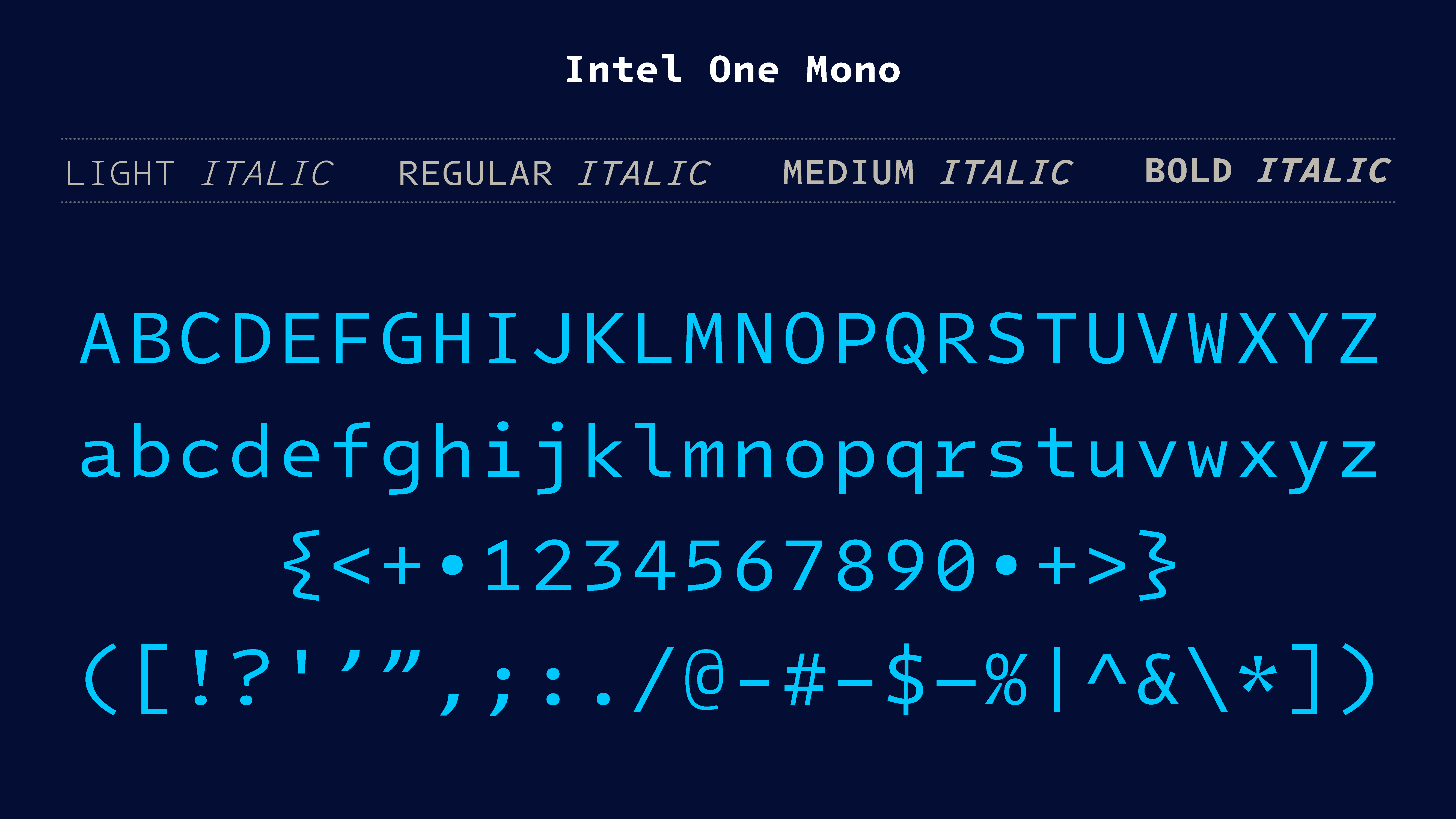
Introducing Intel One Mono, an expressive monospaced font family thatâs
built with clarity, legibility, and the needs of developers in mind.
Itâs easier to read, and available for free, with an open-source font
license.
-Identifying the typographically underserved low-vision developer audience, The
Intel Brand Team designed the Intel One Mono typeface together with VMLY&R and
[Frere-Jones Type](https://frerejones.com/), for maximum legibility to address
developers' fatigue and eyestrain and reduce coding errors. A panel of
low-vision and legally blind developers provided feedback at each stage of
design.
+Identifying the typographically underserved low-vision developer audience,
[Frere-Jones Type](https://frerejones.com/) designed the Intel One Mono
typeface in partnership with the Intel Brand Team and VMLY&R, for maximum
legibility to address developers' fatigue and eyestrain and reduce coding
errors. A panel of low-vision and legally blind developers provided feedback at
each stage of design.
-Intel One Mono also covers a wide range of over 200 languages using the Latin
script. The Intel One Mono fonts are provided in four weights â Light,
Regular, Medium, and Bold â with matching italics, and we are happy to share
both an oï¬cial release of fonts ready to use as well as editable sources.
+Intel One Mono also covers a wide range of over 200 languages using the Latin
script. The Intel One Mono fonts are provided in four weights â Light,
Regular, Medium, and Bold â with matching italics, and we are happy to share
both an official release of fonts ready to use as well as editable sources.
-## Using the Fonts
+## Using the Fonts
-To install the fonts, please use the provided builds under Releases.
Refer to your softwareâs documentation for how to activate and use theseÂ
fonts.
+To install the fonts, please use the provided builds under
[Releases](https://github.com/intel/intel-one-mono/releases). Refer to your
softwareâs documentation for how to activate and use these fonts.
-### Font Formats
-- We recommend the .otf or .ttf format for desktop use.
-- The .ttf ï¬les are also well suited for mobile apps.
-- The .woff and .woff2 fonts are optimized for web use.
+### Font Formats
+- We recommend the .otf or .ttf format for desktop use.
+- The .ttf files are also well suited for mobile apps.
+- The .woff and .woff2 fonts are optimized for web use.
-### Screen Rendering and Size Ranges
-We recommend using these fonts at 7 points and larger in print, 9Â
pixels and larger on screen. The .ttf, .woff and .woff2 fontsÂ
provided in the oï¬cial release have been manually optimized forÂ
screen display, improving clarity and legibility, especially onÂ
Windows platforms.
+### Screen Rendering and Size Ranges
+We recommend using these fonts at 7 points and larger in print, 9 pixels and
larger on screen. The .ttf, .woff and .woff2 fonts provided in the official
release have been manually optimized for screen display, improving clarity and
legibility, especially on Windows platforms.
-### Available OpenType Features
-Outside of the default characters, there are a few extra featuresÂ
that are accessible in some applications, as well as via CSS:
-**Raised Colon:**Â there is an option for a raised colon, either applied
contextually between numbers or activated generally. The contextual option is
available via ss11 (Stylistic Set #11), or use ss12 (Stylistic Set #12)Â
or salt (Stylistic Alternates) for the global switch.
-**Language Support:** ccmp, mark and locl features ensure correct display
across a wide range of languages. These are usually activated byÂ
default. We recommend setting the language tag/setting in your software
to the desired language for best results.
-**Superior/superscript and inferior/subscript ï¬gures** are included viaÂ
their Unicode codepoints, or you can produce them from the defaultÂ
ï¬gures via the sups (Superscript), subs (Subscript), and si
(Scientiï¬c Inferior) features.
-**Fraction numerals** are similarly available via the numr (Numerator) andÂ
dnom (Denominator) features. A set of premade fractions is alsoÂ
available in the fonts.
+### Available OpenType Features
+Outside of the default characters, there are a few extra features that are
accessible in some applications, as well as via CSS:
+**Raised Colon:** there is an option for a raised colon, either applied
contextually between numbers or activated generally. The contextual option is
available via ss11 (Stylistic Set #11), or use ss12 (Stylistic Set #12) or salt
(Stylistic Alternates) for the global switch.
+**Language Support:** ccmp and locl features ensure correct display across a
wide range of languages. These are usually activated by default. We recommend
setting the language tag/setting in your software to the desired language for
best results.
+**Superior/superscript and inferior/subscript figures** are included via their
Unicode codepoints, or you can produce them from the default figures via the
sups (Superscript), subs (Subscript), and si (Scientific Inferior) features.
+**Fraction numerals** are similarly available via the numr (Numerator) and
dnom (Denominator) features. A set of premade fractions is also available in
the fonts.
-## Viewing and Editing Sources
+## Viewing and Editing Sources
-### UFO Source Files: Instances
-You will ï¬nd editable sources in the sources directory. The instances
subfolder contains separate source ï¬les for each style of the typeface.
Sources are provided in .ufo ï¬les, which contain complete artwork, OpenType
features, as well as meta information like naming and vertical alignments for
each style of the typeface.
+### UFO Source Files: Instances
+You will find editable sources in the sources directory. The instances
subfolder contains separate source files for each style of the typeface.
Sources are provided in .ufo files, which contain complete artwork, OpenType
features, as well as meta information like naming and vertical alignments for
each style of the typeface.
-These are not installable fonts, but rather the source ï¬les that produce
them: UFO (Uniï¬ed Font Object) is an open, human-readable font source ï¬le
format; you can ï¬nd the [ï¬le spec
here](https://github.com/unified-font-object/ufo-spec).
-These sources were created using [RoboFont](https://robofont.com/). Many other
font editors will also be able to open .ufo ï¬les; we recommend using RoboFont
version 3.4 or up for the cloest approximation of the original design and
development environment.
+These are not installable fonts, but rather the source files that produce
them: UFO (Unified Font Object) is an open, human-readable font source file
format; you can find the [file spec
here](https://github.com/unified-font-object/ufo-spec).
+These sources were created using [RoboFont](https://robofont.com/). Many other
font editors will also be able to open .ufo files; we recommend using RoboFont
version 3.4 or up for the closest approximation of the original design and
development environment.
-### Outline Formats
-For instances, you will ï¬nd postscript and truetype subfolders;Â
these contain separate source ï¬les for the .otf format and the
.ttf/.woff/.woff2 ï¬les respectively. Since the format for the outline
drawings differs between these sets of formats, for best results we recommend
using the postscript sources to create .otf fonts, and the TrueTypeÂ
sources to create .ttf, .woff, or .woff2 fonts.
-Â
-### Generating Fonts
-After making your desired edits, you can generate installable fonts directly
from the font editor using its âGenerate Fontâ functionality. If youÂ
use RoboFont, any install options should default to the ideal settings,
but here they are for reference:
-- For .otf builds, we recommend activating âDecomposeâ as wellÂ
as âAutohintâ options.
-- For .ttf, .woff and .woff2 builds, we recommend activating theÂ
âAutohintâ option only for more compact ï¬les (see note onÂ
hinting below).
-- In any case, we recommend using the âRelease Modeâ settingÂ
for best results.
-Â
-### UFO Source Files: Masters
+### Outline Formats
+For instances, you will find postscript and truetype subfolders; these contain
separate source files for the .otf format and the .ttf/.woff/.woff2 files
respectively. Since the format for the outline drawings differs between these
sets of formats, for best results we recommend using the postscript sources to
create .otf fonts, and the TrueType sources to create .ttf, .woff, or .woff2
fonts.
+
+### Generating Fonts
+After making your desired edits, you can generate installable fonts directly
from the font editor using its âGenerate Fontâ functionality. If you use
RoboFont, any install options should default to the ideal settings, but here
they are for reference:
+- For .otf builds, we recommend activating âDecomposeâ as well as
âAutohintâ options.
+- For .ttf, .woff and .woff2 builds, we recommend activating the
âAutohintâ option only for more compact files (see note on hinting below).
+- In any case, we recommend using the âRelease Modeâ setting for best
results.
+
+### UFO Source Files: Masters
-If you would like to apply edits across multiple weights, a more advanced yet
potentially eï¬cient way is to edit the masters. These are special sources
that describe the extreme points in the design space â the lightest and
heaviest weights for both roman and italic designs.
+If you would like to apply edits across multiple weights, a more advanced yet
potentially efficient way is to edit the masters. These are special sources
that describe the extreme points in the design space â the lightest and
heaviest weights for both roman and italic designs.
-After editing masters, you will need to rerun interpolation to generate
individual weights and styles within that design space. This requires the
.designspace ï¬les enclosed with the masters; the designspace format is an
open, XML-based format that describes interpolation spaces ([format
speciï¬cation](https://github.com/fonttools/fonttools/tree/main/Doc/source/designspaceLib)
for reference). For a RoboFont-based workï¬ow we recommend
[Skateboard](https://extensionstore.robofont.com/extensions/skateboard/) for
interpolation; you can also use the free
[DesignSpaceEditor](https://github.com/LettError/designSpaceRoboFontExtension)
extension to view and edit these ï¬les.
+After editing masters, you will need to rerun interpolation to generate
individual weights and styles within that design space. This requires the
.designspace files enclosed with the masters; the designspace format is an
open, XML-based format that describes interpolation spaces ([format
specification](https://github.com/fonttools/fonttools/tree/main/Doc/source/designspaceLib)
for reference). For a RoboFont-based workflow we recommend
[Skateboard](https://extensionstore.robofont.com/extensions/skateboard/) for
interpolation; you can also use the free
[DesignSpaceEditor](https://github.com/LettError/designSpaceRoboFontExtension)
extension to view and edit these files.
-Note that masters are only available in postscript format, so they will be
best for creating .otf fonts. If you need to make TrueType based builds from
the masters, we recommend
[QuadraticConverter](https://github.com/BlackFoundry/QuadraticConverter) for
best quality conversion of the curves before generating .ttf, .woff, or .woff2
ï¬les; mind that the results will not match the provided instances precisely.
+Note that masters are only available in postscript format, so they will be
best for creating .otf fonts. If you need to make TrueType based builds from
the masters, we recommend
[QuadraticConverter](https://github.com/BlackFoundry/QuadraticConverter) for
best quality conversion of the curves before generating .ttf, .woff, or .woff2
files; mind that the results will not match the provided instances precisely.
-NB: The prepared instances contain some additional data than cannot be stored
in the masters and maintained through interpolation. For best results, compare
new interpolations to the existing instance sources and update them
accordingly, speciï¬cally the information accessible through the Font Info
panels. Also note that provided instances contain a mark feature in the
OpenType features, which handles advanced accent placement for full support of
the range of languages. This is computed for each style individually, so it is
not contained in the masters.
+NB: The prepared instances contain some additional data that cannot be stored
in the masters and maintained through interpolation. For best results, compare
new interpolations to the existing instance sources and update them
accordingly, specifically the information accessible through the Font Info
panels.
-### Other Files: Hinting Source
-For TrueType-based formats (.ttf, .woff, .woff2 ï¬les), the oï¬cialÂ
releases are manually optimized for screen rendering. These âhintingâ
sources are stored separately from the .ufo ï¬les, which do not contain any
TrueType hinting information. When rebuilding TrueType-based formats, we
recommend using the âautohintâ option to achieve reasonable, though not
identical screen rendering.
+### Other Files: Hinting Source
+For TrueType-based formats (.ttf, .woff, .woff2 files), the official releases
are manually optimized for screen rendering. These âhintingâ sources are
stored separately from the .ufo files, which do not contain any TrueType
hinting information. When rebuilding TrueType-based formats, we recommend using
the âautohintâ option to achieve reasonable, though not identical screen
rendering.
-If you would like to access and edit manual hinting instructions,Â
you will ï¬nd these in the separate set of source ï¬les under other
ï¬les/truetype hinting source. These special TTF ï¬les will be viewableÂ
and editable using [MicrosoftÂ
VTT](https://learn.microsoft.com/en-us/typography/tools/vtt/).
-Â
-Â
-## Suggesting Edits
-If you have suggestions for edits or additions to the oï¬cial releases,
please email [email protected].
-Â
+If you would like to access and edit manual hinting instructions, you will
find these in the separate set of source files under other files/truetype
hinting source. These special TTF files will be viewable and editable using
[Microsoft VTT](https://learn.microsoft.com/en-us/typography/tools/vtt/).
+
+
+## Suggesting Edits
+If you have suggestions for edits or additions to the official releases,
please email [email protected].
++++++ ttf.zip ++++++
Binary files /var/tmp/diff_new_pack.exC2Ao/_old and
/var/tmp/diff_new_pack.exC2Ao/_new differ

