wolfier opened a new issue #14864:
URL: https://github.com/apache/airflow/issues/14864
**Apache Airflow version**: 2.0.0 **Kubernetes version (if you are using kubernetes)** (use `kubectl version`): n/a **What happened**: When I do not use the context manager for the task group and instead call the add function to add the tasks, those tasks show up on the Graph view.  However, when I click on the task group item on the Graph UI, it will fix the issue. When I close the task group item, the tasks will not be displayed as expected.  **What you expected to happen**: I expected the tasks inside the task group to not display on the Graph view. 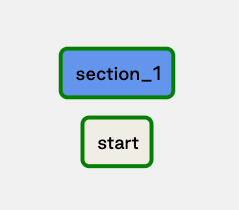 **How to reproduce it**: Render this DAG in Airflow ```python from airflow.models import DAG from airflow.operators.bash import BashOperator from airflow.operators.dummy import DummyOperator from airflow.utils.task_group import TaskGroup from datetime import datetime with DAG(dag_id="example_task_group", start_date=datetime(2021, 1, 1), tags=["example"], catchup=False) as dag: start = BashOperator(task_id="start", bash_command='echo 1; sleep 10; echo 2;') tg = TaskGroup("section_1", tooltip="Tasks for section_1") task_1 = DummyOperator(task_id="task_1") task_2 = BashOperator(task_id="task_2", bash_command='echo 1') task_3 = DummyOperator(task_id="task_3") tg.add(task_1) tg.add(task_2) tg.add(task_3) ``` ---------------------------------------------------------------- This is an automated message from the Apache Git Service. To respond to the message, please log on to GitHub and use the URL above to go to the specific comment. For queries about this service, please contact Infrastructure at: [email protected]



