sobee07 opened a new issue #16322:
URL: https://github.com/apache/airflow/issues/16322
<!--
IMPORTANT!!!
PLEASE CHECK "SIMILAR TO X EXISTING ISSUES" OPTION IF VISIBLE
NEXT TO "SUBMIT NEW ISSUE" BUTTON!!!
PLEASE CHECK IF THIS ISSUE HAS BEEN REPORTED PREVIOUSLY USING SEARCH!!!
Please complete the next sections or the issue will be closed.
These questions are the first thing we need to know to understand the
context.
-->
**Apache Airflow version**:2.1.0
**Kubernetes version (if you are using kubernetes)** (use `kubectl version`):
**Environment**: Docker
- **Cloud provider or hardware configuration**:
- **OS** (e.g. from /etc/os-release):
- **Kernel** (e.g. `uname -a`):
- **Install tools**:
- **Others**:
**What happened**:
<!-- I install snowflake provider package but not able to see it in the
Airflow UI -->
**What you expected to happen**:
<!-- Post snowflake provider package installation, snowflake should have
been present in the connection dropdown-->
**How to reproduce it**:
<!---
I used below Dockercompose file
version: '3'
x-airflow-common:
&airflow-common
image: ${AIRFLOW_IMAGE_NAME:-apache/airflow:2.1.0}
environment:
&airflow-common-env
AIRFLOW__CORE__EXECUTOR: CeleryExecutor
AIRFLOW__CORE__SQL_ALCHEMY_CONN:
postgresql+psycopg2://airflow:airflow@postgres/airflow
AIRFLOW__CELERY__RESULT_BACKEND:
db+postgresql://airflow:airflow@postgres/airflow
AIRFLOW__CELERY__BROKER_URL: redis://:@redis:6379/0
AIRFLOW__CORE__FERNET_KEY: ''
AIRFLOW__CORE__DAGS_ARE_PAUSED_AT_CREATION: 'true'
AIRFLOW__CORE__LOAD_EXAMPLES: 'false'
AIRFLOW__API__AUTH_BACKEND: 'airflow.api.auth.backend.basic_auth'
volumes:
- ./dags:/opt/airflow/dags
- ./logs:/opt/airflow/logs
- ./plugins:/opt/airflow/plugins
- ./packages:/opt/airflow/packages
user: "${AIRFLOW_UID:-50000}:${AIRFLOW_GID:-50000}"
depends_on:
redis:
condition: service_healthy
postgres:
condition: service_healthy
services:
postgres:
image: postgres:13
environment:
POSTGRES_USER: airflow
POSTGRES_PASSWORD: airflow
POSTGRES_DB: airflow
volumes:
- postgres-db-volume:/var/lib/postgresql/data
healthcheck:
test: ["CMD", "pg_isready", "-U", "airflow"]
interval: 5s
retries: 5
restart: always
redis:
image: redis:latest
ports:
- 6379:6379
healthcheck:
test: ["CMD", "redis-cli", "ping"]
interval: 5s
timeout: 30s
retries: 50
restart: always
airflow-webserver:
<<: *airflow-common
command: webserver
ports:
- 8080:8080
healthcheck:
test: ["CMD", "curl", "--fail", "http://localhost:8080/health";]
interval: 10s
timeout: 10s
retries: 5
restart: always
airflow-scheduler:
<<: *airflow-common
command: scheduler
healthcheck:
test: ["CMD-SHELL", 'airflow jobs check --job-type SchedulerJob
--hostname "$${HOSTNAME}"']
interval: 10s
timeout: 10s
retries: 5
restart: always
airflow-worker:
<<: *airflow-common
command: celery worker
healthcheck:
test:
- "CMD-SHELL"
- 'celery --app airflow.executors.celery_executor.app inspect ping
-d "celery@$${HOSTNAME}"'
interval: 10s
timeout: 10s
retries: 5
restart: always
airflow-init:
<<: *airflow-common
command: version
environment:
<<: *airflow-common-env
_AIRFLOW_DB_UPGRADE: 'true'
_AIRFLOW_WWW_USER_CREATE: 'true'
_AIRFLOW_WWW_USER_USERNAME: ${_AIRFLOW_WWW_USER_USERNAME:-airflow}
_AIRFLOW_WWW_USER_PASSWORD: ${_AIRFLOW_WWW_USER_PASSWORD:-airflow}
flower:
<<: *airflow-common
command: celery flower
ports:
- 5555:5555
healthcheck:
test: ["CMD", "curl", "--fail", "http://localhost:5555/";]
interval: 10s
timeout: 10s
retries: 5
restart: always
volumes:
postgres-db-volume:
Steps to install the docker file
mkdir ./dags ./logs ./plugins ./packages
echo -e "AIRFLOW_UID=$(id -u)\nAIRFLOW_GID=0" > .env
sudo service docker start
sudo docker-compose up airflow-init
sudo docker-compose up -d
After service is up
sudo docker ps
CONTAINER ID IMAGE COMMAND CREATED
STATUS PORTS NAMES
1621533ee32a apache/airflow:2.1.0 "/usr/bin/dumb-init …" About a
minute ago Up About a minute (healthy) 8080/tcp
ec2-user_airflow-worker_1
3518961dcb77 apache/airflow:2.1.0 "/usr/bin/dumb-init …" About a
minute ago Up About a minute (healthy) 8080/tcp
ec2-user_airflow-scheduler_1
75a08dbf520c apache/airflow:2.1.0 "/usr/bin/dumb-init …" About a
minute ago Up About a minute (healthy) 0.0.0.0:5555->5555/tcp, 8080/tcp
ec2-user_flower_1
f0996bae3cf4 apache/airflow:2.1.0 "/usr/bin/dumb-init …" About a
minute ago Up About a minute (healthy) 0.0.0.0:8080->8080/tcp
ec2-user_airflow-webserver_1
1f52157188c4 postgres:13 "docker-entrypoint.s…" About a
minute ago Up About a minute (healthy) 5432/tcp
ec2-user_postgres_1
b529a482f072 redis:latest "docker-entrypoint.s…" About a
minute ago Up About a minute (healthy) 0.0.0.0:6379->6379/tcp
ec2-user_redis_1
Then install the packages in all the containers except postgres and redis
sudo docker exec -ti -u root 1621533ee32a /bin/bash
pip install apache-airflow-providers-snowflake==1.1.0rc1
cd ./packages/ && pip install -r requirements.txt
exit
sudo docker exec -ti -u root 3518961dcb77 /bin/bash
pip install apache-airflow-providers-snowflake==1.1.0rc1
cd ./packages/ && pip install -r requirements.txt
exit
sudo docker exec -ti -u root 75a08dbf520c /bin/bash
pip install apache-airflow-providers-snowflake==1.1.0rc1
cd ./packages/ && pip install -r requirements.txt
exit
sudo docker exec -ti -u root f0996bae3cf4 /bin/bash
pip install apache-airflow-providers-snowflake==1.1.0rc1
cd ./packages/ && pip install -r requirements.txt
exit
The contents of requirements.txt (This is present inside packages folder)
snowflake-connector-python
snowflake
snowflake-sqlalchemy
lxml
pandas
--->
**Anything else we need to know**:
<!-- Even after this , i caanot see the snowflake in the connection
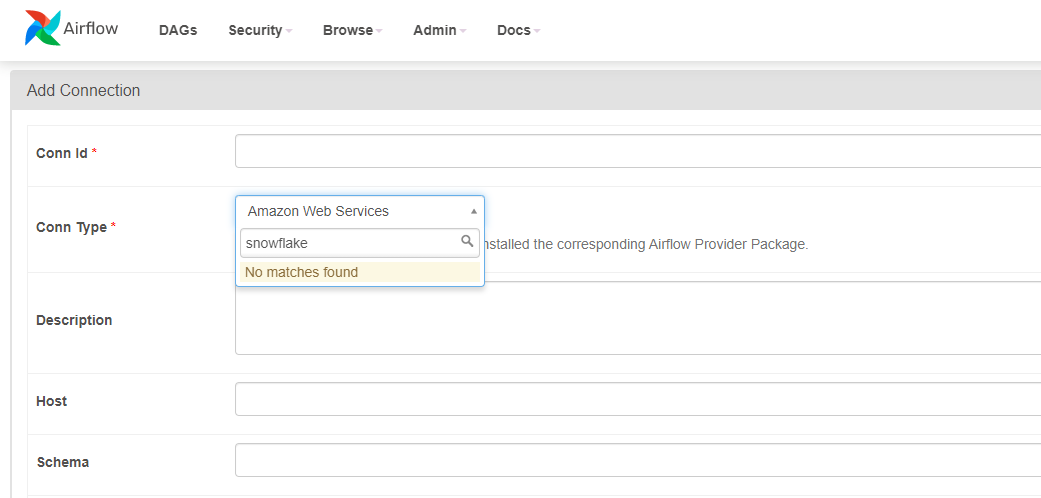
-->
--
This is an automated message from the Apache Git Service.
To respond to the message, please log on to GitHub and use the
URL above to go to the specific comment.
For queries about this service, please contact Infrastructure at:
[email protected]

