enricogandini opened a new issue, #25444:
URL: https://github.com/apache/airflow/issues/25444
### Apache Airflow version 2.3.3 (latest released) ### What happened I just started using Airflow. After initializing the airflow database and creating a user, I initialized the Airflow webserver and scheduler. Using the Firefox browser, I went to localhost:8080, and I logged in. Many icons were missing, as you can see from the screenshot 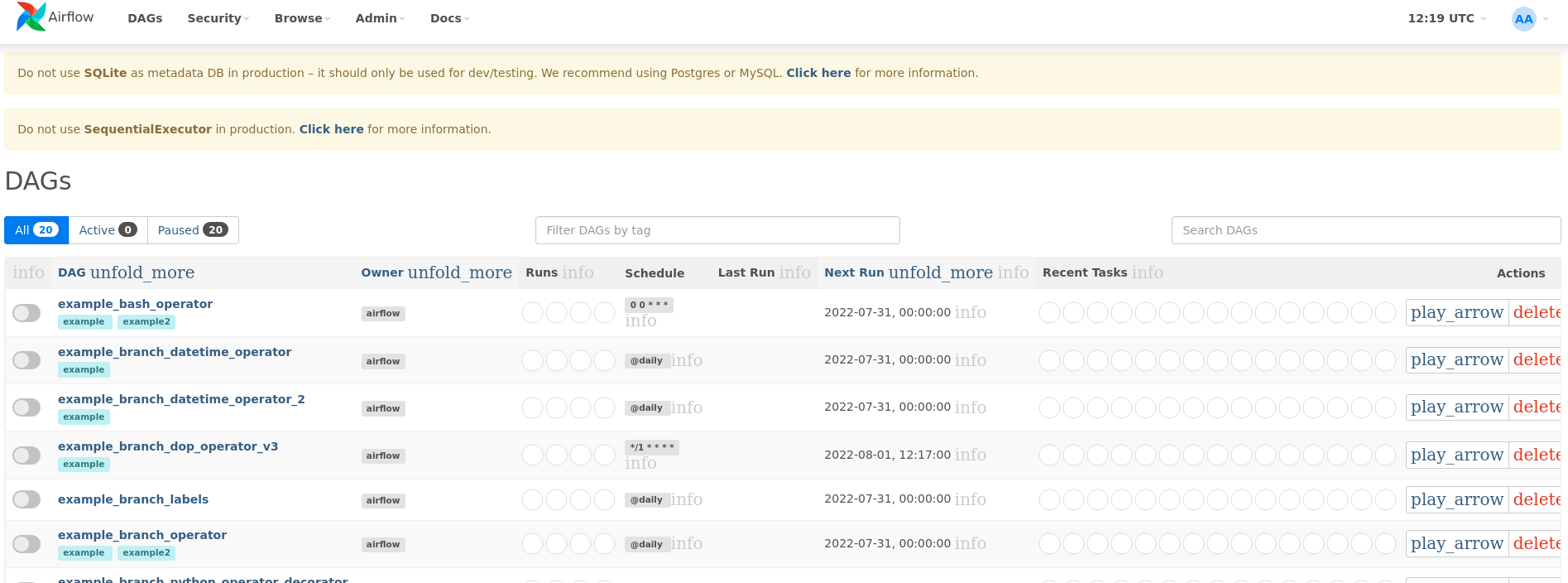 . I am running Airflow on the Ubuntu 20.04 operating system, with Firefox 103.0. I installed Airflow 2.3.3 through Anaconda (using the conda-forge channel). I also tried reinstalling Airflow using pip, but the problem persisted. I then tried opening the Airflow website on Chrome: everything was fine, all the icons were shown properly. ### What you think should happen instead The icons should have been properly displayed. ### How to reproduce airflow webserver airflow scheduler Go to: localhost:8080, and login. You will notice that the icons are not displayed! ### Operating System Ubuntu 20.04.4 LTS ### Versions of Apache Airflow Providers _No response_ ### Deployment Virtualenv installation ### Deployment details I installed Airflow 2.3.3 with Anaconda 4.13.0, through the conda-forge channel. Even after reinstalling with pip, the problem persisted. ### Anything else _No response_ ### Are you willing to submit PR? - [ ] Yes I am willing to submit a PR! ### Code of Conduct - [X] I agree to follow this project's [Code of Conduct](https://github.com/apache/airflow/blob/main/CODE_OF_CONDUCT.md) -- This is an automated message from the Apache Git Service. To respond to the message, please log on to GitHub and use the URL above to go to the specific comment. To unsubscribe, e-mail: [email protected] For queries about this service, please contact Infrastructure at: [email protected]

