Jorricks opened a new issue, #25615:
URL: https://github.com/apache/airflow/issues/25615
### Apache Airflow version Other Airflow 2 version ### What happened Airflow version: 2.2.3 We cleared a task for a DAG containing around 10 tasks. This clearing was done for a recent date till almost a year back. It marks all the DagRuns back to queued, which was good. However, at a certain point the DagRuns don't come in order anymore and spawn all over the place as shown in the image. 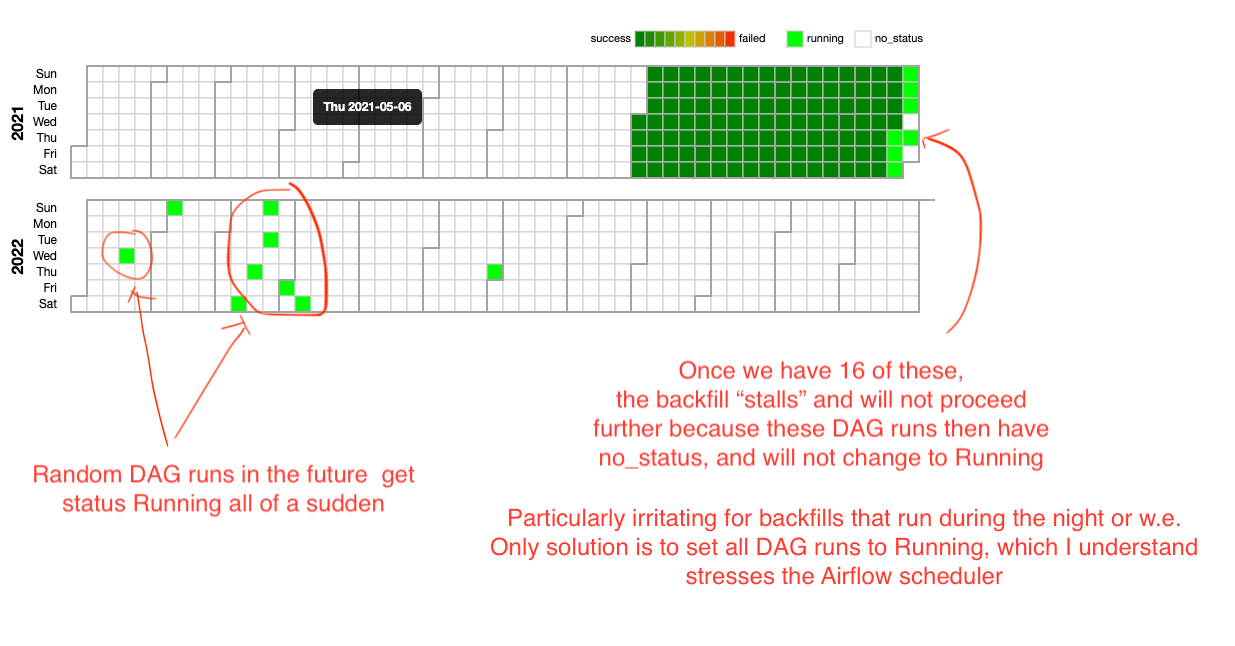 Because of the `depends_on_past=True`, the DAG will get stuck with this behavior as soon as we have `x` random DagRuns where `x` equals the `max_active_runs`. ### What you think should happen instead It should have set the DagRuns to running in sequential order. ### How to reproduce Run a large airflow instance with a lot of DAGs and run 4 schedulers. Then clear a lot of TaskInstance of the same task. ### Operating System CentOS Linux 7 (Core) ### Versions of Apache Airflow Providers None ### Deployment Virtualenv installation ### Deployment details - 4 Schedulers - 4 Webservers - 4 Celery workers - Postgres database - We have a custom plugin ### Anything else It seems to happen when we clear a lot of (old?) TaskInstances of the same tasks. ### Are you willing to submit PR? - [X] Yes I am willing to submit a PR! ### Code of Conduct - [X] I agree to follow this project's [Code of Conduct](https://github.com/apache/airflow/blob/main/CODE_OF_CONDUCT.md) -- This is an automated message from the Apache Git Service. To respond to the message, please log on to GitHub and use the URL above to go to the specific comment. To unsubscribe, e-mail: [email protected] For queries about this service, please contact Infrastructure at: [email protected]

