sangrpatil2 opened a new issue, #29555:
URL: https://github.com/apache/airflow/issues/29555
### Apache Airflow version Other Airflow 2 version (please specify below) ### What happened We have dynamic Dag, where we have a few Task Groups and each of these contains dynamic tasks depending on airflow variables. In variables, we store a list of batches to execute. e.g. Airflow variables: `batch_list [1, 2]`. Suppose we have Task Groups like A, B & C. So here we're going to execute each batch in these respective task groups (as shown below).  Tasks/Steps: - **Start:** It just collects the config details sent to the Dag - **Fetch Batch:** It queries a few tables and prepares the list of batches to execute. - **Load Batch:** It updates the environment variable with the latest batches fetched from the previous step. - **A/B/C:** These are Task Groups. Each of them contains dynamic tasks depending on `batch_list` from airflow variables. - **A1, A2, B1, B2 ... :** These are the dynamic Tasks, which execute the spark script and generate the dataset and write it to the S3. But in a few executions/runs it didn't refresh the tasks as per the latest variables (Batches). Instead, it tries to execute the same old task/step from the previous run and fails with the error - `Dependencies not met for <TaskInstance: DAG-NAME.A1>`. For example, In the first run, it executed `batch_list: [1, 2]`. But In the next, it might fail with the below scenarios. Consider `batch_list: [3,4]` for the second run : - It Marks Tasks within the Task Group as failed and all the downstream steps as `upstream_failed`. But on page refresh, you can see it updates the dynamic tasks with the latest batches (environment variable) and starts executing the same but still downstream steps will be in the `upstream_failed` state. Before Refresh: 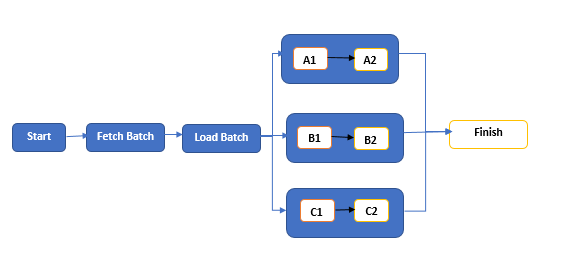 On Refresh:  - It removes the old steps (which were failed) and updates the steps with the latest batches (environment variable) and marks all the steps including the latest dynamic steps as `upstream_failed` 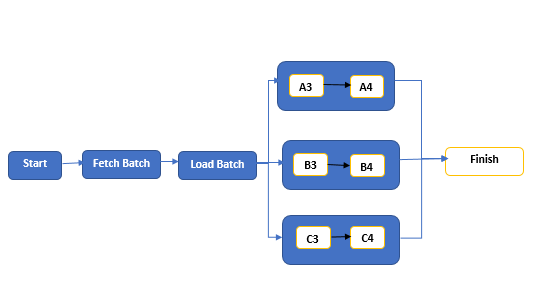 To overcome this issue, we tried a few workarounds like adding a delay of a few minutes with the dummy step prior to dynamic step creation. But still, sometimes it fails to update the dynamic steps.  **Note:** Airflow version : 2.2.2 ### What you think should happen instead It should update the Dag with the correct dynamic tasks. ### How to reproduce You can create some dynamic dags using Airflow variables with the Airflow version. 2.2.2 and try a few runs with different variables. ### Operating System - ### Versions of Apache Airflow Providers _No response_ ### Deployment MWAA ### Deployment details _No response_ ### Anything else _No response_ ### Are you willing to submit PR? - [ ] Yes I am willing to submit a PR! ### Code of Conduct - [X] I agree to follow this project's [Code of Conduct](https://github.com/apache/airflow/blob/main/CODE_OF_CONDUCT.md) -- This is an automated message from the Apache Git Service. To respond to the message, please log on to GitHub and use the URL above to go to the specific comment. To unsubscribe, e-mail: [email protected] For queries about this service, please contact Infrastructure at: [email protected]





