This is an automated email from the ASF dual-hosted git repository.

kalyanr pushed a commit to branch main
in repository https://gitbox.apache.org/repos/asf/airflow.git
The following commit(s) were added to refs/heads/main by this push:
     new 223a7418695 capitalize the term airflow (#49450)
223a7418695 is described below

commit 223a741869505ad31c38310f307bf2f0f0f193fb
Author: Kalyan R <[email protected]>
AuthorDate: Sat Apr 19 16:47:32 2025 +0530

    capitalize the term airflow (#49450)
---
 airflow-core/docs/installation/upgrading.rst       |  4 +-
 airflow-core/docs/security/kerberos.rst            |  8 +--
 airflow-core/docs/security/sbom.rst                |  4 +-
 airflow-core/docs/security/security_model.rst      |  2 +-
 airflow-core/docs/security/workload.rst            |  4 +-
 airflow-core/docs/tutorial/pipeline.rst            |  4 +-
 airflow-core/newsfragments/40029.significant.rst   |  2 +-
 airflow-core/newsfragments/41564.significant.rst   |  2 +-
 airflow-core/newsfragments/42252.significant.rst   |  2 +-
 airflow-core/newsfragments/47441.significant.rst   |  2 +-
 airflow-core/newsfragments/48223.significant.rst   |  4 +-
 airflow-core/newsfragments/49161.significant.rst   |  2 +-
 .../newsfragments/template.significant.rst         |  2 +-
 chart/docs/keda.rst                                |  4 +-
 chart/docs/manage-dag-files.rst                    |  2 +-
 chart/docs/production-guide.rst                    |  2 +-
 contributing-docs/01_roles_in_airflow_project.rst  |  2 +-
 contributing-docs/03_contributors_quick_start.rst  | 10 ++--
 contributing-docs/05_pull_requests.rst             |  2 +-
 contributing-docs/07_local_virtualenv.rst          | 16 +++---
 contributing-docs/08_static_code_checks.rst        |  2 +-
 contributing-docs/09_testing.rst                   |  4 +-
 contributing-docs/10_working_with_git.rst          |  2 +-
 contributing-docs/12_provider_distributions.rst    | 10 ++--
 .../13_airflow_dependencies_and_extras.rst         | 16 +++---
 contributing-docs/14_metadata_database_updates.rst |  2 +-
 contributing-docs/README.rst                       |  2 +-
 .../contributors_quick_start_gitpod.rst            |  4 +-
 .../contributors_quick_start_pycharm.rst           |  6 +-
 .../contributors_quick_start_vscode.rst            |  4 +-
 contributing-docs/testing/dag_testing.rst          |  2 +-
 contributing-docs/testing/docker_compose_tests.rst |  2 +-
 contributing-docs/testing/k8s_tests.rst            | 16 +++---
 contributing-docs/testing/unit_tests.rst           | 34 +++++------
 dev/breeze/doc/02_customizing.rst                  |  2 +-
 dev/breeze/doc/03_developer_tasks.rst              |  4 +-
 dev/breeze/doc/05_test_commands.rst                | 14 ++---
 dev/breeze/doc/06_managing_docker_images.rst       |  2 +-
 dev/breeze/doc/09_release_management_tasks.rst     | 66 +++++++++++-----------
 dev/breeze/doc/10_advanced_breeze_topics.rst       |  2 +-
 docker-stack-docs/build-arg-ref.rst                |  4 +-
 docker-stack-docs/build.rst                        | 38 ++++++-------
 docker-stack-docs/entrypoint.rst                   |  4 +-
 docker-stack-docs/index.rst                        |  4 +-
 docker-stack-docs/recipes.rst                      |  2 +-
 .../howto/create-custom-providers.rst              |  4 +-
 providers-summary-docs/index.rst                   |  4 +-
 providers-summary-docs/installing-from-pypi.rst    |  2 +-
 providers/MANAGING_PROVIDERS_LIFECYCLE.rst         | 16 +++---
 providers/amazon/docs/connections/aws.rst          |  2 +-
 providers/celery/docs/celery_executor.rst          |  2 +-
 providers/cncf/kubernetes/docs/operators.rst       |  2 +-
 providers/edge3/docs/edge_executor.rst             |  2 +-
 providers/edge3/docs/install_on_windows.rst        |  2 +-
 providers/elasticsearch/docs/logging/index.rst     |  2 +-
 .../fab/docs/auth-manager/api-authentication.rst   |  2 +-
 56 files changed, 184 insertions(+), 184 deletions(-)

diff --git a/airflow-core/docs/installation/upgrading.rst
b/airflow-core/docs/installation/upgrading.rst
index 675896d1477..f2be39dd427 100644
--- a/airflow-core/docs/installation/upgrading.rst
+++ b/airflow-core/docs/installation/upgrading.rst
@@ -52,7 +52,7 @@ In some cases the upgrade happens automatically - it depends
if in your deployme
 built-in as post-install action. For example when you are using
:doc:`helm-chart:index` with
 post-upgrade hooks enabled, the database upgrade happens automatically right
after the new software
 is installed. Similarly all Airflow-As-A-Service solutions perform the upgrade
automatically for you,
-when you choose to upgrade airflow via their UI.
+when you choose to upgrade Airflow via their UI.

 How to upgrade
 ==============
@@ -74,7 +74,7 @@ you access to Airflow ``CLI`` :doc:`/howto/usage-cli` and the
database.
 Offline SQL migration scripts
 =============================
 If you want to run the upgrade script offline, you can use the ``-s`` or
``--show-sql-only`` flag
-to get the SQL statements that would be executed. You may also specify the
starting airflow version with the ``--from-version`` flag and the ending
airflow version with the ``-n`` or ``--to-version`` flag. This feature is
supported in Postgres and MySQL
+to get the SQL statements that would be executed. You may also specify the
starting Airflow version with the ``--from-version`` flag and the ending
Airflow version with the ``-n`` or ``--to-version`` flag. This feature is
supported in Postgres and MySQL
 from Airflow 2.0.0 onward.

 Sample usage for Airflow version 2.7.0 or greater:
diff --git a/airflow-core/docs/security/kerberos.rst
b/airflow-core/docs/security/kerberos.rst
index b38ebb61467..0dea38c60bb 100644
--- a/airflow-core/docs/security/kerberos.rst
+++ b/airflow-core/docs/security/kerberos.rst
@@ -45,10 +45,10 @@ To enable Kerberos you will need to generate a (service)
key tab.
     # in the kadmin.local or kadmin shell, create the airflow principal
     kadmin:  addprinc -randkey
airflow/[email protected]

-    # Create the airflow keytab file that will contain the airflow principal
+    # Create the Airflow keytab file that will contain the Airflow principal
     kadmin:  xst -norandkey -k airflow.keytab
airflow/fully.qualified.domain.name

-Now store this file in a location where the airflow user can read it (chmod
600). And then add the following to
+Now store this file in a location where the Airflow user can read it (chmod
600). And then add the following to
 your ``airflow.cfg``

 .. code-block:: ini
@@ -103,9 +103,9 @@ Launch the ticket renewer by
 To support more advanced deployment models for using kerberos in standard or
one-time fashion,
 you can specify the mode while running the ``airflow kerberos`` by using the
``--one-time`` flag.

-a) standard: The airflow kerberos command will run endlessly. The ticket
renewer process runs continuously every few seconds
+a) standard: The Airflow kerberos command will run endlessly. The ticket
renewer process runs continuously every few seconds
 and refreshes the ticket if it has expired.
-b) one-time: The airflow kerberos will run once and exit. In case of failure
the main task won't spin up.
+b) one-time: The Airflow kerberos will run once and exit. In case of failure
the main task won't spin up.

 The default mode is standard.

diff --git a/airflow-core/docs/security/sbom.rst
b/airflow-core/docs/security/sbom.rst
index 273c16c79ce..9912ad4067d 100644
--- a/airflow-core/docs/security/sbom.rst
+++ b/airflow-core/docs/security/sbom.rst
@@ -25,7 +25,7 @@ of the software dependencies.
 The general use case for such files is to help assess and manage risks. For
instance a quick lookup against your SBOM files can help identify if a CVE
(Common Vulnerabilities and Exposures) in a
 library is affecting you.

-By default, Apache Airflow SBOM files are generated for airflow core with all
providers. In the near future we aim at generating SBOM files per provider and
also provide them for docker standard images.
+By default, Apache Airflow SBOM files are generated for Airflow core with all
providers. In the near future we aim at generating SBOM files per provider and
also provide them for docker standard images.

-Each airflow version has its own SBOM files, one for each supported python
version.
+Each Airflow version has its own SBOM files, one for each supported python
version.
 You can find them `here
<https://airflow.apache.org/docs/apache-airflow/stable/sbom>`_.
diff --git a/airflow-core/docs/security/security_model.rst
b/airflow-core/docs/security/security_model.rst
index cf19d0a276e..2ebff598c54 100644
--- a/airflow-core/docs/security/security_model.rst
+++ b/airflow-core/docs/security/security_model.rst
@@ -240,7 +240,7 @@ in the Scheduler and API Server processes.
 Deploying and protecting Airflow installation
 .............................................

-Deployment Managers are also responsible for deploying airflow and make it
accessible to the users
+Deployment Managers are also responsible for deploying Airflow and make it
accessible to the users
 in the way that follows best practices of secure deployment applicable to the
organization where
 Airflow is deployed. This includes but is not limited to:

diff --git a/airflow-core/docs/security/workload.rst
b/airflow-core/docs/security/workload.rst
index 9f6bfecad94..31714aa21fb 100644
--- a/airflow-core/docs/security/workload.rst
+++ b/airflow-core/docs/security/workload.rst
@@ -29,8 +29,8 @@ instances based on the task's ``run_as_user`` parameter,
which takes a user's na
 **NOTE:** For impersonations to work, Airflow requires ``sudo`` as subtasks
are run
 with ``sudo -u`` and permissions of files are changed. Furthermore, the unix
user
 needs to exist on the worker. Here is what a simple sudoers file entry could
look
-like to achieve this, assuming airflow is running as the ``airflow`` user.
This means
-the airflow user must be trusted and treated the same way as the root user.
+like to achieve this, assuming Airflow is running as the ``airflow`` user.
This means
+the Airflow user must be trusted and treated the same way as the root user.

 .. code-block:: none

diff --git a/airflow-core/docs/tutorial/pipeline.rst
b/airflow-core/docs/tutorial/pipeline.rst
index 4f25b695f44..cc6f41e4977 100644
--- a/airflow-core/docs/tutorial/pipeline.rst
+++ b/airflow-core/docs/tutorial/pipeline.rst
@@ -163,7 +163,7 @@ Next, we'll download a CSV file, save it locally, and load
it into ``employees_t

   @task
   def get_data():
-      # NOTE: configure this as appropriate for your airflow environment
+      # NOTE: configure this as appropriate for your Airflow environment
       data_path = "/opt/airflow/dags/files/employees.csv"
       os.makedirs(os.path.dirname(data_path), exist_ok=True)

@@ -280,7 +280,7 @@ Now that we've defined all our tasks, it's time to put them
together into a DAG.

       @task
       def get_data():
-          # NOTE: configure this as appropriate for your airflow environment
+          # NOTE: configure this as appropriate for your Airflow environment
           data_path = "/opt/airflow/dags/files/employees.csv"
           os.makedirs(os.path.dirname(data_path), exist_ok=True)

diff --git a/airflow-core/newsfragments/40029.significant.rst
b/airflow-core/newsfragments/40029.significant.rst
index 1d9bc26ef85..26d66f69c0d 100644
--- a/airflow-core/newsfragments/40029.significant.rst
+++ b/airflow-core/newsfragments/40029.significant.rst
@@ -1,4 +1,4 @@
-Removed deprecated airflow configuration
``webserver.allow_raw_html_descriptions`` from UI Trigger forms.
+Removed deprecated Airflow configuration
``webserver.allow_raw_html_descriptions`` from UI Trigger forms.

 * Types of change

diff --git a/airflow-core/newsfragments/41564.significant.rst
b/airflow-core/newsfragments/41564.significant.rst
index eed922f86c1..dd576783bdb 100644
--- a/airflow-core/newsfragments/41564.significant.rst
+++ b/airflow-core/newsfragments/41564.significant.rst
@@ -1,4 +1,4 @@
-Move all time operators and sensors from airflow core to standard provider
+Move all time operators and sensors from Airflow core to standard provider

 * Types of change

diff --git a/airflow-core/newsfragments/42252.significant.rst
b/airflow-core/newsfragments/42252.significant.rst
index 2533fb451b4..51ebcbd3af7 100644
--- a/airflow-core/newsfragments/42252.significant.rst
+++ b/airflow-core/newsfragments/42252.significant.rst
@@ -1,4 +1,4 @@
-Move bash operators from airflow core to standard provider
+Move bash operators from Airflow core to standard provider

 * Types of change

diff --git a/airflow-core/newsfragments/47441.significant.rst
b/airflow-core/newsfragments/47441.significant.rst
index 05fe947efe0..36f2af35970 100644
--- a/airflow-core/newsfragments/47441.significant.rst
+++ b/airflow-core/newsfragments/47441.significant.rst
@@ -1,7 +1,7 @@
 There are no more production bundle or devel extras

 There are no more production ``all*`` or ``devel*`` bundle extras available in
``wheel`` package of airflow.
-If you want to install airflow with all extras you can use ``uv pip install
--all-extras`` command.
+If you want to install Airflow with all extras you can use ``uv pip install
--all-extras`` command.

 * Types of change

diff --git a/airflow-core/newsfragments/48223.significant.rst
b/airflow-core/newsfragments/48223.significant.rst
index 5aee91c591f..5d05cc85bf5 100644
--- a/airflow-core/newsfragments/48223.significant.rst
+++ b/airflow-core/newsfragments/48223.significant.rst
@@ -9,10 +9,10 @@ already existing ``providers`` and the dependencies are
isolated and simplified
 packages.

 While the original installation methods via ``apache-airflow`` distribution
package and extras still
-work as previously and it installs complete airflow installation ready to
serve as scheduler, webserver, triggerer
+work as previously and it installs complete Airflow installation ready to
serve as scheduler, webserver, triggerer
 and worker, the ``apache-airflow`` package is now a meta-package that cab
install all the other distribution
 packages (mandatory of via optional extras), it's also possible to install
only the distribution
-packages that are needed for a specific component you want to run airflow with.
+packages that are needed for a specific component you want to run Airflow with.

 One change vs. Airflow 2 is that neither ``apache-airflow`` nor
``apache-airflow-core`` distribution packages
 have ``leveldb`` extra that is an optional feature of
``apache-airflow-providers-google`` distribution package.
diff --git a/airflow-core/newsfragments/49161.significant.rst
b/airflow-core/newsfragments/49161.significant.rst
index 549d27bdfe3..faf732faf82 100644
--- a/airflow-core/newsfragments/49161.significant.rst
+++ b/airflow-core/newsfragments/49161.significant.rst
@@ -1,4 +1,4 @@
-Removed airflow configuration ``navbar_logo_text_color``
+Removed Airflow configuration ``navbar_logo_text_color``

 * Types of change

diff --git a/airflow-core/newsfragments/template.significant.rst
b/airflow-core/newsfragments/template.significant.rst
index 4877b0cbd1e..702670ebec0 100644
--- a/airflow-core/newsfragments/template.significant.rst
+++ b/airflow-core/newsfragments/template.significant.rst
@@ -4,7 +4,7 @@

 .. Check the type of change that applies to this change
 .. Dag changes: requires users to change their dag code
-.. Config changes: requires users to change their airflow config
+.. Config changes: requires users to change their Airflow config
 .. API changes: requires users to change their Airflow REST API calls
 .. CLI changes: requires users to change their Airflow CLI usage
 .. Behaviour changes: the existing code won't break, but the behavior is
different
diff --git a/chart/docs/keda.rst b/chart/docs/keda.rst
index de17ecaff40..e5e0ce8e4a3 100644
--- a/chart/docs/keda.rst
+++ b/chart/docs/keda.rst
@@ -39,7 +39,7 @@ of tasks in ``queued`` or ``running`` state.
        --namespace keda \
        --version "v2.0.0"

-Enable for the airflow instance by setting ``workers.keda.enabled=true`` in
your
+Enable for the Airflow instance by setting ``workers.keda.enabled=true`` in
your
 helm command or in the ``values.yaml``.

 .. code-block:: bash
@@ -51,7 +51,7 @@ helm command or in the ``values.yaml``.
        --set executor=CeleryExecutor \
        --set workers.keda.enabled=true

-A ``ScaledObject`` and an ``hpa`` will be created in the airflow namespace.
+A ``ScaledObject`` and an ``hpa`` will be created in the Airflow namespace.

 KEDA will derive the desired number of Celery workers by querying
 Airflow metadata database:
diff --git a/chart/docs/manage-dag-files.rst b/chart/docs/manage-dag-files.rst
index 7f450ff1bd7..dfbd20a8f3d 100644
--- a/chart/docs/manage-dag-files.rst
+++ b/chart/docs/manage-dag-files.rst
@@ -24,7 +24,7 @@ When you create new or modify existing DAG files, it is
necessary to deploy them
 Bake dags in docker image
 -------------------------

-With this approach, you include your dag files and related code in the airflow
image.
+With this approach, you include your dag files and related code in the Airflow
image.

 This method requires redeploying the services in the helm chart with the new
docker image in order to deploy the new DAG code. This can work well
particularly if DAG code is not expected to change frequently.

diff --git a/chart/docs/production-guide.rst b/chart/docs/production-guide.rst
index 279bef01599..1dc53c2cfcf 100644
--- a/chart/docs/production-guide.rst
+++ b/chart/docs/production-guide.rst
@@ -219,7 +219,7 @@ Example to create a Kubernetes Secret from ``kubectl``:

 The webserver key is also used to authorize requests to Celery workers when
logs are retrieved. The token
 generated using the secret key has a short expiry time though - make sure that
time on ALL the machines
-that you run airflow components on is synchronized (for example using ntpd)
otherwise you might get
+that you run Airflow components on is synchronized (for example using ntpd)
otherwise you might get
 "forbidden" errors when the logs are accessed.

 Eviction configuration
diff --git a/contributing-docs/01_roles_in_airflow_project.rst
b/contributing-docs/01_roles_in_airflow_project.rst
index 220f9ec1cc7..911c63138ef 100644
--- a/contributing-docs/01_roles_in_airflow_project.rst
+++ b/contributing-docs/01_roles_in_airflow_project.rst
@@ -113,7 +113,7 @@ There are certain expectations from the members of the
security team:

 * The security team members might inform 3rd parties about fixes, for example
in order to assess if the fix
   is solving the problem or in order to assess its applicability to be applied
by 3rd parties, as soon
-  as a PR solving the issue is opened in the public airflow repository.
+  as a PR solving the issue is opened in the public Airflow repository.

 * In case of critical security issues, the members of the security team might
iterate on a fix in a
   private repository and only open the PR in the public repository once the
fix is ready to be released,
diff --git a/contributing-docs/03_contributors_quick_start.rst
b/contributing-docs/03_contributors_quick_start.rst
index 2016003628b..2d79ad0e3e1 100644
--- a/contributing-docs/03_contributors_quick_start.rst
+++ b/contributing-docs/03_contributors_quick_start.rst
@@ -184,7 +184,7 @@ Setting up virtual-env

   sudo apt install openssl sqlite3 default-libmysqlclient-dev
libmysqlclient-dev postgresql

-If you want to install all airflow providers, more system dependencies might
be needed. For example on Debian/Ubuntu
+If you want to install all Airflow providers, more system dependencies might
be needed. For example on Debian/Ubuntu
 like system, this command will install all necessary dependencies that should
be installed when you use
 ``all`` extras while installing airflow.

@@ -212,7 +212,7 @@ Forking and cloning Project
             alt="Forking Apache Airflow project">
      </div>

-2. Goto your github account's fork of airflow click on ``Code`` you will find
the link to your repo
+2. Goto your github account's fork of Airflow click on ``Code`` you will find
the link to your repo

    .. raw:: html

@@ -450,7 +450,7 @@ see in CI in your local environment.
    means that you are inside the Breeze container and ready to run most of the
development tasks. You can leave
    the environment with ``exit`` and re-enter it with just ``breeze`` command

-6. Once you enter the Breeze environment, create airflow tables and users from
the breeze CLI. ``airflow db reset``
+6. Once you enter the Breeze environment, create Airflow tables and users from
the breeze CLI. ``airflow db reset``
    is required to execute at least once for Airflow Breeze to get the
database/tables created. If you run
    tests, however - the test database will be initialized automatically for you

@@ -580,7 +580,7 @@ Using Breeze
     :select-layout tiled


-2. Now you can access airflow web interface on your local machine at
|http://localhost:28080| with user name ``admin``
+2. Now you can access Airflow web interface on your local machine at
|http://localhost:28080| with user name ``admin``
    and password ``admin``

    .. |http://localhost:28080| raw:: html
@@ -640,7 +640,7 @@ Following are some of important topics of `Breeze
documentation <../dev/breeze/d
 * `Troubleshooting Breeze environment
<../dev/breeze/doc/04_troubleshooting.rst>`__


-Installing airflow in the local venv
+Installing Airflow in the local venv
 ------------------------------------

 1. It may require some packages to be installed; watch the output of the
command to see which ones are missing
diff --git a/contributing-docs/05_pull_requests.rst
b/contributing-docs/05_pull_requests.rst
index c18a466a187..d6e360721d2 100644
--- a/contributing-docs/05_pull_requests.rst
+++ b/contributing-docs/05_pull_requests.rst
@@ -32,7 +32,7 @@ these guidelines:

 -   Include tests, either as doctests, unit tests, or both, to your pull
request.

-    The airflow repo uses `GitHub Actions
<https://help.github.com/en/actions>`__ to
+    The Airflow repo uses `GitHub Actions
<https://help.github.com/en/actions>`__ to
     run the tests and `codecov <https://codecov.io/gh/apache/airflow>`__ to
track
     coverage. You can set up both for free on your fork. It will help you make
sure you do not
     break the build with your PR and that you help increase coverage.
diff --git a/contributing-docs/07_local_virtualenv.rst
b/contributing-docs/07_local_virtualenv.rst
index d565309f2cf..a9774ea5149 100644
--- a/contributing-docs/07_local_virtualenv.rst
+++ b/contributing-docs/07_local_virtualenv.rst
@@ -55,7 +55,7 @@ Please refer to the `Dockerfile.ci <../Dockerfile.ci>`__ for
a comprehensive lis
 .. note::

    As of version 2.8 Airflow follows PEP 517/518 and uses ``pyproject.toml``
file to define build dependencies
-   and build process and it requires relatively modern versions of packaging
tools to get airflow built from
+   and build process and it requires relatively modern versions of packaging
tools to get Airflow built from
    local sources or ``sdist`` packages, as PEP 517 compliant build hooks are
used to determine dynamic build
    dependencies. In case of ``pip`` it means that at least version 22.1.0 is
needed (released at the beginning of
    2022) to build or install Airflow from sources. This does not affect the
ability of installing Airflow from
@@ -139,7 +139,7 @@ need to change the python version.
 Syncing project (including providers) with uv
 .............................................

-In a project like airflow it's important to have a consistent set of
dependencies across all developers.
+In a project like Airflow it's important to have a consistent set of
dependencies across all developers.
 You can use ``uv sync`` to install dependencies from ``pyproject.toml`` file.
This will install all
 dependencies from the ``pyproject.toml`` file in the current directory -
including devel dependencies of
 airflow, all providers dependencies.
@@ -148,7 +148,7 @@ airflow, all providers dependencies.

     uv sync

-This will synchronize core dependencies of airflow including all optional core
dependencies as well as
+This will synchronize core dependencies of Airflow including all optional core
dependencies as well as
 installs sources for all preinstalled providers and their dependencies.

 For example this is how you install dependencies for amazon provider, amazon
provider sources,
@@ -165,7 +165,7 @@ packages by running:

     uv sync --all-packages

-This will synchronize all development extras of airflow and all packages (this
might require some additional
+This will synchronize all development extras of Airflow and all packages (this
might require some additional
 system dependencies to be installed - depending on your OS requirements).

 Working on airflow-core only
@@ -215,7 +215,7 @@ command - or alternatively running ``uv run`` in the
provider directory.:
 Note that the ``uv sync`` command will automatically synchronize all
dependencies needed for your provider
 and it's development dependencies.

-Creating and installing airflow with other build-frontends
+Creating and installing Airflow with other build-frontends
 ----------------------------------------------------------

 While ``uv`` uses ``workspace`` feature to synchronize both Airflow and
Providers in a single sync
@@ -234,7 +234,7 @@ In Airflow 3.0 we moved each provider to a separate
sub-folder in "providers" di
 providers is a separate distribution with its own ``pyproject.toml`` file. The
``uv workspace`` feature allows
 to install all the distributions together and work together on all or only
selected providers.

-When you install airflow from sources using editable install you only install
airflow now, but as described
+When you install Airflow from sources using editable install you only install
Airflow now, but as described
 in the previous chapter, you can develop together both - main version of
Airflow and providers of your choice,
 which is pretty convenient, because you can use the same environment for both.

@@ -284,7 +284,7 @@ all basic devel requirements and requirements of google
provider as last success


 In the future we will utilise ``uv.lock`` to manage dependencies and
constraints, but for the moment we do not
-commit ``uv.lock`` file to airflow repository because we need to figure out
automation of updating the ``uv.lock``
+commit ``uv.lock`` file to Airflow repository because we need to figure out
automation of updating the ``uv.lock``
 very frequently (few times a day sometimes). With Airflow's 700+ dependencies
it's all but guaranteed that we
 will have 3-4 changes a day and currently automated constraints generation
mechanism in ``canary`` build keeps
 constraints updated, but for ASF policy reasons we cannot update ``uv.lock``
in the same way - but work is in
@@ -300,7 +300,7 @@ succeeds. Usually what works in this case is running your
install command withou

 You can upgrade just airflow, without paying attention to provider's
dependencies by using
 the 'constraints-no-providers' constraint files. This allows you to keep
installed provider dependencies
-and install to latest supported ones by pure airflow core.
+and install to latest supported ones by pure Airflow core.

 .. code:: bash

diff --git a/contributing-docs/08_static_code_checks.rst
b/contributing-docs/08_static_code_checks.rst
index 452a94d26f2..cf25a39e6ed 100644
--- a/contributing-docs/08_static_code_checks.rst
+++ b/contributing-docs/08_static_code_checks.rst
@@ -485,7 +485,7 @@ Mypy checks
 When we run mypy checks locally when committing a change, one of the
``mypy-*`` checks is run, ``mypy-airflow``,
 ``mypy-dev``, ``mypy-providers``, ``mypy-airflow-ctl``, depending on the files
you are changing. The mypy checks
 are run by passing those changed files to mypy. This is way faster than
running checks for all files (even
-if mypy cache is used - especially when you change a file in airflow core that
is imported and used by many
+if mypy cache is used - especially when you change a file in Airflow core that
is imported and used by many
 files). However, in some cases, it produces different results than when
running checks for the whole set
 of files, because ``mypy`` does not even know that some types are defined in
other files and it might not
 be able to follow imports properly if they are dynamic. Therefore in CI we run
``mypy`` check for whole
diff --git a/contributing-docs/09_testing.rst b/contributing-docs/09_testing.rst
index 7496acb1c47..6b94b134764 100644
--- a/contributing-docs/09_testing.rst
+++ b/contributing-docs/09_testing.rst
@@ -44,10 +44,10 @@ includes:
 * `System tests <testing/system_tests.rst>`__ are automatic tests that use
external systems like
   Google Cloud and AWS. These tests are intended for an end-to-end DAG
execution.

-You can also run other kinds of tests when you are developing airflow packages:
+You can also run other kinds of tests when you are developing Airflow packages:

 * `Testing distributions <testing/testing_distributions.rst>`__ is a document
that describes how to
-  manually build and test pre-release candidate distributions of airflow and
providers.
+  manually build and test pre-release candidate distributions of Airflow and
providers.

 * `Python client tests <testing/python_client_tests.rst>`__ are tests we run
to check if the Python API
   client works correctly.
diff --git a/contributing-docs/10_working_with_git.rst
b/contributing-docs/10_working_with_git.rst
index 02f6ef14d43..15372e2557f 100644
--- a/contributing-docs/10_working_with_git.rst
+++ b/contributing-docs/10_working_with_git.rst
@@ -219,5 +219,5 @@ Useful when you understand the flow but don't remember the
steps and want a quic

 -------

-Now, once you know it all you can read more about how Airflow repository is a
monorepo containing both airflow package and
+Now, once you know it all you can read more about how Airflow repository is a
monorepo containing both Airflow package and
 more than 80 `providers <11_documentation_building.rst>`__ and how to develop
providers.
diff --git a/contributing-docs/12_provider_distributions.rst
b/contributing-docs/12_provider_distributions.rst
index 7ff6016e886..fd0ff8b1d70 100644
--- a/contributing-docs/12_provider_distributions.rst
+++ b/contributing-docs/12_provider_distributions.rst
@@ -160,17 +160,17 @@ parts of the system are developed in the same repository
but then they are packa
 All the community-managed providers are in ``providers`` folder and their code
is placed as sub-directories of
 ``providers`` directory.

-In order to allow the same Python airflow sub-packages to be present in
different distributions of the source tree,
+In order to allow the same Python Airflow sub-packages to be present in
different distributions of the source tree,
 we are heavily utilising `namespace packages
<https://packaging.python.org/en/latest/guides/packaging-namespace-packages/>`_.
 For now we have a bit of mixture of native (no ``__init__.py`` namespace
packages) and pkgutil-style
 namespace packages (with ``__init__.py`` and path extension) but we are moving
 towards using only native namespace packages.

 All the providers are available as ``apache-airflow-providers-<PROVIDER_ID>``
-distributions when installed by users, but when you contribute to providers
you can work on airflow main
+distributions when installed by users, but when you contribute to providers
you can work on Airflow main
 and install provider dependencies via ``editable`` extras (using uv workspace)
- without
 having to manage and install providers separately, you can easily run tests
for the providers
-and when you run airflow from the ``main`` sources, all community providers are
+and when you run Airflow from the ``main`` sources, all community providers are
 automatically available for you.

 The capabilities of the community-managed providers are the same as the
third-party ones. When
@@ -192,7 +192,7 @@ complicated.
 Regardless if you plan to contribute your provider, when you are developing
your own, custom providers,
 you can use the above functionality to make your development easier. You can
add your provider
 as a sub-folder of the ``airflow.providers`` Python package, add the
``provider.yaml`` file and install airflow
-in development mode - then capabilities of your provider will be discovered by
airflow and you will see
+in development mode - then capabilities of your provider will be discovered by
Airflow and you will see
 the provider among other providers in ``airflow providers`` command output.


@@ -370,4 +370,4 @@ with latest version of the provider.

 ------

-You can read about airflow `dependencies and extras
<13_airflow_dependencies_and_extras.rst>`_ .
+You can read about Airflow `dependencies and extras
<13_airflow_dependencies_and_extras.rst>`_ .
diff --git a/contributing-docs/13_airflow_dependencies_and_extras.rst
b/contributing-docs/13_airflow_dependencies_and_extras.rst
index 0cb3d268203..9ac355f6c11 100644
--- a/contributing-docs/13_airflow_dependencies_and_extras.rst
+++ b/contributing-docs/13_airflow_dependencies_and_extras.rst
@@ -52,7 +52,7 @@ Pinned constraint files
    for cycles in `this PR
<https://github.com/bazelbuild/rules_python/pull/1166>`_ so it might be that
    newer versions of ``bazel`` will handle it.

-   If you wish to install airflow using these tools you should use the
constraint files and convert
+   If you wish to install Airflow using these tools you should use the
constraint files and convert
    them to appropriate format and workflow that your tool requires.


@@ -64,18 +64,18 @@ example ``pip install apache-airflow==1.10.2
Werkzeug<1.0.0``)

 There are several sets of constraints we keep:

-* 'constraints' - these are constraints generated by matching the current
airflow version from sources
+* 'constraints' - these are constraints generated by matching the current
Airflow version from sources
    and providers that are installed from PyPI. Those are constraints used by
the users who want to
-   install airflow with pip, they are named
``constraints-<PYTHON_MAJOR_MINOR_VERSION>.txt``.
+   install Airflow with pip, they are named
``constraints-<PYTHON_MAJOR_MINOR_VERSION>.txt``.

 * "constraints-source-providers" - these are constraints generated by using
providers installed from
   current sources. While adding new providers their dependencies might change,
so this set of providers
-  is the current set of the constraints for airflow and providers from the
current main sources.
+  is the current set of the constraints for Airflow and providers from the
current main sources.
   Those providers are used by CI system to keep "stable" set of constraints.
They are named
   ``constraints-source-providers-<PYTHON_MAJOR_MINOR_VERSION>.txt``

 * "constraints-no-providers" - these are constraints generated from only
Apache Airflow, without any
-  providers. If you want to manage airflow separately and then add providers
individually, you can
+  providers. If you want to manage Airflow separately and then add providers
individually, you can
   use them. Those constraints are named
``constraints-no-providers-<PYTHON_MAJOR_MINOR_VERSION>.txt``.

 The first two can be used as constraints file when installing Apache Airflow
in a repeatable way.
@@ -91,7 +91,7 @@ from the PyPI package:
 The last one can be used to install Airflow in "minimal" mode - i.e when bare
Airflow is installed without
 extras.

-When you install airflow from sources (in editable mode) you should use
"constraints-source-providers"
+When you install Airflow from sources (in editable mode) you should use
"constraints-source-providers"
 instead (this accounts for the case when some providers have not yet been
released and have conflicting
 requirements).

@@ -140,7 +140,7 @@ if the tests are successful.
    the problem in `this PR
<https://github.com/bazelbuild/rules_python/pull/1166>`_ so it might be that
    newer versions of ``bazel`` will handle it.

-   If you wish to install airflow using these tools you should use the
constraint files and convert
+   If you wish to install Airflow using these tools you should use the
constraint files and convert
    them to appropriate format and workflow that your tool requires.


@@ -151,7 +151,7 @@ There are a number of extras that can be specified when
installing Airflow. Thos
 extras can be specified after the usual pip install - for example ``pip
install -e.[ssh]`` for editable
 installation. Note that there are two kinds of extras - ``regular`` extras
(used when you install
 airflow as a user, but in ``editable`` mode you can also install ``devel``
extras that are necessary if
-you want to run airflow locally for testing and ``doc`` extras that install
tools needed to build
+you want to run Airflow locally for testing and ``doc`` extras that install
tools needed to build
 the documentation.


diff --git a/contributing-docs/14_metadata_database_updates.rst
b/contributing-docs/14_metadata_database_updates.rst
index d0d90360499..80ad4537510 100644
--- a/contributing-docs/14_metadata_database_updates.rst
+++ b/contributing-docs/14_metadata_database_updates.rst
@@ -109,7 +109,7 @@ Replace the content of your application's ``alembic.ini``
file with Airflow's ``

 If the above is not clear, you might want to look at the FAB implementation of
this migration.

-After setting up those, and you want airflow to run the migration for you when
running ``airflow db migrate`` then you need to
+After setting up those, and you want Airflow to run the migration for you when
running ``airflow db migrate`` then you need to
 add your DBManager to the ``[core] external_db_managers`` configuration.

 --------
diff --git a/contributing-docs/README.rst b/contributing-docs/README.rst
index f26fd952bac..73233cec481 100644
--- a/contributing-docs/README.rst
+++ b/contributing-docs/README.rst
@@ -92,7 +92,7 @@ Advanced Topics
 Developing Providers
 .....................

-You can learn how Airflow repository is a monorepo split into airflow and
providers,
+You can learn how Airflow repository is a monorepo split into Airflow and
providers,
 and how to contribute to the providers:

 * `Provider distributions <12_provider_distributions.rst>`__ describes the
providers and how they
diff --git
a/contributing-docs/quick-start-ide/contributors_quick_start_gitpod.rst
b/contributing-docs/quick-start-ide/contributors_quick_start_gitpod.rst
index 2a25ffcae89..66da407e5e5 100644
--- a/contributing-docs/quick-start-ide/contributors_quick_start_gitpod.rst
+++ b/contributing-docs/quick-start-ide/contributors_quick_start_gitpod.rst
@@ -48,7 +48,7 @@ Connect your project to Gitpod

       <div align="center" style="padding-bottom:10px">
         <img src="images/airflow_gitpod_url.png"
-             alt="Open personal airflow clone with Gitpod">
+             alt="Open personal Airflow clone with Gitpod">
       </div>


@@ -103,7 +103,7 @@ Starting Airflow
 To start Airflow using Breeze:

 .. image:: images/airflow-gitpod.png
-   :alt: Open personal airflow clone with Gitpod
+   :alt: Open personal Airflow clone with Gitpod
    :align: center
    :width: 600px

diff --git
a/contributing-docs/quick-start-ide/contributors_quick_start_pycharm.rst
b/contributing-docs/quick-start-ide/contributors_quick_start_pycharm.rst
index a7e8de7c161..86d39c507a6 100644
--- a/contributing-docs/quick-start-ide/contributors_quick_start_pycharm.rst
+++ b/contributing-docs/quick-start-ide/contributors_quick_start_pycharm.rst
@@ -63,7 +63,7 @@ Next: Configure your IDEA project.
    ``module.xml`` file using the ``setup_idea.py`` script:

    To setup the source roots for all the modules that exist in the project,
you can run the following command:
-   This needs to done on the airflow repository root directory. It overwrites
the existing ``.idea/airflow.iml`` and
+   This needs to done on the Airflow repository root directory. It overwrites
the existing ``.idea/airflow.iml`` and
    ``.idea/modules.xml`` files if they exist.

     .. code-block:: bash
@@ -165,8 +165,8 @@ It requires "airflow-env" virtual environment configured
locally.
            alt="Adding existing interpreter">
     </div>

-- In PyCharm IDE open airflow project, directory ``/files/dags`` of local
machine is by default mounted to docker
-  machine when breeze airflow is started. So any DAG file present in this
directory will be picked automatically by
+- In PyCharm IDE open Airflow project, directory ``/files/dags`` of local
machine is by default mounted to docker
+  machine when breeze Airflow is started. So any DAG file present in this
directory will be picked automatically by
   scheduler running in docker machine and same can be seen on
``http://127.0.0.1:28080``.

 - Copy any example DAG present in the ``/airflow/example_dags`` directory to
``/files/dags/``.
diff --git
a/contributing-docs/quick-start-ide/contributors_quick_start_vscode.rst
b/contributing-docs/quick-start-ide/contributors_quick_start_vscode.rst
index 34991d02715..8891cb84463 100644
--- a/contributing-docs/quick-start-ide/contributors_quick_start_vscode.rst
+++ b/contributing-docs/quick-start-ide/contributors_quick_start_vscode.rst
@@ -95,8 +95,8 @@ Setting up debugging

 1. Debugging an example DAG

-- In Visual Studio Code open airflow project, directory ``/files/dags`` of
local machine is by default mounted to docker
-  machine when breeze airflow is started. So any DAG file present in this
directory will be picked automatically by
+- In Visual Studio Code open Airflow project, directory ``/files/dags`` of
local machine is by default mounted to docker
+  machine when breeze Airflow is started. So any DAG file present in this
directory will be picked automatically by
   scheduler running in docker machine and same can be seen on
``http://127.0.0.1:28080``.

 - Copy any example DAG present in the ``/airflow/example_dags`` directory to
``/files/dags/``.
diff --git a/contributing-docs/testing/dag_testing.rst
b/contributing-docs/testing/dag_testing.rst
index 8fbe8a27efb..327679449c6 100644
--- a/contributing-docs/testing/dag_testing.rst
+++ b/contributing-docs/testing/dag_testing.rst
@@ -43,7 +43,7 @@ You can also run the dag in the same manner with the Airflow
CLI command ``airfl
     airflow dags test example_branch_operator 2018-01-01

 By default ``/files/dags`` folder is mounted from your local
``<AIRFLOW_SOURCES>/files/dags`` and this is
-the directory used by airflow scheduler and webserver to scan dags for. You
can place your dags there
+the directory used by Airflow scheduler and webserver to scan dags for. You
can place your dags there
 to test them.

 The DAGs can be run in the main version of Airflow but they also work
diff --git a/contributing-docs/testing/docker_compose_tests.rst
b/contributing-docs/testing/docker_compose_tests.rst
index 921a3cafb19..603c4cccffc 100644
--- a/contributing-docs/testing/docker_compose_tests.rst
+++ b/contributing-docs/testing/docker_compose_tests.rst
@@ -63,7 +63,7 @@ to see the output of the test as it happens (it can be also
set via
 ``WAIT_FOR_CONTAINERS_TIMEOUT`` environment variable)

 The test can be also run manually with ``pytest
docker_tests/test_docker_compose_quick_start.py``
-command, provided that you have a local airflow venv with ``dev`` extra set
and the
+command, provided that you have a local Airflow venv with ``dev`` extra set
and the
 ``DOCKER_IMAGE`` environment variable is set to the image you want to test.
The variable defaults
 to ``ghcr.io/apache/airflow/main/prod/python3.9:latest`` which is built by
default
 when you run ``breeze prod-image build --python 3.9``. also the switches
``--skip-docker-compose-deletion``
diff --git a/contributing-docs/testing/k8s_tests.rst
b/contributing-docs/testing/k8s_tests.rst
index 4ecc1cdf468..21ca662fe77 100644
--- a/contributing-docs/testing/k8s_tests.rst
+++ b/contributing-docs/testing/k8s_tests.rst
@@ -94,7 +94,7 @@ Deploy Airflow to Kubernetes Cluster

 Then Airflow (by using Helm Chart) can be deployed to the cluster via
``deploy-airflow`` command.
 This can also be done for all/selected images/clusters in parallel via
``--run-in-parallel`` flag. You can
-pass extra options when deploying airflow to configure your deployment.
+pass extra options when deploying Airflow to configure your deployment.

 You can check the status, dump logs and finally delete cluster via ``status``,
``logs``, ``delete-cluster``
 commands. This can also be done for all created clusters in parallel via
``--all`` flag.
@@ -374,7 +374,7 @@ Should show the status of current KinD cluster.

 .. code-block:: text

-    Building the K8S image for Python 3.9 using airflow base image:
ghcr.io/apache/airflow/main/prod/python3.9:latest
+    Building the K8S image for Python 3.9 using Airflow base image:
ghcr.io/apache/airflow/main/prod/python3.9:latest

     [+] Building 0.1s (8/8) FINISHED
      => [internal] load build definition from Dockerfile


                                                    0.0s
@@ -414,7 +414,7 @@ Should show the status of current KinD cluster.
     Image: "ghcr.io/apache/airflow/main/prod/python3.9-kubernetes" with ID
"sha256:fb6195f7c2c2ad97788a563a3fe9420bf3576c85575378d642cd7985aff97412" not
yet present on node "airflow-python-3.9-v1.24.2-worker", loading...
     Image: "ghcr.io/apache/airflow/main/prod/python3.9-kubernetes" with ID
"sha256:fb6195f7c2c2ad97788a563a3fe9420bf3576c85575378d642cd7985aff97412" not
yet present on node "airflow-python-3.9-v1.24.2-control-plane", loading...

-    NEXT STEP: You might now deploy airflow by:
+    NEXT STEP: You might now deploy Airflow by:

     breeze k8s deploy-airflow

@@ -428,7 +428,7 @@ Should show the status of current KinD cluster.
 .. code-block:: text

     Deploying Airflow for cluster airflow-python-3.9-v1.24.2
-    Deploying kind-airflow-python-3.9-v1.24.2 with airflow Helm Chart.
+    Deploying kind-airflow-python-3.9-v1.24.2 with Airflow Helm Chart.
     Copied chart sources to
/private/var/folders/v3/gvj4_mw152q556w2rrh7m46w0000gn/T/chart_edu__kir/chart
     Deploying Airflow from
/private/var/folders/v3/gvj4_mw152q556w2rrh7m46w0000gn/T/chart_edu__kir/chart
     NAME: airflow
@@ -470,7 +470,7 @@ Should show the status of current KinD cluster.

     Information on how to set a static webserver secret key can be found here:

https://airflow.apache.org/docs/helm-chart/stable/production-guide.html#webserver-secret-key
-    Deployed kind-airflow-python-3.9-v1.24.2 with airflow Helm Chart.
+    Deployed kind-airflow-python-3.9-v1.24.2 with Airflow Helm Chart.

     Airflow for Python 3.9 and K8S version v1.24.2 has been successfully
deployed.

@@ -483,7 +483,7 @@ Should show the status of current KinD cluster.
     Established connection to webserver at http://localhost:18150/health and
it is healthy.
     Airflow Web server URL: http://localhost:18150 (admin/admin)

-    NEXT STEP: You might now run tests or interact with airflow via shell
(kubectl, pytest etc.) or k9s commands:
+    NEXT STEP: You might now run tests or interact with Airflow via shell
(kubectl, pytest etc.) or k9s commands:


     breeze k8s tests
@@ -498,7 +498,7 @@ Should show the status of current KinD cluster.
 Note that the tests are executed in production container not in the CI
container.
 There is no need for the tests to run inside the Airflow CI container image as
they only
 communicate with the Kubernetes-run Airflow deployed via the production image.
-Those Kubernetes tests require virtualenv to be created locally with airflow
installed.
+Those Kubernetes tests require virtualenv to be created locally with Airflow
installed.
 The virtualenv required will be created automatically when the scripts are run.

 8a) You can run all the tests
@@ -685,7 +685,7 @@ You can also run complete k8s tests with

     breeze k8s run-complete-tests

-This will create cluster, build images, deploy airflow run tests and finally
delete clusters as single
+This will create cluster, build images, deploy Airflow run tests and finally
delete clusters as single
 command. It is the way it is run in our CI, you can also run such complete
tests in parallel.

 -----
diff --git a/contributing-docs/testing/unit_tests.rst
b/contributing-docs/testing/unit_tests.rst
index 63b7fe6f6b6..1ee818b060a 100644
--- a/contributing-docs/testing/unit_tests.rst
+++ b/contributing-docs/testing/unit_tests.rst
@@ -1018,14 +1018,14 @@ Those tests are skipped by default. You can enable them
with ``--include-quarant
 can also decide to only run tests with ``-m quarantined`` flag to run only
those tests.


-Compatibility Provider unit tests against older airflow releases
+Compatibility Provider unit tests against older Airflow releases
 ----------------------------------------------------------------

 Why we run provider compatibility tests
 .......................................

-Our CI runs provider tests for providers with previous compatible airflow
releases. This allows to check
-if the providers still work when installed for older airflow versions.
+Our CI runs provider tests for providers with previous compatible Airflow
releases. This allows to check
+if the providers still work when installed for older Airflow versions.

 The back-compatibility tests based on the configuration specified in the
 ``PROVIDERS_COMPATIBILITY_TESTS_MATRIX`` constant in the
``./dev/breeze/src/airflow_breeze/global_constants.py``
@@ -1058,7 +1058,7 @@ directly to the container.

    breeze ci-image build --python 3.9

-2. Enter breeze environment by selecting the appropriate airflow version and
choosing
+2. Enter breeze environment by selecting the appropriate Airflow version and
choosing
    ``providers-and-tests`` option for ``--mount-sources`` flag.

 .. code-block:: bash
@@ -1079,7 +1079,7 @@ directly to the container.
 .. note::

    Since providers are installed from sources rather than from packages,
plugins from providers are not
-   recognised by ProvidersManager for airflow < 2.10 and tests that expect
plugins to work might not work.
+   recognised by ProvidersManager for Airflow < 2.10 and tests that expect
plugins to work might not work.
    In such case you should follow the ``CI`` way of running the tests (see
below).

 Implementing compatibility for provider tests for older Airflow versions
@@ -1091,7 +1091,7 @@ Note that some of the tests, if written without taking
care about the compatibil
 versions of Airflow - this is because of refactorings, renames, and tests
relying on internals of Airflow that
 are not part of the public API. We deal with it in one of the following ways:

-1) If the whole provider is supposed to only work for later airflow version,
we remove the whole provider
+1) If the whole provider is supposed to only work for later Airflow version,
we remove the whole provider
    by excluding it from compatibility test configuration (see below)

 2) Some compatibility shims are defined in
``devel-common/src/tests_common/test_utils/compat.py`` - and
@@ -1101,7 +1101,7 @@ are not part of the public API. We deal with it in one of
the following ways:
    ``ParseImportError`` should import it from the
``tests_common.tests_utils.compat`` module. There are few
    other compatibility shims defined there and you can add more if needed in a
similar way.

-3) If only some tests are not compatible and use features that are available
only in newer airflow version,
+3) If only some tests are not compatible and use features that are available
only in newer Airflow version,
    we can mark those tests with appropriate ``AIRFLOW_V_2_X_PLUS`` boolean
constant defined in ``version_compat.py``
    For example:

@@ -1114,7 +1114,7 @@ are not part of the public API. We deal with it in one of
the following ways:
   def some_test_that_only_works_for_airflow_2_10_plus():
       pass

-4) Sometimes, the tests should only be run when airflow is installed from the
sources in main.
+4) Sometimes, the tests should only be run when Airflow is installed from the
sources in main.
    In this case you can add conditional ``skipif`` markerfor
``RUNNING_TESTS_AGAINST_AIRFLOW_PACKAGES``
    to the test. For example:

@@ -1143,7 +1143,7 @@ are not part of the public API. We deal with it in one of
the following ways:
    with ignore_provider_compatibility_error("2.8.0", __file__):
        from airflow.providers.common.io.xcom.backend import
XComObjectStorageBackend

-6) In some cases in order to enable collection of pytest on older airflow
version you might need to convert
+6) In some cases in order to enable collection of pytest on older Airflow
version you might need to convert
    top-level import into a local import, so that Pytest parser does not fail
on collection.

 Running provider compatibility tests in CI
@@ -1153,13 +1153,13 @@ In CI those tests are run in a slightly more complex
way because we want to run
 providers, rather than mounted from sources.

 In case of canary runs we add ``--clean-airflow-installation`` flag that
removes all packages before
-installing older airflow version, and then installs development dependencies
-from latest airflow - in order to avoid case where a provider depends on a new
dependency added in latest
+installing older Airflow version, and then installs development dependencies
+from latest Airflow - in order to avoid case where a provider depends on a new
dependency added in latest
 version of Airflow. This clean removal and re-installation takes quite some
time though and in order to
 speed up the tests in regular PRs we only do that in the canary runs.

 The exact way CI tests are run can be reproduced locally building providers
from selected tag/commit and
-using them to install and run tests against the selected airflow version.
+using them to install and run tests against the selected Airflow version.

 Herr id how to reproduce it.

@@ -1187,7 +1187,7 @@ Herr id how to reproduce it.
    the incompatible providers in the ``PROVIDERS_COMPATIBILITY_TESTS_MATRIX``
constant in the
    ``./dev/breeze/src/airflow_breeze/global_constants.py`` file.

-5. Enter breeze environment, installing selected airflow version and the
providers prepared from main
+5. Enter breeze environment, installing selected Airflow version and the
providers prepared from main

 .. code-block:: bash

@@ -1212,9 +1212,9 @@ In case you want to reproduce canary run, you need to add
``--clean-airflow-inst

 The tests are run using:

-* airflow installed from PyPI
-* tests coming from the current airflow sources (they are mounted inside the
breeze image)
-* providers built from the current airflow sources and placed in dist
+* Airflow installed from PyPI
+* tests coming from the current Airflow sources (they are mounted inside the
breeze image)
+* providers built from the current Airflow sources and placed in dist

 This means that you can modify and run tests and re-run them because sources
are mounted from the host,
 but if you want to modify provider code you need to exit breeze, rebuild the
provider package and
@@ -1317,7 +1317,7 @@ reproduce the same set of dependencies in your local
virtual environment by:
     cd airflow-core
     uv sync --resolution lowest-direct

-for airflow core, and
+for Airflow core, and

 .. code-block:: bash

diff --git a/dev/breeze/doc/02_customizing.rst
b/dev/breeze/doc/02_customizing.rst
index 60932015472..9f75364edf0 100644
--- a/dev/breeze/doc/02_customizing.rst
+++ b/dev/breeze/doc/02_customizing.rst
@@ -143,7 +143,7 @@ When Breeze starts, it can start additional integrations.
Those are additional d
 that are started in the same docker-compose command. Those are required by
some of the tests
 as described in `</contributing-docs/testing/integration_tests.rst>`_.

-By default Breeze starts only airflow container without any integration
enabled. If you selected
+By default Breeze starts only Airflow container without any integration
enabled. If you selected
 ``postgres`` or ``mysql`` backend, the container for the selected backend is
also started (but only the one
 that is selected). You can start the additional integrations by passing
``--integration`` flag
 with appropriate integration name when starting Breeze. You can specify
several ``--integration`` flags
diff --git a/dev/breeze/doc/03_developer_tasks.rst
b/dev/breeze/doc/03_developer_tasks.rst
index 7df77c1d403..e7c93bb0f9d 100644
--- a/dev/breeze/doc/03_developer_tasks.rst
+++ b/dev/breeze/doc/03_developer_tasks.rst
@@ -352,7 +352,7 @@ For testing Airflow you often want to start multiple
components (in multiple ter
 built-in ``start-airflow`` command that start breeze container, launches
multiple terminals using tmux
 and launches all Airflow necessary components in those terminals.

-When you are starting airflow from local sources, www asset compilation is
automatically executed before.
+When you are starting Airflow from local sources, www asset compilation is
automatically executed before.

 .. code-block:: bash

@@ -391,7 +391,7 @@ These are all available flags of ``start-airflow`` command:
 Launching multiple terminals in the same environment
 ----------------------------------------------------

-Often if you want to run full airflow in the Breeze environment you need to
launch multiple terminals and
+Often if you want to run full Airflow in the Breeze environment you need to
launch multiple terminals and
 run ``airflow api-server``, ``airflow scheduler``, ``airflow worker`` in
separate terminals.

 This can be achieved either via ``tmux`` or via exec-ing into the running
container from the host. Tmux
diff --git a/dev/breeze/doc/05_test_commands.rst
b/dev/breeze/doc/05_test_commands.rst
index e478bc8ed99..ed0d3b80427 100644
--- a/dev/breeze/doc/05_test_commands.rst
+++ b/dev/breeze/doc/05_test_commands.rst
@@ -241,7 +241,7 @@ Here is the detailed set of options for the ``breeze
testing providers-integrati
 Running Python API client tests
 ...............................

-To run Python API client tests, you need to have airflow python client
packaged in dist folder.
+To run Python API client tests, you need to have Airflow python client
packaged in dist folder.
 To package the client, clone the airflow-python-client repository and run the
following command:

 .. code-block:: bash
@@ -327,7 +327,7 @@ automatically to run the tests.
 You can:

 * Setup environment for k8s tests with ``breeze k8s setup-env``
-* Build airflow k8S images with ``breeze k8s build-k8s-image``
+* Build Airflow k8S images with ``breeze k8s build-k8s-image``
 * Manage KinD Kubernetes cluster and upload image and deploy Airflow to KinD
cluster via
   ``breeze k8s create-cluster``, ``breeze k8s configure-cluster``, ``breeze
k8s deploy-airflow``, ``breeze k8s status``,
   ``breeze k8s upload-k8s-image``, ``breeze k8s delete-cluster`` commands
@@ -412,7 +412,7 @@ All parameters of the command are here:
 Uploading Airflow K8s images
 ............................

-The K8S airflow images need to be uploaded to the KinD cluster. This can be
done via
+The K8S Airflow images need to be uploaded to the KinD cluster. This can be
done via
 ``breeze k8s upload-k8s-image`` command. It can also be done in parallel for
all images via
 ``--run-in-parallel`` flag.

@@ -442,7 +442,7 @@ Deploying Airflow to the Cluster

 Airflow can be deployed to the Cluster with ``breeze k8s deploy-airflow``.
This step will automatically
 (unless disabled by switches) will rebuild the image to be deployed. It also
uses the latest version
-of the Airflow Helm Chart to deploy it. You can also choose to upgrade
existing airflow deployment
+of the Airflow Helm Chart to deploy it. You can also choose to upgrade
existing Airflow deployment
 and pass extra arguments to ``helm install`` or ``helm upgrade`` commands that
are used to
 deploy airflow. By passing ``--run-in-parallel`` the deployment can be run
 for all clusters in parallel.
@@ -457,7 +457,7 @@ All parameters of the command are here:
 Checking status of the K8S cluster
 ..................................

-You can delete kubernetes cluster and airflow deployed in the current cluster
+You can delete kubernetes cluster and Airflow deployed in the current cluster
 via ``breeze k8s status`` command. It can be also checked for all clusters
created so far by passing
 ``--all`` flag.

@@ -517,7 +517,7 @@ Running k8s complete tests
 ..........................

 You can run ``breeze k8s run-complete-tests`` command to combine all previous
steps in one command. That
-command will create cluster, deploy airflow and run tests and finally delete
cluster. It is used in CI
+command will create cluster, deploy Airflow and run tests and finally delete
cluster. It is used in CI
 to run the whole chains in parallel.

 Run all tests:
@@ -575,7 +575,7 @@ as executor you use, similar to:

 The shell automatically activates the virtual environment that has all
appropriate dependencies
 installed and you can interactively run all k8s tests with pytest command (of
course the cluster need to
-be created and airflow deployed to it before running the tests):
+be created and Airflow deployed to it before running the tests):

 .. code-block:: bash

diff --git a/dev/breeze/doc/06_managing_docker_images.rst
b/dev/breeze/doc/06_managing_docker_images.rst
index ac0b0e6b1f6..d743a7ef7bc 100644
--- a/dev/breeze/doc/06_managing_docker_images.rst
+++ b/dev/breeze/doc/06_managing_docker_images.rst
@@ -196,7 +196,7 @@ but here typical examples are presented:

      breeze prod-image build --additional-airflow-extras "jira"

-This installs additional ``jira`` extra while installing airflow in the image.
+This installs additional ``jira`` extra while installing Airflow in the image.


 .. code-block:: bash
diff --git a/dev/breeze/doc/09_release_management_tasks.rst
b/dev/breeze/doc/09_release_management_tasks.rst
index 9c279a6c364..c7e2728e2b9 100644
--- a/dev/breeze/doc/09_release_management_tasks.rst
+++ b/dev/breeze/doc/09_release_management_tasks.rst
@@ -33,21 +33,21 @@ Those are all of the available release management commands:
 Airflow release commands
 ........................

-Running airflow release commands is part of the release procedure performed by
the release managers
+Running Airflow release commands is part of the release procedure performed by
the release managers
 and it is described in detail in `dev <dev/README_RELEASE_AIRFLOW.md>`_ .

-Preparing airflow distributions
+Preparing Airflow distributions
 """"""""""""""""""""""""""

-You can prepare airflow distributions using Breeze:
+You can prepare Airflow distributions using Breeze:

 .. code-block:: bash

      breeze release-management prepare-airflow-distributions

-This prepares airflow .whl package in the dist folder.
+This prepares Airflow .whl package in the dist folder.

-Again, you can specify optional ``--distribution-format`` flag to build
selected formats of airflow distributions,
+Again, you can specify optional ``--distribution-format`` flag to build
selected formats of Airflow distributions,
 default is to build ``both`` type of distributions ``sdist`` and ``wheel``.

 .. code-block:: bash
@@ -60,10 +60,10 @@ default is to build ``both`` type of distributions
``sdist`` and ``wheel``.
   :alt: Breeze release-management prepare-airflow-distributions


-Preparing airflow tarball
+Preparing Airflow tarball
 """""""""""""""""""""""""

-You can prepare airflow source tarball using Breeze:
+You can prepare Airflow source tarball using Breeze:

 .. code-block:: bash

@@ -127,10 +127,10 @@ When we prepare final release, we automate some of the
steps we need to do.
   :width: 100%
   :alt: Breeze release-management start-rc-process

-Generating airflow core Issue
+Generating Airflow core Issue
 """""""""""""""""""""""""

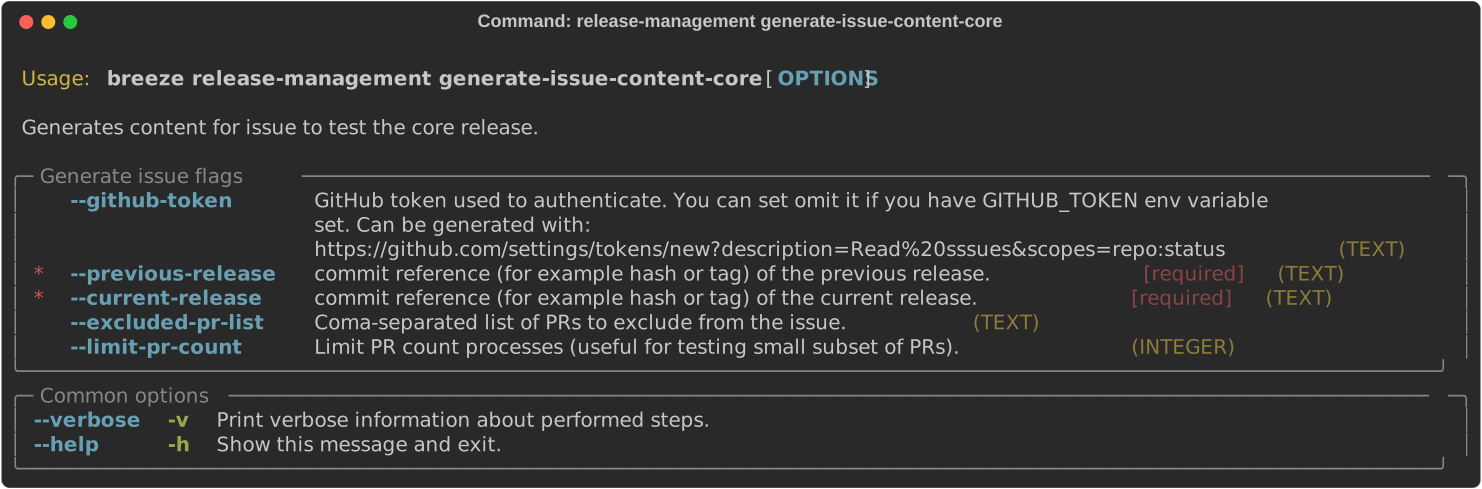
-You can use Breeze to generate a airflow core issue when you release new
airflow.
+You can use Breeze to generate a Airflow core issue when you release new
airflow.

 .. image::
./images/output_release-management_generate-issue-content-providers.svg
   :target:
https://raw.githubusercontent.com/apache/airflow/main/dev/breeze/doc/images/output_release-management_generate-issue-content-core.svg
@@ -192,7 +192,7 @@ These are all of the available flags for the
``release-prod-images`` command:
 Adding git tags for providers
 """""""""""""""""""""""""""""

-This command can be utilized to manage git tags for providers within the
airflow remote repository during provider releases.
+This command can be utilized to manage git tags for providers within the
Airflow remote repository during provider releases.
 Sometimes in cases when there is a connectivity issue to GitHub, it might be
possible that local tags get created and lead to annoying errors.
 The default behaviour would be to clean such local tags up.

@@ -302,7 +302,7 @@ Preparing providers
 You can use Breeze to prepare providers.

 The distributions are prepared in ``dist`` folder. Note, that this command
cleans up the ``dist`` folder
-before running, so you should run it before generating airflow package below
as it will be removed.
+before running, so you should run it before generating Airflow package below
as it will be removed.

 The below example builds providers in the wheel format.

@@ -332,7 +332,7 @@ You can see all providers available by running this command:
 Installing providers
 """"""""""""""""""""

-In some cases we want to just see if the providers generated can be installed
with airflow without
+In some cases we want to just see if the providers generated can be installed
with Airflow without
 verifying them. This happens automatically on CI for sdist pcackages but you
can also run it manually if you
 just prepared providers and they are present in ``dist`` folder.

@@ -340,7 +340,7 @@ just prepared providers and they are present in ``dist``
folder.

      breeze release-management install-provider-distributions

-You can also run the verification with an earlier airflow version to check for
compatibility.
+You can also run the verification with an earlier Airflow version to check for
compatibility.

 .. code-block:: bash

@@ -364,7 +364,7 @@ just prepared providers and they are present in ``dist``
folder.

      breeze release-management verify-provider-distributions

-You can also run the verification with an earlier airflow version to check for
compatibility.
+You can also run the verification with an earlier Airflow version to check for
compatibility.

 .. code-block:: bash

@@ -381,7 +381,7 @@ Generating Providers Metadata
 """""""""""""""""""""""""""""

 The release manager can generate providers metadata per provider version -
information about provider versions
-including the associated Airflow version for the provider version (i.e first
airflow version released after the
+including the associated Airflow version for the provider version (i.e first
Airflow version released after the
 provider has been released) and date of the release of the provider version.

 These are all of the available flags for the ``generate-providers-metadata``
command:
@@ -446,17 +446,17 @@ all or selected python version and single constraint mode
like this:

 Constraints are generated separately for each python version and there are
separate constraints modes:

-* 'constraints' - those are constraints generated by matching the current
airflow version from sources
+* 'constraints' - those are constraints generated by matching the current
Airflow version from sources
    and providers that are installed from PyPI. Those are constraints used by
the users who want to
-   install airflow with pip.
+   install Airflow with pip.

 * "constraints-source-providers" - those are constraints generated by using
providers installed from
   current sources. While adding new providers their dependencies might change,
so this set of providers
-  is the current set of the constraints for airflow and providers from the
current main sources.
+  is the current set of the constraints for Airflow and providers from the
current main sources.
   Those providers are used by CI system to keep "stable" set of constraints.

 * "constraints-no-providers" - those are constraints generated from only
Apache Airflow, without any
-  providers. If you want to manage airflow separately and then add providers
individually, you can
+  providers. If you want to manage Airflow separately and then add providers
individually, you can
   use those.

 These are all available flags of ``generate-constraints`` command:
@@ -541,7 +541,7 @@ while publishing the documentation.
      breeze release-management publish-docs --airflow-site-directory

 You can also use shorthand names as arguments instead of using the full names
-for airflow providers. To find the short hand names, follow the instructions
in :ref:`generating_short_form_names`.
+for Airflow providers. To find the short hand names, follow the instructions
in :ref:`generating_short_form_names`.

 The flag ``--airflow-site-directory`` takes the path of the cloned
``airflow-site``. The command will
 not proceed if this is an invalid path.
@@ -561,7 +561,7 @@ Adding back referencing HTML for the documentation

 To add back references to the documentation generated by ``build-docs`` in
Breeze to ``airflow-site``,
 use the ``release-management add-back-references`` command. This is important
to support backward compatibility
-the airflow documentation.
+the Airflow documentation.

 You have to specify which distributions you run it on. For example you can run
it for all providers:

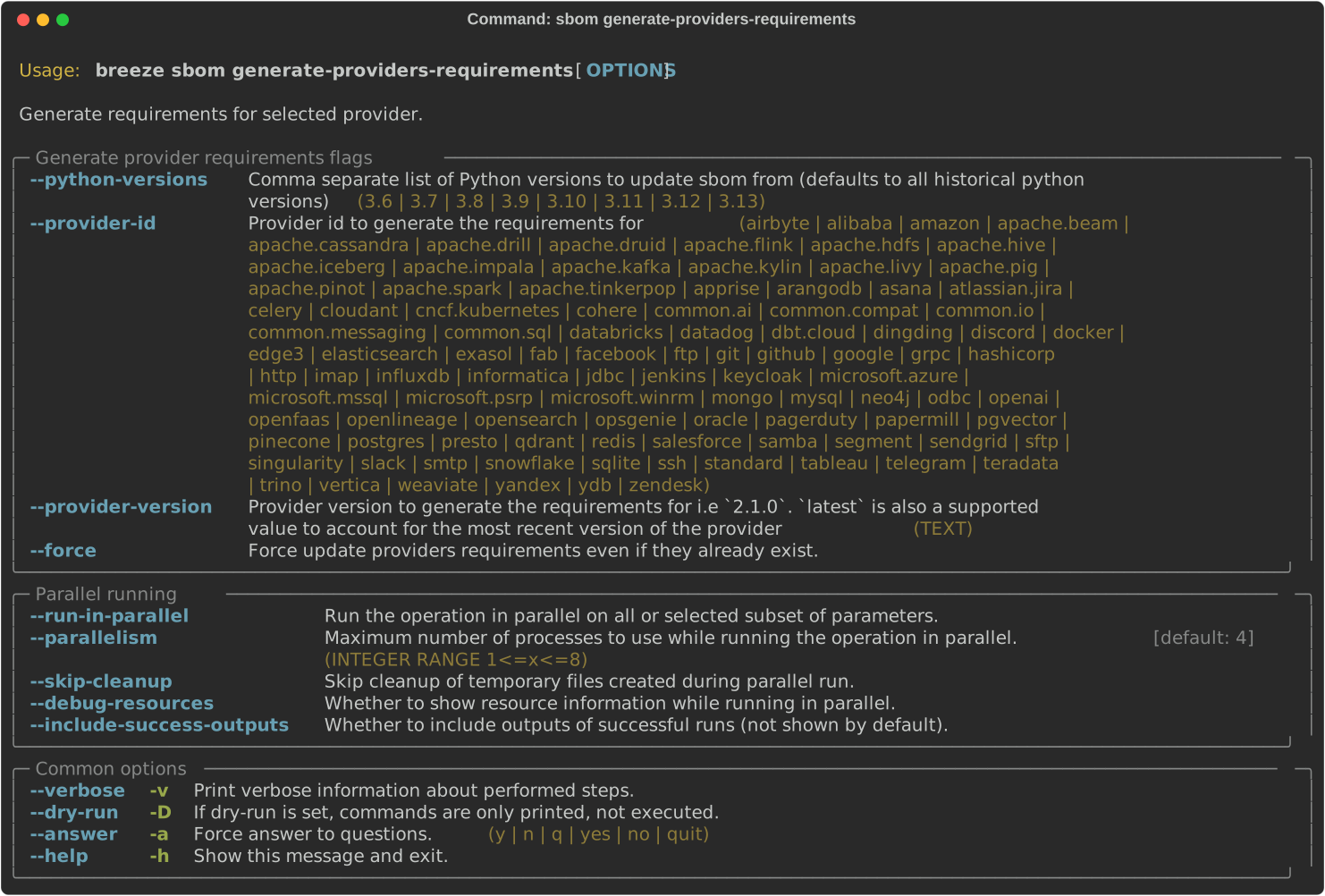
@@ -616,7 +616,7 @@ Generating Provider requirements

 In order to generate SBOM information for providers, we need to generate
requirements for them. This is
 done by the ``generate-providers-requirements`` command. This command
generates requirements for the
-selected provider and python version, using the airflow version specified.
+selected provider and python version, using the Airflow version specified.

 .. image:: ./images/output_sbom_generate-providers-requirements.svg
   :target:
https://raw.githubusercontent.com/apache/airflow/main/dev/breeze/doc/images/output_sbom_generate-providers-requirements.svg
@@ -638,17 +638,17 @@ These are all of the available flags for the
``update-sbom-information`` command
   :width: 100%
   :alt: Breeze update sbom information

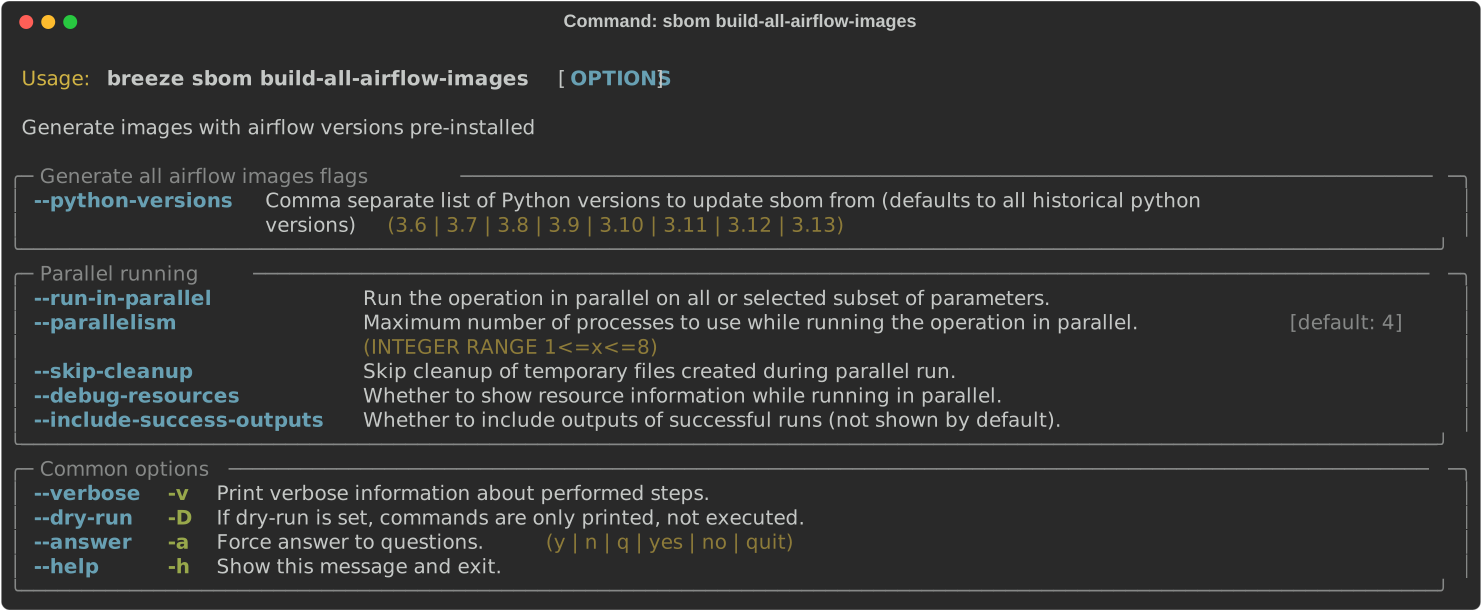
-Build all airflow images
+Build all Airflow images
 """"""""""""""""""""""""

-In order to generate providers requirements, we need docker images with all
airflow versions pre-installed,
+In order to generate providers requirements, we need docker images with all
Airflow versions pre-installed,
 such images are built with the ``build-all-airflow-images`` command.
-This command will build one docker image per python version, with all the
airflow versions >=2.0.0 compatible.
+This command will build one docker image per python version, with all the
Airflow versions >=2.0.0 compatible.

 .. image:: ./images/output_sbom_build-all-airflow-images.svg
   :target:
https://raw.githubusercontent.com/apache/airflow/main/dev/breeze/doc/images/output_sbom_build-all-airflow-images.svg
   :width: 100%
-  :alt: Breeze build all airflow images
+  :alt: Breeze build all Airflow images


 Exporting SBOM information
@@ -667,16 +667,16 @@ properties of the dependencies. This is done by the
``export-dependency-informat
 Next step: Follow the `Advanced Breeze topics
<10_advanced_breeze_topics.rst>`_ to
 learn more about Breeze internals.

-Preparing airflow Task SDK distributions
+Preparing Airflow Task SDK distributions
 """""""""""""""""""""""""""""""""""

-You can prepare airflow distributions using Breeze:
+You can prepare Airflow distributions using Breeze:

 .. code-block:: bash

      breeze release-management prepare-task-sdk-distributions

-This prepares airflow Task SDK .whl package in the dist folder.
+This prepares Airflow Task SDK .whl package in the dist folder.

 Again, you can specify optional ``--distribution-format`` flag to build
selected formats of the Task SDK distributions,
 default is to build ``both`` type of distributions ``sdist`` and ``wheel``.
@@ -691,18 +691,18 @@ default is to build ``both`` type of distributions
``sdist`` and ``wheel``.
   :alt: Breeze release-management prepare-task-sdk-distributions


-Preparing airflow ctl distributions
+Preparing Airflow ctl distributions
 """""""""""""""""""""""""""""""""""

-You can prepare airflow distributions using Breeze:
+You can prepare Airflow distributions using Breeze:

 .. code-block:: bash

      breeze release-management prepare-airflow-ctl-distributions

-This prepares airflow Task SDK .whl package in the dist folder.
+This prepares Airflow Task SDK .whl package in the dist folder.

-Again, you can specify optional ``--distribution-format`` flag to build
selected formats of the airflow ctl distributions,
+Again, you can specify optional ``--distribution-format`` flag to build
selected formats of the Airflow ctl distributions,
 default is to build ``both`` type of distributions ``sdist`` and ``wheel``.

 .. code-block:: bash
diff --git a/dev/breeze/doc/10_advanced_breeze_topics.rst
b/dev/breeze/doc/10_advanced_breeze_topics.rst
index aae033de9af..3cd22855db2 100644
--- a/dev/breeze/doc/10_advanced_breeze_topics.rst
+++ b/dev/breeze/doc/10_advanced_breeze_topics.rst
@@ -117,7 +117,7 @@ which will be mapped to ``/files`` in your Docker
container. You can pass there
 configure and run Docker. They will not be removed between Docker runs.

 By default ``/files/dags`` folder is mounted from your local
``<AIRFLOW_ROOT_PATH>/files/dags`` and this is
-the directory used by airflow scheduler and api-server to scan dags for. You
can use it to test your dags
+the directory used by Airflow scheduler and api-server to scan dags for. You
can use it to test your dags
 from local sources in Airflow. If you wish to add local DAGs that can be run
by Breeze.

 The ``/files/airflow-breeze-config`` folder contains configuration files that
might be used to
diff --git a/docker-stack-docs/build-arg-ref.rst
b/docker-stack-docs/build-arg-ref.rst
index 0e3a444b84a..776d50d280d 100644
--- a/docker-stack-docs/build-arg-ref.rst
+++ b/docker-stack-docs/build-arg-ref.rst
@@ -34,11 +34,11 @@ Those are the most common arguments that you use when you
want to build a custom

+------------------------------------------+------------------------------------------+---------------------------------------------+
 | ``AIRFLOW_VERSION``                      | :subst-code:`|airflow-version|`
       | version of Airflow.                         |

+------------------------------------------+------------------------------------------+---------------------------------------------+
-| ``AIRFLOW_EXTRAS``                       | (see below the table)
       | Default extras with which airflow is        |
+| ``AIRFLOW_EXTRAS``                       | (see below the table)
       | Default extras with which Airflow is        |
 |                                          |
       | installed.                                  |

+------------------------------------------+------------------------------------------+---------------------------------------------+
 | ``ADDITIONAL_AIRFLOW_EXTRAS``            |
       | Optional additional extras with which       |
-|                                          |
       | airflow is installed.                       |
+|                                          |
       | Airflow is installed.                       |

+------------------------------------------+------------------------------------------+---------------------------------------------+
 | ``AIRFLOW_HOME``                         | ``/opt/airflow``
       | Airflow's HOME (that's where logs and       |
 |                                          |
       | SQLite databases are stored).               |
diff --git a/docker-stack-docs/build.rst b/docker-stack-docs/build.rst
index 74d75d699d4..3ecfdd7f00e 100644
--- a/docker-stack-docs/build.rst
+++ b/docker-stack-docs/build.rst
@@ -63,7 +63,7 @@ as ``root`` will fail with an appropriate error message.
    your new packages have conflicting dependencies, ``pip`` might decide to
downgrade or upgrade
    apache-airflow for you, so adding it explicitly is a good practice - this
way if you have conflicting
    requirements, you will get an error message with conflict information,
rather than a surprise
-   downgrade or upgrade of airflow. If you upgrade airflow base image, you
should also update the version
+   downgrade or upgrade of airflow. If you upgrade Airflow base image, you
should also update the version
    to match the new version of airflow.

 .. note::
@@ -93,7 +93,7 @@ Note that similarly when adding individual packages, you need
to use the ``airfl
    your new packages have conflicting dependencies, ``pip`` might decide to
downgrade or upgrade
    apache-airflow for you, so adding it explicitly is a good practice - this
way if you have conflicting
    requirements, you will get an error message with conflict information,
rather than a surprise
-   downgrade or upgrade of airflow. If you upgrade airflow base image, you
should also update the version
+   downgrade or upgrade of airflow. If you upgrade Airflow base image, you
should also update the version
    to match the new version of airflow.


@@ -125,7 +125,7 @@ The following example adds ``test_dag.py`` to your image in
the ``/opt/airflow/d
 Add Airflow configuration with environment variables
 ....................................................

-The following example adds airflow configuration to the image. ``airflow.cfg``
file in
+The following example adds Airflow configuration to the image. ``airflow.cfg``
file in
 ``$AIRFLOW_HOME`` directory contains Airflow's configuration. You can set
options with environment variables for those Airflow's configuration by using
this format:
 :envvar:`AIRFLOW__{SECTION}__{KEY}` (note the double underscores).

@@ -155,7 +155,7 @@ Here is the comparison of the two approaches:

+----------------------------------------------------+-----------+-------------+
 | Produces image heavily optimized for size          | No        | Yes
|

+----------------------------------------------------+-----------+-------------+
-| Can build from custom airflow sources (forks)      | No        | Yes
|
+| Can build from custom Airflow sources (forks)      | No        | Yes
|

+----------------------------------------------------+-----------+-------------+
 | Can build on air-gapped system                     | No        | Yes
|

+----------------------------------------------------+-----------+-------------+
@@ -234,7 +234,7 @@ In the simplest case building your image consists of those
steps:

 3) [Optional] Test the image. Airflow contains tool that allows you to test
the image. This step, however,
    requires locally checked out or extracted Airflow sources. If you happen to
have the sources you can
-   test the image by running this command (in airflow root folder). The output
will tell you if the image
+   test the image by running this command (in Airflow root folder). The output
will tell you if the image
    is "good-to-go".

 .. code-block:: shell
@@ -336,7 +336,7 @@ Important notes for the base images

 You should be aware, about a few things

-* The production image of airflow uses "airflow" user, so if you want to add
some of the tools
+* The production image of Airflow uses "airflow" user, so if you want to add
some of the tools
   as ``root`` user, you need to switch to it with ``USER`` directive of the
Dockerfile and switch back to
   ``airflow`` user when you are done. Also you should remember about following
the
   `best practices of Dockerfiles
<https://docs.docker.com/develop/develop-images/dockerfile_best-practices/>`_
@@ -352,7 +352,7 @@ You should be aware, about a few things
 * The PyPI dependencies in Apache Airflow are installed in the ``~/.local``
virtualenv, of the "airflow" user,
   so PIP packages are installed to ``~/.local`` folder as if the ``--user``
flag was specified when running
   PIP. This has the effect that when you create a virtualenv with
``--system-site-packages`` flag, the
-  virtualenv created will automatically have all the same packages installed
as local airflow installation.
+  virtualenv created will automatically have all the same packages installed
as local Airflow installation.
   Note also that using ``--no-cache-dir`` in ``pip`` or ``--no-cache`` in
``uv`` is a good idea that can
   help to make your image smaller.

@@ -407,7 +407,7 @@ python package from PyPI.
 Example of adding ``apt`` package
 .................................

-The following example adds ``vim`` to the airflow image.
+The following example adds ``vim`` to the Airflow image.

 .. exampleinclude:: docker-examples/extending/add-apt-packages/Dockerfile
     :language: Dockerfile
@@ -465,7 +465,7 @@ Note that similarly when adding individual packages, you
need to use the ``airfl
    your new packages have conflicting dependencies, ``pip`` might decide to
downgrade or upgrade
    apache-airflow for you, so adding it explicitly is a good practice - this
way if you have conflicting
    requirements, you will get an error message with conflict information,
rather than a surprise
-   downgrade or upgrade of airflow. If you upgrade airflow base image, you
should also update the version
+   downgrade or upgrade of airflow. If you upgrade Airflow base image, you
should also update the version
    to match the new version of airflow.

 .. exampleinclude::
docker-examples/extending/add-requirement-packages/Dockerfile
@@ -518,10 +518,10 @@ The following example adds ``test_dag.py`` to your image
in the ``/opt/airflow/d
     :start-after: [START dag]
     :end-before: [END dag]

-Example of changing airflow configuration using environment variables
+Example of changing Airflow configuration using environment variables
 .....................................................................

-The following example adds airflow configuration changes to the airflow image.
+The following example adds Airflow configuration changes to the Airflow image.

 .. exampleinclude::
docker-examples/extending/add-airflow-configuration/Dockerfile
     :language: Dockerfile
@@ -595,7 +595,7 @@ When customizing the image you can choose a number of
options how you install Ai
 * From locally stored binary packages for Airflow, Airflow Providers and other
dependencies. This is
   particularly useful if you want to build Airflow in a highly-secure
environment where all such packages
   must be vetted by your security team and stored in your private artifact
registry. This also
-  allows to build airflow image in an air-gaped environment.
+  allows to build Airflow image in an air-gaped environment.
 * Side note. Building ``Airflow`` in an ``air-gaped`` environment sounds
pretty funny, doesn't it?

 You can also add a range of customizations while building the image:
@@ -614,7 +614,7 @@ that it can be predictably installed, even if some new
versions of Airflow depen
 released (or even dependencies of our dependencies!). The docker image and
accompanying scripts
 usually determine automatically the right versions of constraints to be used
based on the Airflow
 version installed and Python version. For example 2.0.2 version of Airflow
installed from PyPI
-uses constraints from ``constraints-2.0.2`` tag). However, in some cases -
when installing airflow from
+uses constraints from ``constraints-2.0.2`` tag). However, in some cases -
when installing Airflow from
 GitHub for example - you have to manually specify the version of constraints
used, otherwise
 it will default to the latest version of the constraints which might not be
compatible with the
 version of Airflow you use.
@@ -655,7 +655,7 @@ You can use ``docker-context-files`` for the following
purposes:
    your new packages have conflicting dependencies, ``pip`` might decide to
downgrade or upgrade
    apache-airflow for you, so adding it explicitly is a good practice - this
way if you have conflicting
    requirements, you will get an error message with conflict information,
rather than a surprise
-   downgrade or upgrade of airflow. If you upgrade airflow base image, you
should also update the version
+   downgrade or upgrade of airflow. If you upgrade Airflow base image, you
should also update the version
    to match the new version of airflow.


@@ -730,7 +730,7 @@ package. The ``2.3.0`` constraints are used automatically.
     :start-after: [START build]
     :end-before: [END build]

-The following example builds the production image in version ``3.9`` with
additional airflow extras
+The following example builds the production image in version ``3.9`` with
additional Airflow extras
 (``mssql,hdfs``) from ``2.3.0`` PyPI package, and additional dependency
(``oauth2client``).

 .. exampleinclude:: docker-examples/customizing/pypi-extras-and-deps.sh
@@ -757,7 +757,7 @@ have more complex dependencies to build.
 Building optimized images
 .........................

-The following example builds the production image in version ``3.9`` with
additional airflow extras from
+The following example builds the production image in version ``3.9`` with
additional Airflow extras from
 PyPI package but it includes additional apt dev and runtime dependencies.

 The dev dependencies are those that require ``build-essential`` and usually
need to involve recompiling
@@ -871,7 +871,7 @@ Note, that those customizations are only available in the
``build`` segment of t
 are not present in the ``final`` image. If you wish to extend the final image
and add custom ``.piprc`` and
 ``pip.conf``, you should add them in your own Dockerfile used to extend the
Airflow image.

-Such customizations are independent of the way how airflow is installed.
+Such customizations are independent of the way how Airflow is installed.

 .. note::
   Similar results could be achieved by modifying the Dockerfile manually (see
below) and injecting the
@@ -883,7 +883,7 @@ Such customizations are independent of the way how airflow
is installed.

 The following - rather complex - example shows capabilities of:

-* Adding airflow extras (slack, odbc)
+* Adding Airflow extras (slack, odbc)
 * Adding PyPI dependencies (``azure-storage-blob, oauth2client,
beautifulsoup4, dateparser, rocketchat_API,typeform``)
 * Adding custom environment variables while installing ``apt`` dependencies -
both DEV and RUNTIME
   (``ACCEPT_EULA=Y'``)
@@ -914,7 +914,7 @@ installation as it is using external installation method.
 Note that as a prerequisite - you need to have downloaded wheel files. In the
example below we
 first download such constraint file locally and then use ``pip download`` to
get the ``.whl`` files needed
 but in most likely scenario, those wheel files should be copied from an
internal repository of such .whl
-files. Note that ``AIRFLOW_VERSION_SPECIFICATION`` is only there for
reference, the apache airflow ``.whl`` file
+files. Note that ``AIRFLOW_VERSION_SPECIFICATION`` is only there for
reference, the Apache Airflow ``.whl`` file
 in the right version is part of the ``.whl`` files downloaded.

 Note that 'pip download' will only works on Linux host as some of the packages
need to be compiled from
diff --git a/docker-stack-docs/entrypoint.rst b/docker-stack-docs/entrypoint.rst
index 0f40bdcc7d5..5661d4229c9 100644
--- a/docker-stack-docs/entrypoint.rst
+++ b/docker-stack-docs/entrypoint.rst
@@ -147,7 +147,7 @@ you pass extra parameters. For example:
   > docker run -it apache/airflow:3.0.0-python3.9 python -c "print('test')"
   test

-If first argument equals to "airflow" - the rest of the arguments is treated
as an airflow command
+If first argument equals to ``airflow`` - the rest of the arguments is treated
as an Airflow command
 to execute. Example:

 .. code-block:: bash
@@ -317,7 +317,7 @@ Upgrading Airflow DB

 If you set :envvar:`_AIRFLOW_DB_MIGRATE` variable to a non-empty value, the
entrypoint will run
 the ``airflow db migrate`` command right after verifying the connection. You
can also use this
-when you are running airflow with internal SQLite database (default) to
upgrade the db and create
+when you are running Airflow with internal SQLite database (default) to
upgrade the db and create
 admin users at entrypoint, so that you can start the webserver immediately.
Note - using SQLite is
 intended only for testing purpose, never use SQLite in production as it has
severe limitations when it
 comes to concurrency.
diff --git a/docker-stack-docs/index.rst b/docker-stack-docs/index.rst
index aea56610c43..982b0f270c1 100644
--- a/docker-stack-docs/index.rst
+++ b/docker-stack-docs/index.rst
@@ -58,7 +58,7 @@ You can find the following images there (Assuming Airflow
version :subst-code:`|
 Those are "reference" regular images. They contain the most common set of
extras, dependencies and providers that are
 often used by the users and they are good to "try-things-out" when you want to
just take Airflow for a spin,

-You can also use "slim" images that contain only core airflow and are about
half the size of the "regular" images
+You can also use "slim" images that contain only core Airflow and are about
half the size of the "regular" images
 but you need to add all the :doc:`apache-airflow:extra-packages-ref` and
providers that you need separately
 via :ref:`Building the image <build:build_image>`.

@@ -148,7 +148,7 @@ You have four options:

 3. If the base platform we use (currently Debian Bookworm) does not contain
the latest versions you want
    and you want to use other base images, you can take a look at what system
dependencies are installed
-   and scripts in the latest ``Dockerfile`` of airflow and take inspiration
from it and build your own image
+   and scripts in the latest ``Dockerfile`` of Airflow and take inspiration
from it and build your own image
    or copy it and modify it to your needs. See the
    `Dockerfile
<https://github.com/apache/airflow/blob/|airflow-version|/Dockerfile>`__ for
the latest version.

diff --git a/docker-stack-docs/recipes.rst b/docker-stack-docs/recipes.rst
index 7666fa892f7..1ff87fb9449 100644
--- a/docker-stack-docs/recipes.rst
+++ b/docker-stack-docs/recipes.rst
@@ -74,7 +74,7 @@ Apache Beam Go Stack installation
 ---------------------------------

 To be able to run Beam Go Pipeline with the
:class:`~airflow.providers.apache.beam.operators.beam.BeamRunGoPipelineOperator`,
-you will need Go in your container. Install airflow with
``apache-airflow-providers-google>=6.5.0`` and
``apache-airflow-providers-apache-beam>=3.2.0``
+you will need Go in your container. Install Airflow with
``apache-airflow-providers-google>=6.5.0`` and
``apache-airflow-providers-apache-beam>=3.2.0``

 Create a new Dockerfile like the one shown below.

diff --git a/providers-summary-docs/howto/create-custom-providers.rst
b/providers-summary-docs/howto/create-custom-providers.rst
index 15d03a734f7..e33d8d462f0 100644
--- a/providers-summary-docs/howto/create-custom-providers.rst
+++ b/providers-summary-docs/howto/create-custom-providers.rst
@@ -24,7 +24,7 @@ Custom providers
 ''''''''''''''''

 You can develop and release your own providers. Your custom operators, hooks,
sensors, transfer operators
-can be packaged together in a standard airflow package and installed using the
same mechanisms.
+can be packaged together in a standard Airflow package and installed using the
same mechanisms.
 Moreover they can also use the same mechanisms to extend the Airflow Core with
auth backends,
 custom connections, logging, secret backends and extra operator links as
described in the previous chapter.

@@ -225,7 +225,7 @@ You do not need to do anything special besides creating the
``apache_airflow_pro
 returning properly formatted meta-data  - dictionary with ``extra-links`` and
``connection-types`` fields
 (and deprecated ``hook-class-names`` field if you are also targeting versions
of Airflow before 2.2.0).

-Anyone who runs airflow in an environment that has your Python package
installed will be able to use the
+Anyone who runs Airflow in an environment that has your Python package
installed will be able to use the
 package as a provider package.


diff --git a/providers-summary-docs/index.rst b/providers-summary-docs/index.rst
index f71d117a972..d6efb80f92a 100644
--- a/providers-summary-docs/index.rst
+++ b/providers-summary-docs/index.rst
@@ -155,8 +155,8 @@ Details will vary per-provider and if there is a limitation
for particular versi
 constraining the Airflow version used, it will be included as limitation of
dependencies in the provider
 package.

-Each community provider has corresponding extra which can be used when
installing airflow to install the
-provider together with ``Apache Airflow`` - for example you can install
airflow with those extras:
+Each community provider has corresponding extra which can be used when
installing Airflow to install the
+provider together with ``Apache Airflow`` - for example you can install
Airflow with those extras:
 ``apache-airflow[google,amazon]`` (with correct constraints -see
:doc:`apache-airflow:installation/index`) and you
 will install the appropriate versions of the
``apache-airflow-providers-amazon`` and
 ``apache-airflow-providers-google`` packages together with ``Apache Airflow``.
diff --git a/providers-summary-docs/installing-from-pypi.rst
b/providers-summary-docs/installing-from-pypi.rst
index dca0eea2ab2..86f2cf61e99 100644
--- a/providers-summary-docs/installing-from-pypi.rst
+++ b/providers-summary-docs/installing-from-pypi.rst
@@ -41,7 +41,7 @@ Only ``pip`` installation is currently officially supported.
   newer versions of ``bazel`` will handle it.


-Typical command to install airflow from PyPI looks like below (you need to use
the right Airflow version and Python version):
+Typical command to install Airflow from PyPI looks like below (you need to use
the right Airflow version and Python version):

 .. code-block::

diff --git a/providers/MANAGING_PROVIDERS_LIFECYCLE.rst
b/providers/MANAGING_PROVIDERS_LIFECYCLE.rst
index 1814c6c2b91..6066bbbd7d8 100644
--- a/providers/MANAGING_PROVIDERS_LIFECYCLE.rst
+++ b/providers/MANAGING_PROVIDERS_LIFECYCLE.rst
@@ -127,7 +127,7 @@ breeze and I'll run unit tests for my Hook.
 Adding chicken-egg providers
 ----------------------------

-Sometimes we want to release provider that depends on the version of airflow
that has not yet been released
+Sometimes we want to release provider that depends on the version of Airflow
that has not yet been released
 - for example when we released ``common.io`` provider it had
``apache-airflow>=2.8.0`` dependency.

 Add chicken-egg-provider to compatibility checks
@@ -147,7 +147,7 @@ The short ``provider id`` (``common.io`` for example) for
such a provider should
 to ``CHICKEN_EGG_PROVIDERS`` list in
``src/airflow_breeze/utils/selective_checks.py``:

 This list will be kept here until the official version of Airflow the
chicken-egg-providers depend on
-is released and the version of airflow is updated in the ``main`` and
``v2-X-Y`` branch to ``2.X+1.0.dev0``
+is released and the version of Airflow is updated in the ``main`` and
``v2-X-Y`` branch to ``2.X+1.0.dev0``
 and ``2.X.1.dev0`` respectively. After that the chicken-egg providers will be
correctly installed because
 both ``2.X.1.dev0`` and ``2.X+1.0.dev0`` are considered by ``pip`` as
``>2.X.0`` (unlike ``2.X.0.dev0``).

@@ -163,7 +163,7 @@ pre-release versions of Airflow - because ``pip`` does not
recognize the ``.dev0
 suffixes of those packages as valid in the ``>=X.Y.Z`` comparison.

 When you want to install a provider package with ``apache-airflow>=2.8.0``
requirement and you have
-``2.9.0.dev0`` airflow package, ``pip`` will not install the package, because
it does not recognize
+``2.9.0.dev0`` Airflow package, ``pip`` will not install the package, because
it does not recognize
 ``2.9.0.dev0`` as a valid version for ``>=2.8.0`` dependency. This is because
``pip``
 currently implements the minimum version selection algorithm requirement
specified in packaging as
 described in the packaging version specification
@@ -211,7 +211,7 @@ An important part of building a new provider is the
documentation.
 Some steps for documentation occurs automatically by ``pre-commit`` see
 `Installing pre-commit guide
</contributing-docs/03_contributors_quick_start.rst#pre-commit>`_

-Those are important files in the airflow source tree that affect providers.
The ``pyproject.toml`` in root
+Those are important files in the Airflow source tree that affect providers.
The ``pyproject.toml`` in root
 Airflow folder is automatically generated based on content of
``provider.yaml`` file in each provider
 when ``pre-commit`` is run. Files such as ``extra-packages-ref.rst`` should be
manually updated because
 they are manually formatted for better layout and ``pre-commit`` will just
verify if the information
@@ -422,13 +422,13 @@ The fix for that is to turn the feature into an optional
provider feature (in th
   Those tests should be adjusted (but this is not very likely to happen,
because the tests are using only
   the most common providers that we will not be likely to suspend).

-Bumping min airflow version
+Bumping min Airflow version
 ===========================

-We regularly bump min airflow version for all providers we release. This bump
is done according to our
+We regularly bump min Airflow version for all providers we release. This bump
is done according to our
 `Provider policies
<https://github.com/apache/airflow/blob/main/PROVIDERS.rst>`_ and it is only
applied
 to non-suspended/removed providers. We are running basic import compatibility
checks in our CI and
-the compatibility checks should be updated when min airflow version is updated.
+the compatibility checks should be updated when min Airflow version is updated.

 Details on how this should be done are described in
 `Provider policies
<https://github.com/apache/airflow/blob/main/dev/README_RELEASE_PROVIDER_PACKAGES.md>`_
@@ -463,7 +463,7 @@ Releasing pre-installed providers for the first time

 When releasing providers for the first time, you need to release them in state
``not-ready``.
 This will make it available for release management commands, but it will not
be added to airflow's
-preinstalled providers list - allowing airflow in main ``CI`` builds to be
built without expecting the
+preinstalled providers list - allowing Airflow in main ``CI`` builds to be
built without expecting the
 provider to be available in PyPI.

 You need to add ``--include-not-ready-providers`` if you want to add them to
the list of providers
diff --git a/providers/amazon/docs/connections/aws.rst
b/providers/amazon/docs/connections/aws.rst
index a5850f0a830..e2e6d9473c8 100644
--- a/providers/amazon/docs/connections/aws.rst
+++ b/providers/amazon/docs/connections/aws.rst
@@ -178,7 +178,7 @@ Snippet to create Connection and convert to URI
     - host
     - port

-    are not given, see example below. This is a known airflow limitation.
+    are not given, see example below. This is a known Airflow limitation.

     ``airflow connections add aws_conn --conn-uri
aws://@/?region_name=eu-west-1``

diff --git a/providers/celery/docs/celery_executor.rst
b/providers/celery/docs/celery_executor.rst
index f4f78ce37c3..37ac8e6a2da 100644
--- a/providers/celery/docs/celery_executor.rst
+++ b/providers/celery/docs/celery_executor.rst
@@ -79,7 +79,7 @@ to start a Flower web server:

     airflow celery flower

-Please note that you must have the ``flower`` python library already installed
on your system. The recommended way is to install the airflow celery bundle.
+Please note that you must have the ``flower`` python library already installed
on your system. The recommended way is to install the Airflow celery bundle.

 .. code-block:: bash

diff --git a/providers/cncf/kubernetes/docs/operators.rst
b/providers/cncf/kubernetes/docs/operators.rst
index 94b3875072d..7188da11f20 100644
--- a/providers/cncf/kubernetes/docs/operators.rst
+++ b/providers/cncf/kubernetes/docs/operators.rst
@@ -285,7 +285,7 @@ Never use environment variables to pass secrets (for
example connection authenti
 Kubernetes Pod Operator. Such environment variables will be visible to anyone
who has access
 to see and describe PODs in Kubernetes. Instead, pass your secrets via native
Kubernetes ``Secrets`` or
 use Connections and Variables from Airflow. For the latter, you need to have
``apache-airflow`` package
-installed in your image in the same version as airflow you run your Kubernetes
Pod Operator from).
+installed in your image in the same version as Airflow you run your Kubernetes
Pod Operator from).

 Reference
 ^^^^^^^^^
diff --git a/providers/edge3/docs/edge_executor.rst
b/providers/edge3/docs/edge_executor.rst
index 528e281d71f..74439dce71a 100644
--- a/providers/edge3/docs/edge_executor.rst
+++ b/providers/edge3/docs/edge_executor.rst
@@ -26,7 +26,7 @@ The configuration parameters of the Edge Executor can be
found in the Edge provi

 Here are a few imperative requirements for your workers:

-- ``airflow`` needs to be installed, and the airflow CLI needs to be in the
path
+- ``airflow`` needs to be installed, and the Airflow CLI needs to be in the
path
 - Airflow configuration settings should be homogeneous across the cluster and
on the edge site
 - Operators that are executed on the Edge Worker need to have their
dependencies
   met in that context. Please take a look to the respective provider package
diff --git a/providers/edge3/docs/install_on_windows.rst
b/providers/edge3/docs/install_on_windows.rst
index 4b016dad2aa..04841c5486b 100644
--- a/providers/edge3/docs/install_on_windows.rst
+++ b/providers/edge3/docs/install_on_windows.rst
@@ -33,7 +33,7 @@ To setup a instance of Edge Worker on Windows, you need to
follow the steps belo
 2. Create an empty folder as base to start with. In our example it is
``C:\\Airflow``.
 3. Start Shell/Command Line in ``C:\\Airflow`` and create a new virtual
environment via: ``python -m venv venv``
 4. Activate the virtual environment via: ``venv\\Scripts\\activate.bat``
-5. Install Edge provider using the Airflow constraints as of your airflow
version via
+5. Install Edge provider using the Airflow constraints as of your Airflow
version via
    ``pip install apache-airflow-providers-edge3 --constraint
https://raw.githubusercontent.com/apache/airflow/constraints-2.10.5/constraints-3.12.txt``.
    (or alternative build and copy the wheel of the edge provider to the folder
``C:\\Airflow``.
    This document used
``apache_airflow_providers_edge-0.9.7rc0-py3-none-any.whl``, install the wheel
file with the
diff --git a/providers/elasticsearch/docs/logging/index.rst
b/providers/elasticsearch/docs/logging/index.rst
index eaa46def53b..292b288832b 100644
--- a/providers/elasticsearch/docs/logging/index.rst
+++ b/providers/elasticsearch/docs/logging/index.rst
@@ -22,7 +22,7 @@ Writing logs to Elasticsearch

 Airflow can be configured to read task logs from Elasticsearch and optionally
write logs to stdout in standard or json format. These logs can later be
collected and forwarded to the Elasticsearch cluster using tools like fluentd,
logstash or others.

-Airflow also supports writing log to Elasticsearch directly without requiring
additional software like filebeat and logstash. To enable this feature, set
``write_to_es`` and ``json_format`` to ``True`` and ``write_stdout`` to
``False`` in ``airflow.cfg``. Please be aware that if you set both
``write_to_es`` and ``delete_local_logs`` in logging section to true, airflow
will delete the local copy of task logs upon successfully writing task logs to
ElasticSearch.
+Airflow also supports writing log to Elasticsearch directly without requiring
additional software like filebeat and logstash. To enable this feature, set
``write_to_es`` and ``json_format`` to ``True`` and ``write_stdout`` to
``False`` in ``airflow.cfg``. Please be aware that if you set both
``write_to_es`` and ``delete_local_logs`` in logging section to true, Airflow
will delete the local copy of task logs upon successfully writing task logs to
ElasticSearch.

 You can choose to have all task logs from workers output to the highest parent
level process, instead of the standard file locations. This allows for some
additional flexibility in container environments like Kubernetes, where
container stdout is already being logged to the host nodes. From there a log
shipping tool can be used to forward them along to Elasticsearch. To use this
feature, set the ``write_stdout`` option in ``airflow.cfg``.
 You can also choose to have the logs output in a JSON format, using the
``json_format`` option. Airflow uses the standard Python logging module and
JSON fields are directly extracted from the LogRecord object. To use this
feature, set the ``json_fields`` option in ``airflow.cfg``. Add the fields to
the comma-delimited string that you want collected for the logs. These fields
are from the LogRecord object in the ``logging`` module. `Documentation on
different attributes can be found here  [...]
diff --git a/providers/fab/docs/auth-manager/api-authentication.rst
b/providers/fab/docs/auth-manager/api-authentication.rst
index 969457f8def..279cbeec681 100644
--- a/providers/fab/docs/auth-manager/api-authentication.rst
+++ b/providers/fab/docs/auth-manager/api-authentication.rst
@@ -57,7 +57,7 @@ To enable Kerberos authentication, set the following in the
configuration:
     [kerberos]
     keytab = <KEYTAB>

-The airflow Kerberos service is configured as
``airflow/fully.qualified.domainname@REALM``. Make sure this
+The Airflow Kerberos service is configured as
``airflow/fully.qualified.domainname@REALM``. Make sure this
 principal exists `in both the Kerberos database as well as in the keytab file
</docs/apache-airflow/stable/security/kerberos.html#enabling-kerberos>`_.

 You have to make sure to name your users with the kerberos full username/realm
in order to make it