KevinKobi opened a new issue #8431: Mark Success/Failure from the UI uses wrong settings URL: https://github.com/apache/airflow/issues/8431 **What happened**: In the UI the default behavior is Downstream and Recursive set for Clear: 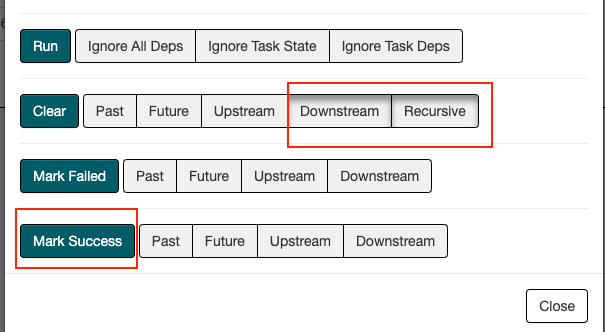 these preset choices should effect only clear button but they effect all the others. By choosing `Mark success` or `Mark Failed` it will take the choice of `Downstream` and `Recursive` from `Clear` unless removing them explicitly. <!-- (please include exact error messages if you can) --> **What you expected to happen**: Each row has it's own settings. As the UI shows Mark Success has it's own Downstream Upstream buttons. It should use it's own not other rows settings. As alternative, at the end the window perform only ONE action (Clear, Mark Success, Mark Failure) the block of 4 * 3 = 12 buttons is not needed: 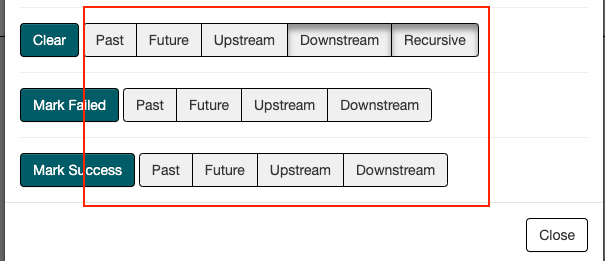 It can have just 4 buttons for all the three actions (Clear, Mark Success, Mark Failed) and Clear can have extra setting of Recursive. I'm not UX expert so there might be better way to do this but it feels that there is redundancy with the buttons (which also create this bug) **How to reproduce it**: 1. Add any DAG 2. in the UI click on any task to open the menu 3. Choose `Mark success` or `Mark Failure` it will show you list of all tasks met with `Recursive` and `Downsteam` though you did not choose these settings. 4. Go back, remove the preset of `Recursive` and `Downsteam` from `Clear` row. Click on `Mark success` or `Mark Failure` now it will show you only the task you choose.
----------------------------------------------------------------
This is an automated message from the Apache Git Service.
To respond to the message, please log on to GitHub and use the
URL above to go to the specific comment.

For queries about this service, please contact Infrastructure at:
[email protected]


With regards,
Apache Git Services


