This is an automated email from the ASF dual-hosted git repository.

sijie pushed a commit to branch master
in repository https://gitbox.apache.org/repos/asf/bookkeeper.git
The following commit(s) were added to refs/heads/master by this push:
new 9d61fb4 [DOCS] Modify “Using Autoecovery”,recover does not support
the specified target bookie
9d61fb4 is described below
commit 9d61fb4fe4fa2c46a25c12f7fb070878b5bda22d
Author: Dapeng <[email protected]>
AuthorDate: Mon Dec 9 16:08:25 2019 +0800
[DOCS] Modify “Using Autoecovery”,recover does not support the specified
target bookie
### Motivation
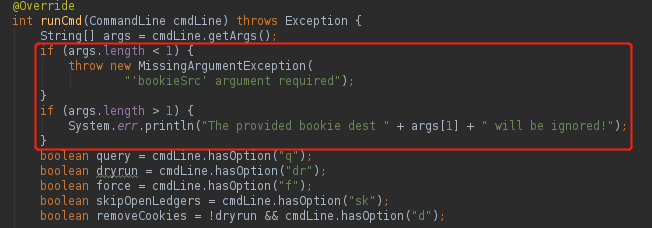
`bin/bookkeeper shell recover` only receives one parameter i.e. failed
bookie. According to
[recovery](https://bookkeeper.apache.org/docs/latest/admin/autorecovery/#manual-recovery)
it is useless to specify ZooKeeper address and target bookie.
Reviewers: Enrico Olivelli <[email protected]>, Sijie Guo <None>
This closes #2207 from SunDapeng1/branch-2207
---
site/docs/latest/admin/autorecovery.md | 7 ++-----
site/docs/latest/admin/bookies.md | 10 ++--------
2 files changed, 4 insertions(+), 13 deletions(-)
diff --git a/site/docs/latest/admin/autorecovery.md
b/site/docs/latest/admin/autorecovery.md
index e64dbac..4ff881c 100644
--- a/site/docs/latest/admin/autorecovery.md
+++ b/site/docs/latest/admin/autorecovery.md
@@ -12,24 +12,21 @@ When a {% pop bookie %} crashes, all {% pop ledgers %} on
that bookie become und
You can manually recover failed bookies using the
[`bookkeeper`](../../reference/cli) command-line tool. You need to specify:
* the `shell recover` option
-* an IP and port for your BookKeeper cluster's ZooKeeper ensemble
* the IP and port for the failed bookie
Here's an example:
```bash
$ bin/bookkeeper shell recover \
- zk1.example.com:2181 \ # IP and port for ZooKeeper
192.168.1.10:3181 # IP and port for the failed bookie
```
-If you wish, you can also specify which bookie you'd like to rereplicate to.
Here's an example:
+If you wish, you can also specify which ledgers you'd like to recover. Here's
an example:
```bash
$ bin/bookkeeper shell recover \
- zk1.example.com:2181 \ # IP and port for ZooKeeper
192.168.1.10:3181 \ # IP and port for the failed bookie
- 192.168.1.11:3181 # IP and port for the bookie to rereplicate to
+ --ledger ledgerID # ledgerID which you want to recover
```
### The manual recovery process
diff --git a/site/docs/latest/admin/bookies.md
b/site/docs/latest/admin/bookies.md
index 68e8a7d..418c4ca 100644
--- a/site/docs/latest/admin/bookies.md
+++ b/site/docs/latest/admin/bookies.md
@@ -162,19 +162,13 @@ If the change was the result of an accidental
configuration change, the change c
1. Run the following command to re-replicate the data:
```bash
- $ bin/bookkeeper shell recover \
- <zkserver> \
- <oldbookie> \
- <newbookie>
+ $ bin/bookkeeper shell recover <oldbookie>
```
The ZooKeeper server, old bookie, and new bookie, are all identified by
their external IP and `bookiePort` (3181 by default). Here's an example:
```bash
- $ bin/bookkeeper shell recover \
- zk1.example.com \
- 192.168.1.10:3181 \
- 192.168.1.10:3181
+ $ bin/bookkeeper shell recover 192.168.1.10:3181
```
See the [AutoRecovery](../autorecovery) documentation for more info on the
re-replication process.

