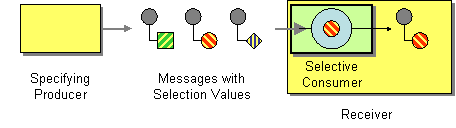
Modified: websites/production/camel/content/scripting-languages-context.html
==============================================================================
--- websites/production/camel/content/scripting-languages-context.html
(original)
+++ websites/production/camel/content/scripting-languages-context.html Fri Aug
25 08:22:01 2017
@@ -36,17 +36,6 @@
<![endif]-->
- <link href='//camel.apache.org/styles/highlighter/styles/shCoreCamel.css'
rel='stylesheet' type='text/css' />
- <link href='//camel.apache.org/styles/highlighter/styles/shThemeCamel.css'
rel='stylesheet' type='text/css' />
- <script src='//camel.apache.org/styles/highlighter/scripts/shCore.js'
type='text/javascript'></script>
- <script src='//camel.apache.org/styles/highlighter/scripts/shBrushJava.js'
type='text/javascript'></script>
- <script src='//camel.apache.org/styles/highlighter/scripts/shBrushXml.js'
type='text/javascript'></script>
- <script src='//camel.apache.org/styles/highlighter/scripts/shBrushPlain.js'
type='text/javascript'></script>
-
- <script type="text/javascript">
- SyntaxHighlighter.defaults['toolbar'] = false;
- SyntaxHighlighter.all();
- </script>
<title>
Apache Camel: Scripting Languages Context
@@ -86,46 +75,19 @@
<tbody>
<tr>
<td valign="top" width="100%">
-<div class="wiki-content maincontent"><h3
id="ScriptingLanguagesContext-ScriptContextOptions"><code>ScriptContext</code>
Options</h3><p> </p><div class="confluence-information-macro
confluence-information-macro-information"><span class="aui-icon aui-icon-small
aui-iconfont-info confluence-information-macro-icon"></span><div
class="confluence-information-macro-body">The <code>JSR-223</code>
scripting language's <strong><code>ScriptContext</code></strong> is
pre-configured with the following attributes all set at
<strong><code>ENGINE_SCOPE</code></strong>.</div></div><div
class="table-wrap"><table class="confluenceTable"><tbody><tr><th colspan="1"
rowspan="1" class="confluenceTh"><p>Attribute</p></th><th colspan="1"
rowspan="1" class="confluenceTh"><p>Type</p></th><th colspan="1" rowspan="1"
class="confluenceTh"><p>Value</p></th></tr><tr><td colspan="1" rowspan="1"
class="confluenceTd"><p><span><code>camelContext</code><br
clear="none"></span></p></td><td colspan="1" ro
wspan="1"
class="confluenceTd"><p><code>org.apache.camel.CamelContext</code></p></td><td
colspan="1" rowspan="1" class="confluenceTd"><p>The Camel
Context.</p></td></tr><tr><td colspan="1" rowspan="1"
class="confluenceTd"><p><code>context</code></p></td><td colspan="1"
rowspan="1"
class="confluenceTd"><p><code>org.apache.camel.CamelContext</code></p></td><td
colspan="1" rowspan="1" class="confluenceTd"><p>The Camel Context (cannot be
used in groovy).</p></td></tr><tr><td colspan="1" rowspan="1"
class="confluenceTd"><p><code>exchange</code></p></td><td colspan="1"
rowspan="1"
class="confluenceTd"><p><code>org.apache.camel.Exchange</code></p></td><td
colspan="1" rowspan="1" class="confluenceTd"><p>The current
Exchange.</p></td></tr><tr><td colspan="1" rowspan="1"
class="confluenceTd"><p><code>properties</code></p></td><td colspan="1"
rowspan="1"
class="confluenceTd"><p><code>org.apache.camel.builder.script.PropertiesFunction</code></p></td><td
colspan="1" rowspan="1" class="confluence
Td"><p><strong>Camel 2.9:</strong> Function with a
<strong><code>resolve</code></strong> method to make it easier to use Camels <a
shape="rect" href="properties.html">Properties</a> component from scripts. See
further below for example.</p></td></tr><tr><td colspan="1" rowspan="1"
class="confluenceTd"><p><code>request</code></p></td><td colspan="1"
rowspan="1"
class="confluenceTd"><p><code>org.apache.camel.Message</code></p></td><td
colspan="1" rowspan="1"
class="confluenceTd"><p>The <strong><code>IN</code></strong>
message.</p></td></tr><tr><td colspan="1" rowspan="1"
class="confluenceTd"><p><code>response</code></p></td><td colspan="1"
rowspan="1"
class="confluenceTd"><p><code>org.apache.camel.Message</code></p></td><td
colspan="1" rowspan="1" class="confluenceTd"><p><strong>Deprecated</strong>:
The <strong><code>OUT</code></strong> message.
The <strong><code>OUT</code></strong> message
is <strong><code>null</code></strong> by default. Use the <strong><code>IN<
/code></strong> message instead.</p></td></tr></tbody></table></div><p>See <a
shape="rect" href="scripting-languages.html">Scripting Languages</a> for the
list of languages with explicit DSL support.</p><h3
id="ScriptingLanguagesContext-PassingAdditionalArgumentstotheScriptingEngine">Passing
Additional Arguments to
the <code>ScriptingEngine</code></h3><p><strong>Available from Camel
2.8</strong></p><p>You can provide additional arguments to the
<strong><code>ScriptingEngine</code></strong> using a header on the Camel
message with the key
<strong><code>CamelScriptArguments</code></strong>.</p><p>Example:</p><div
class="code panel pdl" style="border-width: 1px;"><div class="codeContent
panelContent pdl">
-<script class="brush: java; gutter: false; theme: Default"
type="syntaxhighlighter"><![CDATA[
-public void testArgumentsExample() throws Exception {
- getMockEndpoint("mock:result").expectedMessageCount(0);
- getMockEndpoint("mock:unmatched").expectedMessageCount(1);
-
- // additional arguments to ScriptEngine
- Map<String, Object> arguments = new HashMap<String, Object>();
- arguments.put("foo", "bar");
- arguments.put("baz", 7);
-
- // those additional arguments is provided as a header on the Camel Message
- template.sendBodyAndHeader("direct:start", "hello",
ScriptBuilder.ARGUMENTS, arguments);
-
- assertMockEndpointsSatisfied();
-}
-]]></script>
-</div></div><h3 id="ScriptingLanguagesContext-UsingPropertiesFunction">Using
Properties Function</h3><p><strong>Available from Camel 2.9</strong></p><p>If
you need to use the <a shape="rect" href="properties.html">Properties</a>
component from a script to lookup property placeholders, then its a bit
cumbersome to do so. For example, to set a header
name <strong><code>myHeader</code></strong> with a value from a property
placeholder, whose key is taken from a header named
<strong><code>foo</code></strong>.</p><div class="code panel pdl"
style="border-width: 1px;"><div class="codeContent panelContent pdl">
-<script class="brush: java; gutter: false; theme: Default"
type="syntaxhighlighter"><![CDATA[.setHeader("myHeader").groovy("context.resolvePropertyPlaceholders('{{'
+ request.headers.get('foo') + '}}')")
-]]></script>
-</div></div><p>From <strong>Camel 2.9</strong>: you can now use the properties
function and the same example is simpler:</p><div class="code panel pdl"
style="border-width: 1px;"><div class="codeContent panelContent pdl">
-<script class="brush: java; gutter: false; theme: Default"
type="syntaxhighlighter"><![CDATA[.setHeader("myHeader").groovy("properties.resolve(request.headers.get('foo'))")
-]]></script>
-</div></div><h3
id="ScriptingLanguagesContext-LoadingScriptFromExternalResource">Loading Script
From External Resource</h3><p><strong>Available from Camel
2.11</strong></p><p>You can externalize the script and have Camel load it from
a resource such as <strong><code>classpath:</code></strong>,
<strong><code>file:</code></strong>, or <strong><code>http:</code></strong>.
This is done using the following syntax:
<strong><code>resource:scheme:location</code></strong> e.g. to refer to a file
on the classpath you can do:</p><div class="code panel pdl"
style="border-width: 1px;"><div class="codeContent panelContent pdl">
-<script class="brush: java; gutter: false; theme: Default"
type="syntaxhighlighter"><![CDATA[.setHeader("myHeader").groovy("resource:classpath:mygroovy.groovy")
-]]></script>
-</div></div><h3
id="ScriptingLanguagesContext-HowtoGettheResultfromMultipleStatementsScript">How
to Get the Result from Multiple Statements Script</h3><p><strong>Available
from Camel 2.14</strong></p><p>The script engine's eval method returns
a <strong><code>null</code></strong> when it runs a multi-statement
script. However, Camel can look up the value of a script's result by using the
key <strong><code>result</code></strong> from the value set. When writing a
multi-statement script set the value of
the <strong><code>result</code></strong> variable as the script return
value.</p><div class="code panel pdl" style="border-width: 1px;"><div
class="codeContent panelContent pdl">
-<script class="brush: text; gutter: false; theme: Default"
type="syntaxhighlighter"><![CDATA[bar = "baz";
+<div class="wiki-content maincontent"><h3
id="ScriptingLanguagesContext-ScriptContextOptions"><code>ScriptContext</code>
Options</h3><p> </p><rich-text-body>The <code>JSR-223</code>
scripting language's <strong><code>ScriptContext</code></strong> is
pre-configured with the following attributes all set at
<strong><code>ENGINE_SCOPE</code></strong>.</rich-text-body><div
class="table-wrap"><table class="confluenceTable"><tbody><tr><th colspan="1"
rowspan="1" class="confluenceTh"><p>Attribute</p></th><th colspan="1"
rowspan="1" class="confluenceTh"><p>Type</p></th><th colspan="1" rowspan="1"
class="confluenceTh"><p>Value</p></th></tr><tr><td colspan="1" rowspan="1"
class="confluenceTd"><p><span><code>camelContext</code><br
clear="none"></span></p></td><td colspan="1" rowspan="1"
class="confluenceTd"><p><code>org.apache.camel.CamelContext</code></p></td><td
colspan="1" rowspan="1" class="confluenceTd"><p>The Camel
Context.</p></td></tr><tr><td colspan="1" rowspan="1" class
="confluenceTd"><p><code>context</code></p></td><td colspan="1" rowspan="1"
class="confluenceTd"><p><code>org.apache.camel.CamelContext</code></p></td><td
colspan="1" rowspan="1" class="confluenceTd"><p>The Camel Context (cannot be
used in groovy).</p></td></tr><tr><td colspan="1" rowspan="1"
class="confluenceTd"><p><code>exchange</code></p></td><td colspan="1"
rowspan="1"
class="confluenceTd"><p><code>org.apache.camel.Exchange</code></p></td><td
colspan="1" rowspan="1" class="confluenceTd"><p>The current
Exchange.</p></td></tr><tr><td colspan="1" rowspan="1"
class="confluenceTd"><p><code>properties</code></p></td><td colspan="1"
rowspan="1"
class="confluenceTd"><p><code>org.apache.camel.builder.script.PropertiesFunction</code></p></td><td
colspan="1" rowspan="1" class="confluenceTd"><p><strong>Camel 2.9:</strong>
Function with a <strong><code>resolve</code></strong> method to make it easier
to use Camels <a shape="rect" href="properties.html">Properties</a> component
from scripts.
See further below for example.</p></td></tr><tr><td colspan="1" rowspan="1"
class="confluenceTd"><p><code>request</code></p></td><td colspan="1"
rowspan="1"
class="confluenceTd"><p><code>org.apache.camel.Message</code></p></td><td
colspan="1" rowspan="1"
class="confluenceTd"><p>The <strong><code>IN</code></strong>
message.</p></td></tr><tr><td colspan="1" rowspan="1"
class="confluenceTd"><p><code>response</code></p></td><td colspan="1"
rowspan="1"
class="confluenceTd"><p><code>org.apache.camel.Message</code></p></td><td
colspan="1" rowspan="1" class="confluenceTd"><p><strong>Deprecated</strong>:
The <strong><code>OUT</code></strong> message.
The <strong><code>OUT</code></strong> message
is <strong><code>null</code></strong> by default. Use the
<strong><code>IN</code></strong> message
instead.</p></td></tr></tbody></table></div><p>See <a shape="rect"
href="scripting-languages.html">Scripting Languages</a> for the list of
languages with explicit DSL support.</p><h3
id="ScriptingLanguagesContext-PassingAdditionalArgumentstotheScriptingEngine">Passing
Additional Arguments to
the <code>ScriptingEngine</code></h3><p><strong>Available from Camel
2.8</strong></p><p>You can provide additional arguments to the
<strong><code>ScriptingEngine</code></strong> using a header on the Camel
message with the key
<strong><code>CamelScriptArguments</code></strong>.</p><p>Example:<plain-text-body>{snippet:id=e1|lang=java|url=camel/trunk/components/camel-script/src/test/java/org/apache/camel/builder/script/JavaScriptExpressionTest.java}</plain-text-body></p><h3
id="ScriptingLanguagesContext-UsingPropertiesFunction">Using Properties
Function</h3><p><strong>Available from Camel 2.9</strong></p><p>If you need to
use the <a shape="rect" href="properties.html">Properties</a> component from a
script to lookup property placeholders, then its a bit cumbersome to do so. For
example, to set a header name <strong><code>myHeader</code></strong> with
a value from a
property placeholder, whose key is taken from a header named
<strong><code>foo</code></strong>.</p><plain-text-body>.setHeader("myHeader").groovy("context.resolvePropertyPlaceholders('{{'
+ request.headers.get('foo') + '}}')")
+</plain-text-body><p>From <strong>Camel 2.9</strong>: you can now use the
properties function and the same example is simpler:</p><parameter
ac:name="language">java</parameter><plain-text-body>.setHeader("myHeader").groovy("properties.resolve(request.headers.get('foo'))")
+</plain-text-body><h3
id="ScriptingLanguagesContext-LoadingScriptFromExternalResource">Loading Script
From External Resource</h3><p><strong>Available from Camel
2.11</strong></p><p>You can externalize the script and have Camel load it from
a resource such as <strong><code>classpath:</code></strong>,
<strong><code>file:</code></strong>, or <strong><code>http:</code></strong>.
This is done using the following syntax:
<strong><code>resource:scheme:location</code></strong> e.g. to refer to a file
on the classpath you can do:</p><parameter
ac:name="language">java</parameter><plain-text-body>.setHeader("myHeader").groovy("resource:classpath:mygroovy.groovy")
+</plain-text-body><h3
id="ScriptingLanguagesContext-HowtoGettheResultfromMultipleStatementsScript">How
to Get the Result from Multiple Statements Script</h3><p><strong>Available
from Camel 2.14</strong></p><p>The script engine's eval method returns
a <strong><code>null</code></strong> when it runs a multi-statement
script. However, Camel can look up the value of a script's result by using the
key <strong><code>result</code></strong> from the value set. When writing a
multi-statement script set the value of
the <strong><code>result</code></strong> variable as the script return
value.</p><parameter ac:name="language">text</parameter><plain-text-body>bar =
"baz";
# some other statements ...
# camel take the result value as the script evaluation result
result = body * 2 + 1
-]]></script>
-</div></div><p> </p><h3
id="ScriptingLanguagesContext-Dependencies">Dependencies</h3><p>To use
scripting languages in your camel routes you need to add the a dependency on
<strong><code>camel-script</code></strong> which integrates the JSR-223
scripting engine.</p><p>If you use maven you could just add the following to
your <strong><code>pom.xml</code></strong>, substituting the version number for
the latest & greatest release (see <a shape="rect" href="download.html">the
download page for the latest versions</a>).</p><div class="code panel pdl"
style="border-width: 1px;"><div class="codeContent panelContent pdl">
-<script class="brush: xml; gutter: false; theme: Default"
type="syntaxhighlighter"><![CDATA[<dependency>
+</plain-text-body><p> </p><h3
id="ScriptingLanguagesContext-Dependencies">Dependencies</h3><p>To use
scripting languages in your camel routes you need to add the a dependency on
<strong><code>camel-script</code></strong> which integrates the JSR-223
scripting engine.</p><p>If you use maven you could just add the following to
your <strong><code>pom.xml</code></strong>, substituting the version number for
the latest & greatest release (see <a shape="rect" href="download.html">the
download page for the latest versions</a>).</p><parameter
ac:name="">xml</parameter><plain-text-body><dependency>
<groupId>org.apache.camel</groupId>
<artifactId>camel-script</artifactId>
<version>x.x.x</version>
</dependency>
-]]></script>
-</div></div></div>
+</plain-text-body></div>
</td>
<td valign="top">
<div class="navigation">
Modified: websites/production/camel/content/scripting-languages.html
==============================================================================
--- websites/production/camel/content/scripting-languages.html (original)
+++ websites/production/camel/content/scripting-languages.html Fri Aug 25
08:22:01 2017
@@ -36,17 +36,6 @@
<![endif]-->
- <link href='//camel.apache.org/styles/highlighter/styles/shCoreCamel.css'
rel='stylesheet' type='text/css' />
- <link href='//camel.apache.org/styles/highlighter/styles/shThemeCamel.css'
rel='stylesheet' type='text/css' />
- <script src='//camel.apache.org/styles/highlighter/scripts/shCore.js'
type='text/javascript'></script>
- <script src='//camel.apache.org/styles/highlighter/scripts/shBrushJava.js'
type='text/javascript'></script>
- <script src='//camel.apache.org/styles/highlighter/scripts/shBrushXml.js'
type='text/javascript'></script>
- <script src='//camel.apache.org/styles/highlighter/scripts/shBrushPlain.js'
type='text/javascript'></script>
-
- <script type="text/javascript">
- SyntaxHighlighter.defaults['toolbar'] = false;
- SyntaxHighlighter.all();
- </script>
<title>
Apache Camel: Scripting Languages
@@ -97,46 +86,19 @@
<p>However any <a shape="rect" class="external-link"
href="http://jcp.org/en/jsr/detail?id=223"; rel="nofollow">JSR 223</a> scripting
language can be used using the generic DSL methods.</p>
-<h3 id="ScriptingLanguages-ScriptContextOptions"><code>ScriptContext</code>
Options</h3><p> </p><div class="confluence-information-macro
confluence-information-macro-information"><span class="aui-icon aui-icon-small
aui-iconfont-info confluence-information-macro-icon"></span><div
class="confluence-information-macro-body">The <code>JSR-223</code>
scripting language's <strong><code>ScriptContext</code></strong> is
pre-configured with the following attributes all set at
<strong><code>ENGINE_SCOPE</code></strong>.</div></div><div
class="table-wrap"><table class="confluenceTable"><tbody><tr><th colspan="1"
rowspan="1" class="confluenceTh"><p>Attribute</p></th><th colspan="1"
rowspan="1" class="confluenceTh"><p>Type</p></th><th colspan="1" rowspan="1"
class="confluenceTh"><p>Value</p></th></tr><tr><td colspan="1" rowspan="1"
class="confluenceTd"><p><span><code>camelContext</code><br
clear="none"></span></p></td><td colspan="1" rowspan="1"
class="confluenceTd"><p><code>org.a
pache.camel.CamelContext</code></p></td><td colspan="1" rowspan="1"
class="confluenceTd"><p>The Camel Context.</p></td></tr><tr><td colspan="1"
rowspan="1" class="confluenceTd"><p><code>context</code></p></td><td
colspan="1" rowspan="1"
class="confluenceTd"><p><code>org.apache.camel.CamelContext</code></p></td><td
colspan="1" rowspan="1" class="confluenceTd"><p>The Camel Context (cannot be
used in groovy).</p></td></tr><tr><td colspan="1" rowspan="1"
class="confluenceTd"><p><code>exchange</code></p></td><td colspan="1"
rowspan="1"
class="confluenceTd"><p><code>org.apache.camel.Exchange</code></p></td><td
colspan="1" rowspan="1" class="confluenceTd"><p>The current
Exchange.</p></td></tr><tr><td colspan="1" rowspan="1"
class="confluenceTd"><p><code>properties</code></p></td><td colspan="1"
rowspan="1"
class="confluenceTd"><p><code>org.apache.camel.builder.script.PropertiesFunction</code></p></td><td
colspan="1" rowspan="1" class="confluenceTd"><p><strong>Camel 2.9:</strong>
Function w
ith a <strong><code>resolve</code></strong> method to make it easier to use
Camels <a shape="rect" href="properties.html">Properties</a> component from
scripts. See further below for example.</p></td></tr><tr><td colspan="1"
rowspan="1" class="confluenceTd"><p><code>request</code></p></td><td
colspan="1" rowspan="1"
class="confluenceTd"><p><code>org.apache.camel.Message</code></p></td><td
colspan="1" rowspan="1"
class="confluenceTd"><p>The <strong><code>IN</code></strong>
message.</p></td></tr><tr><td colspan="1" rowspan="1"
class="confluenceTd"><p><code>response</code></p></td><td colspan="1"
rowspan="1"
class="confluenceTd"><p><code>org.apache.camel.Message</code></p></td><td
colspan="1" rowspan="1" class="confluenceTd"><p><strong>Deprecated</strong>:
The <strong><code>OUT</code></strong> message.
The <strong><code>OUT</code></strong> message
is <strong><code>null</code></strong> by default. Use the
<strong><code>IN</code></strong> message instead.</p></td></tr
></tbody></table></div><p>See <a shape="rect"
>href="scripting-languages.html">Scripting Languages</a> for the list of
>languages with explicit DSL support.</p><h3
>id="ScriptingLanguages-PassingAdditionalArgumentstotheScriptingEngine">Passing
> Additional Arguments to
>the <code>ScriptingEngine</code></h3><p><strong>Available from Camel
>2.8</strong></p><p>You can provide additional arguments to the
><strong><code>ScriptingEngine</code></strong> using a header on the Camel
>message with the key
><strong><code>CamelScriptArguments</code></strong>.</p><p>Example:</p><div
>class="code panel pdl" style="border-width: 1px;"><div class="codeContent
>panelContent pdl">
-<script class="brush: java; gutter: false; theme: Default"
type="syntaxhighlighter"><![CDATA[
-public void testArgumentsExample() throws Exception {
- getMockEndpoint("mock:result").expectedMessageCount(0);
- getMockEndpoint("mock:unmatched").expectedMessageCount(1);
-
- // additional arguments to ScriptEngine
- Map<String, Object> arguments = new HashMap<String, Object>();
- arguments.put("foo", "bar");
- arguments.put("baz", 7);
-
- // those additional arguments is provided as a header on the Camel Message
- template.sendBodyAndHeader("direct:start", "hello",
ScriptBuilder.ARGUMENTS, arguments);
-
- assertMockEndpointsSatisfied();
-}
-]]></script>
-</div></div><h3 id="ScriptingLanguages-UsingPropertiesFunction">Using
Properties Function</h3><p><strong>Available from Camel 2.9</strong></p><p>If
you need to use the <a shape="rect" href="properties.html">Properties</a>
component from a script to lookup property placeholders, then its a bit
cumbersome to do so. For example, to set a header
name <strong><code>myHeader</code></strong> with a value from a property
placeholder, whose key is taken from a header named
<strong><code>foo</code></strong>.</p><div class="code panel pdl"
style="border-width: 1px;"><div class="codeContent panelContent pdl">
-<script class="brush: java; gutter: false; theme: Default"
type="syntaxhighlighter"><![CDATA[.setHeader("myHeader").groovy("context.resolvePropertyPlaceholders('{{'
+ request.headers.get('foo') + '}}')")
-]]></script>
-</div></div><p>From <strong>Camel 2.9</strong>: you can now use the properties
function and the same example is simpler:</p><div class="code panel pdl"
style="border-width: 1px;"><div class="codeContent panelContent pdl">
-<script class="brush: java; gutter: false; theme: Default"
type="syntaxhighlighter"><![CDATA[.setHeader("myHeader").groovy("properties.resolve(request.headers.get('foo'))")
-]]></script>
-</div></div><h3
id="ScriptingLanguages-LoadingScriptFromExternalResource">Loading Script From
External Resource</h3><p><strong>Available from Camel 2.11</strong></p><p>You
can externalize the script and have Camel load it from a resource such as
<strong><code>classpath:</code></strong>, <strong><code>file:</code></strong>,
or <strong><code>http:</code></strong>. This is done using the following
syntax: <strong><code>resource:scheme:location</code></strong> e.g. to refer to
a file on the classpath you can do:</p><div class="code panel pdl"
style="border-width: 1px;"><div class="codeContent panelContent pdl">
-<script class="brush: java; gutter: false; theme: Default"
type="syntaxhighlighter"><![CDATA[.setHeader("myHeader").groovy("resource:classpath:mygroovy.groovy")
-]]></script>
-</div></div><h3
id="ScriptingLanguages-HowtoGettheResultfromMultipleStatementsScript">How to
Get the Result from Multiple Statements Script</h3><p><strong>Available from
Camel 2.14</strong></p><p>The script engine's eval method returns
a <strong><code>null</code></strong> when it runs a multi-statement
script. However, Camel can look up the value of a script's result by using the
key <strong><code>result</code></strong> from the value set. When writing a
multi-statement script set the value of
the <strong><code>result</code></strong> variable as the script return
value.</p><div class="code panel pdl" style="border-width: 1px;"><div
class="codeContent panelContent pdl">
-<script class="brush: text; gutter: false; theme: Default"
type="syntaxhighlighter"><![CDATA[bar = "baz";
+<h3 id="ScriptingLanguages-ScriptContextOptions"><code>ScriptContext</code>
Options</h3><p> </p><rich-text-body>The <code>JSR-223</code>
scripting language's <strong><code>ScriptContext</code></strong> is
pre-configured with the following attributes all set at
<strong><code>ENGINE_SCOPE</code></strong>.</rich-text-body><div
class="table-wrap"><table class="confluenceTable"><tbody><tr><th colspan="1"
rowspan="1" class="confluenceTh"><p>Attribute</p></th><th colspan="1"
rowspan="1" class="confluenceTh"><p>Type</p></th><th colspan="1" rowspan="1"
class="confluenceTh"><p>Value</p></th></tr><tr><td colspan="1" rowspan="1"
class="confluenceTd"><p><span><code>camelContext</code><br
clear="none"></span></p></td><td colspan="1" rowspan="1"
class="confluenceTd"><p><code>org.apache.camel.CamelContext</code></p></td><td
colspan="1" rowspan="1" class="confluenceTd"><p>The Camel
Context.</p></td></tr><tr><td colspan="1" rowspan="1"
class="confluenceTd"><p><code>context</code></p></
td><td colspan="1" rowspan="1"
class="confluenceTd"><p><code>org.apache.camel.CamelContext</code></p></td><td
colspan="1" rowspan="1" class="confluenceTd"><p>The Camel Context (cannot be
used in groovy).</p></td></tr><tr><td colspan="1" rowspan="1"
class="confluenceTd"><p><code>exchange</code></p></td><td colspan="1"
rowspan="1"
class="confluenceTd"><p><code>org.apache.camel.Exchange</code></p></td><td
colspan="1" rowspan="1" class="confluenceTd"><p>The current
Exchange.</p></td></tr><tr><td colspan="1" rowspan="1"
class="confluenceTd"><p><code>properties</code></p></td><td colspan="1"
rowspan="1"
class="confluenceTd"><p><code>org.apache.camel.builder.script.PropertiesFunction</code></p></td><td
colspan="1" rowspan="1" class="confluenceTd"><p><strong>Camel 2.9:</strong>
Function with a <strong><code>resolve</code></strong> method to make it easier
to use Camels <a shape="rect" href="properties.html">Properties</a> component
from scripts. See further below for example.</p></td></tr><
tr><td colspan="1" rowspan="1"
class="confluenceTd"><p><code>request</code></p></td><td colspan="1"
rowspan="1"
class="confluenceTd"><p><code>org.apache.camel.Message</code></p></td><td
colspan="1" rowspan="1"
class="confluenceTd"><p>The <strong><code>IN</code></strong>
message.</p></td></tr><tr><td colspan="1" rowspan="1"
class="confluenceTd"><p><code>response</code></p></td><td colspan="1"
rowspan="1"
class="confluenceTd"><p><code>org.apache.camel.Message</code></p></td><td
colspan="1" rowspan="1" class="confluenceTd"><p><strong>Deprecated</strong>:
The <strong><code>OUT</code></strong> message.
The <strong><code>OUT</code></strong> message
is <strong><code>null</code></strong> by default. Use the
<strong><code>IN</code></strong> message
instead.</p></td></tr></tbody></table></div><p>See <a shape="rect"
href="scripting-languages.html">Scripting Languages</a> for the list of
languages with explicit DSL support.</p><h3
id="ScriptingLanguages-PassingAdditionalArgu
mentstotheScriptingEngine">Passing Additional Arguments to
the <code>ScriptingEngine</code></h3><p><strong>Available from Camel
2.8</strong></p><p>You can provide additional arguments to the
<strong><code>ScriptingEngine</code></strong> using a header on the Camel
message with the key
<strong><code>CamelScriptArguments</code></strong>.</p><p>Example:<plain-text-body>{snippet:id=e1|lang=java|url=camel/trunk/components/camel-script/src/test/java/org/apache/camel/builder/script/JavaScriptExpressionTest.java}</plain-text-body></p><h3
id="ScriptingLanguages-UsingPropertiesFunction">Using Properties
Function</h3><p><strong>Available from Camel 2.9</strong></p><p>If you need to
use the <a shape="rect" href="properties.html">Properties</a> component from a
script to lookup property placeholders, then its a bit cumbersome to do so. For
example, to set a header name <strong><code>myHeader</code></strong> with
a value from a property placeholder, whose key is taken from a header name
d
<strong><code>foo</code></strong>.</p><plain-text-body>.setHeader("myHeader").groovy("context.resolvePropertyPlaceholders('{{'
+ request.headers.get('foo') + '}}')")
+</plain-text-body><p>From <strong>Camel 2.9</strong>: you can now use the
properties function and the same example is simpler:</p><parameter
ac:name="language">java</parameter><plain-text-body>.setHeader("myHeader").groovy("properties.resolve(request.headers.get('foo'))")
+</plain-text-body><h3
id="ScriptingLanguages-LoadingScriptFromExternalResource">Loading Script From
External Resource</h3><p><strong>Available from Camel 2.11</strong></p><p>You
can externalize the script and have Camel load it from a resource such as
<strong><code>classpath:</code></strong>, <strong><code>file:</code></strong>,
or <strong><code>http:</code></strong>. This is done using the following
syntax: <strong><code>resource:scheme:location</code></strong> e.g. to refer to
a file on the classpath you can do:</p><parameter
ac:name="language">java</parameter><plain-text-body>.setHeader("myHeader").groovy("resource:classpath:mygroovy.groovy")
+</plain-text-body><h3
id="ScriptingLanguages-HowtoGettheResultfromMultipleStatementsScript">How to
Get the Result from Multiple Statements Script</h3><p><strong>Available from
Camel 2.14</strong></p><p>The script engine's eval method returns
a <strong><code>null</code></strong> when it runs a multi-statement
script. However, Camel can look up the value of a script's result by using the
key <strong><code>result</code></strong> from the value set. When writing a
multi-statement script set the value of
the <strong><code>result</code></strong> variable as the script return
value.</p><parameter ac:name="language">text</parameter><plain-text-body>bar =
"baz";
# some other statements ...
# camel take the result value as the script evaluation result
result = body * 2 + 1
-]]></script>
-</div></div><p> </p><h3
id="ScriptingLanguages-Dependencies">Dependencies</h3><p>To use scripting
languages in your camel routes you need to add the a dependency on
<strong><code>camel-script</code></strong> which integrates the JSR-223
scripting engine.</p><p>If you use maven you could just add the following to
your <strong><code>pom.xml</code></strong>, substituting the version number for
the latest & greatest release (see <a shape="rect" href="download.html">the
download page for the latest versions</a>).</p><div class="code panel pdl"
style="border-width: 1px;"><div class="codeContent panelContent pdl">
-<script class="brush: xml; gutter: false; theme: Default"
type="syntaxhighlighter"><![CDATA[<dependency>
+</plain-text-body><p> </p><h3
id="ScriptingLanguages-Dependencies">Dependencies</h3><p>To use scripting
languages in your camel routes you need to add the a dependency on
<strong><code>camel-script</code></strong> which integrates the JSR-223
scripting engine.</p><p>If you use maven you could just add the following to
your <strong><code>pom.xml</code></strong>, substituting the version number for
the latest & greatest release (see <a shape="rect" href="download.html">the
download page for the latest versions</a>).</p><parameter
ac:name="">xml</parameter><plain-text-body><dependency>
<groupId>org.apache.camel</groupId>
<artifactId>camel-script</artifactId>
<version>x.x.x</version>
</dependency>
-]]></script>
-</div></div>
+</plain-text-body>
<h2 id="ScriptingLanguages-SeeAlso">See Also</h2>
Modified: websites/production/camel/content/siteindex.html
==============================================================================
--- websites/production/camel/content/siteindex.html (original)
+++ websites/production/camel/content/siteindex.html Fri Aug 25 08:22:01 2017
@@ -1586,7 +1586,7 @@
<div class="smalltext" style="margin: 0 0 0 36px">Includes This
contains a number of reusable page fragments which are included in multiple
real pages in the documentation.</div>
<span class="icon aui-icon aui-icon-small
aui-iconfont-homepage" title="Home page">Home page:</span> <a
shape="rect" href="index.html">Index</a>
<br clear="none">
- <div class="smalltext" style="margin: 0 0 0 36px">Download it
Today! http://camel.apache.org/images/camel-box-small.png What is Camel News
RSS Feed
https://cwiki.apache.org/confluence/createrssfeed.action?types=blogpost&spaces=CAMEL&title=Apache+Camel+News&sort=modified&maxResults=10&timeSpan=60&showCont</div>
+ <div class="smalltext" style="margin: 0 0 0 36px">Since we're on
a major migration process of this website, some component documents here are
out of sync right now. In the meantime you may want to look at the asciidoc in
the repository: https://github.com/apache/camel/blob/master/README.md
https://github</div>
<span class="icon aui-icon aui-icon-small
aui-iconfont-page-default" title="Page">Page:</span> <a
shape="rect" href="infinispan.html">Infinispan</a>
<br clear="none">
<div class="smalltext" style="margin: 0 0 0 36px">Infinispan
Component Available as of Camel 2.13.0 This component allows you to interact
with Infinispan http://infinispan.org/ distributed data grid / cache.
Infinispan is an extremely scalable, highly available key/value data store and
data grid platform</div>
@@ -2214,7 +2214,7 @@
<div class="smalltext" style="margin: 0 0 0 36px">2017
CVE-2017-5643 - Apache Camel's Validation Component is vulnerable against SSRF
via remote DTDs and XXE CVE-2017-3159 - Apache Camel's Snakeyaml unmarshalling
operation is vulnerable to Remote Code Execution attacks 2016 CVE-2016-8749 -
Apache Camel's</div>
<span class="icon aui-icon aui-icon-small
aui-iconfont-page-default" title="Page">Page:</span> <a
shape="rect" href="seda.html">SEDA</a>
<br clear="none">
- <div class="smalltext" style="margin: 0 0 0 36px">SEDA Component
The seda: component provides asynchronous SEDA
http://www.eecs.harvard.edu/~mdw/proj/seda/ behavior, so that messages are
exchanged on a BlockingQueue
http://java.sun.com/j2se/1.5.0/docs/api/java/util/concurrent/BlockingQueue.html
and consu</div>
+ <div class="smalltext" style="margin: 0 0 0 36px">SEDA Component
The seda: component provides asynchronous SEDA
https://en.wikipedia.org/wiki/Staged_event-driven_architecture behavior, so
that messages are exchanged on a BlockingQueue and consumers are invoked in a
separate thread from the producer. http</div>
<span class="icon aui-icon aui-icon-small
aui-iconfont-page-default" title="Page">Page:</span> <a
shape="rect" href="selective-consumer.html">Selective Consumer</a>
<br clear="none">
<div class="smalltext" style="margin: 0 0 0 36px">Selective
Consumer The Selective Consumer
http://www.enterpriseintegrationpatterns.com/MessageSelector.html from the EIP
patterns can be implemented in two ways
http://www.enterpriseintegrationpatterns.com/img/MessageSelectorSolution.gif
The first solutio</div>
Modified: websites/production/camel/content/spring-java-config-example.html
==============================================================================
--- websites/production/camel/content/spring-java-config-example.html (original)
+++ websites/production/camel/content/spring-java-config-example.html Fri Aug
25 08:22:01 2017
@@ -36,17 +36,6 @@
<![endif]-->
- <link href='//camel.apache.org/styles/highlighter/styles/shCoreCamel.css'
rel='stylesheet' type='text/css' />
- <link href='//camel.apache.org/styles/highlighter/styles/shThemeCamel.css'
rel='stylesheet' type='text/css' />
- <script src='//camel.apache.org/styles/highlighter/scripts/shCore.js'
type='text/javascript'></script>
- <script src='//camel.apache.org/styles/highlighter/scripts/shBrushJava.js'
type='text/javascript'></script>
- <script src='//camel.apache.org/styles/highlighter/scripts/shBrushXml.js'
type='text/javascript'></script>
- <script src='//camel.apache.org/styles/highlighter/scripts/shBrushPlain.js'
type='text/javascript'></script>
-
- <script type="text/javascript">
- SyntaxHighlighter.defaults['toolbar'] = false;
- SyntaxHighlighter.all();
- </script>
<title>
Apache Camel: Spring Java Config Example
@@ -86,12 +75,9 @@
<tbody>
<tr>
<td valign="top" width="100%">
-<div class="wiki-content maincontent"><h2
id="SpringJavaConfigExample-SpringJavaConfigExample">Spring Java Config
Example</h2><div class="confluence-information-macro
confluence-information-macro-information"><p class="title">Simple Jar
runner</p><span class="aui-icon aui-icon-small aui-iconfont-info
confluence-information-macro-icon"></span><div
class="confluence-information-macro-body"><p>Want to run your jar file and
supply a list of packages / configuration classes and just see it run with
Camel? Try <code>Main</code> from <code>org.apache.camel.spring</code> which
even supports command-line flags.</p></div></div><p><span style="line-height:
1.4285715;">The spring java config example is a simple refactor of the
</span><a shape="rect" href="spring-example.html">spring example</a><span
style="line-height: 1.4285715;"> since Camel 2.0 to show how to use the
</span><a shape="rect" class="external-link"
href="http://www.springsource.org/javaconfig"; rel="nofollow"
style="line-height:
1.4285715;">Spring JavaConfig</a><span style="line-height: 1.4285715;">
approach to working with Camel. In this example we just write RouteBuilder
implementations, then Camel will find it through your
configuration.</span></p><p> </p><p><strong>NOTE</strong> From Camel
2.2.0, camel-example-spring-javaconfig can only work with Spring 3.x.</p><p>To
run the example we use the <a shape="rect" href="camel-maven-plugin.html">Camel
Maven Plugin</a>. For example from the source or binary distribution the
following should work</p><div class="code panel pdl" style="border-width:
1px;"><div class="codeContent panelContent pdl">
-<script class="brush: java; gutter: false; theme: Default"
type="syntaxhighlighter"><![CDATA[cd examples/camel-example-spring-javaconfig
+<div class="wiki-content maincontent"><h2
id="SpringJavaConfigExample-SpringJavaConfigExample">Spring Java Config
Example</h2><parameter ac:name="title">Simple Jar
runner</parameter><rich-text-body><p>Want to run your jar file and supply a
list of packages / configuration classes and just see it run with Camel? Try
<code>Main</code> from <code>org.apache.camel.spring</code> which even supports
command-line flags.</p></rich-text-body><p><span style="line-height:
1.4285715;">The spring java config example is a simple refactor of the
</span><a shape="rect" href="spring-example.html">spring example</a><span
style="line-height: 1.4285715;"> since Camel 2.0 to show how to use the
</span><a shape="rect" class="external-link"
href="http://www.springsource.org/javaconfig"; rel="nofollow"
style="line-height: 1.4285715;">Spring JavaConfig</a><span style="line-height:
1.4285715;"> approach to working with Camel. In this example we just write
RouteBuilder implementations, then Camel will find it
through your configuration.</span></p><p> </p><p><strong>NOTE</strong>
From Camel 2.2.0, camel-example-spring-javaconfig can only work with Spring
3.x.</p><p>To run the example we use the <a shape="rect"
href="camel-maven-plugin.html">Camel Maven Plugin</a>. For example from the
source or binary distribution the following should work</p><plain-text-body>cd
examples/camel-example-spring-javaconfig
mvn camel:run
-]]></script>
-</div></div><p>You need to add camel-spring-javaconfig dependency into pom.xml
and also set the configure class or base package in the camel plugin
configuration.</p><div class="code panel pdl" style="border-width: 1px;"><div
class="codeContent panelContent pdl">
-<script class="brush: java; gutter: false; theme: Default"
type="syntaxhighlighter"><![CDATA[ <dependency>
+</plain-text-body><p>You need to add camel-spring-javaconfig dependency into
pom.xml and also set the configure class or base package in the camel plugin
configuration.</p><plain-text-body> <dependency>
<groupId>org.apache.camel</groupId>
<artifactId>camel-spring</artifactId>
</dependency>
@@ -100,20 +86,7 @@ mvn camel:run
<groupId>org.apache.camel</groupId>
<artifactId>camel-spring-javaconfig</artifactId>
</dependency>
-]]></script>
-</div></div><p>Here is the configuration for camel plugin.</p><div class="code
panel pdl" style="border-width: 1px;"><div class="codeContent panelContent pdl">
-<script class="brush: xml; gutter: false; theme: Default"
type="syntaxhighlighter"><![CDATA[
-
-<!-- Allows the routes to be run via 'mvn exec:java' -->
-<plugin>
- <groupId>org.codehaus.mojo</groupId>
- <artifactId>exec-maven-plugin</artifactId>
- <configuration>
-
<mainClass>org.apache.camel.example.spring.javaconfig.MyApplication</mainClass>
- </configuration>
-</plugin>
-]]></script>
-</div></div><p>What this does is boot up the Spring ApplicationContext defined
in the file MyRouteConfig class on the classpath. This is a regular Java file
which has the Spring JavaConfig annotation to configure a <a shape="rect"
href="camelcontext.html">CamelContext</a>.</p><div class="error"><span
class="error">Error formatting macro: snippet:
java.lang.IndexOutOfBoundsException: Index: 20, Size: 20</span> </div><p>In the
method of setupCamelContext(CamelContext camelContext), we setup the JMS
component's connection factory and register the component into the
camelcontext. You can override this method if you want to setup the another
connection factory or start up a JMS broker here.</p><p>You can write the route
rule with Java <a shape="rect" href="dsl.html">DSL</a> in the route()
method.</p><p>This approach, of using Java code to write the routes in the <a
shape="rect" href="dsl.html">DSL</a> and Spring will help your configure the
Camel context as the <a shape="rect" href="spri
ng-java-config-example.html">Spring Java Config Example</a> shows.</p></div>
+</plain-text-body><p>Here is the configuration for camel
plugin.</p><plain-text-body>{snippet:id=example|lang=xml|url=camel/trunk/examples/camel-example-spring-javaconfig/pom.xml}</plain-text-body><p>What
this does is boot up the Spring ApplicationContext defined in the file
MyRouteConfig class on the classpath. This is a regular Java file which has the
Spring JavaConfig annotation to configure a <a shape="rect"
href="camelcontext.html">CamelContext</a>.</p><plain-text-body>{snippet:id=RouteConfig|lang=java|url=camel/trunk/examples/camel-example-spring-javaconfig/src/main/java/org/apache/camel/example/spring/javaconfig/MyRouteConfig.java}</plain-text-body><p>In
the method of setupCamelContext(CamelContext camelContext), we setup the JMS
component's connection factory and register the component into the
camelcontext. You can override this method if you want to setup the another
connection factory or start up a JMS broker here.</p><p>You can write the route
rule with Java <a shape="re
ct" href="dsl.html">DSL</a> in the route() method.</p><p>This approach, of
using Java code to write the routes in the <a shape="rect"
href="dsl.html">DSL</a> and Spring will help your configure the Camel context
as the <a shape="rect" href="spring-java-config-example.html">Spring Java
Config Example</a> shows.</p></div>
</td>
<td valign="top">
<div class="navigation">
Modified: websites/production/camel/content/spring-security.html
==============================================================================
--- websites/production/camel/content/spring-security.html (original)
+++ websites/production/camel/content/spring-security.html Fri Aug 25 08:22:01
2017
@@ -36,17 +36,6 @@
<![endif]-->
- <link href='//camel.apache.org/styles/highlighter/styles/shCoreCamel.css'
rel='stylesheet' type='text/css' />
- <link href='//camel.apache.org/styles/highlighter/styles/shThemeCamel.css'
rel='stylesheet' type='text/css' />
- <script src='//camel.apache.org/styles/highlighter/scripts/shCore.js'
type='text/javascript'></script>
- <script src='//camel.apache.org/styles/highlighter/scripts/shBrushJava.js'
type='text/javascript'></script>
- <script src='//camel.apache.org/styles/highlighter/scripts/shBrushXml.js'
type='text/javascript'></script>
- <script src='//camel.apache.org/styles/highlighter/scripts/shBrushPlain.js'
type='text/javascript'></script>
-
- <script type="text/javascript">
- SyntaxHighlighter.defaults['toolbar'] = false;
- SyntaxHighlighter.all();
- </script>
<title>
Apache Camel: Spring Security
@@ -86,67 +75,7 @@
<tbody>
<tr>
<td valign="top" width="100%">
-<div class="wiki-content maincontent"><h2
id="SpringSecurity-SpringSecurity">Spring Security</h2><p><strong>Available as
of Camel 2.3</strong></p><p>The <strong>camel-spring-security</strong>
component provides role-based authorization for Camel routes. It leverages the
authentication and user services provided by <a shape="rect"
class="external-link"
href="http://static.springsource.org/spring-security/site/index.html";
rel="nofollow">Spring Security</a> (formerly Acegi Security) and adds a
declarative, role-based policy system to control whether a route can be
executed by a given principal.</p><p>If you are not familiar with the Spring
Security authentication and authorization system, please review the current
reference documentation on the SpringSource web site linked above.</p><h3
id="SpringSecurity-Creatingauthorizationpolicies">Creating authorization
policies</h3><p>Access to a route is controlled by an instance of a
<code>SpringSecurityAuthorizationPolicy</code> object. A poli
cy object contains the name of the Spring Security authority (role) required
to run a set of endpoints and references to Spring Security
<code>AuthenticationManager</code> and <code>AccessDecisionManager</code>
objects used to determine whether the current principal has been assigned that
role. Policy objects may be configured as Spring beans or by using an
<code><authorizationPolicy></code> element in Spring XML.</p><p>The
<code><authorizationPolicy></code> element may contain the following
attributes:</p><div class="table-wrap"><table
class="confluenceTable"><tbody><tr><th colspan="1" rowspan="1"
class="confluenceTh"><p>Name</p></th><th colspan="1" rowspan="1"
class="confluenceTh"><p>Default Value</p></th><th colspan="1" rowspan="1"
class="confluenceTh"><p>Description</p></th></tr><tr><td colspan="1"
rowspan="1" class="confluenceTd"><p><code>id</code></p></td><td colspan="1"
rowspan="1" class="confluenceTd"><p><code>null</code></p></td><td colspan="1"
rowspan="1" class
="confluenceTd"><p>The unique Spring bean identifier which is used to
reference the policy in routes (required)</p></td></tr><tr><td colspan="1"
rowspan="1" class="confluenceTd"><p><code>access</code></p></td><td colspan="1"
rowspan="1" class="confluenceTd"><p><code>null</code></p></td><td colspan="1"
rowspan="1" class="confluenceTd"><p>The Spring Security authority name that is
passed to the access decision manager (required)</p></td></tr><tr><td
colspan="1" rowspan="1"
class="confluenceTd"><p><code>authenticationManager</code></p></td><td
colspan="1" rowspan="1"
class="confluenceTd"><p><code>authenticationManager</code></p></td><td
colspan="1" rowspan="1" class="confluenceTd"><p>The name of the Spring Security
<code>AuthenticationManager</code> object in the context</p></td></tr><tr><td
colspan="1" rowspan="1"
class="confluenceTd"><p><code>accessDecisionManager</code></p></td><td
colspan="1" rowspan="1"
class="confluenceTd"><p><code>accessDecisionManager</code></p></td><td colspan
="1" rowspan="1" class="confluenceTd"><p>The name of the Spring Security
<code>AccessDecisionManager</code> object in the context</p></td></tr><tr><td
colspan="1" rowspan="1"
class="confluenceTd"><p><code>authenticationAdapter</code></p></td><td
colspan="1" rowspan="1"
class="confluenceTd"><p>DefaultAuthenticationAdapter</p></td><td colspan="1"
rowspan="1" class="confluenceTd"><p><strong>Camel 2.4</strong> The name of a
<strong>camel-spring-security</strong> <code>AuthenticationAdapter</code>
object in the context that is used to convert a
<code>javax.security.auth.Subject</code> into a Spring Security
<code>Authentication</code> instance.</p></td></tr><tr><td colspan="1"
rowspan="1"
class="confluenceTd"><p><code>useThreadSecurityContext</code></p></td><td
colspan="1" rowspan="1" class="confluenceTd"><p><code>true</code></p></td><td
colspan="1" rowspan="1" class="confluenceTd"><p>If a
<code>javax.security.auth.Subject</code> cannot be found in the In message
header under Exchange.AU
THENTICATION, check the Spring Security <code>SecurityContextHolder</code> for
an <code>Authentication</code> object.</p></td></tr><tr><td colspan="1"
rowspan="1"
class="confluenceTd"><p><code>alwaysReauthenticate</code></p></td><td
colspan="1" rowspan="1" class="confluenceTd"><p><code>false</code></p></td><td
colspan="1" rowspan="1" class="confluenceTd"><p>If set to true, the
<code>SpringSecurityAuthorizationPolicy</code> will always call
<code>AuthenticationManager.authenticate()</code> each time the policy is
accessed.</p></td></tr></tbody></table></div><h3
id="SpringSecurity-ControllingaccesstoCamelroutes">Controlling access to Camel
routes</h3><p>A Spring Security <code>AuthenticationManager</code> and
<code>AccessDecisionManager</code> are required to use this component. Here is
an example of how to configure these objects in Spring XML using the Spring
Security namespace:</p><div class="code panel pdl" style="border-width:
1px;"><div class="codeContent panelContent pdl">
-<script class="brush: xml; gutter: false; theme: Default"
type="syntaxhighlighter"><![CDATA[
-<beans xmlns="http://www.springframework.org/schema/beans"
- xmlns:xsi="http://www.w3.org/2001/XMLSchema-instance"
-
xmlns:spring-security="http://www.springframework.org/schema/security"
- xsi:schemaLocation="http://www.springframework.org/schema/beans
-
http://www.springframework.org/schema/beans/spring-beans.xsd
- http://www.springframework.org/schema/security
-
http://www.springframework.org/schema/security/spring-security.xsd">
-
- <bean id="accessDecisionManager"
class="org.springframework.security.access.vote.AffirmativeBased">
- <constructor-arg index="0">
- <bean
class="org.springframework.security.access.vote.RoleVoter"/>
- </constructor-arg>
- <property name="allowIfAllAbstainDecisions"
value="true"/>
- </bean>
-
- <spring-security:authentication-manager
alias="authenticationManager">
- <spring-security:authentication-provider
user-service-ref="userDetailsService"/>
- </spring-security:authentication-manager>
-
- <spring-security:user-service id="userDetailsService">
- <spring-security:user name="jim"
password="jimspassword" authorities="ROLE_USER,
ROLE_ADMIN"/>
- <spring-security:user name="bob"
password="bobspassword" authorities="ROLE_USER"/>
- </spring-security:user-service>
-
-</beans>
-]]></script>
-</div></div><p>Now that the underlying security objects are set up, we can use
them to configure an authorization policy and use that policy to control access
to a route:</p><div class="code panel pdl" style="border-width: 1px;"><div
class="codeContent panelContent pdl">
-<script class="brush: xml; gutter: false; theme: Default"
type="syntaxhighlighter"><![CDATA[
-<beans xmlns="http://www.springframework.org/schema/beans"
- xmlns:xsi="http://www.w3.org/2001/XMLSchema-instance"
-
xmlns:spring-security="http://www.springframework.org/schema/security"
- xsi:schemaLocation="
- http://www.springframework.org/schema/beans
http://www.springframework.org/schema/beans/spring-beans.xsd
- http://camel.apache.org/schema/spring
http://camel.apache.org/schema/spring/camel-spring.xsd
- http://camel.apache.org/schema/spring-security
http://camel.apache.org/schema/spring-security/camel-spring-security.xsd
- http://www.springframework.org/schema/security
http://www.springframework.org/schema/security/spring-security.xsd">
-
- <!-- import the spring security configuration -->
- <import
resource="classpath:org/apache/camel/component/spring/security/commonSecurity.xml"/>
-
- <authorizationPolicy id="admin" access="ROLE_ADMIN"
-
authenticationManager="authenticationManager"
-
accessDecisionManager="accessDecisionManager"
-
xmlns="http://camel.apache.org/schema/spring-security"/>
-
- <camelContext id="myCamelContext"
xmlns="http://camel.apache.org/schema/spring">
- <route>
- <from uri="direct:start"/>
- <!-- The exchange should be authenticated with the role of
ADMIN before it is send to mock:endpoint -->
- <policy ref="admin">
- <to uri="mock:end"/>
- </policy>
- </route>
- </camelContext>
-
-</beans>
-]]></script>
-</div></div><p>In this example, the endpoint <code>mock:end</code> will not be
executed unless a Spring Security <code>Authentication</code> object that has
been or can be authenticated and contains the <code>ROLE_ADMIN</code> authority
can be located by the <em>admin</em>
<code>SpringSecurityAuthorizationPolicy</code>.</p><h3
id="SpringSecurity-Authentication">Authentication</h3><p>The process of
obtaining security credentials that are used for authorization is not specified
by this component. You can write your own processors or components which get
authentication information from the exchange depending on your needs. For
example, you might create a processor that gets credentials from an HTTP
request header originating in the <a shape="rect" href="jetty.html">Jetty</a>
component. No matter how the credentials are collected, they need to be placed
in the In message or the <code>SecurityContextHolder</code> so the Camel <a
shape="rect" href="spring-security.html">Spring Security</a
> component can access them:</p><div class="code panel pdl"
> style="border-width: 1px;"><div class="codeContent panelContent pdl">
-<script class="brush: java; gutter: false; theme: Default"
type="syntaxhighlighter"><![CDATA[import javax.security.auth.Subject;
+<div class="wiki-content maincontent"><h2
id="SpringSecurity-SpringSecurity">Spring Security</h2><p><strong>Available as
of Camel 2.3</strong></p><p>The <strong>camel-spring-security</strong>
component provides role-based authorization for Camel routes. It leverages the
authentication and user services provided by <a shape="rect"
class="external-link"
href="http://static.springsource.org/spring-security/site/index.html";
rel="nofollow">Spring Security</a> (formerly Acegi Security) and adds a
declarative, role-based policy system to control whether a route can be
executed by a given principal.</p><p>If you are not familiar with the Spring
Security authentication and authorization system, please review the current
reference documentation on the SpringSource web site linked above.</p><h3
id="SpringSecurity-Creatingauthorizationpolicies">Creating authorization
policies</h3><p>Access to a route is controlled by an instance of a
<code>SpringSecurityAuthorizationPolicy</code> object. A poli
cy object contains the name of the Spring Security authority (role) required
to run a set of endpoints and references to Spring Security
<code>AuthenticationManager</code> and <code>AccessDecisionManager</code>
objects used to determine whether the current principal has been assigned that
role. Policy objects may be configured as Spring beans or by using an
<code><authorizationPolicy></code> element in Spring XML.</p><p>The
<code><authorizationPolicy></code> element may contain the following
attributes:</p><div class="table-wrap"><table
class="confluenceTable"><tbody><tr><th colspan="1" rowspan="1"
class="confluenceTh"><p>Name</p></th><th colspan="1" rowspan="1"
class="confluenceTh"><p>Default Value</p></th><th colspan="1" rowspan="1"
class="confluenceTh"><p>Description</p></th></tr><tr><td colspan="1"
rowspan="1" class="confluenceTd"><p><code>id</code></p></td><td colspan="1"
rowspan="1" class="confluenceTd"><p><code>null</code></p></td><td colspan="1"
rowspan="1" class
="confluenceTd"><p>The unique Spring bean identifier which is used to
reference the policy in routes (required)</p></td></tr><tr><td colspan="1"
rowspan="1" class="confluenceTd"><p><code>access</code></p></td><td colspan="1"
rowspan="1" class="confluenceTd"><p><code>null</code></p></td><td colspan="1"
rowspan="1" class="confluenceTd"><p>The Spring Security authority name that is
passed to the access decision manager (required)</p></td></tr><tr><td
colspan="1" rowspan="1"
class="confluenceTd"><p><code>authenticationManager</code></p></td><td
colspan="1" rowspan="1"
class="confluenceTd"><p><code>authenticationManager</code></p></td><td
colspan="1" rowspan="1" class="confluenceTd"><p>The name of the Spring Security
<code>AuthenticationManager</code> object in the context</p></td></tr><tr><td
colspan="1" rowspan="1"
class="confluenceTd"><p><code>accessDecisionManager</code></p></td><td
colspan="1" rowspan="1"
class="confluenceTd"><p><code>accessDecisionManager</code></p></td><td colspan
="1" rowspan="1" class="confluenceTd"><p>The name of the Spring Security
<code>AccessDecisionManager</code> object in the context</p></td></tr><tr><td
colspan="1" rowspan="1"
class="confluenceTd"><p><code>authenticationAdapter</code></p></td><td
colspan="1" rowspan="1"
class="confluenceTd"><p>DefaultAuthenticationAdapter</p></td><td colspan="1"
rowspan="1" class="confluenceTd"><p><strong>Camel 2.4</strong> The name of a
<strong>camel-spring-security</strong> <code>AuthenticationAdapter</code>
object in the context that is used to convert a
<code>javax.security.auth.Subject</code> into a Spring Security
<code>Authentication</code> instance.</p></td></tr><tr><td colspan="1"
rowspan="1"
class="confluenceTd"><p><code>useThreadSecurityContext</code></p></td><td
colspan="1" rowspan="1" class="confluenceTd"><p><code>true</code></p></td><td
colspan="1" rowspan="1" class="confluenceTd"><p>If a
<code>javax.security.auth.Subject</code> cannot be found in the In message
header under Exchange.AU
THENTICATION, check the Spring Security <code>SecurityContextHolder</code> for
an <code>Authentication</code> object.</p></td></tr><tr><td colspan="1"
rowspan="1"
class="confluenceTd"><p><code>alwaysReauthenticate</code></p></td><td
colspan="1" rowspan="1" class="confluenceTd"><p><code>false</code></p></td><td
colspan="1" rowspan="1" class="confluenceTd"><p>If set to true, the
<code>SpringSecurityAuthorizationPolicy</code> will always call
<code>AuthenticationManager.authenticate()</code> each time the policy is
accessed.</p></td></tr></tbody></table></div><h3
id="SpringSecurity-ControllingaccesstoCamelroutes">Controlling access to Camel
routes</h3><p>A Spring Security <code>AuthenticationManager</code> and
<code>AccessDecisionManager</code> are required to use this component. Here is
an example of how to configure these objects in Spring XML using the Spring
Security
namespace:</p><plain-text-body>{snippet:id=example|lang=xml|url=camel/trunk/components/camel-spring-security/src/tes
t/resources/org/apache/camel/component/spring/security/commonSecurity.xml}</plain-text-body><p>Now
that the underlying security objects are set up, we can use them to configure
an authorization policy and use that policy to control access to a
route:</p><plain-text-body>{snippet:id=example|lang=xml|url=camel/trunk/components/camel-spring-security/src/test/resources/org/apache/camel/component/spring/security/SpringSecurityCamelContext.xml}</plain-text-body><p>In
this example, the endpoint <code>mock:end</code> will not be executed unless a
Spring Security <code>Authentication</code> object that has been or can be
authenticated and contains the <code>ROLE_ADMIN</code> authority can be located
by the <em>admin</em> <code>SpringSecurityAuthorizationPolicy</code>.</p><h3
id="SpringSecurity-Authentication">Authentication</h3><p>The process of
obtaining security credentials that are used for authorization is not specified
by this component. You can write your own processors or components w
hich get authentication information from the exchange depending on your needs.
For example, you might create a processor that gets credentials from an HTTP
request header originating in the <a shape="rect" href="jetty.html">Jetty</a>
component. No matter how the credentials are collected, they need to be placed
in the In message or the <code>SecurityContextHolder</code> so the Camel <a
shape="rect" href="spring-security.html">Spring Security</a> component can
access them:</p><parameter ac:name="">java</parameter><plain-text-body>import
javax.security.auth.Subject;
import org.apache.camel.*;
import org.apache.commons.codec.binary.Base64;
import org.springframework.security.authentication.*;
@@ -156,8 +85,8 @@ public class MyAuthService implements Pr
public void process(Exchange exchange) throws Exception {
// get the username and password from the HTTP header
// http://en.wikipedia.org/wiki/Basic_access_authentication
- String userpass = new
String(Base64.decodeBase64(exchange.getIn().getHeader("Authorization",
String.class)));
- String[] tokens = userpass.split(":");
+ String userpass = new
String(Base64.decodeBase64(exchange.getIn().getHeader("Authorization",
String.class)));
+ String[] tokens = userpass.split(":");
// create an Authentication object
UsernamePasswordAuthenticationToken authToken = new
UsernamePasswordAuthenticationToken(tokens[0], tokens[1]);
@@ -173,36 +102,30 @@ public class MyAuthService implements Pr
// SecurityContextHolder.getContext().setAuthentication(authToken);
}
}
-]]></script>
-</div></div><p>The <code>SpringSecurityAuthorizationPolicy</code> will
automatically authenticate the <code>Authentication</code> object if
necessary.</p><p>There are two issues to be aware of when using the
<code>SecurityContextHolder</code> instead of or in addition to the
<code>Exchange.AUTHENTICATION</code> header. First, the context holder uses a
thread-local variable to hold the <code>Authentication</code> object. Any
routes that cross thread boundaries, like <strong>seda</strong> or
<strong>jms</strong>, will lose the <code>Authentication</code> object. Second,
the Spring Security system appears to expect that an
<code>Authentication</code> object in the context is already authenticated and
has roles (see the Technical Overview <a shape="rect" class="external-link"
href="http://static.springsource.org/spring-security/site/docs/3.0.x/reference/technical-overview.html#tech-intro-authentication";
rel="nofollow">section 5.3.1</a> for more details).</p><p>The default behavior
of <s
trong>camel-spring-security</strong> is to look for a <code>Subject</code> in
the <code>Exchange.AUTHENTICATION</code> header. This <code>Subject</code> must
contain at least one principal, which must be a subclass of
<code>org.springframework.security.core.Authentication</code>. You can
customize the mapping of <code>Subject</code> to <code>Authentication</code>
object by providing an implementation of the
<code>org.apache.camel.component.spring.security.AuthenticationAdapter</code>
to your <code><authorizationPolicy></code> bean. This can be useful if
you are working with components that do not use Spring Security but do provide
a <code>Subject</code>. At this time, only the <a shape="rect"
href="cxf.html">CXF</a> component populates the
<code>Exchange.AUTHENTICATION</code> header.</p><h3
id="SpringSecurity-Handlingauthenticationandauthorizationerrors">Handling
authentication and authorization errors</h3><p>If authentication or
authorization fails in the <code>SpringSecurity
AuthorizationPolicy</code>, a <code>CamelAuthorizationException</code> will be
thrown. This can be handled using Camel's standard exception handling methods,
like the <a shape="rect" href="exception-clause.html">Exception Clause</a>. The
<code>CamelAuthorizationException</code> will have a reference to the ID of the
policy which threw the exception so you can handle errors based on the policy
as well as the type of exception:</p><div class="code panel pdl"
style="border-width: 1px;"><div class="codeContent panelContent pdl">
-<script class="brush: xml; gutter: false; theme: Default"
type="syntaxhighlighter"><![CDATA[<onException>
+</plain-text-body><p>The <code>SpringSecurityAuthorizationPolicy</code> will
automatically authenticate the <code>Authentication</code> object if
necessary.</p><p>There are two issues to be aware of when using the
<code>SecurityContextHolder</code> instead of or in addition to the
<code>Exchange.AUTHENTICATION</code> header. First, the context holder uses a
thread-local variable to hold the <code>Authentication</code> object. Any
routes that cross thread boundaries, like <strong>seda</strong> or
<strong>jms</strong>, will lose the <code>Authentication</code> object. Second,
the Spring Security system appears to expect that an
<code>Authentication</code> object in the context is already authenticated and
has roles (see the Technical Overview <a shape="rect" class="external-link"
href="http://static.springsource.org/spring-security/site/docs/3.0.x/reference/technical-overview.html#tech-intro-authentication";
rel="nofollow">section 5.3.1</a> for more details).</p><p>The default behavior
of <strong>camel-spring-security</strong> is to look for a
<code>Subject</code> in the <code>Exchange.AUTHENTICATION</code> header. This
<code>Subject</code> must contain at least one principal, which must be a
subclass of <code>org.springframework.security.core.Authentication</code>. You
can customize the mapping of <code>Subject</code> to
<code>Authentication</code> object by providing an implementation of the
<code>org.apache.camel.component.spring.security.AuthenticationAdapter</code>
to your <code><authorizationPolicy></code> bean. This can be useful if
you are working with components that do not use Spring Security but do provide
a <code>Subject</code>. At this time, only the <a shape="rect"
href="cxf.html">CXF</a> component populates the
<code>Exchange.AUTHENTICATION</code> header.</p><h3
id="SpringSecurity-Handlingauthenticationandauthorizationerrors">Handling
authentication and authorization errors</h3><p>If authentication or
authorization fails in the <code>SpringSe
curityAuthorizationPolicy</code>, a <code>CamelAuthorizationException</code>
will be thrown. This can be handled using Camel's standard exception handling
methods, like the <a shape="rect" href="exception-clause.html">Exception
Clause</a>. The <code>CamelAuthorizationException</code> will have a reference
to the ID of the policy which threw the exception so you can handle errors
based on the policy as well as the type of exception:</p><parameter
ac:name="">xml</parameter><plain-text-body><onException>
<exception>org.springframework.security.authentication.AccessDeniedException</exception>
<choice>
<when>
- <simple>${exception.policyId} == 'user'</simple>
+ <simple>${exception.policyId} == 'user'</simple>
<transform>
<constant>You do not have ROLE_USER access!</constant>
</transform>
</when>
<when>
- <simple>${exception.policyId} == 'admin'</simple>
+ <simple>${exception.policyId} == 'admin'</simple>
<transform>
<constant>You do not have ROLE_ADMIN access!</constant>
</transform>
</when>
</choice>
</onException>
-]]></script>
-</div></div><h3 id="SpringSecurity-Dependencies">Dependencies</h3><p>Maven
users will need to add the following dependency to their <code>pom.xml</code>
for this component:</p><div class="code panel pdl" style="border-width:
1px;"><div class="codeContent panelContent pdl">
-<script class="brush: xml; gutter: false; theme: Default"
type="syntaxhighlighter"><![CDATA[
+</plain-text-body><h3
id="SpringSecurity-Dependencies">Dependencies</h3><p>Maven users will need to
add the following dependency to their <code>pom.xml</code> for this
component:</p><parameter ac:name="">xml</parameter><plain-text-body>
<dependency>
<groupId>org.apache.camel</groupId>
<artifactId>camel-spring-security</artifactId>
<version>2.4.0</version>
</dependency>
-]]></script>
-</div></div><p>This dependency will also pull in
<code>org.springframework.security:spring-security-core:3.0.3.RELEASE</code>
and
<code>org.springframework.security:spring-security-config:3.0.3.RELEASE</code>.</p><p></p><h3
id="SpringSecurity-SeeAlso">See Also</h3>
-<ul><li><a shape="rect" href="configuring-camel.html">Configuring
Camel</a></li><li><a shape="rect"
href="component.html">Component</a></li><li><a shape="rect"
href="endpoint.html">Endpoint</a></li><li><a shape="rect"
href="getting-started.html">Getting Started</a></li></ul><ul
class="alternate"><li><a shape="rect"
href="components.html">Components</a></li></ul></div>
+</plain-text-body><p>This dependency will also pull in
<code>org.springframework.security:spring-security-core:3.0.3.RELEASE</code>
and
<code>org.springframework.security:spring-security-config:3.0.3.RELEASE</code>.</p><p><parameter
ac:name=""><a shape="rect" href="endpoint-see-also.html">Endpoint See
Also</a></parameter></p><ul class="alternate"><li><a shape="rect"
href="components.html">Components</a></li></ul></div>
</td>
<td valign="top">
<div class="navigation">