Modified: websites/production/camel/content/scala-dsl.html
==============================================================================
--- websites/production/camel/content/scala-dsl.html (original)
+++ websites/production/camel/content/scala-dsl.html Thu Sep 14 19:25:46 2017
@@ -102,7 +102,7 @@
 <p>If you use maven you could just add the following to your pom.xml, 
substituting the version number for the latest &amp; greatest release (see the 
download page for the latest versions).</p>
 
 <div class="code panel pdl" style="border-width: 1px;"><div class="codeContent 
panelContent pdl">
-<script class="brush: xml; gutter: false; theme: Default" 
type="syntaxhighlighter"><![CDATA[

+<script class="brush: java; gutter: false; theme: Default" 
type="syntaxhighlighter"><![CDATA[
 &lt;dependency&gt;
   &lt;groupId&gt;org.apache.camel&lt;/groupId&gt;
   &lt;artifactId&gt;camel-scala&lt;/artifactId&gt;
@@ -115,7 +115,7 @@
 <p>Starting from version 2.11 Camel Scala DSL is compiled against Scala 2.10. 
If you plan to use Scala 2.9 with Camel 2.11, add the following to your pom.xml 
file instead.</p>
 
 <div class="code panel pdl" style="border-width: 1px;"><div class="codeContent 
panelContent pdl">
-<script class="brush: xml; gutter: false; theme: Default" 
type="syntaxhighlighter"><![CDATA[
+<script class="brush: java; gutter: false; theme: Default" 
type="syntaxhighlighter"><![CDATA[
 &lt;dependency&gt;
   &lt;groupId&gt;org.apache.camel&lt;/groupId&gt;
   &lt;artifactId&gt;camel-scala_2.9&lt;/artifactId&gt;

Modified: websites/production/camel/content/scheduler.html
==============================================================================
--- websites/production/camel/content/scheduler.html (original)
+++ websites/production/camel/content/scheduler.html Thu Sep 14 19:25:46 2017
@@ -98,7 +98,7 @@
 <script class="brush: java; gutter: false; theme: Default" 
type="syntaxhighlighter"><![CDATA[   
from(&quot;scheduler://foo?period=60s&quot;).to(&quot;bean:myBean?method=someMethodName&quot;);
 ]]></script>
 </div></div><p>&#160;</p><p>The above route will generate an event and then 
invoke the <code>someMethodName</code> method on the bean called 
<code>myBean</code> in the <a shape="rect" href="registry.html">Registry</a> 
such as JNDI or <a shape="rect" href="spring.html">Spring</a>.</p><p>And the 
route in Spring DSL:</p><div class="code panel pdl" style="border-width: 
1px;"><div class="codeContent panelContent pdl">
-<script class="brush: xml; gutter: false; theme: Default" 
type="syntaxhighlighter"><![CDATA[  &lt;route&gt;
+<script class="brush: java; gutter: false; theme: Default" 
type="syntaxhighlighter"><![CDATA[  &lt;route&gt;
     &lt;from uri=&quot;scheduler://foo?period=60s&quot;/&gt;
     &lt;to uri=&quot;bean:myBean?method=someMethodName&quot;/&gt;
   &lt;/route&gt;

Modified: websites/production/camel/content/script.html
==============================================================================
--- websites/production/camel/content/script.html (original)
+++ websites/production/camel/content/script.html Thu Sep 14 19:25:46 2017
@@ -90,7 +90,7 @@
   .script().groovy(&quot;// some groovy code goes here&quot;)
   .to(&quot;bean:MyServiceBean.processLine&quot;);]]></script>
 </div></div><h3 id="Script-UsingfromSpringDSL">Using from Spring 
DSL</h3><p>And from XML its easy as well</p><div class="code panel pdl" 
style="border-width: 1px;"><div class="codeContent panelContent pdl">
-<script class="brush: xml; gutter: false; theme: Default" 
type="syntaxhighlighter"><![CDATA[&lt;route&gt;
+<script class="brush: java; gutter: false; theme: Default" 
type="syntaxhighlighter"><![CDATA[&lt;route&gt;
   &lt;from uri=&quot;file://inbox&quot;/&gt;
   &lt;script&gt;
     &lt;groovy&gt;// some groovy code goes here&lt;/groovy&gt;
@@ -101,7 +101,7 @@
 &lt;bean id=&quot;myServiceBean&quot; 
class=&quot;com.mycompany.MyServiceBean&quot;/&gt;
 ]]></script>
 </div></div><p>Mind that you can use CDATA in XML if the groovy scrip uses 
&lt; &gt; etc</p><p>&#160;</p><div class="code panel pdl" style="border-width: 
1px;"><div class="codeContent panelContent pdl">
-<script class="brush: xml; gutter: false; theme: Default" 
type="syntaxhighlighter"><![CDATA[&lt;route&gt;
+<script class="brush: java; gutter: false; theme: Default" 
type="syntaxhighlighter"><![CDATA[&lt;route&gt;
   &lt;from uri=&quot;file://inbox&quot;/&gt;
   &lt;script&gt;
     &lt;groovy&gt;&lt;![CDATA[ some groovy script here that can be multiple 
lines and whatnot ]]&gt;&lt;/groovy&gt;
@@ -111,7 +111,7 @@
 
 &lt;bean id=&quot;myServiceBean&quot; 
class=&quot;com.mycompany.MyServiceBean&quot;/&gt;]]></script>
 </div></div><h3 id="Script-Usingexternalscriptfiles">Using external script 
files</h3><p>You can refer to external script files instead of inlining the 
script. For example to load a groovy script from the classpath you need to 
prefix the value with <strong>resource:</strong> as shown:</p><div class="code 
panel pdl" style="border-width: 1px;"><div class="codeContent panelContent pdl">
-<script class="brush: xml; gutter: false; theme: Default" 
type="syntaxhighlighter"><![CDATA[&lt;route&gt;
+<script class="brush: java; gutter: false; theme: Default" 
type="syntaxhighlighter"><![CDATA[&lt;route&gt;
   &lt;from uri=&quot;file://inbox&quot;/&gt;
   &lt;script&gt;
     &lt;groovy&gt;resource:classpath:com/foo/myscript.groovy&lt;/groovy&gt;

Modified: websites/production/camel/content/service-activator.html
==============================================================================
--- websites/production/camel/content/service-activator.html (original)
+++ websites/production/camel/content/service-activator.html Thu Sep 14 
19:25:46 2017
@@ -108,7 +108,7 @@ from(&quot;direct:invokeMyService&quot;)
 <p><strong>Using the <a shape="rect" href="spring-xml-extensions.html">Spring 
XML Extensions</a></strong></p>
 
 <div class="code panel pdl" style="border-width: 1px;"><div class="codeContent 
panelContent pdl">
-<script class="brush: xml; gutter: false; theme: Default" 
type="syntaxhighlighter"><![CDATA[
+<script class="brush: java; gutter: false; theme: Default" 
type="syntaxhighlighter"><![CDATA[
 &lt;route&gt;
     &lt;from uri=&quot;direct:invokeMyService&quot;/&gt;
     &lt;to uri=&quot;bean:myService&quot;/&gt;

Modified: websites/production/camel/content/servicecall-eip.html
==============================================================================
--- websites/production/camel/content/servicecall-eip.html (original)
+++ websites/production/camel/content/servicecall-eip.html Thu Sep 14 19:25:46 
2017
@@ -90,7 +90,7 @@
     .serviceCall(&quot;foo&quot;)
     .to(&quot;mock:result&quot;);]]></script>
 </div></div><p>And in XML DSL:</p><div class="code panel pdl" 
style="border-width: 1px;"><div class="codeContent panelContent pdl">
-<script class="brush: xml; gutter: false; theme: Default" 
type="syntaxhighlighter"><![CDATA[&lt;camelContext 
xmlns=&quot;http://camel.apache.org/schema/spring&quot;&gt;
+<script class="brush: java; gutter: false; theme: Default" 
type="syntaxhighlighter"><![CDATA[&lt;camelContext 
xmlns=&quot;http://camel.apache.org/schema/spring&quot;&gt;
   &lt;route&gt;
     &lt;from uri=&quot;direct:start&quot;/&gt;
     &lt;serviceCall name=&quot;foo&quot;/&gt;
@@ -134,7 +134,7 @@ from(&quot;direct:start&quot;)
     .serviceCall(&quot;foo&quot;)
     .to(&quot;mock:result&quot;);]]></script>
 </div></div><p>In XML DSL:</p><div class="code panel pdl" style="border-width: 
1px;"><div class="codeContent panelContent pdl">
-<script class="brush: xml; gutter: false; theme: Default" 
type="syntaxhighlighter"><![CDATA[&lt;camelContext 
xmlns=&quot;http://camel.apache.org/schema/spring&quot;&gt;
+<script class="brush: java; gutter: false; theme: Default" 
type="syntaxhighlighter"><![CDATA[&lt;camelContext 
xmlns=&quot;http://camel.apache.org/schema/spring&quot;&gt;
   &lt;kubernetesConfiguration id=&quot;kubernetes&quot; 
component=&quot;netty4-http&quot;/&gt;
   &lt;route&gt;
     &lt;from uri=&quot;direct:start&quot;/&gt;

Modified: websites/production/camel/content/shiro-security.html
==============================================================================
--- websites/production/camel/content/shiro-security.html (original)
+++ websites/production/camel/content/shiro-security.html Thu Sep 14 19:25:46 
2017
@@ -86,7 +86,7 @@
         <tr>
         <td valign="top" width="100%">
 <div class="wiki-content maincontent"><h2 
id="ShiroSecurity-ShiroSecurityComponent">Shiro Security 
Component</h2><p><strong>Available as of Camel 2.5</strong></p><p>The 
<strong>shiro-security</strong> component in Camel is a security focused 
component, based on the Apache Shiro security project.</p><p>Apache Shiro is a 
powerful and flexible open-source security framework that cleanly handles 
authentication, authorization, enterprise session management and cryptography. 
The objective of the Apache Shiro project is to provide the most robust and 
comprehensive application security framework available while also being very 
easy to understand and extremely simple to use.</p><p>This camel shiro-security 
component allows authentication and authorization support to be applied to 
different segments of a camel route.</p><p>Shiro security is applied on a route 
using a Camel Policy. A Policy in Camel utilizes a strategy pattern for 
applying interceptors on Camel Processors. It offering the abil
 ity to apply cross-cutting concerns (for example. security, transactions etc) 
on sections/segments of a camel route.</p><p>Maven users will need to add the 
following dependency to their <code>pom.xml</code> for this component:</p><div 
class="code panel pdl" style="border-width: 1px;"><div class="codeContent 
panelContent pdl">
-<script class="brush: xml; gutter: false; theme: Default" 
type="syntaxhighlighter"><![CDATA[&lt;dependency&gt;
+<script class="brush: java; gutter: false; theme: Default" 
type="syntaxhighlighter"><![CDATA[&lt;dependency&gt;
     &lt;groupId&gt;org.apache.camel&lt;/groupId&gt;
     &lt;artifactId&gt;camel-shiro&lt;/artifactId&gt;
     &lt;version&gt;x.x.x&lt;/version&gt;

Modified: websites/production/camel/content/simplescheduledroutepolicy.html
==============================================================================
--- websites/production/camel/content/simplescheduledroutepolicy.html (original)
+++ websites/production/camel/content/simplescheduledroutepolicy.html Thu Sep 
14 19:25:46 2017
@@ -92,7 +92,7 @@
 
 <p>Maven users will need to add a <code>camel-quartz</code> dependency to 
their <code>pom.xml</code> to avail this capability.</p>
 <div class="code panel pdl" style="border-width: 1px;"><div class="codeContent 
panelContent pdl">
-<script class="brush: xml; gutter: false; theme: Default" 
type="syntaxhighlighter"><![CDATA[
+<script class="brush: java; gutter: false; theme: Default" 
type="syntaxhighlighter"><![CDATA[
 &lt;dependency&gt;
     &lt;groupId&gt;org.apache.camel&lt;/groupId&gt;
     &lt;artifactId&gt;camel-quartz&lt;/artifactId&gt;

Modified: websites/production/camel/content/sip.html
==============================================================================
--- websites/production/camel/content/sip.html (original)
+++ websites/production/camel/content/sip.html Thu Sep 14 19:25:46 2017
@@ -86,7 +86,7 @@
         <tr>
         <td valign="top" width="100%">
 <div class="wiki-content maincontent"><h2 id="Sip-SIPComponent">SIP 
Component</h2><p><strong>Available as of Camel 2.5</strong></p><p>The 
<strong>sip</strong> component in Camel is a communication component, based on 
the Jain SIP implementation (available under the JCP license).</p><p>Session 
Initiation Protocol (SIP) is an IETF-defined signaling protocol, widely used 
for controlling multimedia communication sessions such as voice and video calls 
over Internet Protocol (IP).The SIP protocol is an Application Layer protocol 
designed to be independent of the underlying transport layer; it can run on 
Transmission Control Protocol (TCP), User Datagram Protocol (UDP) or Stream 
Control Transmission Protocol (SCTP).</p><p>The Jain SIP implementation 
supports TCP and UDP only.</p><p>The Camel SIP component <strong>only</strong> 
supports the SIP Publish and Subscribe capability as described in the <a 
shape="rect" class="external-link" href="http://www.ietf.org/rfc/rfc3903.txt"; 
rel="nofollow"
 >RFC3903 - Session Initiation Protocol (SIP) Extension for 
 >Event</a></p><p>This camel component supports both producer and consumer 
 >endpoints.</p><p>Camel SIP Producers (Event Publishers) and SIP Consumers 
 >(Event Subscribers) communicate event &amp; state information to each other 
 >using an intermediary entity called a SIP Presence Agent (a stateful 
 >brokering entity).</p><p>For SIP based communication, a SIP Stack with a 
 >listener <strong>must</strong> be instantiated on both the SIP Producer and 
 >Consumer (using separate ports if using localhost). This is necessary in 
 >order to support the handshakes &amp; acknowledgements exchanged between the 
 >SIP Stacks during communication.</p><p>Maven users will need to add the 
 >following dependency to their <code>pom.xml</code> for this 
 >component:</p><div class="code panel pdl" style="border-width: 1px;"><div 
 >class="codeContent panelContent pdl">
-<script class="brush: xml; gutter: false; theme: Default" 
type="syntaxhighlighter"><![CDATA[&lt;dependency&gt;
+<script class="brush: java; gutter: false; theme: Default" 
type="syntaxhighlighter"><![CDATA[&lt;dependency&gt;
     &lt;groupId&gt;org.apache.camel&lt;/groupId&gt;
     &lt;artifactId&gt;camel-sip&lt;/artifactId&gt;
     &lt;version&gt;x.x.x&lt;/version&gt;

Modified: websites/production/camel/content/siteindex.html
==============================================================================
--- websites/production/camel/content/siteindex.html (original)
+++ websites/production/camel/content/siteindex.html Thu Sep 14 19:25:46 2017
@@ -91,7 +91,7 @@
 
 <p>
 <table class="grid" width="99%" cellspacing="0"><tr><td colspan="2" 
rowspan="1">
-         <table width="100%"><tr><td colspan="1" rowspan="1"><a shape="rect" 
href="#index-0-9">0-9</a> ... 0</td><td colspan="1" rowspan="1"><a shape="rect" 
href="#index-A">A</a> ... 39</td><td colspan="1" rowspan="1"><a shape="rect" 
href="#index-B">B</a> ... 43</td><td colspan="1" rowspan="1"><a shape="rect" 
href="#index-C">C</a> ... 203</td><td colspan="1" rowspan="1"><a shape="rect" 
href="#index-D">D</a> ... 32</td><td colspan="1" rowspan="1"><a shape="rect" 
href="#index-E">E</a> ... 33</td></tr><tr><td colspan="1" rowspan="1"><a 
shape="rect" href="#index-F">F</a> ... 15</td><td colspan="1" rowspan="1"><a 
shape="rect" href="#index-G">G</a> ... 33</td><td colspan="1" rowspan="1"><a 
shape="rect" href="#index-H">H</a> ... 88</td><td colspan="1" rowspan="1"><a 
shape="rect" href="#index-I">I</a> ... 19</td><td colspan="1" rowspan="1"><a 
shape="rect" href="#index-J">J</a> ... 32</td><td colspan="1" rowspan="1"><a 
shape="rect" href="#index-K">K</a> ... 6</td></tr><tr><td colspan="1" row
 span="1"><a shape="rect" href="#index-L">L</a> ... 20</td><td colspan="1" 
rowspan="1"><a shape="rect" href="#index-M">M</a> ... 36</td><td colspan="1" 
rowspan="1"><a shape="rect" href="#index-N">N</a> ... 12</td><td colspan="1" 
rowspan="1"><a shape="rect" href="#index-O">O</a> ... 7</td><td colspan="1" 
rowspan="1"><a shape="rect" href="#index-P">P</a> ... 27</td><td colspan="1" 
rowspan="1"><a shape="rect" href="#index-Q">Q</a> ... 5</td></tr><tr><td 
colspan="1" rowspan="1"><a shape="rect" href="#index-R">R</a> ... 33</td><td 
colspan="1" rowspan="1"><a shape="rect" href="#index-S">S</a> ... 90</td><td 
colspan="1" rowspan="1"><a shape="rect" href="#index-T">T</a> ... 44</td><td 
colspan="1" rowspan="1"><a shape="rect" href="#index-U">U</a> ... 19</td><td 
colspan="1" rowspan="1"><a shape="rect" href="#index-V">V</a> ... 8</td><td 
colspan="1" rowspan="1"><a shape="rect" href="#index-W">W</a> ... 
30</td></tr><tr><td colspan="1" rowspan="1"><a shape="rect" 
href="#index-X">X</a> ... 14</td>
 <td colspan="1" rowspan="1"><a shape="rect" href="#index-Y">Y</a> ... 
2</td><td colspan="1" rowspan="1"><a shape="rect" href="#index-Z">Z</a> ... 
4</td><td colspan="1" rowspan="1"><a shape="rect" 
href="#index-%21@%23%24">!@#$</a> ... 0</td><td colspan="1" 
rowspan="1">&#160;</td><td colspan="1" rowspan="1">&#160;</td></tr></table>
+         <table width="100%"><tr><td colspan="1" rowspan="1"><a shape="rect" 
href="#index-0-9">0-9</a> ... 0</td><td colspan="1" rowspan="1"><a shape="rect" 
href="#index-A">A</a> ... 39</td><td colspan="1" rowspan="1"><a shape="rect" 
href="#index-B">B</a> ... 43</td><td colspan="1" rowspan="1"><a shape="rect" 
href="#index-C">C</a> ... 204</td><td colspan="1" rowspan="1"><a shape="rect" 
href="#index-D">D</a> ... 32</td><td colspan="1" rowspan="1"><a shape="rect" 
href="#index-E">E</a> ... 33</td></tr><tr><td colspan="1" rowspan="1"><a 
shape="rect" href="#index-F">F</a> ... 15</td><td colspan="1" rowspan="1"><a 
shape="rect" href="#index-G">G</a> ... 33</td><td colspan="1" rowspan="1"><a 
shape="rect" href="#index-H">H</a> ... 88</td><td colspan="1" rowspan="1"><a 
shape="rect" href="#index-I">I</a> ... 19</td><td colspan="1" rowspan="1"><a 
shape="rect" href="#index-J">J</a> ... 32</td><td colspan="1" rowspan="1"><a 
shape="rect" href="#index-K">K</a> ... 6</td></tr><tr><td colspan="1" row
 span="1"><a shape="rect" href="#index-L">L</a> ... 20</td><td colspan="1" 
rowspan="1"><a shape="rect" href="#index-M">M</a> ... 36</td><td colspan="1" 
rowspan="1"><a shape="rect" href="#index-N">N</a> ... 12</td><td colspan="1" 
rowspan="1"><a shape="rect" href="#index-O">O</a> ... 7</td><td colspan="1" 
rowspan="1"><a shape="rect" href="#index-P">P</a> ... 27</td><td colspan="1" 
rowspan="1"><a shape="rect" href="#index-Q">Q</a> ... 5</td></tr><tr><td 
colspan="1" rowspan="1"><a shape="rect" href="#index-R">R</a> ... 33</td><td 
colspan="1" rowspan="1"><a shape="rect" href="#index-S">S</a> ... 90</td><td 
colspan="1" rowspan="1"><a shape="rect" href="#index-T">T</a> ... 44</td><td 
colspan="1" rowspan="1"><a shape="rect" href="#index-U">U</a> ... 19</td><td 
colspan="1" rowspan="1"><a shape="rect" href="#index-V">V</a> ... 8</td><td 
colspan="1" rowspan="1"><a shape="rect" href="#index-W">W</a> ... 
30</td></tr><tr><td colspan="1" rowspan="1"><a shape="rect" 
href="#index-X">X</a> ... 14</td>
 <td colspan="1" rowspan="1"><a shape="rect" href="#index-Y">Y</a> ... 
2</td><td colspan="1" rowspan="1"><a shape="rect" href="#index-Z">Z</a> ... 
4</td><td colspan="1" rowspan="1"><a shape="rect" 
href="#index-%21@%23%24">!@#$</a> ... 0</td><td colspan="1" 
rowspan="1">&#160;</td><td colspan="1" rowspan="1">&#160;</td></tr></table>
         </td></tr><tr valign="top"><td colspan="1" rowspan="1"><h4 
style="margin-top: 0px"><a shape="rect" name="index-0-9"></a>0-9</h4>
         </td><td colspan="1" rowspan="1"><h4 style="margin-top: 0px"><a 
shape="rect" name="index-A"></a>A</h4>
                              <span class="icon aui-icon aui-icon-small 
aui-iconfont-page-default" title="Page">Page:</span>                 <a 
shape="rect" href="acknowledgment.html">Acknowledgment</a>
@@ -117,7 +117,7 @@
              <div class="smalltext" style="margin: 0 0 0 36px">Aggregate 
Example Available as of Camel 2.3 About This example demonstrates the new 
overhauled Aggregator EIP in Apache Camel 2.3. The example is focused on the 
persistence support, which means the aggregated messages is stored in a 
persistent file storag</div>
                              <span class="icon aui-icon aui-icon-small 
aui-iconfont-page-default" title="Page">Page:</span>                 <a 
shape="rect" href="aggregator.html">Aggregator</a>
         <br clear="none">
-             <div class="smalltext" style="margin: 0 0 0 36px">Aggregator This 
applies for Camel version 2.2 or older. If you use a newer version then the 
Aggregator has been rewritten from Camel 2.3 onwards and you should use this 
Aggregator2 link instead. The Aggregator 
http://www.enterpriseintegrationpatterns.com/</div>
+             <div class="smalltext" style="margin: 0 0 0 36px">Aggregator This 
applies for Camel version 2.2 or older. If you use a newer version then the 
Aggregator has been rewritten from Camel 2.3 on and you should use this 
Aggregator2 link instead. The Aggregator 
http://www.enterpriseintegrationpatterns.com/Aggre</div>
                              <span class="icon aui-icon aui-icon-small 
aui-iconfont-page-default" title="Page">Page:</span>                 <a 
shape="rect" href="aggregator2.html">Aggregator2</a>
         <br clear="none">
              <div class="smalltext" style="margin: 0 0 0 36px">Aggregator This 
applies for Camel version 2.3 or newer. If you use an older version then use 
this Aggregator link instead. The Aggregator 
http://www.enterpriseintegrationpatterns.com/Aggregator.html from the EIP 
patterns allows you to combine a number of </div>
@@ -578,13 +578,16 @@
              <div class="smalltext" style="margin: 0 0 0 36px">Camel 2.19.2 
Release http://camel.apache.org/images/camel-box-small.png  New and Noteworthy 
Welcome to the 2.19.2 release which is mainly a maintenance release and 
resolved 41 issues. Known Issues See Camel 2.19.0 Release 
http://camel.apache.org/camel-219</div>
                              <span class="icon aui-icon aui-icon-small 
aui-iconfont-page-default" title="Page">Page:</span>                 <a 
shape="rect" href="camel-2193-release.html">Camel 2.19.3 Release</a>
         <br clear="none">
-             <div class="smalltext" style="margin: 0 0 0 36px">Camel 2.19.3 
Release (currently in progress) 
http://camel.apache.org/images/camel-box-small.png  New and Noteworthy Welcome 
to the x.y.z release which approx XXX issues resolved (new features, 
improvements and bug fixes such as...) highlighted issue fixed</div>
+             <div class="smalltext" style="margin: 0 0 0 36px">Camel 2.19.3 
Release http://camel.apache.org/images/camel-box-small.png  New and Noteworthy 
Welcome to the 2.19.3 release which is a maintenance release and resolved 40 
issues. Known Issues See Camel 2.19.0 Release 
http://camel.apache.org/camel-2190-relea</div>
+                             <span class="icon aui-icon aui-icon-small 
aui-iconfont-page-default" title="Page">Page:</span>                 <a 
shape="rect" href="camel-2194-release.html">Camel 2.19.4 Release</a>
+        <br clear="none">
+             <div class="smalltext" style="margin: 0 0 0 36px">Camel 2.19.4 
Release (currently in progress) 
http://camel.apache.org/images/camel-box-small.png  New and Noteworthy Welcome 
to the x.y.z release which approx XXX issues resolved (new features, 
improvements and bug fixes such as...) highlighted issue fixed</div>
                              <span class="icon aui-icon aui-icon-small 
aui-iconfont-page-default" title="Page">Page:</span>                 <a 
shape="rect" href="camel-220-release.html">Camel 2.2.0 Release</a>
         <br clear="none">
              <div class="smalltext" style="margin: 0 0 0 36px">Camel 2.2.0 
release http://camel.apache.org/download.data/camel-box-v1.0-150x200.png New 
and Noteworthy Welcome to the 2.2.0 release which approx 180 issues resolved 
(new features, improvements and bug fixes such as...) Routing Slip now breaks 
when an exc</div>
                              <span class="icon aui-icon aui-icon-small 
aui-iconfont-page-default" title="Page">Page:</span>                 <a 
shape="rect" href="camel-2200-release.html">Camel 2.20.0 Release</a>
         <br clear="none">
-             <div class="smalltext" style="margin: 0 0 0 36px">Camel 2.20.0 
Release (currently in progress) 
http://camel.apache.org/images/camel-box-small.png  New and Noteworthy Welcome 
to the x.y.z release which approx XXX issues resolved (new features, 
improvements and bug fixes such as...) Many internal optimisat</div>
+             <div class="smalltext" style="margin: 0 0 0 36px">Camel 2.20.0 
Release (currently in progress) 
http://camel.apache.org/images/camel-box-small.png   New and Noteworthy Welcome 
to the x.y.z release which approx XXX issues resolved (new features, 
improvements and bug fixes such as...) Many internal optimisa</div>
                              <span class="icon aui-icon aui-icon-small 
aui-iconfont-page-default" title="Page">Page:</span>                 <a 
shape="rect" href="camel-23-overhaul-of-aggregator-eip.html">Camel 2.3 - 
Overhaul of Aggregator EIP</a>
         <br clear="none">
              <div class="smalltext" style="margin: 0 0 0 36px">Camel 2.3 - 
Overhaul of Aggregator EIP The Aggregator EIP needs an overhaul in Camel to 
remedy a few new features, improvements and fix an issue with using completion 
predicate and timeout. Current issues Build on top of BatchProcessor which has 
to comple</div>
@@ -878,7 +881,7 @@
              <div class="smalltext" style="margin: 0 0 0 36px">CI builds using 
Jenkins Continuous integration builds for Apache Camel have been set up at 
https://builds.apache.org/ https://builds.apache.org/. More information about 
using Jenkins at Apache can be found at http://wiki.apache.org/general/Jenkins 
http://</div>
                              <span class="icon aui-icon aui-icon-small 
aui-iconfont-page-default" title="Page">Page:</span>                 <a 
shape="rect" href="contributing.html">Contributing</a>
         <br clear="none">
-             <div class="smalltext" style="margin: 0 0 0 36px">There are many 
ways you can help make Camel a better piece of software - please dive in and 
help! Try surf the documentation - if somethings confusing or not clear, let us 
know. Download the code &amp; try it out and see what you think. Browse the 
source code</div>
+             <div class="smalltext" style="margin: 0 0 0 36px">See the 
up-to-date documentation at the Apache Camel site on github: 
https://github.com/apache/camel/blob/master/CONTRIBUTING.md 
https://github.com/apache/camel/blob/master/CONTRIBUTING.md</div>
                              <span class="icon aui-icon aui-icon-small 
aui-iconfont-page-default" title="Page">Page:</span>                 <a 
shape="rect" href="controlbus.html">ControlBus</a>
         <br clear="none">
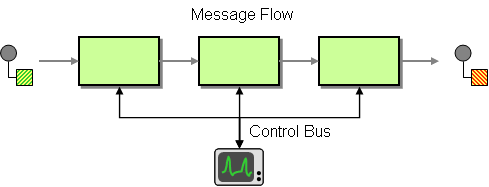
              <div class="smalltext" style="margin: 0 0 0 36px">ControlBus The 
Control Bus http://www.eaipatterns.com/ControlBus.html from the EIP patterns 
allows for the integration system to be monitored and managed from within the 
framework. http://www.eaipatterns.com/img/ControlBus.gif Use a Control Bus to 
manage </div>
@@ -1020,7 +1023,7 @@
              <div class="smalltext" style="margin: 0 0 0 36px">Does Camel work 
on IBM's JDK? Yes, we've tested Camel with IBM's JDK on the AIX and Linux 
platforms. There are a few things to look out for though Exception using 
camel-http You may get a sun.io.MalformedInputException when using camel-http 
on IBM's JDK. </div>
                              <span class="icon aui-icon aui-icon-small 
aui-iconfont-page-default" title="Page">Page:</span>                 <a 
shape="rect" href="download.html">Download</a>
         <br clear="none">
-             <div class="smalltext" style="margin: 0 0 0 36px">Latest Releases 
http://camel.apache.org/images/camel-box-small.png Grab these releases while 
they are hot! The latest release for Camel 2.19.x is Camel 2.19.2 Release. The 
latest release for Camel 2.18.x is Camel 2.18.4 Release. The latest release for 
Cam</div>
+             <div class="smalltext" style="margin: 0 0 0 36px">Latest Releases 
http://camel.apache.org/images/camel-box-small.png Grab these releases while 
they are hot! The latest release for Camel 2.19.x is Camel 2.19.3 Release. The 
latest release for Camel 2.18.x is Camel 2.18.4 Release. The latest release for 
Cam</div>
                              <span class="icon aui-icon aui-icon-small 
aui-iconfont-page-default" title="Page">Page:</span>                 <a 
shape="rect" href="download-archives.html">Download Archives</a>
         <br clear="none">
              <div class="smalltext" style="margin: 0 0 0 36px">Download 
archives You can use the Apache Archives to download all the Camel releases. 
http://archive.apache.org/dist/camel/apache-camel/ 
http://archive.apache.org/dist/camel/apache-camel/ - All release since Camel 
became a top level Apache project http://</div>
@@ -2588,7 +2591,7 @@
              <div class="smalltext" style="margin: 0 0 0 36px">User Guide If 
you want to get more familiar with what Apache Camel has to offer, please try 
the following resources: Wiki pages Getting Started Longer Getting Started 
Guide Camel JAR Dependencies Camel Boot Working with Camel and CDI Working with 
Camel an</div>
                              <span class="icon aui-icon aui-icon-small 
aui-iconfont-page-default" title="Page">Page:</span>                 <a 
shape="rect" href="user-stories.html">User Stories</a>
         <br clear="none">
-             <div class="smalltext" style="margin: 0 0 0 36px">User Stories 
This page is intended as a place to collect user stories and feedback on Apache 
Camel. If you are using or have tried Apache Camel please add an entry or 
comment; or post to the Discussion Forums. Company, Product, or Project 
Description Apac</div>
+             <div class="smalltext" style="margin: 0 0 0 36px">User Stories 
This page is intended as a place to collect user stories and feedback on Apache 
Camel. If you are using or have tried Apache Camel please add an entry or 
comment; or post to the mailing list. Company, Product, or Project Description 
Apache Ac</div>
                              <span class="icon aui-icon aui-icon-small 
aui-iconfont-page-default" title="Page">Page:</span>                 <a 
shape="rect" href="uses-commons-logging.html">Uses Commons Logging</a>
         <br clear="none">
              <div class="smalltext" style="margin: 0 0 0 36px">Camel uses 
sfl4j http://www.slf4j.org/ which allows you to configure logging via, among 
others: Log4j http://logging.apache.org/log4j/ Logback http://logback.qos.ch/ 
JDK Util Logging logging 
http://java.sun.com/j2se/1.4.2/docs/api/java/util/logging/packag</div>


Reply via email to