derhecht opened a new issue #4925:
URL: https://github.com/apache/cloudstack/issues/4925
##### ISSUE TYPE
* Bug Report
##### COMPONENT NAME
~~~
Setup
~~~
##### CLOUDSTACK VERSION
~~~
4.15.0
~~~
##### CONFIGURATION
not relevant I think
##### OS / ENVIRONMENT
not relevant I think
##### SUMMARY
I run
cloudstack-setup-databases cloud:<dbpassword>@localhost
--deploy-as=root:<password> -e <encryption_type> -m <management_server_key> -k
<database_key> -i <management_server_ip>
with e.g. the following (see database key)
cloudstack-setup-databases cloud:<dbpassword>@localhost
--deploy-as=root:<password> -e <encryption_type> -m <management_server_key> -k
"Some&Crazy&Password" -i <management_server_ip>
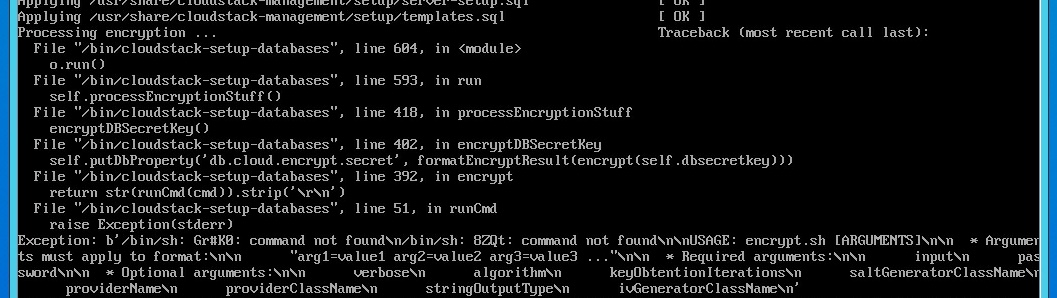
it splits the key and try to run it as commands (see screenshot)
##### STEPS TO REPRODUCE
1. Follow install instructions on
https://docs.cloudstack.apache.org/en/4.15.0.0/installguide/management-server/index.html
2. in step where you have to run cloudstack-setup-databases, do something
like the following:
~~~
cloudstack-setup-databases cloud:"password"@localhost
--deploy-as=root:"password" -m "password" -k "Some&Crazy&Password"
~~~
##### EXPECTED RESULTS
~~~
Script should setup the given key.
~~~
##### ACTUAL RESULTS
Error message when processing encryption.
~~~

~~~
--
This is an automated message from the Apache Git Service.
To respond to the message, please log on to GitHub and use the
URL above to go to the specific comment.
For queries about this service, please contact Infrastructure at:
[email protected]

