nvazquez opened a new issue #5111:
URL: https://github.com/apache/cloudstack/issues/5111
##### ISSUE TYPE
* Bug Report
##### COMPONENT NAME
~~~
VM lifecycle
~~~
##### CLOUDSTACK VERSION
~~~
4.15.0, 4.15.1, 4.16 (master)
~~~
##### CONFIGURATION
Register a multidisk OVA selecting 'Read VM settings from OVA'
````
<DiskSection>
<Info>List of the virtual disks</Info>
<Disk ovf:capacityAllocationUnits="byte"
ovf:format="http://www.vmware.com/interfaces/specifications/vmdk.html#streamOptimized";
ovf:diskId="vmdisk1" ovf:capacity="2621440000" ovf:fileRef="file1"/>
<Disk ovf:capacityAllocationUnits="byte"
ovf:format="http://www.vmware.com/interfaces/specifications/vmdk.html#streamOptimized";
ovf:diskId="vmdisk2" ovf:capacity="1073741824" ovf:fileRef="file2"/>
<Disk ovf:capacityAllocationUnits="byte"
ovf:format="http://www.vmware.com/interfaces/specifications/vmdk.html#streamOptimized";
ovf:diskId="vmdisk3" ovf:capacity="1073741824" ovf:fileRef="file3"/>
<Disk ovf:capacityAllocationUnits="byte"
ovf:format="http://www.vmware.com/interfaces/specifications/vmdk.html#streamOptimized";
ovf:diskId="vmdisk4" ovf:capacity="1073741824" ovf:fileRef="file4"/>
</DiskSection>
...
<Item>
<rasd:AddressOnParent>0</rasd:AddressOnParent>
<rasd:ElementName>Hard Disk 1</rasd:ElementName>
<rasd:HostResource>ovf:/disk/vmdisk1</rasd:HostResource>
<rasd:InstanceID>9</rasd:InstanceID>
<rasd:Parent>4</rasd:Parent>
<rasd:ResourceType>17</rasd:ResourceType>
</Item>
<Item>
<rasd:AddressOnParent>0</rasd:AddressOnParent>
<rasd:ElementName>Hard Disk 2</rasd:ElementName>
<rasd:HostResource>ovf:/disk/vmdisk2</rasd:HostResource>
<rasd:InstanceID>10</rasd:InstanceID>
<rasd:Parent>3</rasd:Parent>
<rasd:ResourceType>17</rasd:ResourceType>
</Item>
<Item>
<rasd:AddressOnParent>0</rasd:AddressOnParent>
<rasd:ElementName>Hard Disk 3</rasd:ElementName>
<rasd:HostResource>ovf:/disk/vmdisk3</rasd:HostResource>
<rasd:InstanceID>11</rasd:InstanceID>
<rasd:Parent>6</rasd:Parent>
<rasd:ResourceType>17</rasd:ResourceType>
</Item>
<Item>
<rasd:AddressOnParent>0</rasd:AddressOnParent>
<rasd:ElementName>Hard Disk 4</rasd:ElementName>
<rasd:HostResource>ovf:/disk/vmdisk4</rasd:HostResource>
<rasd:InstanceID>12</rasd:InstanceID>
<rasd:Parent>5</rasd:Parent>
<rasd:ResourceType>17</rasd:ResourceType>
</Item>
````
##### OS / ENVIRONMENT
VMware hypervisor
##### SUMMARY
VM deployment fails as the mapping of the disks fails. The order of the
disks as described in the OVF file as shown above differs from the order
retrieved by VMware (as also shown in the picture below):
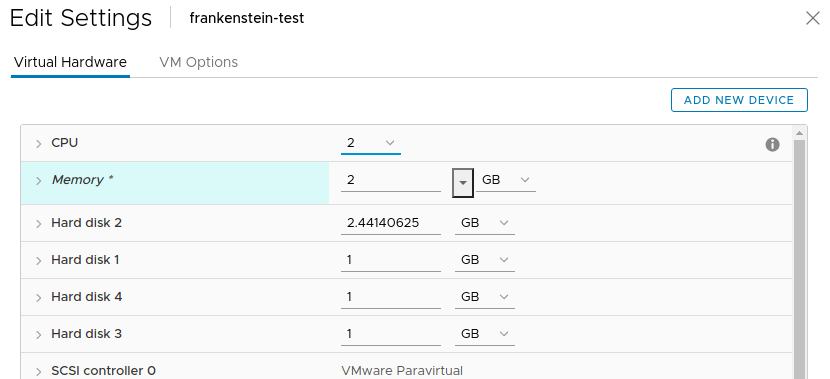
The mismatch on the ordering of disks leads to the following:
````
2021-06-15 01:44:48,748 INFO [c.c.h.v.r.VmwareResource]
(DirectAgent-2:ctx-7b5db496 10.0.35.3, job-72/job-74, cmd: StartCommand)
(logid:52158c09) Mapping VM disks to spec disks and tearing down datadisks (if
any)
2021-06-15 01:44:48,748 DEBUG [c.c.h.v.r.VmwareResource]
(DirectAgent-2:ctx-7b5db496 10.0.35.3, job-72/job-74, cmd: StartCommand)
(logid:52158c09) Mapping spec disks information to cloned VM disks for VM
i-2-10-VM
2021-06-15 01:44:48,753 INFO [c.c.h.v.r.VmwareResource]
(DirectAgent-2:ctx-7b5db496 10.0.35.3, job-72/job-74, cmd: StartCommand)
(logid:52158c09) Mapped disk size is not the same as the cloned VM disk size:
2621440000 - 1073741824
2021-06-15 01:44:48,753 INFO [c.c.h.v.r.VmwareResource]
(DirectAgent-2:ctx-7b5db496 10.0.35.3, job-72/job-74, cmd: StartCommand)
(logid:52158c09) Mapped disk size is not the same as the cloned VM disk size:
1073741824 - 2621440000
````
And failure:
````
Message: Unsupported VM disk chain length: 2
com.cloud.utils.exception.CloudRuntimeException: Unsupported VM disk chain
length: 2
at
com.cloud.hypervisor.vmware.resource.VmwareResource.resizeRootDiskOnVMStart(VmwareResource.java:2801)
at
com.cloud.hypervisor.vmware.resource.VmwareResource.execute(VmwareResource.java:2065)
at
com.cloud.hypervisor.vmware.resource.VmwareResource.executeRequest(VmwareResource.java:545)
````
##### STEPS TO REPRODUCE
~~~
- Register a template with different controller types for example one per
disk and select the option 'Read VM settings from OVA'
- Create VM from template
- Start VM
~~~
##### EXPECTED RESULTS
~~~
VM is deployed and its state = Running
~~~
##### ACTUAL RESULTS
~~~
VM deployment fails
````
Message: Unsupported VM disk chain length: 2
com.cloud.utils.exception.CloudRuntimeException: Unsupported VM disk chain
length: 2
at
com.cloud.hypervisor.vmware.resource.VmwareResource.resizeRootDiskOnVMStart(VmwareResource.java:2801)
at
com.cloud.hypervisor.vmware.resource.VmwareResource.execute(VmwareResource.java:2065)
at
com.cloud.hypervisor.vmware.resource.VmwareResource.executeRequest(VmwareResource.java:545)
````
~~~
--
This is an automated message from the Apache Git Service.
To respond to the message, please log on to GitHub and use the
URL above to go to the specific comment.
For queries about this service, please contact Infrastructure at:
[email protected]

